

ChatGPT
: How to use it, features, and the business problems it solves
Add bookmark
What is ChatGPT?
ChatGPT is an AI assistant provided by OpenAI, the conversational service at the center of the generative AI boom. Since October 2026, Chat runs on GPT-6 (GPT-6 Sol on paid plans, GPT-6 Luna on Free and Go), and the new Intelligent UI builds charts, buttons, forms, and small tools into answers. With the Chrome extension, Chat can read your open tabs and Work can operate them to fill out forms, send messages, and download files (all plans). ChatGPT Slides lets you create and co-edit decks in real time (Pro, Business, Enterprise). It also offers Deep Research, image generation, data analysis, voice conversation, and a coding agent (Codex), plus projects, scheduled tasks, custom GPTs, and workspace agents. Pricing is free / Go ¥1,400 / Plus ¥3,000 / Pro ¥16,800– (individual, monthly), with Business and Enterprise for organizations.
Business problems it solves












About "ChatGPT"
What is ChatGPT
ChatGPT is an AI assistant provided by OpenAI, the conversational service at the center of the generative AI boom. Since October 2026, the default model in Chat is GPT-6 (GPT-6 Sol on paid plans, GPT-6 Luna on Free and Go), and a new capability called "Intelligent UI" builds interactive elements such as charts, buttons, and calculators into answers. It handles question answering and writing, and also brings Deep Research (automated research), image generation, data analysis, voice conversation, and a coding agent (Codex) together in a single app. It goes beyond mere chat, expanding into features that "hand off tasks," such as project management, scheduled execution, custom GPTs, and workspace agents.
From "conversation" to "task execution"
ChatGPT's current position is not just answering questions but executing tasks such as research, generation, and implementation. Run automated research with Deep Research, hand off coding to Codex, and automate routine processing with scheduled tasks. With custom GPTs, internal tool integrations, and a built-in browser, you can embed it into your business workflows.
GPT-6 and Intelligent UI (October 2026)
On October 7, 2026 (US time), OpenAI rolled out GPT-6 to Chat in ChatGPT. Plus, Pro, Business, and Enterprise get GPT-6 Sol from that day, and Free and Go get GPT-6 Luna from October 8 (a gradual, global rollout that includes Japan).
- Intelligent UI — Depending on the question, answers can include visuals, charts, tappable buttons, forms, and small tools such as calculators. No special prompt is needed and there is no separate usage limit
- Starts answering while it thinks — For questions that need web search, GPT-6 Instant starts answering 44% sooner on average than GPT-5.6 Instant (per OpenAI)
- Chat only — The models in ChatGPT Work and Codex are not changing in this release
Reading and controlling tabs with the Chrome extension (October 2026)
On October 15, 2026 (US time), OpenAI announced on its official X account (@ChatGPT) that the ChatGPT Chrome extension (ChatGPT for Chrome) can now use your Chrome tabs. The extension is free on the Chrome Web Store and available on all ChatGPT plans (per the same announcement).
- In Chat, it "reads" tabs — It looks across your open tabs, gathers information, and uses it in answers. Example: comparing three products open in separate tabs by dimensions, material, delivery time, and return policy
- In Work, it "controls" tabs — It operates your Chrome tabs to send messages, fill out forms, and download files for you. It can also organize and group the pile of tabs you have open
- Using ChatGPT inside a Chrome tab got an upgrade too — Your full chat history is there, and you can work in Chat or Work side by side with the site you are on
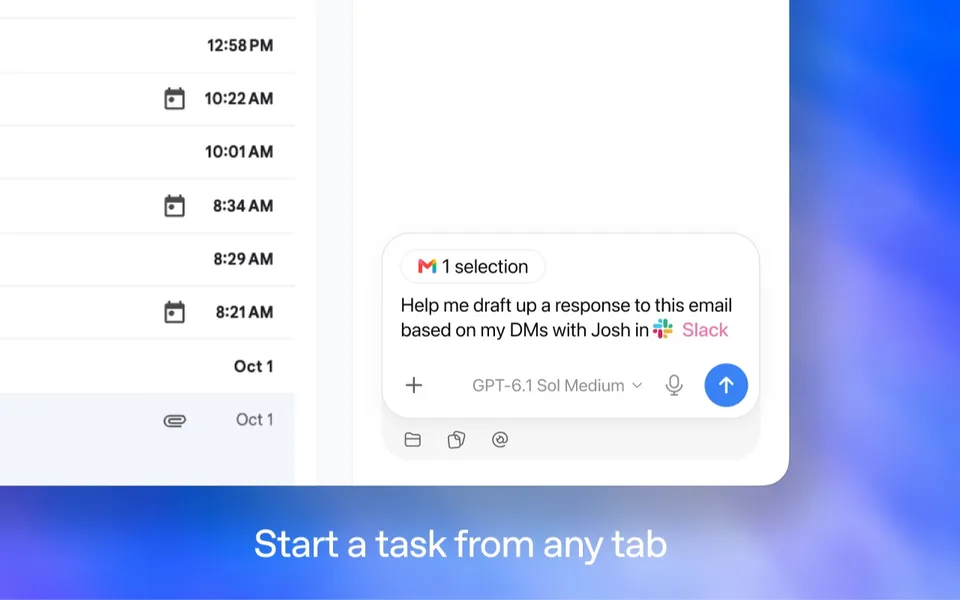
You can start a task right from the tab you have open. Source: Official Chrome Web Store page
Confirmation before actions: According to the store description, ChatGPT always asks for your permission before referencing your browser history and before downloading or uploading files. It works in background tabs without taking over the tab you are browsing. A tab that ChatGPT is operating shows a ""ChatGPT" started debugging this browser" bar with a "Cancel" button, so you can stop it midway.
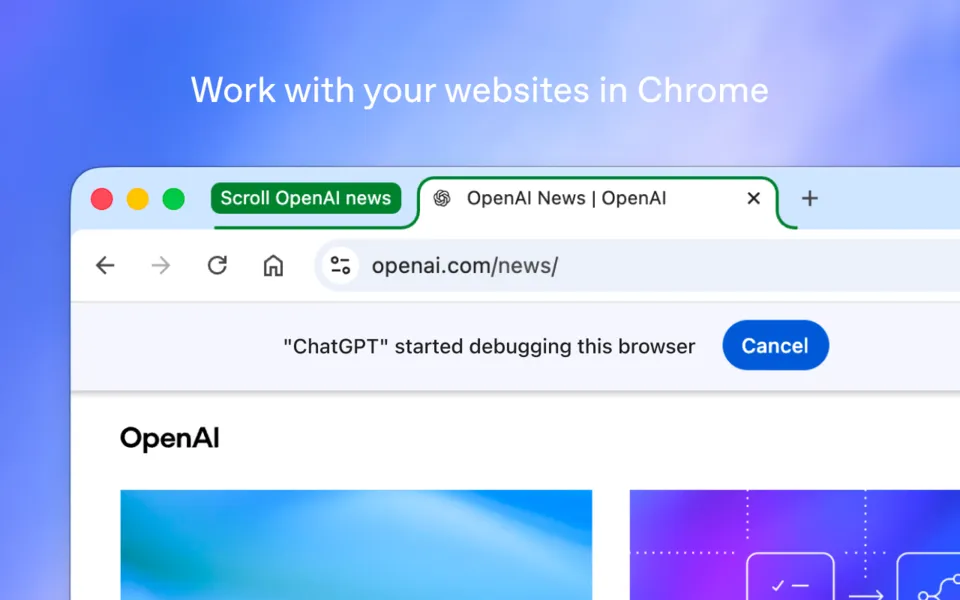
A tab that ChatGPT is operating. Press "Cancel" at the top to stop. Source: Official Chrome Web Store page
Getting started takes three steps: (1) add "ChatGPT" (offered by OpenAI) from the Chrome Web Store, (2) open the ChatGPT icon in the toolbar, and (3) ask for the task you want done in the browser. Besides Chrome, it also works in Chromium-based browsers such as Microsoft Edge, Brave, and Opera (per the store listing). The store shows 7,000,000 users (as of October 22, 2026).
Things to note:
- How much you can use Work differs by plan. The pricing page lists "a Work agent that works across apps and files" for Plus and "more usage of Work and Codex" for Pro. How far Free and Go can use tab control in Work cannot be determined from the announcement or the pricing page
- In a company's Enterprise workspace, admins can turn off browser control through the Chrome extension (Browser Use) and allow or block site access, uploads, and downloads per site (OpenAI Help). Check your company's settings before using it on a work PC
- Because you are handing over form entry and sending on sites where you are signed in, it is safest to review irreversible actions such as sending or purchasing yourself before they run
Creating and co-editing decks with ChatGPT Slides (October 2026)
On October 19, 2026 (US time), OpenAI announced on its official X account (@ChatGPT) that ChatGPT Slides now supports sharing decks, real-time co-editing, and comments. ChatGPT Slides lets you create a presentation inside ChatGPT and keep working on it with ChatGPT and your teammates.
Available plans: Pro, Business, and Enterprise plans with ChatGPT Space access, rolling out gradually to eligible accounts (OpenAI Help: Creating and collaborating on slides in ChatGPT). Free, Go, and Plus are not listed as eligible. ChatGPT Space is where your pages, uploaded files, and other work in ChatGPT are organized and shared with others (Getting started with Space in ChatGPT).
- Two ways to start — Ask ChatGPT in Work to "create ChatGPT slides" (using a conversation or attached files as material), or choose Create > Slide in ChatGPT Space and start from a blank slide or a template. Share an example deck to guide the style and layout
- Edit right on the slide — Edit text, images, shapes, tables, and charts directly. Select an element and choose Request edits to have ChatGPT change just that part
- Real-time co-editing and comments — Once shared, people with edit access can edit at the same time. You can @mention collaborators in comments, and @mention ChatGPT or your dot to turn feedback into changes on the slides
- Present and export — Present directly from ChatGPT. On the web, export to PowerPoint (.pptx), PDF, or Google Slides
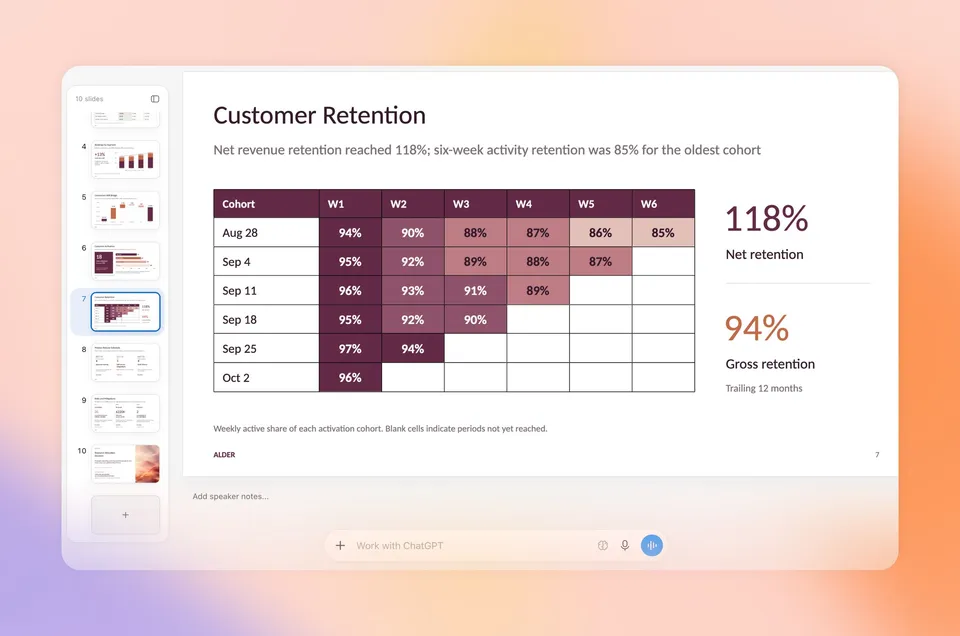
Edit the slide directly and ask ChatGPT for changes in the prompt bar below. Source: official @ChatGPT post
A dot is an always-on agent in ChatGPT that keeps working even when you're not chatting. It is included in Pro (outside the EEA, Switzerland, and the UK) and Business Premium (Getting started with your dot).
Things to note:
- Comment-only access isn't available at launch, so people you share with are invited as editors
- Collaborative Slides are created and edited on the web or in cloud mode of the desktop app. On Windows devices without the required MXC component (such as Windows 10), local creation and editing in the desktop app uses PowerPoint (.pptx) files instead
- On Business and Enterprise, what you can share depends on your organization's sharing settings, and an admin may need to enable sharing first (Getting started with Space in ChatGPT)
How to use it
-
Create an account (free)
Go to chatgpt.com and create an account. You can start using it for free.
-
Ask a question or make a request
Enter what you want to look up or create. Attaching images and files and voice input are also supported.
-
Research and generate
Create reports with Deep Research, or run image generation and data analysis.
-
Hand off tasks
Code with Codex, run things automatically with scheduled tasks, and streamline routine work with custom GPTs. With the Chrome extension, you can also hand off work in your browser tabs.
-
Choose a plan
Depending on your usage and the models you need, upgrade to Go / Plus / Pro (individual) or Business / Enterprise (organizations).
Features
01Conversation and reasoning
Handle a wide range of tasks.
- GPT-6 (Chat) — The default in Chat since October 2026. GPT-6 Sol on paid plans (Instant to Extra High thinking levels), GPT-6 Luna on Free and Go
- GPT-6 Astra / GPT-5.6 family models — GPT-6 Astra, released in September 2026 (as "GPT-6 Pro" in Chat on Pro and above; via ChatGPT Work and Codex on Plus), plus GPT-5.6 Sol/Sol Pro/Terra/Luna
- Intelligent UI — Generates charts, buttons, forms, calculators, and more inside answers
- Large context — Retains long documents and chats
- Voice and Vision — Voice conversation and image understanding
02Generation and research
Create and research in depth.
- Image generation — High-fidelity image creation (including generation via Thinking)
- Deep Research — Automatically gathers information and turns it into a report
- Data analysis — Analysis and visualization based on files
03Agents and extensions
Hand off tasks and connect to your work.
- Codex — A coding agent
- Chrome extension — Chat reads your open tabs, and Work operates tabs to fill out forms, send messages, download files, and organize tabs (all plans)
- ChatGPT Slides — Create decks, edit them directly, co-edit in real time, and comment (Pro, Business, Enterprise; rolling out)
- Projects and scheduled tasks — Ongoing work and automatic execution
- Custom GPTs and app integrations — Purpose-built uses and internal tool connections
Pricing
It is free to use, and higher-tier plans expand your usage, models, and features (amounts shown are monthly prices in Japan as of September 2026; models as of October 2026; for individuals).
| Plan | Monthly | What's included |
|---|---|---|
| Free | ¥0 | GPT-6 Luna (rolling out from Oct 8, 2026; unlimited everyday chat), Intelligent UI, with caps on uploads, image generation, voice, and Deep Research |
| Go | ¥1,400 | GPT-6 Luna (rolling out from Oct 8), expanded limits for messages with tools, uploads, images and voice, longer memory |
| Plus | ¥3,000 | GPT-6 Sol (Instant / Medium / High), GPT-6 Astra rolling out in ChatGPT Work and Codex, expanded Deep Research, projects, scheduled tasks, and custom GPTs |
| Pro | ¥16,800 / ¥30,000 | 5x / 20x usage, GPT-6 Sol (up to Extra High), GPT-6 Pro (GPT-6 Astra) and GPT-5.6 Sol Pro, maximum Codex, unlimited images, maximum Deep Research |
For organizations, Business and Enterprise are available (from 2 users, with annual plans and admin features). ChatGPT Slides, for creating and co-editing decks, is available on Pro, Business, and Enterprise (as of October 2026, rolling out).
Where each plan can use GPT-6 Astra (Chat vs ChatGPT Work vs Codex, limits, and API pricing) is laid out in What GPT-6 Astra is.
How it differs from other AI assistants
ChatGPT is chosen for "the breadth of its features and ecosystem, and its expansion into task execution." Like Claude and Gemini, it is a high-performance conversational AI, but its strength is the comprehensiveness of its features, including image generation, Codex, custom GPTs, and app integrations.
| ChatGPT | Claude | Gemini | |
|---|---|---|---|
| Provider | OpenAI | Anthropic | |
| Strengths | Breadth of features, agents, ecosystem | Writing, code, analysis, safety | Google service integration, video generation |
| Free tier | Yes (¥0) | Yes ($0) | Yes (¥0) |
If you're choosing based on the quality of writing, code, and analysis, Claude is a comparison point; for integration with Google services, Gemini is worth comparing.
Frequently asked questions
Q. Is the ChatGPT Chrome extension free?
A. The extension itself is free, and OpenAI announced that it is "available for all ChatGPT plans" (October 15, 2026). However, how much you can use Work differs by plan (the pricing page lists a "Work agent" for Plus and "more usage of Work and Codex" for Pro).
Q. What can ChatGPT do with my Chrome tabs?
A. In Chat, it reads your open tabs to gather information and uses it in answers. In Work, it operates your tabs to send messages, fill out forms, download files, and organize and group tabs for you.
Q. Will it download files or look at my history without asking?
A. According to the Chrome Web Store description, it always asks for permission before referencing your browser history and before downloading or uploading files. A tab it is operating shows a "Cancel" button so you can stop it midway.
Q. Does it work in browsers other than Chrome?
A. It also works in Chromium-based browsers such as Microsoft Edge, Brave, and Opera (per the store listing). Support for Safari and Firefox is not mentioned.
Q. Which plans can use ChatGPT Slides?
A. Pro, Business, and Enterprise plans with ChatGPT Space access, rolling out gradually to eligible accounts. Free, Go, and Plus are not listed as eligible (OpenAI Help as of October 24, 2026). If you don't see it yet, it may not be available for your account.
Q. Can I use slides made in ChatGPT in PowerPoint?
A. Yes. On the web, you can export to PowerPoint (.pptx), PDF, or Google Slides. If you ask for a specific format in Work, ChatGPT creates the deck as a PowerPoint or Google Slides file from the start.
Q. Can I use it in Japan? Can I ask in Japanese?
A. The announcement does not mention any regional restrictions. The extension's store listing is in English, but ChatGPT itself supports Japanese.
The information on this page is based on what was published on the official website as of October 24, 2026. Please check the official website for the latest specifications and pricing.
Frequently compared services











Articles featuring ChatGPT
Alexa+(アレクサプラス)とは?日本で10月29日に早期アクセス開始|料金(プライム会員は無料・会員以外は月額3,000円)・対応デバイス・申込方法
Amazonは2026年10月29日、生成AIを搭載した新しいアシスタント「Alexa+(アレクサプラス)」の早期アクセスを日本で始めました。早期アクセス中は無料で、終了後もプライム会員なら追加料金なし、会員以外は月額3,000円です。この記事では、アマゾンジャパンの発表とAmazon.co.jpの公式ページにもとづいて、今のAlexaとの違い、日本でできること・まだできないこと(食べログの予約や出前館・Uber Eatsとの連携は今後)、料金と未公表の点、対応するEcho・Fire TVと申込方法、注意点を整理します。
Gemini無料版がFlash-Liteのみに【2026年10月9日から】AI PlusとAI Proどちらを選ぶか・Deep Think・使用量上限の早見表
Googleは個人アカウントのGeminiアプリで使えるモデルをプラン別に分け、有料プランに入っていない人は2026年10月9日からFlash-Liteのみになります。これまで無料で使えたFlashとPro(制限つき)は選べなくなり、月額¥725のGoogle AI PlusもFlashまで(適用日はメールで個別に通知)、Proが使えるのはAI Pro(¥2,900)とAI Ultra(¥14,500〜)だけです。この記事では、Googleの公式ヘルプと料金ページにもとづいて、プラン×モデルの変更前・変更後の早見表、5時間ごとにリセットされる使用量上限の倍率、新しいエフォートレベル(低・中・高)を整理します。英語版ヘルプはAI Ultraのみ、日本語版はAI ProとAI Ultraと記載が分かれているDeep Thinkの対象も確認し、無料のままでよい人・AI Plusで足りる人・AI Proが必要な人の目安と、Workspace・API・スマホアプリの扱いまで解説します。
ChatGPTのGPT-6とIntelligent UIとは【2026年10月最新】無料版で何が変わったか・SolとLunaの違い・Plusは必要か
2026年10月7日(米国時間)、OpenAIはChatGPTのChatにGPT-6を展開しました。Plus・Pro・Business・Enterpriseは同日からGPT-6 Sol、無料版とGoは10月8日からGPT-6 Lunaが日本を含む全世界で順次使われます。同時に、回答の中に図・グラフ・ボタン・フォーム・計算ツールなどの操作できる画面を組み込む「Intelligent UI」が加わり、無料版でも追加の上限なしで使えます。この記事では、更新の対象がChatだけでChatGPT WorkとCodexのモデルは変わらないことをプラン×画面の早見表で整理し、SolとLunaの違い(公式に出ている範囲と未公表の点)、Intelligent UIの使い方と非対応の環境、Web検索つきの質問で回答開始が平均44%早いという数字の比較相手、そして料金は据え置きでGoに上げてもモデルはLunaのままという点から、Plusを払う判断の目安までを、OpenAIの公式発表・ヘルプセンター・システムカード・料金ページにもとづいて解説します。
What Jev Is [October 2026]: The AI That Generates No Text — How to Use It, Pricing, and How It Differs from Microsoft-Decision-1
On 9 October 2026, Microsoft released Microsoft-Decision-1, a decision model at the same price as Jev ($0.042 per million input tokens, free output) and with the same question types. This article explains what Jev — released by TypeSafe AI on 15 September 2026 — is: a System One model that generates no text and returns Choice (classification), Score (rating) and Noul (a 0–1 truth value) with probabilities; speculative fan-out, where stacking questions barely changes latency; how to get started from the waitlist to the Python SDK, HTTP API and Claude Code skill; routing low-confidence answers to people; and use cases. It then compares Jev with Microsoft-Decision-1 (access, context length, availability, Japanese support), explains which to choose and whether you can use them from Japan, and covers Jev's latest status in October (Series A, rate limits, OpenRouter listing). It also covers the official note that CJK accuracy is lower than English and the weak spots TypeSafe publishes itself.

What GPT-6 Astra Is [September 2026]: Which ChatGPT Plans Include It, API Pricing, and How to Split Work with GPT-5.6
GPT-6 Astra, announced by OpenAI on 3 September 2026 (US time), is a flagship tuned for computer use and long, multi-step work, true to the pitch that it "can do anything a person can do on a computer." It scores 72.6% on OSWorld 2.0, and time per task drops 47% from GPT-5.6 Sol's roughly 75 minutes to roughly 40. This article checks what changed against the benchmarks, then lays out where each ChatGPT plan can use it (Pro at ¥16,800 / ¥30,000, Business and Enterprise get "GPT-6 Pro" in Chat; Plus at ¥3,000 gets it through ChatGPT Work and Codex; Free and Go do not), the caps such as 50 or 200 messages a week, API pricing ($10 input / $50 output, 2.5x Sol) and how to split work with Sol, Terra and Luna, and the behaviour changes on switching (more clarifying questions, more sensitivity to skill files), based on OpenAI's announcement, Help Center and model page.

What Is Cloudflare OS? A Deep Dive into the Open-Source AI Agent Workspace (Architecture, Gatekeepers, Self-Hosting, Pricing)
Cloudflare open-sourced Cloudflare OS, an AI agent workspace, on August 5, 2026. This article covers its zero-permission Gatekeeper security, model selection and cost control via AI Gateway, Gadgets (small personal apps), how to deploy it into your own Cloudflare account, and pricing — based on the official blog and GitHub.
Claude Fable 5 vs. GPT-5.5 vs. Gemini 3.1 Pro: Which Should You Choose? A Deep Dive into Performance, Pricing, and Use Cases [July 2026]
A thorough comparison of the latest flagship models from the industry's three leading AI labs, all released in the first half of 2026: Claude Fable 5, GPT-5.5, and Gemini 3.1 Pro. Covers benchmark performance, API pricing, context windows, multimodal support, and how to use them on consumer plans like ChatGPT Plus, Claude Pro, and Google AI Pro — with recommendations by use case, based primarily on official data.
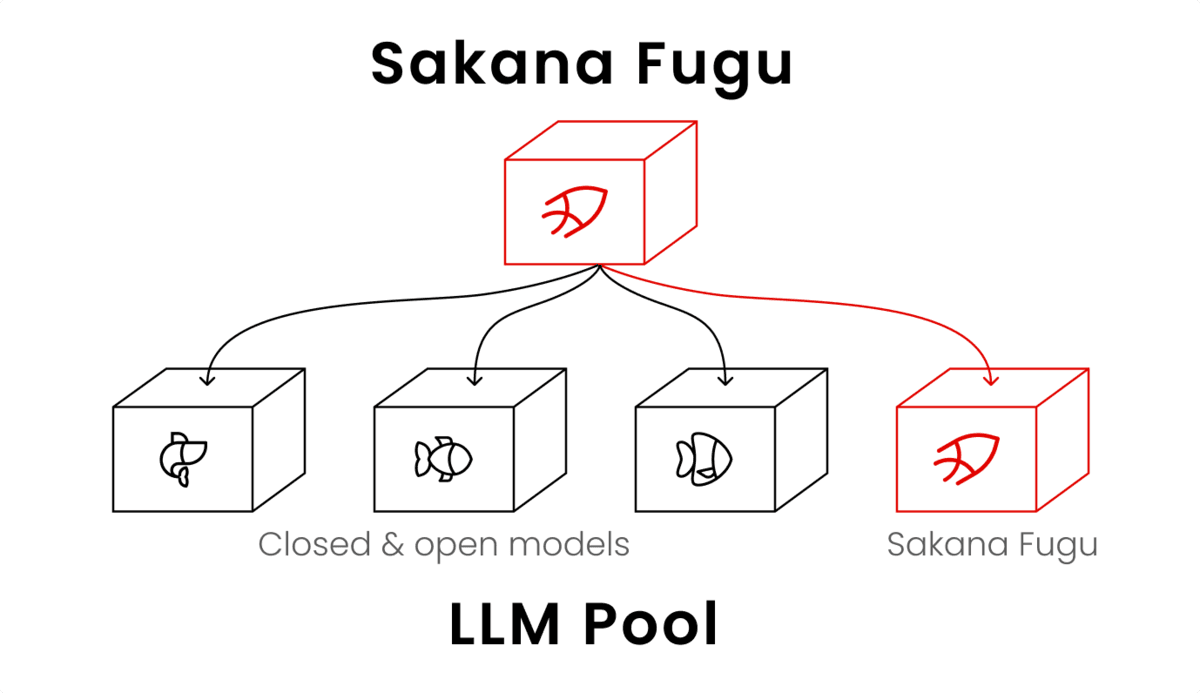
How to Use Sakana AI Fugu: From API Key to Claude Code | Pricing, Free Tier, and Performance
A guide to Sakana AI's multi-agent platform Fugu: issuing an API key at console.sakana.ai, calling the OpenAI-compatible API, and wiring it into Codex and Claude Code. Covers choosing between Fugu, Fugu Ultra, and Fugu Cyber, pricing and whether a free tier exists, and benchmark performance.
[2026 Latest] 16 AI Tools to Maximize Sales Performance | Dramatically Improving Meeting, Proposal, and Call Efficiency
A curated look at the AI tools getting attention in sales today. Covers the latest AI for every workflow challenge — from lead generation and proposal decks to meeting note creation.