
Sider
: How to use it, features, and the business problems it solves
Add bookmark
What is Sider?
An AI assistant for the browser from Vidline Inc. (US). In the sidebar of its Chrome/Edge extension, web app, and desktop and mobile apps, you can summarize, translate and ask questions about the page, PDF or YouTube video you have open, switching between models such as GPT, Claude, Gemini and Grok and comparing their answers. It also offers Sider Hand, a browser agent that opens real websites to do research and copy-paste work for you, and Sider Code, which reshapes the page you are viewing from plain-language instructions. Free tier available; paid plans from US$10/month (about 17% off with annual billing).
Business problems it solves

About "Sider"
What is Sider
Sider is an AI assistant you use from the browser sidebar, provided by Vidline Inc. of Boston, USA. Once installed as a Chrome or Edge extension, it lets you ask an AI about the web page, PDF or YouTube video you have open, or ask it to summarize or translate, all in a panel beside the page. You can switch between multiple AI models such as GPT, Claude, Gemini, Grok and DeepSeek, and even send one question to several models at once to compare their answers.
In 2026 the official site describes Sider as "an AI agent for your browser," built on three pillars: Chat; Sider Hand, a browser agent that opens real websites and does research, comparison and copy-paste work for you; and Sider Code, which reshapes the look and behavior of the page you are viewing from plain-language instructions. The official site claims "10M+ active users," and the Chrome Web Store shows a 4.9 rating (115K ratings) (checked October 23, 2026).
per the official site
115K ratings (Oct 2026)
per the provider
Nano, monthly
How to use
- Install the extension and sign in Click "Add to Chrome" on the official site to open the Chrome Web Store and add the extension. There are also an Edge extension and Mac, Windows, iOS and Android apps, all sharing the same account and usage allowance.
- Ask the sidebar about the page you have open With a web page, PDF or YouTube video open, open the sidebar and ask, for example, "Summarize this page" or "Explain this paragraph." You can also call the AI from the menu that appears when you select text (the context menu).
- Switch and compare models In chat you can choose models such as GPT, Claude and Gemini, and call several models to line up their answers to the same question.
- Hand off tedious work to Hand Ask something like "Make a table of the prices and ratings of the top products," and Sider Hand opens the sites, gathers the information and organizes it into a table or summary. Progress is shown step by step, and you can stop or step in along the way.
Features
01Read and research (Chat)
- AI chat — ask questions while switching between models such as GPT, Claude, Gemini and Grok. A group chat lets you ask several models at once and compare answers
- Page summaries and explanations — get the key points of the article or YouTube video you have open, and have unclear parts explained
- ChatPDF — load PDF, Word or PowerPoint files to summarize, ask questions and translate
- Wisebase — a personal knowledge base where you collect web pages, URLs and files and ask the AI about them together. Research features such as Deep Research and Scholar Research also live in Wisebase
02Translate and write
- Translation — translate text, entire web pages, PDFs and text inside images (the provider says it supports 50+ languages)
- AI writer — write essays, blog posts, emails, social posts and more, specifying tone and length
03Delegate, reshape and create
- Sider Hand — a browser agent that opens real websites and carries out research, comparison, extraction and organizing for you (explained below)
- Sider Code — ask, for example, "summarize the comments" or "switch to dark mode," and it changes the look and behavior of the page you are viewing, reapplying the change the next time you visit
- Create — generate images, videos, slides and documents. Image editing such as background removal and upscaling (up to 4x) is also available
Hand off work to Hand without leaving the page
Sider Hand is an AI browser agent that runs inside your browser. Give it tasks such as research, comparison, data extraction or periodic checks, the kind of work where you used to open site after site and copy things by hand, and Hand opens the pages, follows links and organizes what it finds into tables, summaries, reports and drafts.
According to the provider, Hand uses your current Chrome or Edge session, so it can work on sites you are already signed in to without extra setup or sharing credentials. Each step is shown on screen and important actions are kept reviewable, so you can step in at any time. Official demos include building a list of prices, ratings and review counts for top Amazon products, and researching competitors' careers pages.
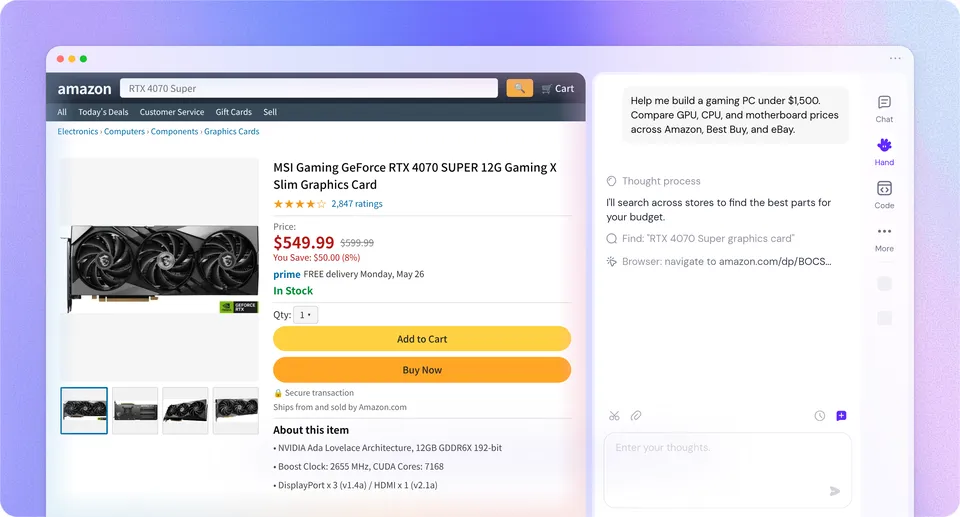
The paid Lite, Pro and Max plans include a dedicated cloud computer that can run Hand 24/7 (CPU and memory vary by plan). Nano uses a temporary cloud server accessed on demand.
Keep reading and translating in the sidebar
Sider's original strength is calling AI without leaving the page. You can pass the article, PDF or YouTube video you are reading straight to the sidebar for a summary and keep asking follow-up questions.
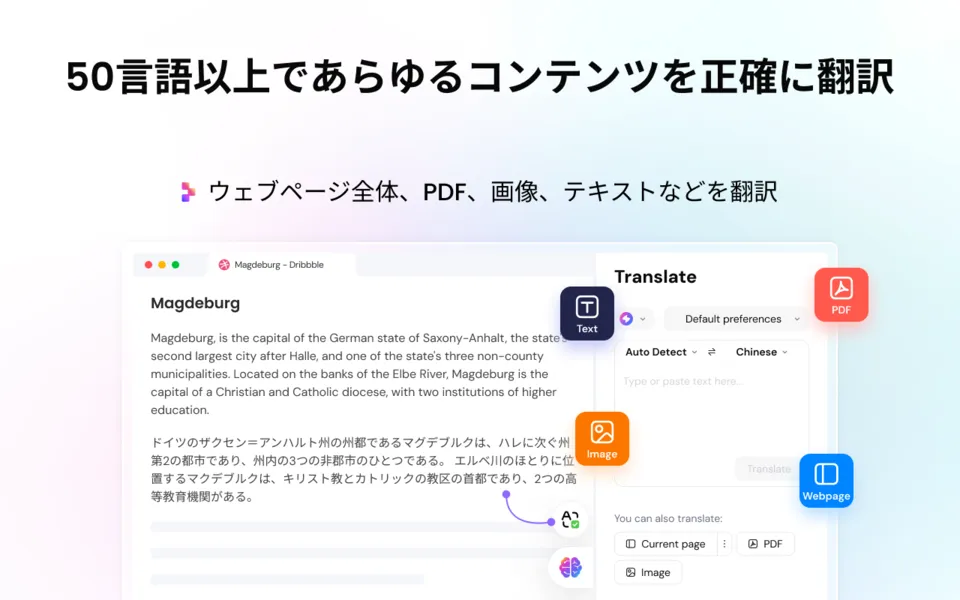
Source: Sider (Chrome Web Store)
Translation works not only on text but also on entire web pages, PDFs and text inside images. Because the translation can be shown under the original, it suits reading English materials while checking the meaning.

Source: Sider (Chrome Web Store) (model names on screen are as of the listing)
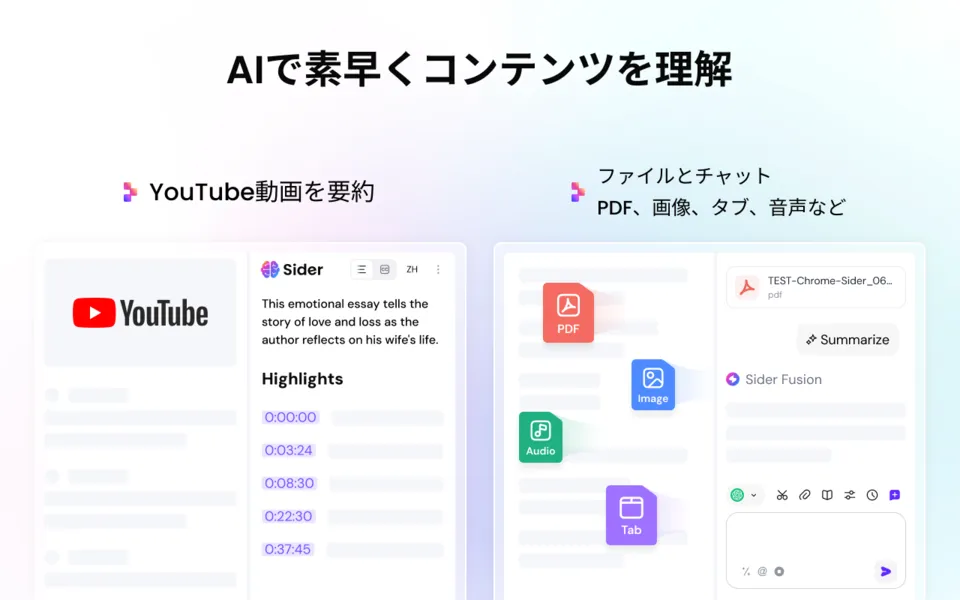
Source: Sider (Chrome Web Store)
Pricing
For individuals, you start free and then choose from four paid plans that differ in monthly credits and cloud computer power. Every plan includes every feature; the differences are the amount of credits and the environment Hand runs in. Prices are in US dollars, and annual billing is about 17% cheaper and also gives more credits per month.
| Plan | Monthly billing | Annual billing (per month / per year) | Credits per month (monthly / annual) | Cloud computer |
|---|---|---|---|---|
| Nano | US$10 | US$8.33 / US$100 | 7,500 / 10,000 | Temporary cloud server (on demand) |
| Lite | US$25 | US$20.83 / US$250 | 15,000 / 25,000 | Dedicated (2 vCPU, 2GB RAM, 40GB SSD) |
| Pro | US$50 | US$41.67 / US$500 | 35,000 / 50,000 | Dedicated (2 vCPU, 4GB RAM, 40GB SSD) |
| Max | US$100–200 | US$83.33–166.67 / US$1,000–2,000 | 80,000–180,000 / 100,000–200,000 | Dedicated (4 vCPU, 8GB RAM, 40GB SSD) |
With Max you choose the amount of credits. Monthly billing starts at US$100 for 80,000 credits and rises by US$20 for every additional 20,000 credits, up to US$200 for 180,000 credits. Annual billing starts at US$1,000 per year for 100,000 credits and rises by US$200 per year for every additional 20,000 credits, up to US$2,000 per year for 200,000 credits.
What you get for free: according to the FAQ in the official Help Center, free users have "30 basic credits per day, 10 image queries in total, and 10 PDFs in total (200 pages per PDF)."
For teams, only monthly per-seat billing is available (annual billing is not yet offered). Per seat, you choose from three tiers: 15,000 credits plus a dedicated cloud computer (2 vCPU, 2GB) for US$25, 35,000 credits (2 vCPU, 4GB) for US$50, or 180,000 credits (4 vCPU, 8GB) for US$200, multiplied by the number of seats. Credits cannot be purchased separately from the current plan.
Prices, credits and cloud computer specs are based on the official pricing page (Individual and Team tabs, monthly/annual toggle, and Max credit selection) checked on October 23, 2026. Prices are in US dollars, and the pricing page does not state how tax is handled. The pricing page does not list how many credits each feature uses; you can check your usage in the credit log on the Billing screen. Credits reset every month on the same day you subscribed. Monthly subscriptions are non-refundable once paid; annual subscriptions are eligible for a full refund within 7 days of purchase if fewer than 500 points have been used (pricing page FAQ). Accounts are for personal use only, and sharing may lead to suspension. There is also an education pricing page, which showed prices 10% off for monthly billing at the time of checking.
Pros and cons
Pros
- Summarize, translate and ask questions without leaving the page, PDF or video you are reading
- Switch between GPT, Claude, Gemini, Grok and more under one subscription, and compare their answers side by side
- The Hand browser agent does research and copy-paste work on sites you are signed in to, showing each step
- The same account and allowance work across the extension, web, desktop and mobile
Cons
- Prices are in US dollars, so the amount you pay in yen varies with exchange rates
- The pricing page does not list credit consumption per feature, making it hard to estimate in advance how many times you can use things each month
- Monthly subscriptions are not refunded after payment. Team plans are monthly only, with no annual option
- Accounts are for personal use; one account cannot be shared by several people
How it differs from other browser AI assistants
| Sider | Monica | Comet | Glarity | |
|---|---|---|---|---|
| Provider | Vidline Inc. (USA) | Butterfly Effect | Perplexity | Felo Inc. |
| Form | Browser extension + web and apps | Browser extension + desktop and mobile | AI browser (the browser itself) | Browser extension |
| Acting on pages for you | Sider Hand (some plans include a dedicated cloud computer) | AI agent | Comet Agent | — |
| Pricing | Free tier. From US$10/month (US$8.33 with annual billing) | Free / Pro / Max / Ultra (USD) | Browser is free. Comet Plus US$5/month | Free tier. Pro ¥1,998/month |
Columns other than Sider reflect what each product's page states as of when it was checked.
If you want the same sidebar style with multiple models under one subscription, Monica is the one to compare. If you would rather hand the whole browser to AI than add an extension, consider Comet; to simply add summaries of YouTube and search results, Glarity is also an option. If you only need to chat with PDFs, see ChatPDF; to use one model in depth, see the pages for ChatGPT, Claude and Gemini.
FAQ
Q. Can I use Sider for free?
A. Yes. You can keep using it for free; according to the official Help Center FAQ, free users get 30 basic credits per day, 10 image queries in total and 10 PDFs in total (200 pages per PDF). For more usage, subscribe to a paid plan (from US$10/month).
Q. Can I use Hand and Code on every plan?
A. The pricing page says "every plan includes every feature," so Chat, Hand, Code and Create are available on Nano, Lite, Pro and Max alike. The differences are monthly credits and the cloud computer that runs Hand (a temporary server on Nano; a dedicated environment that can run 24/7 on Lite and above).
Q. Can Hand work on sites that require login?
A. The official FAQ says that because Hand runs in your own browser, it can use sessions you are already signed in to, with no extra setup or credential sharing. Each step is shown on screen, and important actions are kept reviewable.
Q. Can I use one subscription on both my computer and my phone?
A. Yes. The pricing page FAQ says your account and quota are shared across the browser extension, web, Mac app, iOS app and Android app. However, accounts are for personal use only and cannot be shared with others.
Q. Can I use what I create for work?
A. The Terms of Use say you own the rights to AI-generated outputs and may use and publish them commercially. The pricing page also lists "commercial use license" among the features of paid plans. Note, however, that outputs may be the same as those other users receive, and you must also follow the usage policies of the provider of the model that generated them.
The information on this page is based on the official website (pricing page, Help Center, and the Sider Hand, Sider Code, Wisebase and ChatPDF pages, and the Terms of Use) and the Chrome Web Store listing as of October 2026. Prices, credits and supported models may change, so check the official site for the latest information.