Dia
: How to use it, features, and the business problems it solves
Add bookmark
What is Dia?
An AI browser from The Browser Company of New York, the US maker of Arc (acquired by Atlassian in October 2025). Built on Chromium, it answers questions across your open tabs and connected apps such as Slack, Gmail, Google Calendar, Notion and Jira, and offers a "Morning Brief" that rounds up your calendar, inbox and key links each morning, report and slide-deck creation, and "Skills" for saving repeated requests. Available for macOS and Windows. The browser is free (no AI features); AI comes with the paid Better Answers ($10/month) and Better Days ($100/month) plans. New users can try Better Days free for 14 days (no credit card required). The interface and official website are in English.
Business problems it solves


About "Dia"
What is Dia?
Dia is an AI browser from The Browser Company of New York, the US company behind the Arc browser. It reads your open tabs together with connected apps such as Slack, Gmail, Google Calendar, Notion and Jira, and handles answering questions, building reports and slide decks, and organizing your morning, all inside the browser. The official tagline is "More than a browser. A better workday.", and the product is clearly positioned for work.
Atlassian (the maker of Jira and Confluence) completed its acquisition of The Browser Company on October 21, 2025, and the company is now part of the Atlassian group. Signing in to Dia now uses Atlassian's identity system behind a Dia-branded sign-in screen.
How to use
- Download and sign in: Download the macOS or Windows version for free from diabrowser.com and create an account. Since the general availability of the macOS version in October 2025, there is no waitlist
- Move over from your current browser: Bookmarks, extensions, profiles, tabs, passwords and history can be imported from all major browsers using the standard import flow (FAQ on the For Work page)
- Connect your apps: Connect Slack, Gmail, Google Calendar, Google Drive, Notion, Jira, Confluence, GitHub and others so Dia can draw on their content in its answers
- Ask and delegate: Ask questions about your open tabs and connected apps, or ask Dia to build a report or a deck. Requests you use often can be saved as "Skills"
- Pick a plan to keep using AI: New users can try the top Better Days plan free for 14 days (no credit card required). If you do not choose a plan when the trial ends, AI features pause and Dia keeps working as a browser
Start the day with your calendar, inbox and key links in one place
Morning Brief lays out your calendar, inbox and key links in one place before the day kicks in. The official site says it lets you know exactly what you're walking into. The plans page describes it as "a daily edition of everything you may have missed", and it is included from the Better Answers plan up.
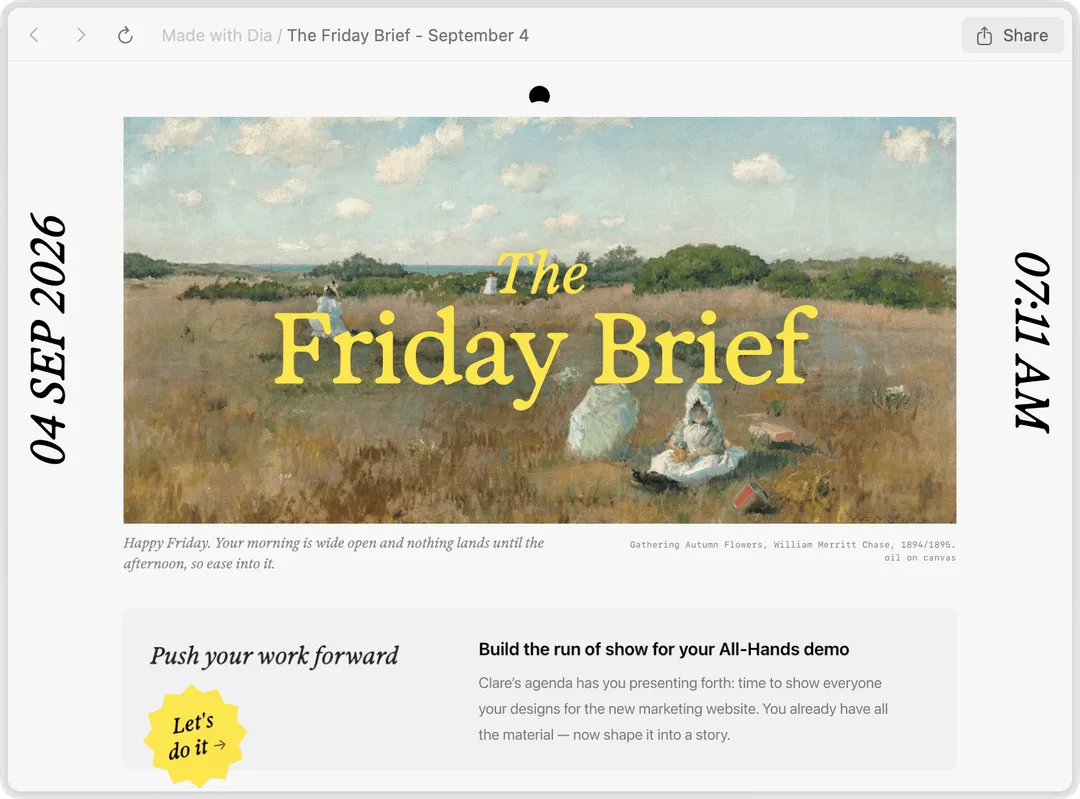
Before meetings, Better Meetings opens the meeting page, agenda, notes and related docs, and shows a gentle countdown so you are on time.
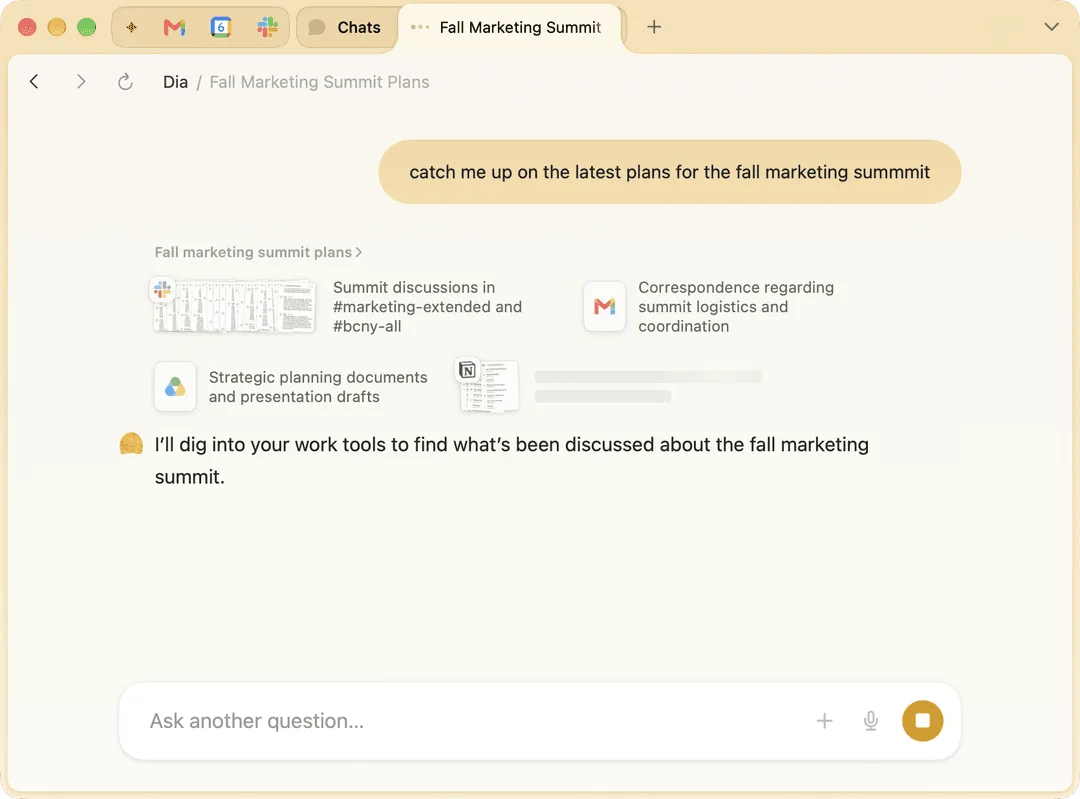
Ask across tabs and apps, then turn it into a report or a deck
When you ask Dia a question, it answers using not only your open tabs but also connected Google Workspace, Teams, Slack, Notion and more. The official site says it "answers like someone who's seen every thread". It can also gather scattered information into a report worth sharing.
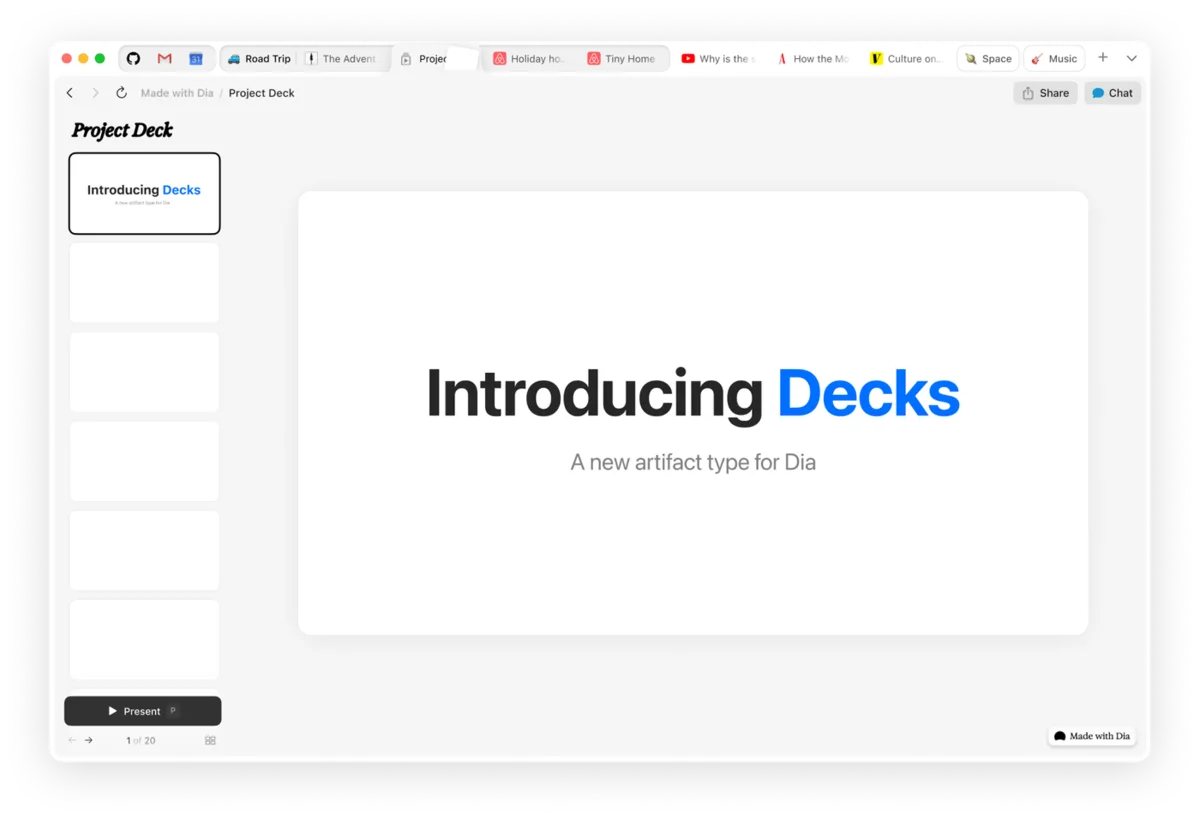
With Decks, you can ask Dia for a slide deck and get real slides with headers, layout and flow. The plans page also lists "find, summarize, draft, or build" as the kinds of work you can ask Dia to do.
The supported apps are listed in the official app directory. As of October 2026 it includes Slack, Gmail, Google Calendar, Google Drive, Notion, Jira, Confluence, Amplitude, Granola, Loom, GitHub and LinkedIn, among others (the plans page also shows Microsoft Outlook and Figma icons).
Keep work and personal life apart, and keep tabs tidy
The free browser part, which does not use AI, also has features built for work.
01Organization
- Profiles — Separate tabs, logins and AI for work, freelance and personal life, and switch with a swipe
- Organized Tabs — Group related tabs under names such as "Design Review" or "Q2 Planning"
- Live Work — Bring the places where work is happening, such as GitHub and Notion, into the tab bar and land on the right PR, spec or draft in one click
02Screen
- Splits — Put two pages side by side, such as a meeting and a doc, and remember your favorite layouts
- Picture-in-picture — Keep a video playing in a small window while you work
03Privacy
- Ad and tracker blocking — All ads are blocked by default
- Cross-device sync — Synced data is end-to-end encrypted
Features
01AI (paid plans)
- Chat — Ask about your open tabs and connected apps; find, summarize and draft
- Morning Brief — A daily roundup of your calendar, inbox and key links
- Reports and Decks — Turn scattered information into reports and slides
- Skills — Save and reuse frequent requests. Describe one in a sentence and Dia assembles the name, icon and the connected tools it needs
- Memory — Remembers preferences and context (can be switched in settings)
02Browser (free)
- Profiles and tab groups — Separate tabs and logins by purpose
- Splits and picture-in-picture — Split view and floating video
- Ad and tracker blocking — On by default
- Cross-device sync — End-to-end encrypted
03For organizations
- SSO — SAML-based single sign-on with Google, Okta, Microsoft Entra ID and others
- MDM — Standard Chromium enterprise policies plus Dia-specific policies, such as disabling AI features on specific websites
- Org-wide content sharing off — Organizations can turn off sharing content for product improvement for everyone
Pricing
Prices are as shown on the official plans page (/plans), in US dollars per month, as of October 2026.
| Plan | Monthly price | What's included |
|---|---|---|
| Better Browser | Free | Profiles and tab groups, split view and picture-in-picture, ad and tracking blocker, cross-device sync. No AI features |
| Better Answers | $10 | Everything in the browser plus Morning Brief, asking Dia to find, summarize, draft or build, and connecting your tools |
| Better Days | $100 | Everything in Better Answers plus 20x more usage (asks) than Better Answers |
- How usage is counted: Paid plans include a monthly allowance measured in "Tasks". Simple requests can use a fraction of a Task, while requests that use more tools, context or longer outputs use more. The allowance resets each billing cycle and does not carry over
- When you run out: You are not billed for overage; AI features pause until your next billing date. To keep going, add usage in $20 credit blocks (auto-reload or one-time top-up). Purchased credits roll over for up to three months from the date of purchase
- Free trial: New users can try Better Days free for 14 days (no credit card required). There is a light limit on how much you can do in a short window
- Changes and cancellation: You can change or cancel at any time and keep AI access until the end of the billing cycle. Unused usage is not refunded unless the law where you live requires otherwise
- Rollout: According to the plans FAQ, paid plans begin rolling out to most new Mac users on August 17. Existing users keep what they have for free for now and will get at least 30 days' notice by email before paid plans apply. Dia on Windows also stays as it is for now
Enterprise AI security and privacy features are offered through a contact link on the plans page.
Security and data handling
According to the official security page, your conversations, history, bookmarks and files are encrypted and stored locally on your device by default. When you make an AI request, only what is needed (such as your question and relevant page context) is sent through The Browser Company's servers to its AI partners.
- AI models used: GPT (OpenAI / Azure), Claude (Anthropic / Vertex / AWS) and Gemini (Vertex)
- Training: AI partners are contractually restricted from retaining your data or using it to train their own models. Dia itself uses some content data to improve the product by default (not tied to your account and deleted after 30 days). You can turn this off in settings, and organizations can turn it off for everyone
- Certification: A SOC 2 Type II examination for Dia covering calendar year 2025 has been completed, with the final report issued in 2026
- Caveats: Dia is not HIPAA-compliant, and the company advises against using it for work involving PHI or other data you are legally obligated to protect. It assumes prompt injection (a page slipping instructions to the AI) may occur and relies on layered controls
Background
01The maker of Arc shifts its focus to an AI browser
- October 9, 2025 — macOS v1.0.1 brings general availability; anyone can use Dia without a waitlist
- October 21, 2025 — Atlassian completes its acquisition of The Browser Company of New York
- October 6, 2026 — Windows v1.0 is released. Skills arrive on Windows in v1.2.0 on October 15
The Browser Company's website presents Dia and Arc side by side. The macOS version continues to be updated week by week; for example, v1.54.0 on October 22, 2026 moved Dia to Chromium M156.
How Dia differs from other AI browsers
Dia stands out by aiming its AI at "the workday": Morning Brief for your calendar and inbox, integrations with work apps such as Jira and Confluence, and admin features for organizations such as SSO and MDM. Without AI it works as a free browser, and AI is a monthly paid plan chosen by usage.
| Product | Provider | Pricing (public information) | Highlights |
|---|---|---|---|
| Dia | The Browser Company of New York (Atlassian group) | Browser free; AI at $10/month or $100/month | Questions across tabs and connected apps, Morning Brief, reports and decks. macOS and Windows |
| Comet | Perplexity | Browser free (Comet Plus $5/month) | Comet Agent handles browser tasks such as filling forms and booking. Perplexity as default search. Mac, Windows, iOS and Android |
| Strawberry | Developer based in Sweden | Free plan (500 credits/month); paid from $20/month | A resident AI uses your logged-in sites and apps to collect leads, update CRMs and more. No Japanese UI |
| Sider | Vidline Inc. (US) | Free tier; paid from US$10/month | A sidebar extension for your existing Chrome or Edge. Switch between multiple AI models |
The columns for other products reflect the information on each product page as of when it was checked.
If you want to hand browser operations themselves to AI, Comet and Strawberry are candidates. If you want to add AI to your current Chrome without switching browsers, consider Sider. If searching across internal documents is the main use, the enterprise-focused Glean is another option.
FAQ
Is Dia free?
The browser is free, but the free plan has no AI features. To use AI you need Better Answers ($10/month) or Better Days ($100/month). New users can try Better Days free for 14 days (no credit card required).
Can I use it in Japanese?
The official site, help pages and pricing page are in English, and support for Japanese (interface language or AI response language) is not explicitly stated. We recommend checking during the free trial.
Does it work on Windows?
Yes. Windows v1.0 was released on October 6, 2026. According to the plans FAQ, paid plans start with new Mac users, and Dia on Windows stays as it is for now.
Is my input used to train AI?
AI partners (OpenAI, Anthropic, Google and others) are contractually restricted from retaining your data or using it for training. Dia uses some content data to improve its own product by default (not tied to your account and deleted after 30 days), but you can turn this off in settings.
How is it different from Arc?
Both are browsers from The Browser Company of New York. The company's website presents Dia and Arc side by side, and Dia is built as an AI browser for work, with AI answering across your open tabs and connected apps.
The information on this page is based on what was publicly available on the official site as of October 2026. Please check the official site for the latest specifications and pricing.