
Monty
: How to use it, features, and the business problems it solves
Add bookmark
What is Monty?
Monty (monty.fast) is an AI video agent that takes one unedited vertical video shot on a phone and automatically cuts pauses, filler words and bad takes, adds speech-synced captions, music ducked under your voice, b-roll matched to what you say and cleaned-up audio, then exports versions for YouTube Shorts, Instagram Reels, TikTok and Telegram. It also writes scripts and offers a browser teleprompter. Currently in open beta: the Free plan gives 3 videos a month (watermarked), and paid plans start at $29/month for Creator (excluding tax). No Japanese interface.
Business problems it solves



About "Monty"
What is Monty?
Monty (monty.fast) is an AI video agent that turns one unedited phone take into a finished vertical short with captions, music and b-roll. It cuts pauses, filler words and bad takes, adds captions synced to your speech, ducks the music under your voice, inserts b-roll matched to what you are saying, cleans up the audio, and exports a separate version for YouTube Shorts, Instagram Reels, TikTok and Telegram.
The company positions Monty as a tool that edits footage you shot yourself, and states plainly that it is not a text-to-video generator, not a long-video clipper and not an avatar tool. It is built for creators, founders, coaches and small teams who want to post one-to-three-minute talking-head videos without editing every one by hand.
As of October 2026, Monty is in open beta. Its press kit lists three known limitations during the beta: some takes fail at the preview stage and need a retry, b-roll choice can be off for abstract topics, and direct posting to the platforms is being enabled account by account.
How to use
- Sign in with a Google account Open app.monty.fast and sign in with Google. According to the company, a beta seat opens within about a minute and an email with the steps arrives. There is nothing to download; everything runs in the browser.
- Choose how to start (record from a script, or upload a video) A new project offers two ways in. Either enter a topic or notes, let Monty write a script and record it in one take while reading from the browser teleprompter, or upload footage you already have (mp4/mov, up to 15 minutes).
- Fix the result in the preview Before the final render you get an editable preview. You can switch blocks on and off, correct captions, swap the music and trim.
- Export or publish Download the finished 1080×1920 video or publish it to a connected account. The post copy (title and description) can be reviewed and edited per platform. You can switch between approving each video before it goes out and letting it post automatically on a schedule.
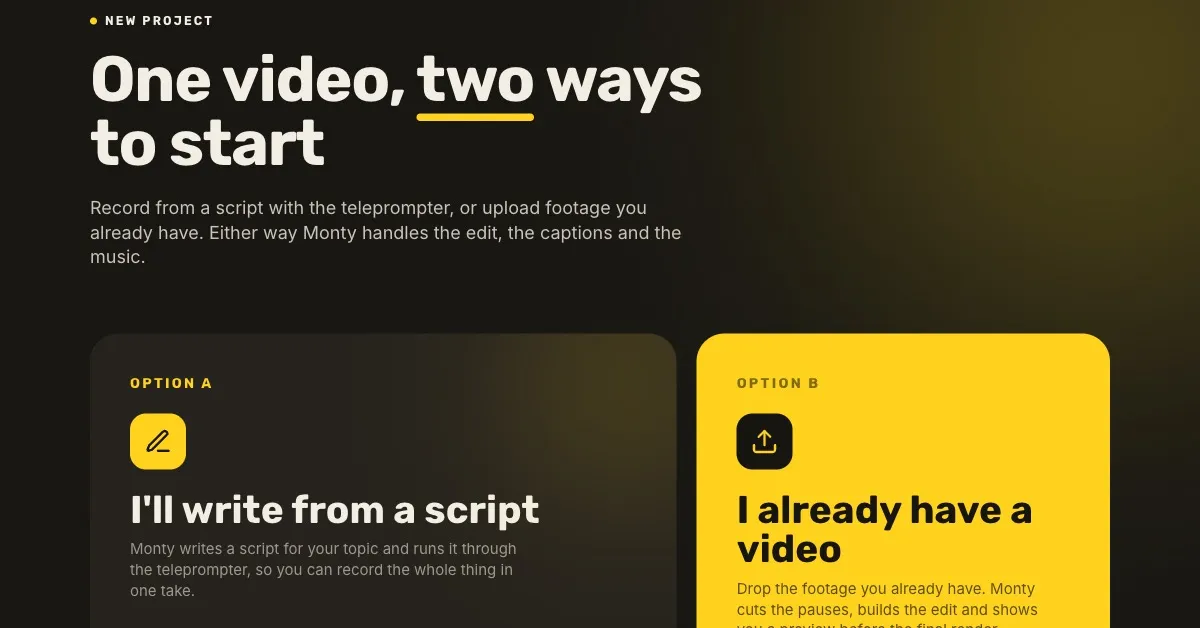
Source: Monty official press kit (as are the other screenshots below; the company notes that interface text may differ slightly from the current beta build)
One take in, edited and posted in a single flow
The company describes the gap it fills this way: clippers butcher the edit and leave the posting to you, while schedulers can post but cannot create. Monty combines scripting, recording, editing and posting in one workflow.
Prepare the footage
- One take shot on a phone
- Or read a Monty-written script from the teleprompter
Automatic edit
- Cuts pauses, filler and bad takes
- Captions, music, b-roll, audio cleanup
Adjust in the preview
Fix captions, swap music, toggle blocks, trim
Send to each platform
Separate exports for Shorts, Reels, TikTok and Telegram, downloaded or posted
You can require approval right before posting, or let videos go out automatically on a schedule
The before-and-after on the official site shows how the same footage changes: a 1:53 raw take became a 45-second finished video.
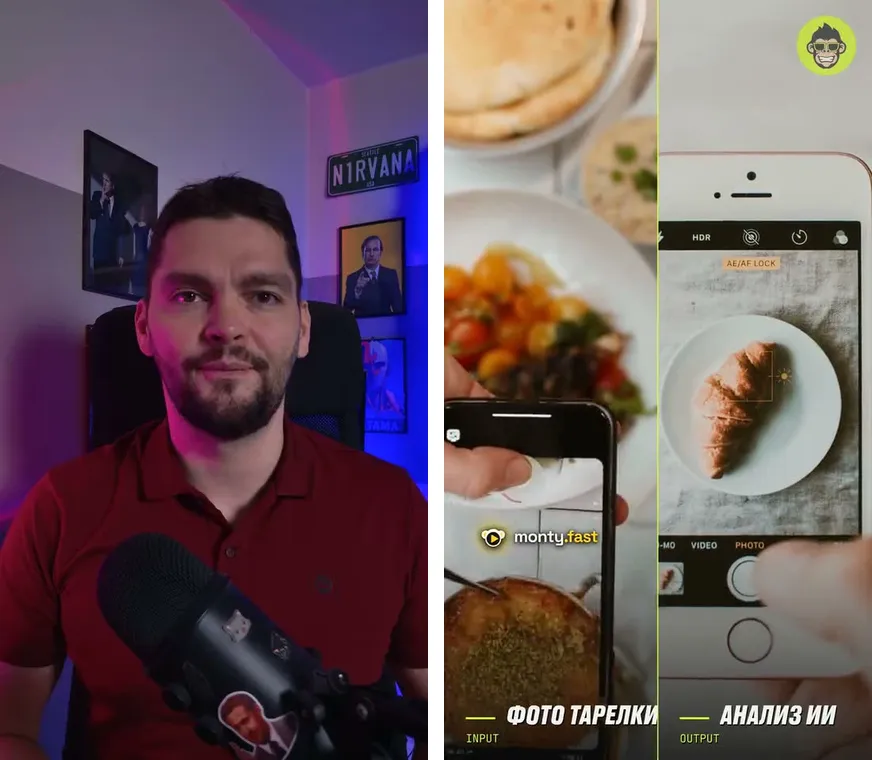
Features
01Edit your footage
This is Monty's core. The input is footage you shot; Monty does not invent new footage.
- Cuts — removes pauses (silence), filler words and bad takes
- Captions — burns in word-by-word captions synced to your speech
- Music — adds music and ducks it under your voice while you speak
- B-roll — picks cutaways that match what you are saying
- Audio cleanup — makes the recorded voice clearer
02Help before you shoot
Usable even when you have not decided what to say.
- Script writing — turns a topic, a news item or bullet notes into a script you can read on camera, with b-roll spots already marked
- Teleprompter — scrolls the script in the browser so you can record in one take. A free version that needs no account is also available
03Stay consistent (Brand Brain)
Keeps the look and voice from drifting between videos.
- Brand Brain — reads your past posts, hooks, phrasing and pacing, and saves a scripting and editing direction that sounds like you. Not available on the Free plan
- Brand settings — save your logo, fonts and caption colors as a profile and apply them by picking the profile when you make a video
04Export and publish
The finished video is prepared separately for each platform.
- Per-platform exports — framing and captions adjusted for YouTube Shorts, Instagram Reels, TikTok and Telegram (1080×1920)
- Auto-posting and scheduling — posts to connected accounts, either after your approval or automatically on a schedule (enabled account by account during the beta)
- Translated captions — translates the video and rebuilds the captions in another language. The official site shows English, Russian, Korean, Chinese and Spanish as examples
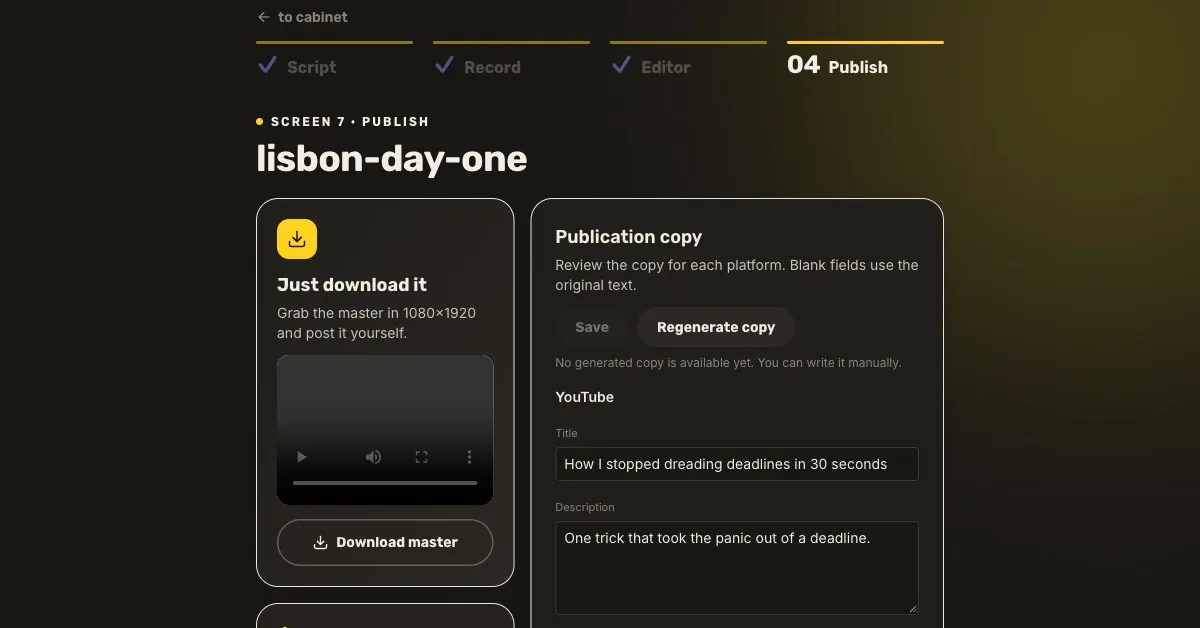
The official site also offers free tools: a vertical-video safe-zone checker, a hook generator, a posting-time guide and subtitle converters (monty.fast/tools).
Pricing
Prices listed on the official site (checked October 2026, in USD). According to the terms of service, prices exclude taxes.
| Plan | Monthly | Yearly | Videos per month | Length per video | Highlights |
|---|---|---|---|---|---|
| Free | $0 | — | 3 | Up to 3 min | 1 channel, captions, auto-posting. “Made by Monty” watermark. No Brand Brain |
| Creator | $29 | $290 | 15 | Up to 3 min | 2 channels, no watermark, post scheduler, 1 Brand Brain |
| Pro | $49 | $490 | 30 | Up to 5 min | All channels, publish to every platform at once, priority rendering, early access to new features |
| Studio | $149 | $1,490 | 100 | Up to 5 min | Up to 5 Brand Brains, API access, white-label (no branding), team access |
Environment, input and output
For the best results, the company recommends your own footage: a one-to-three-minute take of yourself talking to the phone camera, with the phone on a stand, in a quiet room. Long sources such as podcast recordings or two-hour webinars are out of scope, and the company itself points to clippers such as OpusClip for that job.
How your data is handled
The privacy policy (updated September 10, 2026) states that when your uploaded videos contain other people's personal data, Monty acts as a “processor” handling that content on your instructions. Samples you provide for Brand Brain are used only to build and run your own personalized model and are not used to train general AI models. Connecting YouTube or TikTok is a separate authorization from Google sign-in, and disconnecting removes the stored tokens and channel information.
Who makes it
Monty is built by a small team. The press kit describes two people: co-founder Alexey Shmidt (product and marketing) and engineering co-founder Ruslan (the team section of the official site lists three, including a co-founder for business development). Before Monty, Alexey ran an advertising agency in St. Petersburg producing video for brands, and watched editing eat most of every budget, which is where Monty started.
Reviews and reputation
Because Monty is in beta, there are few third-party reviews so far. The company has published a case study, with links to the original posts, of one reel made with Monty that reached 306K views on TikTok and 302K on Instagram, 608K combined (figures as of September 24, 2026). It also states the limits of that evidence: one result cannot isolate the causes of distribution, establish an average outcome or predict another creator's reach.
The team publishes the known beta limitations in its press kit and asks users to report what they hit. The press kit also says that reviewers who need more than the free quota can email with “review” in the subject line, and the quota will be raised within a day.
Pros and cons
Pros
- Upload a take and the cuts, captions, music, b-roll and audio cleanup are done in one pass, with no editing skills needed
- The preview lets you fix captions and music before export, so the automatic edit never goes out unchecked
- Builds a separate version for each of four platforms and can handle the posting too
- Uses your real face and voice rather than AI avatars or synthetic voices
- The Free plan needs no card and gives you 3 videos a month to try
Cons
- It is in open beta, with known limitations such as failed renders and off-target b-roll
- No Japanese interface, and no official word on accuracy for Japanese speech
- Auto-posting is enabled account by account during the beta and may not be available right away
- The Free plan adds a watermark and does not include Brand Brain
- Not suited to clipping long videos or generating video from text
FAQ
Q. Is Monty free? A. There is a Free plan: 3 videos a month (up to 3 minutes each) with no credit card required. Videos carry a “Made by Monty” watermark.
Q. How much does it cost? A. Paid plans are Creator at $29/month, Pro at $49/month and Studio at $149/month (USD, excluding tax). Yearly billing is about 17% cheaper (checked October 2026).
Q. Does it support Japanese? A. As of October 2026, the official site has no Japanese version (it is available in English, Russian, Korean, Chinese and Spanish). There is no official statement on how accurately captions are generated for Japanese speech, so the surest way is to test your own footage on the Free plan.
Q. Do I need editing skills? A. No. Upload your take and it is edited automatically; you just fix captions or swap music in the preview.
Q. Can it make clips from long videos or podcasts? A. Monty is designed for one-to-three-minute talking-head videos, not for clipping long sources. Clippers such as OpusClip are better suited to that.
Q. Can I get a refund? A. On paid plans, you can request a full refund by emailing team@monty.fast within 14 days of your first payment.
How Monty differs from other AI video editors
| Tool | Input | Strength | Handles posting? |
|---|---|---|---|
| Monty | A short take you shot yourself | Cuts, captions, music, b-roll and audio cleanup in one pass, exported per platform | Yes (Shorts, Reels, TikTok, Telegram) |
| OpusClip | Long videos | Automatically finds likely-to-perform moments and mass-produces shorts | Has a scheduler |
| Vrew | Your footage | Edit by editing the transcript like text. Supports Japanese | You post it |
| CapCut | Your footage | Detailed manual editing on a timeline. Supports Japanese | You post it |
If you want to send short talk-to-camera videos to several platforms without editing them, Monty fits. If you want to mass-produce clips from long streams or webinars, compare OpusClip; if you want to finish videos yourself while adding Japanese captions, compare Vrew or CapCut.
The information on this page is based on what was published on the official site, press kit, terms of service and privacy policy as of October 2026. Please check the official site for the latest specifications and pricing.