

QuickDesign
: How to use it, features, and the business problems it solves
Add bookmark
What is QuickDesign?
QuickDesign is an AI ad studio (built by an independent team in Istanbul) for creating high-performing ad creative end to end. It handles competitor-ad research, brand extraction, mass-producing static ads from 10,000+ templates, generating UGC avatar videos, and publishing to and analyzing on Meta all in one platform, designed for performance marketers and DTC operators. Sign-up starts from Start for $1.
Business problems it solves








About "QuickDesign"
What is QuickDesign
QuickDesign is an AI ad studio for building high-performing ad creative end to end. Developed by an independent team in Istanbul, Turkey, it bills itself as "the complete AI ad studio." Its distinguishing trait is handling everything—from competitor-ad research and brand extraction, to mass-producing static ads and generating UGC videos, to publishing and analyzing on Meta—in a single platform. It is designed for performance marketers and DTC (direct-to-consumer) operators.
competitor-research base
patterns that convert
the whole pipeline
(official site)
At its center is a system that drops your product, brand, and copy into 10,000+ "conversion-tested" templates and generates static ads in seconds, in bulk. Rather than designing from scratch, the idea is to mass-produce on top of proven winners.
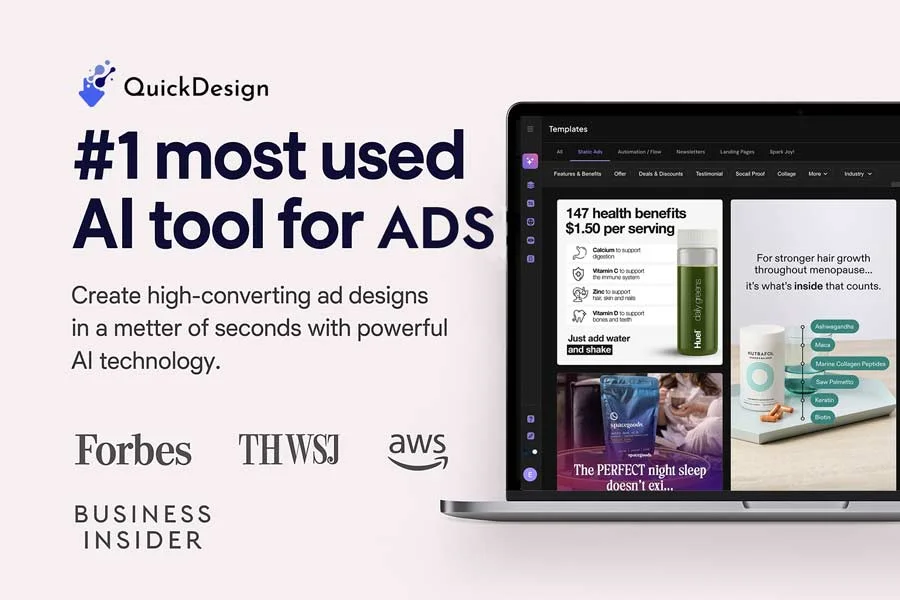
Source: QuickDesign official site
Don't start from scratch—build on proven patterns
Where a typical design tool centers on "create freely from a blank canvas," QuickDesign is optimized end to end for ad performance. Research competitors' ads, find the winning patterns, swap in your own product to mass-produce, ship to Meta, and grade the results—you can run this whole loop in one tool.
Features
01Research & prepare
- Spy Brands — track competitors' winning ads across 1B+ Meta ads, with weekly AI rankings
- Brand DNA — just enter a site URL to extract fonts, palette, logo, and voice
- Chrome extension — one-click save from the Meta Ad Library
02Create
- Static Ads — drop products and copy into 10,000+ templates and mass-produce
- UGC Ads — AI-avatar 60s–3min videos, lip-sync, captions, auto-translate to 8 markets
03Ship & scale
- Analyze & Launch — dashboard Meta ad performance, grade each ad A–F with Creative Radar, and launch the winners
- Library & export — auto-tagged management, export to Meta / TikTok / Drive
- MCP & CLI — call QuickDesign from inside Claude, ChatGPT, or Cursor, and batch-generate via CLI
Pricing
QuickDesign does not publish detailed pricing plans. Sign-up on the official site starts from "Start for $1" ($1 to begin, cancel anytime), and the specific plan structure and prices are confirmed after signing in. Third-party sites mention figures like ~$29/mo with annual discounts, but these are not official first-party information, so check the [official site](https://quickdesign.io/) for exact prices (as of August 2026).
How it differs from other AI ad-creative tools
QuickDesign differs from single-purpose banner generators in that it connects "competitor research → mass-producing static and UGC ads → Meta publishing and analysis" in one thread. The UI is primarily English, but UGC videos can be output in many languages, including Japanese.
| Aspect | QuickDesign | AdCreative.ai | Canva |
|---|---|---|---|
| Focus | Competitor analysis + ad production + delivery | Scored ad-banner generation | General-purpose design |
| Video | UGC avatar videos | Partial | Template videos |
| Integration | Meta publishing / analysis / MCP·CLI | Ad-platform integrations | Export to various socials |
AdCreative.ai, strong at scored ad-banner generation; the Japanese AI writer Catchy; Neurons, which predicts attention before you spend; and the general-purpose Canva are all comparison points. If you want to mass-produce static and video ads based on competitors' winners and run them on Meta, QuickDesign is a strong choice.
The information on this page is based on what was publicly available on the official site as of August 2026. Please check the official site for the latest specifications and pricing.


![[2026 Edition] Must-Know AI Tools for E-Commerce Managers: 7 Tools for Automating Product Image Editing and Virtual Model Try-Ons](/_next/image?url=%2Fimages%2Farticles%2Fai-tools-for-ec-managers.png&w=3840&q=75 "[2026 Edition] Must-Know AI Tools for E-Commerce Managers: 7 Tools for Automating Product Image Editing and Virtual Model Try-Ons")