

Neurons
: How to use it, features, and the business problems it solves
Add bookmark
What is Neurons?
Neurons is a neuroscience-backed AI that predicts and optimizes the attention, memory, and engagement of ads and creative before they go live. It visualizes where people look as a heatmap and predicts with 95%+ accuracy, grounded in 20 years and 300,000 participants' worth of eye-tracking and brain-scan data. It supports frame-by-frame video analysis, object attention tracking, improvement idea generation via Visual Recommendations, and an API. It comes from Denmark-based Neurons, and pricing is quote-based across three packages (Starter, Pro, and Scale).
Business problems it solves



About "Neurons"
What is Neurons
Neurons is a neuroscience-backed AI that predicts and optimizes the "attention, memory, and engagement" of ads and creative before they go live. In just a few clicks, it analyzes the creative you've made before you spend on it, visualizing where people look (attention) as a heatmap. Instead of relying on gut feel, you can judge creative based on data. It comes from Denmark-based Neurons, which claims 95%+ prediction accuracy grounded in 20 years and 300,000 participants' worth of eye-tracking and brain-scan data.
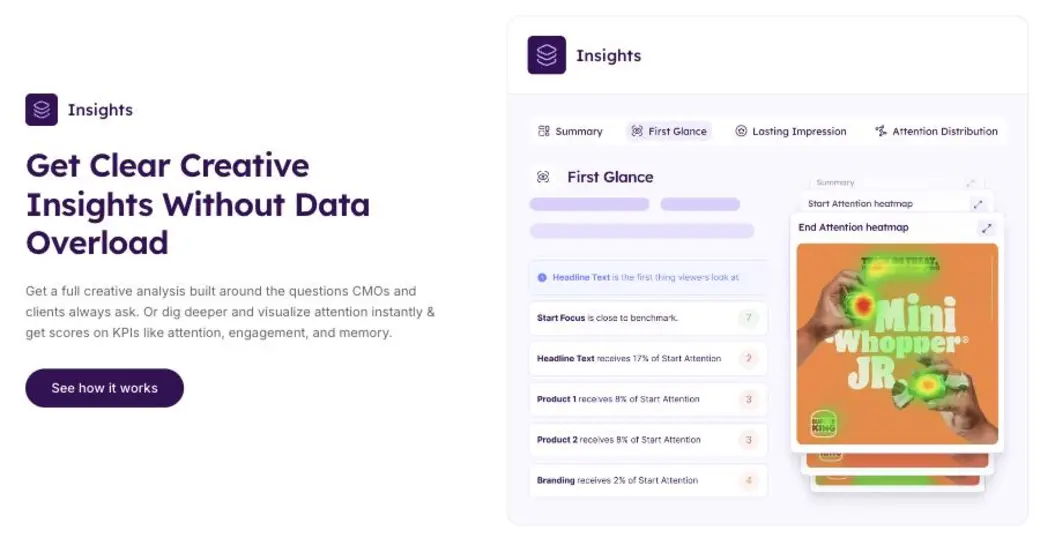
Source: Neurons official site (the image below is from the same source)
How to use
Just upload the creative before it goes live, and you get predicted results within seconds to a few minutes.
Add your creative
Upload an image or video ad. Pre-launch or mid-production is fine.
The AI predicts
Drawing on its neuroscience database, it predicts attention, memory, and engagement.
Check the heatmap
See where people look as a heatmap. Review scores for the headline, product, and brand too.
Improve and optimize
Generate and validate improvement ideas with Visual Recommendations to build stronger creative.
The biggest advantage is confirming whether creative will work at the production stage, without waiting for post-launch data.
Key features
01Pre-Test
Analyze an ad in a few clicks and get results for attention, memory, and more. You learn what to improve before you launch.
02Insights (heatmaps & scores)
Instantly visualize attention as a heatmap and turn KPIs like attention, engagement, and memory into scores. It analyzes creative on exactly the points a CMO or client is bound to ask about.
03Optimization (Visual Recommendations)
Neurons AI generates validated improvement ideas and new creative directions, showing you how a stronger alternative would look.
04Video support & large-scale analysis
Video ads are also turned into frame-by-frame heatmaps and scores. It supports element-level attention for logos, products, headlines, and more (object attention tracking), bulk scoring of hundreds of assets, and improvement to-dos. You can also embed it in your own tools via the Neurons API.
Pricing
Pricing is quote-based, with three packages that differ mainly in the number of Visual Recommendations and other features (as of August 2026). All packages include unlimited analysis and predictions.
| Package | Best for | Key contents |
|---|---|---|
| Starter | Teams just getting started | Unlimited analysis & predictions / 500 Visual Recommendations / up to 5 users / CSM & course |
| Pro | Optimizing multiple campaigns | Everything in Starter + 1,000 Visual Recommendations / Brand kit |
| Scale | Large-scale, company-wide rollout | Unlimited analysis & predictions / 2,000 Visual Recommendations / SSO / Brand kit / workshop |
Pricing is quote-based (Get my quote). No amounts are published on the official site, and the packages differ mainly in the number of Visual Recommendations and whether SSO and a workshop are included. Additional users and additional Visual Recommendations can be expanded via add-ons. Check the latest on the [official site](https://www.neuronsinc.com/pricing).
How it differs from traditional creative testing
The strength of Neurons is that its AI can predict "how creative will be seen" before launch, without waiting for consumer surveys or live A/B tests. You can validate at the production stage, quickly and at scale.
| Aspect | Neurons | Traditional creative testing |
|---|---|---|
| Timing | Predicts before launch | Post-launch data / time-consuming upfront research |
| Method | AI predictions trained on neuroscience data | Surveys, A/B tests, and the like |
| Output | Heatmaps + KPI scores + improvement ideas | Mostly aggregated results |
| Speed | Seconds to minutes, at large scale | Days to weeks |
Creative production itself is done in tools like Canva, and you can pair Neurons with them to validate the impact before launch. For analyzing user behavior on your site, User Insight is a closer fit. For teams that want to confirm whether an ad or creative will work before putting it out, Neurons is a strong option.
FAQ
Q. What does Neurons predict?
It predicts people's attention, memory, and engagement toward ads and creative. Where people look is visualized as a heatmap.
Q. How accurate is it?
The company claims 95%+ prediction accuracy, grounded in 20 years and 300,000 participants' worth of eye-tracking and brain-scan data.
Q. Can it be used for video?
Yes. Video ads can be turned into frame-by-frame heatmaps and scores, and it supports element-level attention tracking and bulk analysis of large volumes of assets.
Q. How much does it cost?
Pricing is quote-based (Get my quote). There are three packages, Starter / Pro / Scale, differing mainly in the number of Visual Recommendations and similar features. Contact the company directly for pricing.
The information on this page is based on what was published on the official site as of August 2026. Features and pricing are subject to change, so check the latest on the Neurons official site.
Frequently compared services




Articles featuring Neurons
[2026 Edition] Must-Have AI Tools for Web Designers: 12 Picks | From No-Code Site Building and Asset Creation to Banner Generation and Copywriting
A curated guide to AI tools that boost web designer productivity. Covers no-code site building, icon and asset creation, automated banner generation, A/B test copy creation, and more — all directly applicable to real-world work.
![[2026 Edition] Must-Have AI Tools for Web Designers: 12 Picks | From No-Code Site Building and Asset Creation to Banner Generation and Copywriting](/_next/image?url=%2Fimages%2Farticles%2Fai-web-design-tools.png&w=3840&q=75 "[2026 Edition] Must-Have AI Tools for Web Designers: 12 Picks | From No-Code Site Building and Asset Creation to Banner Generation and Copywriting")
[2026 Edition] 13 AI Tools to Solve Marketers' Challenges | Organized by Use Case and Workflow
A curated, category-by-category selection of the latest AI tools that tackle marketers' everyday challenges — content creation, social media management, report generation, and more. [Latest 2026]
![[2026 Edition] 13 AI Tools to Solve Marketers' Challenges | Organized by Use Case and Workflow](/_next/image?url=%2Fimages%2Farticles%2Fai-tools-for-marketers.png&w=3840&q=75 "[2026 Edition] 13 AI Tools to Solve Marketers' Challenges | Organized by Use Case and Workflow")