
shortshort
: How to use it, features, and the business problems it solves
Add bookmark
What is shortshort?
shortshort turns long talks, podcasts and courses into vertical shorts cut on complete sentences. From a video file of up to 2GB, or a link to your own YouTube video, AI picks self-contained 15–90-second passages, crops them to follow the speaker and adds word-by-word captions, exporting MP4s in 9:16 or 4:5 (Instagram feed). Shorts can also be scheduled to publish on YouTube (TikTok in early access). Pricing is based on minutes of source video rather than the number of shorts: 30 free credits (30 minutes' worth) at sign-up, then paid plans from €12 a month (excl. VAT).
Business problems it solves


About "shortshort"
What is shortshort?
shortshort is a web service that takes a single long-form video, such as a talk, podcast, online course or webinar, and uses AI to pick out the best moments and turn them into vertical (9:16) short videos. Developed and operated in France, it launched publicly in September 2026.
The segments it picks are 15–90-second stretches that begin and end on complete sentences, found after transcribing the video word by word. Each segment is cropped to a vertical frame that follows the faces on screen, given word-by-word captions synced to the audio, and exported as an MP4 at 1080×1920 (9:16) or, for the Instagram feed, 1080×1350 (4:5). Besides uploading a file, you can import a video you've uploaded to YouTube by pasting its link, and the finished shorts can even be scheduled to publish on YouTube. Every AI suggestion can be edited before rendering, and pricing is based on the length of the source video in minutes, not on the number of shorts.
MP4 / MOV / WebM · YouTube links too
±25% of target to fit sentence breaks
Same no matter how many shorts you make
30 minutes' worth · no card required
Cut at sentence breaks, not by the second
Chop a video mechanically at a fixed number of seconds and the speaker's sentences tend to get cut off midway. A clip that ends just short of the conclusion never gets its point across to the viewer. shortshort was built around exactly this problem, and its stated ground rule is that a clip should "start where a thought starts and end where it ends."
The AI first transcribes the entire video from its audio, then reads that transcript to find segments that make sense when quoted on their own: a question and its answer, a claim and its example, and so on. Each segment starts on the first word of a sentence and ends on the last. Rather than cut a sentence in half, it lets the length drift up to about 25% from the target. With a 30-second target, each short lands between 22.5 and 37.5 seconds.
Cutting at exactly the target length
- Cuts at the 30-second mark, even mid-sentence
- The payoff of the story can end up outside the clip
- Clips often open mid-sentence, too
How shortshort cuts
- Starts on the first word of a sentence and ends on the last
- With a 30-second target, lands on the end of a sentence somewhere within 22.5–37.5 seconds
- Shorts from the same video are separate, non-overlapping segments
Make 10 shorts from one video and you get 10 different moments; you never get the same scene simply reframed a few different ways. Within a single short, the AI may also join several non-overlapping excerpts of the same video to make one self-contained point (up to 3 for a 15-second target, 5 for 30 seconds and 8 from 45 seconds, each listed in the studio with its start and end). Each short comes with an AI-generated title, so you can scan the titles to decide which ones to use.
The speaker stays centered, even in landscape recordings
Most recordings of talks and podcasts are landscape (16:9), and converting them straight to vertical leaves the speaker pushed to the edge of the frame or cut off. shortshort tracks the faces on screen, places a 9:16 crop window over them, and moves the window as the speaker moves. When the recording cuts between cameras, scene detection repositions the window.
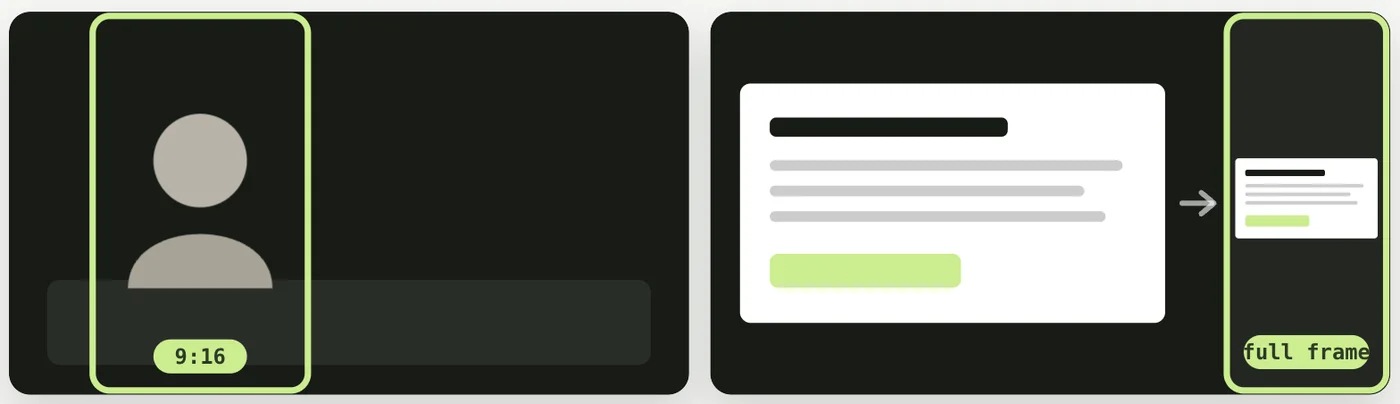
Source: shortshort official website (also applies to the screenshots below)
Slides, screen shares and wide shots of the whole venue, on the other hand, lose content when cropped to vertical. These shots are detected automatically and fitted into the vertical frame scaled down in full, with space added above and below. That's why the text on a speaker's slides stays readable instead of being cut off.
Zoom is automatic and capped at 1.6× the original footage. In 9:16, the zoom on a tracked face stays at 1.0× or 1.04× per shot, with gentle push-ins up to about 1.11× on emphasized words; 1.6× is reached only on passages where no face is tracked, which keeps the image from turning grainy from over-enlargement. Frame position and zoom are fully automatic, with no manual controls to move them. Because it doesn't identify speakers by voice, in a two-person shot the frame may stay on the listener. If a segment doesn't frame the person you want, the intended fix is to adjust the segment's range or pick a different segment.
Captions appear word by word, in step with the voice
Caption timing is taken from the audio itself rather than estimated from an average speaking rate. Once a segment is chosen for a short, just that segment is transcribed a second time and every word gets a fresh timestamp. Words that can't be matched on the second pass fall back to the first-pass timing and are marked as "estimated," so you can see which parts are exact and which are approximate before rendering.
There are four caption styles to choose from.
Caption colors and fonts can be changed per video on every plan, and you can also import an SRT file prepared for the source video and use its text for the captions. Captions stay in the language spoken in the video and are not translated.
How to use it
According to the official site, the hands-on time from upload to export is "about two minutes." The only settings are how many shorts to make, how long each one should be, and how the captions look.
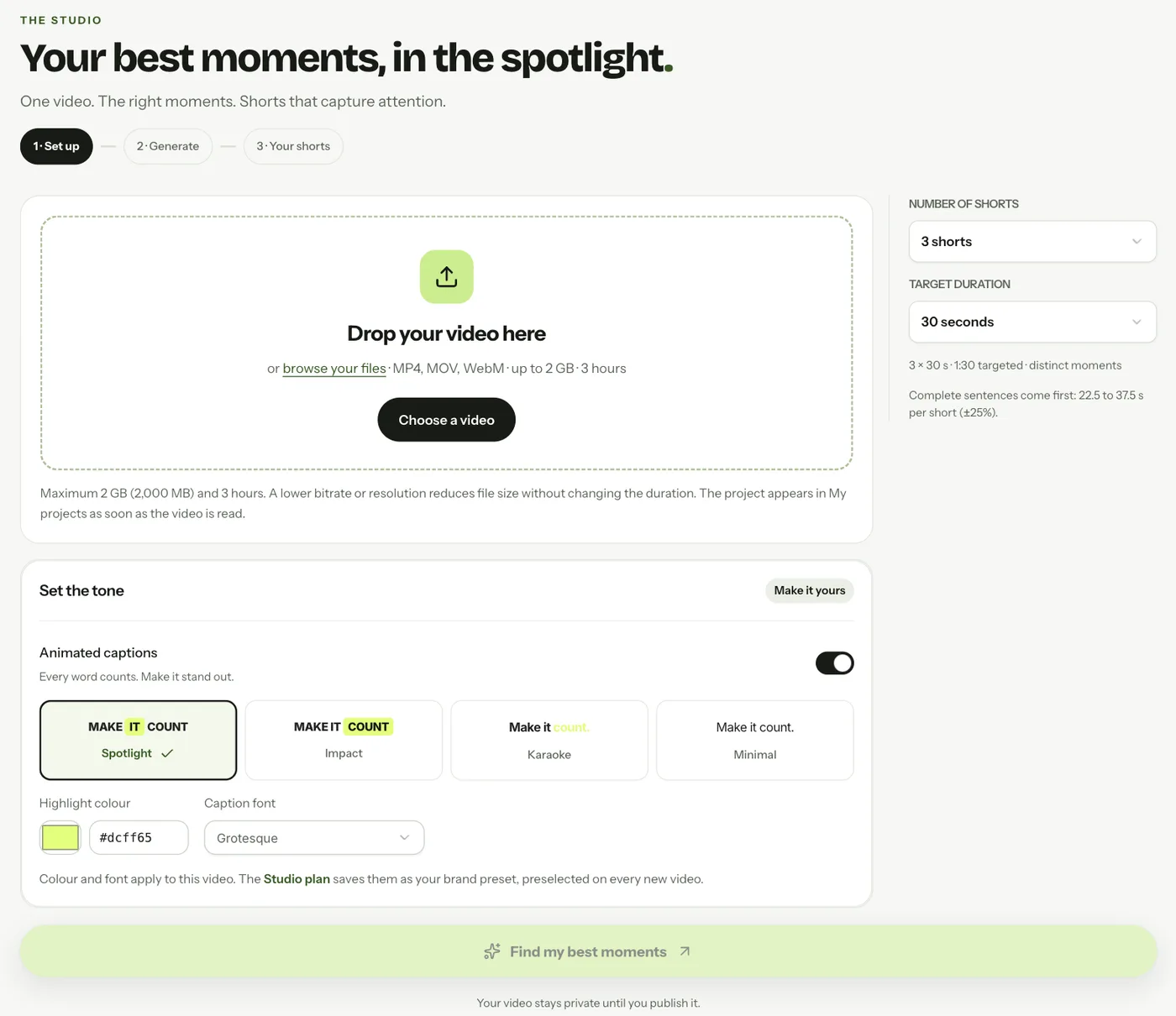
The screenshot is from the September 2026 launch. The official site now gives a 2GB limit per source video and no separate duration limit
-
Prepare your video file
MP4, MOV or WebM files are accepted, up to 2GB each. File size, rather than duration, is usually the limiting factor; for files over 2GB, the official site suggests lowering the bitrate or resolution to shrink the file without changing its length. Instead of a file, you can paste the link of a public or unlisted video you've uploaded to YouTube (it's downloaded on shortshort's servers at up to 720p; private, age-restricted and live videos can't be imported, and if an import fails you upload the file instead). Links from TikTok, Instagram, Vimeo or Google Drive aren't supported. You can only use videos you hold the rights to, and the terms of service ask you to confirm the rights to any music, footage and people that appear in them as well.
-
Choose the number of shorts, their length and the captions
Drop the file into the studio and choose how many shorts to make (up to your plan's limit), the target length of each (15–90 seconds), and the caption style, color and font. AI analysis, the editor and MP4 export require a free account, and analysis uses 1 credit per minute of source video. Without an account you're limited to free tools such as a browser-only one that turns a single passage of up to 90 seconds from your own video (up to 10 minutes and 500MB) into a face-framed vertical MP4 with word-by-word captions, with a watermark.
-
Wait for the AI to process the video
Processing runs through these stages: "upload → waiting for a processing slot → preparing the video → selecting highlights → aligning speech timing → tracking subjects and reframing → adding emphasized words → rendering and saving." With an account, generation and rendering run on the server on every plan, so you can close the tab once the upload finishes.
-
Review and refine the suggestions
Each short arrives as an editable "suggestion." You can change the excerpts and their bounds, the title, the description, the caption text and emphasized words, and the caption style. Rendering doesn't start until you press the button, so you can go through and fix every suggestion first, then export only the ones you want.
-
Export and post it yourself
Each short is exported as a 30fps MP4 (H.264), either in 9:16 (1080×1920) or in 4:5 (1080×1350) for the Instagram feed. The 4:5 version isn't a widened 9:16 crop; the face is tracked again to fit the 4:5 shape. You can download shorts one at a time, or use bulk download to get every short in a ZIP, two versions each: with and without captions. Connect a YouTube channel and you can schedule each short for a chosen day and time, or let shortshort spread them over a calendar, with titles and descriptions written in the language you choose. Publishing to TikTok is in early access; for Instagram and elsewhere, you post the downloaded files yourself.
Features
01Clip
Picks out segments from long videos that make sense on their own.
- Sentence-level segment selection — Transcribes the whole video and suggests 15–90-second segments made of complete sentences, fitting the length to the end of a sentence within ±25% of the target
- Non-overlapping suggestions — Selects up to 20 separate, non-overlapping segments from a single video (depending on plan)
- Joined excerpts — Within one short, joins up to 8 non-overlapping excerpts of the same video (3 at a 15-second target, 5 at 30 seconds) to make one point
- Title and description suggestions — The AI gives each short a title, making it easier to decide which ones to use
02Go vertical
Crops landscape recordings to a vertical frame with the speaker in the center.
- Face tracking — Places the 9:16 frame over the most visible face on screen and moves it with that person
- Scene detection — Repositions the frame when the recording cuts to a new shot
- Full-frame preservation — Keeps slides, screen shares and wide shots whole instead of cropping them, with space added above and below
- Automatic zoom — Capped at 1.6×. In 9:16, 1.0–1.04× on faces, pushing in to about 1.11× on emphasized words
- 4:5 export — For the Instagram feed, the face is tracked again for the 4:5 shape (zoom up to 1.4×, push-ins up to about 1.5×)
03Add captions
Spoken words appear on screen right as they're spoken.
- Word-by-word timing — Re-transcribes the selected segment and takes each word's timing from the audio. Words that can't be matched are marked "estimated"
- Four styles — Spotlight, Impact, Karaoke, Minimal
- Colors and fonts — Changeable per video on all plans. On Studio, they can be saved as one brand preset per account that's preselected for every new video
- SRT import and export — Use an SRT file timed to the source video for your captions
- In the spoken language — Transcription uses OpenAI's whisper-1 (98 languages according to OpenAI). Captions are never translated
04Finish, export and publish
Refine the suggestions, then export only what you need.
- Editor — Change the excerpts and their bounds, title, description, caption text and emphasis, and style. Available with a free account
- MP4 export — 9:16 (1080×1920) or 4:5 (1080×1350), 30fps, H.264. Captions are burned into the video
- Bulk download — Get every short in a ZIP, two versions each: with and without captions
- Server-side processing — On every plan with an account, generation and rendering run on the server. Finished shorts are kept in your library even if you close the tab
- Scheduled YouTube publishing — Connect a channel and pick a day and time for each short, or let shortshort fill the calendar. Titles and descriptions are written in the language you choose. TikTok is in early access
- Edit plan JSON export — Studio. Exports the segments, framing keyframes and per-word timing of saved shorts as JSON for use with a renderer on your own servers
- Community — A public gallery where published shorts can be viewed alongside their source videos and transcripts
Supported input and output
Pricing
Pricing is measured in minutes of source video. Each minute of source video sent for AI analysis uses 1 credit, and the cost stays the same no matter how many shorts you make from it. A 56-minute talk costs 56 credits whether you make 3 shorts or 20. Editing and MP4 export don't use any credits.
| Plan | Monthly price (excl. VAT) | Monthly credits | Shorts per video | Key differences |
|---|---|---|---|---|
| Free | €0 | 30 credits on sign-up (30 minutes' worth, given once) | 3 | No credit card required. Exported shorts carry a small watermark (a shortshort.io badge in the top corner and a 1.5-second credit at the end, within the same length) and are listed in the public gallery (Community) |
| Starter | €12 (€115 billed annually) | 480 (8 hours of video) | 5 | No watermark. An account setting keeps your shorts out of the gallery. Unused monthly credits roll over |
| Creator | €29 (€278 billed annually) | 1,600 (26 hr 40 min of video) | 10 | Everything in Starter, plus add-on credit purchases (add-on credits never expire) |
| Studio | €79 (€758 billed annually) | 6,000 (100 hours of video) | 20 | Everything in Creator, plus a brand preset (caption colors and font) and edit plan JSON export for saved shorts |
On Creator and Studio, you can buy extra credits if you run short during the month.
| Add-on credits | Price (excl. VAT) |
|---|---|
| 400 credits (6 hr 40 min of video) | €9 |
| 1,200 credits (20 hours of video) | €24 |
| 4,000 credits (66 hr 40 min of video) | €69 |
- Prices shown exclude VAT (value-added tax). Annual billing is 20% cheaper than monthly billing
- On Starter, this works out to €0.025 per minute of source video (on 23 September 2026 the monthly credits were doubled at the same prices)
- Unused credits roll over to the next month and never expire. Add-on credits and the 30 sign-up credits are used only after your monthly credits run out
- If a generation fails, the credits it used are refunded
- Payment is by card (Stripe). You can cancel anytime from your account and keep using the service until the end of the period you've paid for. Any remaining credits stay in your account after you cancel
- Plan changes aren't self-service yet; you request them by writing to the address on the terms page. Moving up charges only the difference for the rest of the period, and moving down or cancelling never removes credits you already hold
(Based on the official website, pricing page and terms of service as of October 2026. The official pricing page states that prices and plans were checked on 30 September 2026)
Video data and visibility
When you hand recordings of talks or courses to an outside service, it's worth checking up front where they're stored and who can see them. shortshort's privacy page spells out where data is stored and the path it takes for AI analysis.
The public gallery also doubles as a showcase where you can compare real source videos side by side with the shorts made from them. On the other hand, exported shorts join the gallery by default, so if you're working with recordings of internal meetings or training sessions that shouldn't be seen outside your organization, the safest approach is to switch to a paid plan and turn on the account-wide private setting before exporting.
Features deliberately left out
shortshort focuses solely on cutting vertical shorts out of long videos. The official site publishes a list of what it doesn't support. (Since its launch in September 2026, importing from YouTube links, 4:5 export and scheduled YouTube publishing have been added.)
- Dubbing and translation (captions stay in the spoken language)
- Automatically added B-roll, music or on-screen titles (the output is a crop of the original footage with captions on top)
- Publishing to Instagram, LinkedIn or X (YouTube can be scheduled and TikTok is in early access; for the rest, you download the MP4 and post it yourself)
- Square or 16:9 export, 4K or 60fps (exports are 9:16 at 1080×1920 or 4:5 at 1080×1350, at 30fps)
- Importing from TikTok, Instagram, Vimeo or Google Drive links (import a file or the link to your own YouTube video)
- A "virality score" that predicts views (the AI picks self-contained segments, and you decide which ones to use)
- A public API or team seats
How shortshort differs from other AI clipping tools
shortshort isn't the only AI tool that cuts shorts from long videos. Where these tools differ is in how they decide what to clip, and how much of the work after clipping they take on.
| Aspect | shortshort | OpusClip | Klap |
|---|---|---|---|
| How clips are chosen | Self-contained, sentence-based segments (fitted to sentence ends within ±25% of the target) | AI picks highlights and ranks them with a virality score | AI extracts highlights |
| Vertical cropping | Face tracking; slides and wide shots are kept whole | Subject-tracking reframe (ReframeAnything) | Auto-reframe |
| Captions | Word by word, 4 styles, in the spoken language | Animated captions | Auto-captions in 52 languages |
| Dubbing | No | Yes | AI dubbing (29 languages) |
| Social posting | Scheduled publishing to YouTube (TikTok in early access); otherwise download the MP4 and post it | Direct and scheduled posting | Direct and scheduled posting |
| Pricing unit | Minutes of source video (1 minute = 1 credit) | Credit-based | Videos and clips per month |
| Cheapest paid plan | Starter, €12 a month (excl. VAT) | Starter, $15 a month | Basic, $29 a month ($14 a month billed annually) |
| Free trial | 30 credits on sign-up (30 minutes' worth), no card required | Free plan (with watermark) | Try one video for free |
quso.ai and WayinVideo (formerly Videohunt.Ai) also turn long videos into shorts, as all-in-one tools that pair clipping with scheduled posting or video search. If you'd rather edit an entire video the way you'd edit text, that's the territory of transcript-based video editors such as Vrew and Descript.
Frequently asked questions
This page is based on information published on the official website as of October 2026. Please check the official website for the latest specifications and pricing.