Speechify
: How to use it, features, and the business problems it solves
Add bookmark
What is Speechify?
An AI text-to-speech reader app from Speechify, Inc. (Miami, Florida, USA). It reads PDFs, web pages, Google Docs, emails and photographed book pages aloud in 1,000+ natural AI voices at up to 5x speed, and also offers AI summaries and chat, voice typing and AI podcasts. Available on iPhone, Android, Chrome extension, web app, Mac and Windows, with the website and app displayable in Japanese. Free plan (up to 1.5x, 10 basic voices) and Premium at $29 per month or $139 per year (purchased on the official website).
Business problems it solves


About "Speechify"
What is Speechify?
Speechify is an AI text-to-speech (TTS) reader app that reads anything written aloud in natural AI voices: PDFs, web pages, Google Docs, emails, ebooks, and even pages of a printed book photographed with your phone camera. It is made by Speechify, Inc., based in Miami, Florida, USA. The app highlights the passage being read so you can "read with your ears" at the speed that suits you.
The app was originally built for people who find reading difficult, such as those with dyslexia or ADHD, and its App Store description says it aims for a world where reading is never a barrier. Today it has grown beyond reading aloud into a "Voice AI assistant" that bundles AI summaries and chat about your documents, voice typing that works in any app, and AI podcasts generated from your material, all under one account.
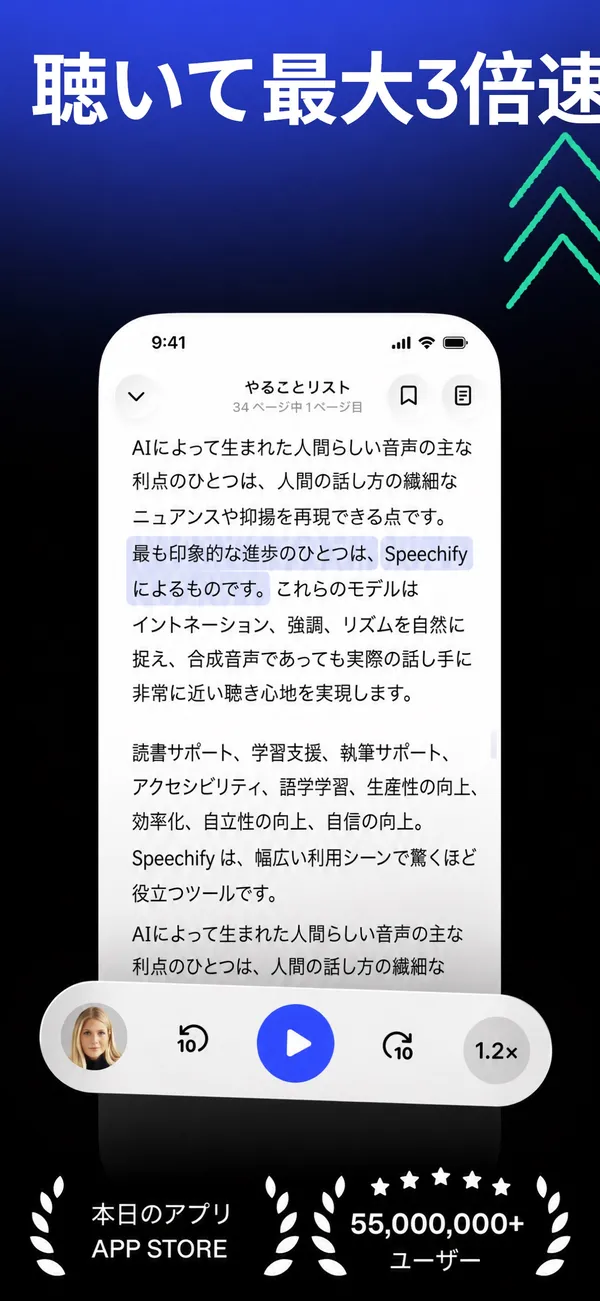
Source: Speechify official website and App Store (Japan) (the same applies to the screenshots below)
How to Use
- Install the app and create an account Install it for free from the App Store, Google Play, the Chrome Web Store and so on, and sign up with an email address or a Google or Apple account. Your library syncs across phone, computer and browser under the same account.
- Open what you want to read For web pages, use the Chrome extension button; for PDFs and documents, upload them to the web app; for printed books, photograph the page with your phone camera. On Premium you can also import documents directly from Google Drive, Dropbox and Microsoft OneDrive.
- Pick a voice and speed, then press play Choose a voice from the voice library (typing a language name in the search box narrows it to voices for that language) and adjust the playback speed. The official help center recommends matching the voice language to the language of the text.
- Go deeper with summaries, questions and podcasts On Premium, AI can summarize the open document and answer questions about it. You can also turn material into an audio podcast to listen to on the go.
Features
01Read with your ears
The core reading-aloud features.
- Text to speech — Reads PDFs, web pages, Google Docs, emails, ebooks and more, highlighting the passage being read
- Playback speed — Up to 1.5x on Free and up to 5x on Premium (as stated on the pricing page)
- 1,000+ voices, 60+ languages — Natural voices available on Premium; the Free plan has 10 robotic-sounding basic voices
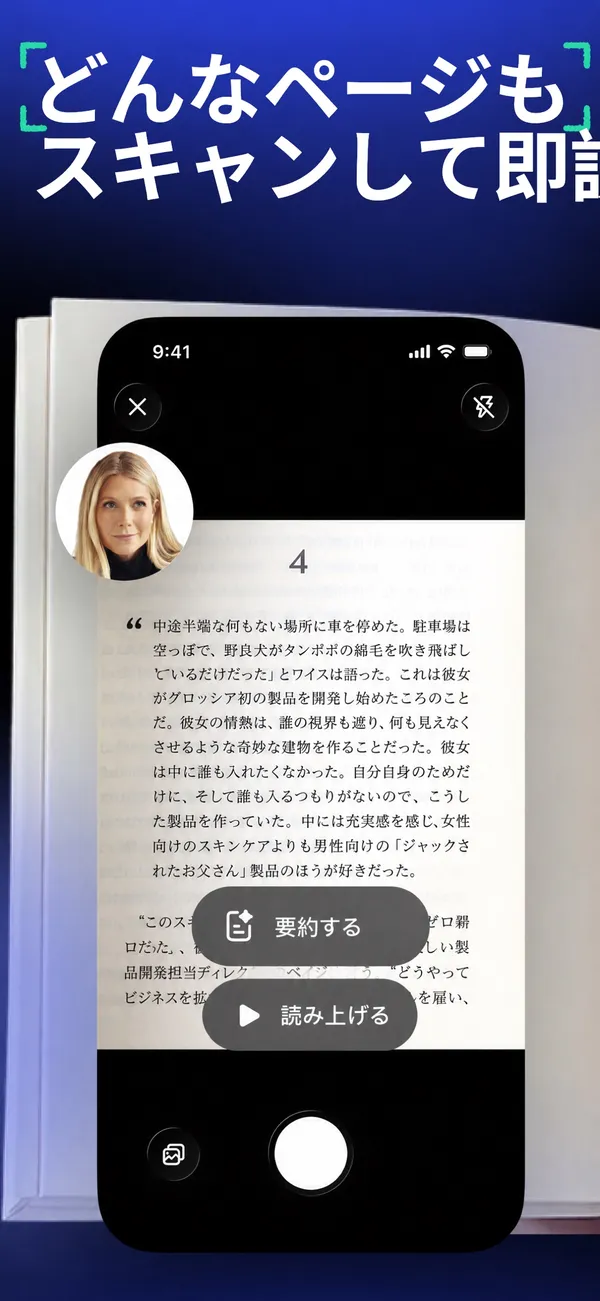
- Scan & listen — Photograph a book or document and it reads the text aloud on the spot (Premium)
02Understand the content
Summarize and talk with the document you are listening to.
- AI summaries & chat — Condenses the key points of a document and answers questions about it (Premium)
- Voice AI assistant — Talk with Speechify by voice and discuss the content of websites and books (Premium)
- AI meeting notes — Summarizes meetings and calls and answers questions about them (a feature presented on the official website)
03Write and create with your voice
The reverse direction: turning your voice into text and audio content.
- Voice typing (dictation) — Turns speech into text in any app, from Google Docs to Gmail. The company says you can write 5x faster than typing (Premium)
- AI podcasts — Creates a podcast in natural AI voices from a document or a short description (Premium)
Separately, there is Speechify Studio for creators who make voiceovers, dubbing and AI avatar videos, and the Speechify API for developers (both priced separately).
Snap a photo, and even printed books become audio
What sets Speechify apart from other reader tools is that it reads printed books and paper documents, not just digital files. Photograph a page with your phone camera and it recognizes the text, then reads it aloud or summarizes it (the Premium "scan and listen" feature).
The App Store description also says screenshots containing text can be turned into audio with a single tap. Books with no digital edition, handouts and letters, which until now could only be read with your eyes, can be listened to while commuting or doing chores.
What to know when using it in Japanese
- The interface can be shown in Japanese — The official website and pricing page have Japanese versions, and the App Store (Japan) lists Japanese among the app's languages. In the web app, the display language can be changed under Settings → General
- It can read Japanese text aloud — The Japanese App Store screenshots show Japanese text being read aloud and scanned. You choose a voice by searching for the language in the voice library
- Terms and help are in English — The terms of service and the help center are in English, and support is via an English email address (help@speechify.com)
- Check how natural it sounds with your own documents — How proper nouns and technical terms are read varies from text to text. If you have documents you use for work, the surest approach is to try them on the Free plan first
If you want free Japanese text-to-speech with character voices, the Japanese-made VOICEVOX is an option, and if you want to choose from many AI voices that are strong in Japanese, consider CoeFont.
Pricing
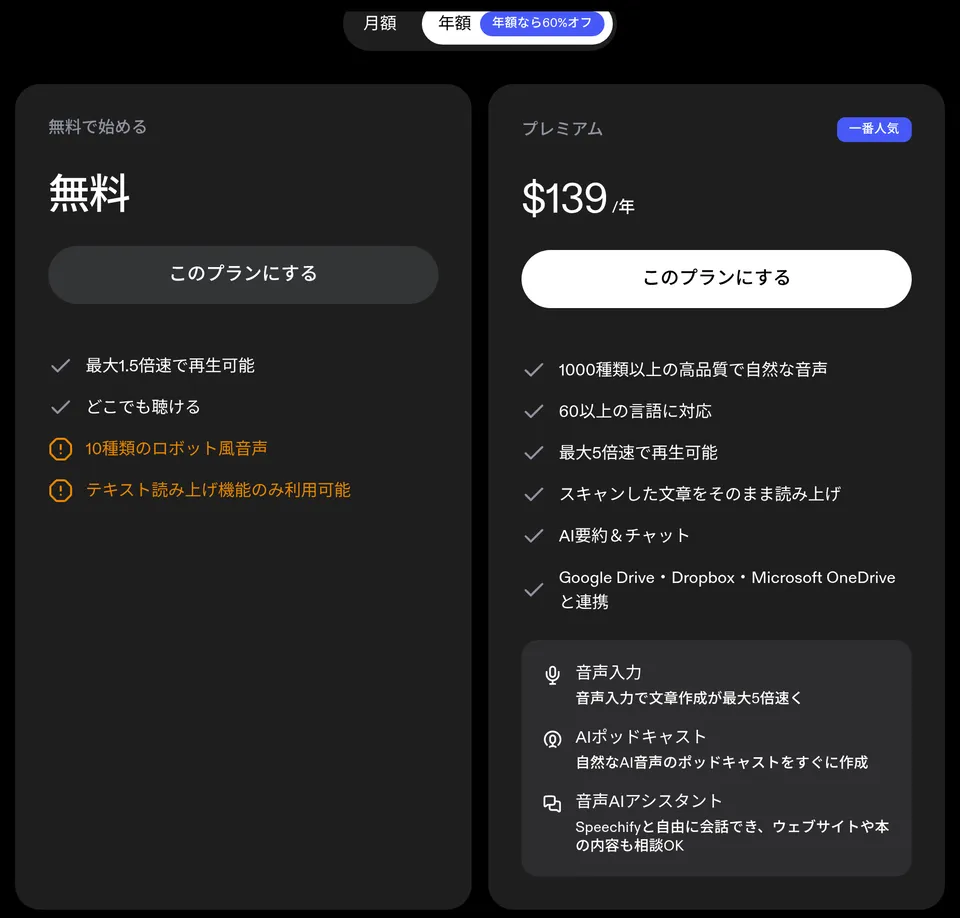
These are the prices when purchasing on the official website (speechify.com). Annual billing is labeled "60% off" (as of October 24, 2026, in US dollars).
| Plan | Price | Main features |
|---|---|---|
| Free | $0 | Playback up to 1.5x, listen anywhere, 10 robotic-sounding basic voices, text-to-speech features only |
| Premium | Monthly $29/month, annual $139/year | 1,000+ natural voices, 60+ languages, up to 5x speed, reading scanned text, AI summaries & chat, Google Drive / Dropbox / Microsoft OneDrive integration, voice typing, AI podcasts, Voice AI assistant |
Prices differ when you buy inside the apps. The official help center states $139.99 per year on the App Store and $99.99 per year on Google Play. The in-app purchases on the App Store (Japan) list several items at different prices, such as "Premium ¥20,000", "Premium Monthly ¥2,000" and "Speechify Premium ¥22,000", so check the amount shown on the purchase screen.
- Free trial — According to the terms of service, the Premium free trial is currently three days (or the period shown at sign-up), and it automatically converts to a paid plan unless you cancel
- Cancellation and refunds — If you subscribed on the official website, you can cancel any time in your account settings and keep access until the end of the term (no prorated refunds for unused days). If you bought through the App Store or Google Play, cancellation and refunds are handled by Apple or Google
- Businesses and schools — "Speechify for Enterprise & EDU" has an inquiry form where you enter the number of users (pricing is not published)
How it differs from other reading and voice tools
AI voice tools split into those for "listening to text you already have" and those for "creating audio assets such as narration." Speechify is a leading example of the former, and it is expanding toward handling everyday reading and writing by voice by adding summaries and voice typing to reading aloud.
| Aspect | Speechify | Audioread | VOICEVOX | ElevenLabs |
|---|---|---|---|---|
| Main use | Listen to documents, web pages and printed books on the spot | Turn articles and PDFs into a podcast feed | Create narration with Japanese character voices | Multilingual AI voice generation, voice cloning, dubbing |
| Reading printed books | Photograph and listen | ― | ― | ― |
| Japanese | Interface and reading supported | Not specifically stated | Specialized in Japanese | Supported |
| Pricing | Free / $29 per month, $139 per year | Free / Pro $9.99 per month | Free (credit required) | Free / from $6 per month |
The columns for other products reflect the information on each product page as of when it was checked.
If you want to listen to articles in your usual podcast app, Audioread fits, and if you want to create narration or voice assets for video, ElevenLabs is better suited. If you only need to write by voice, Wispr Flow, which specializes in voice typing, and if you want audio explanations generated from your own material, NotebookLM are also worth comparing.
Track record and reputation
01Figures presented by the company
- 60+ million users — As stated on the official website (the App Store description says "50+ million")
- Awards — The official website cites the "2025 Apple Design Award" and "Chrome Extension of the Year"
- App Store (Japan) rating — 4.4 out of 5 (4,443 ratings, as of October 24, 2026)
02Named comments in the App Store description
- Richard Branson — Calls Speechify wonderful and says he is truly glad it exists today (presented as an app that supports his reading with dyslexia)
- Gwyneth Paltrow — Says she can listen to Goop blog posts and scripts in the car, that it helps her friends study, and that it is great for scripts
Reviews on the App Store (Japan) include English learners who praise reading aloud in a voice similar to their own and the podcast feature, while one reported that Kindle books bought on Amazon Japan could not be read. If you want it to read ebooks, it is safest to test first within the free tier whether it works in your setup.
FAQ
Q. Can I use Speechify for free? A. Yes. The Free plan lets you use text to speech at up to 1.5x with 10 basic voices. Natural voices, scan and listen, AI summaries, voice typing and so on require Premium ($29 per month or $139 per year on the official website).
Q. Can it read Japanese text aloud? A. Yes. Search for the language in the voice library and choose a Japanese voice. The official help center recommends choosing a voice in the same language as the text.
Q. Is there a difference between buying in the app and on the website? A. The price differs. It is $29 per month or $139 per year on the official website, and according to the official help center $139.99 per year on the App Store and $99.99 per year on Google Play. The Japanese App Store lists several yen-priced items, so check the purchase screen.
Q. Do I get a refund if I cancel? A. If you subscribed on the official website, you can cancel any time but there are no prorated refunds for the remaining period (you keep access until the end of the term). Purchases through the App Store or Google Play follow Apple's and Google's refund policies.
Q. Can I create audio for narrated videos? A. Narration, dubbing and AI avatar videos are made in Speechify Studio, a separate product. It is priced separately from the reader app.
The information on this page is based on what was published on the official website and the App Store as of October 2026. Please check the official website for the latest specifications and pricing.