

Synthesia
: How to use it, features, and the business problems it solves
Add bookmark
What is Synthesia?
A business-focused AI video platform (UK's Synthesia) that turns a script into studio-quality videos of an AI avatar speaking. 160+ languages and 240+ avatars, with translation, dubbing, and interactive avatars. Used by 1M+ people and 90% of the Fortune 100. Free tier / Starter from $29.
Business problems it solves





About "Synthesia"
What is Synthesia
Synthesia is a business-focused AI video platform that turns text (a script) into studio-quality videos of an AI avatar speaking. Under the tagline "All-in-one AI Video platform for business," you create training, marketing, and sales videos with no camera or crew. Run by Synthesia Ltd (London), it's the industry leader — used by 1M+ people and 50,000+ companies (90% of the Fortune 100).
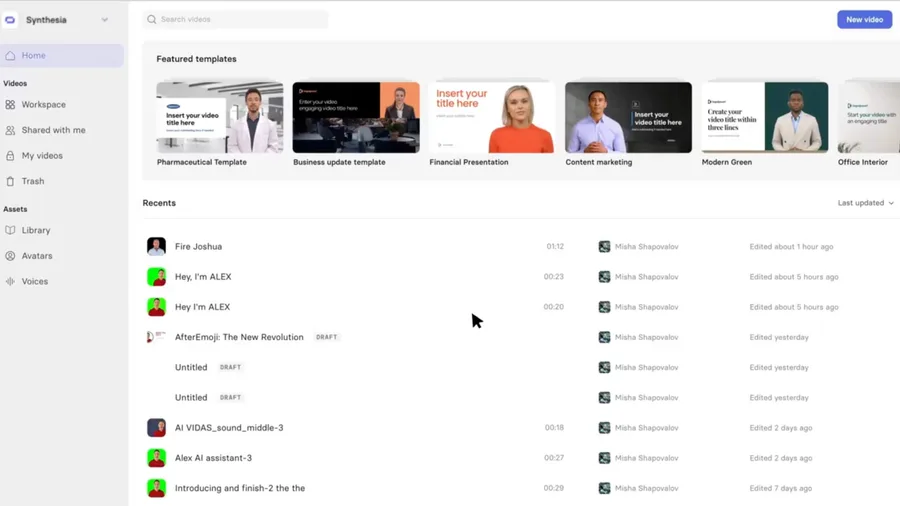
Synthesia's core is entering a script and having the chosen AI avatar speak it in a video. Beyond stock avatars, you can create personal/brand avatars. It supports 160+ languages and 1,000+ voices, plus templates, PowerPoint import, screen recording, Brand Kits, and auto-captions.
Synthesia goes beyond script-to-avatar into translation, dubbing, and interactivity. It offers AI Dubbing (140+ languages on Enterprise), 1-click video translation (80+ languages), interactive avatars, expressive avatars, Roleplay Sessions for practicing conversations, and the Synthesia 2.0 release. Base model names aren't disclosed; it's described as text-to-video / neural video synthesis.
How to use
Enter a script, pick an avatar and voice, and generate.
Enter a script
Type what you want spoken (you can also build from PowerPoint).
Pick avatar & voice
Choose a stock/personal avatar and a language and voice.
Generate
Generate a video of the avatar speaking; use captions and templates.
Translate & share
Translate/dub into many languages and share, or export SCORM (Enterprise).
The free plan allows up to 10 minutes/month, 9 avatars, and a Synthesia watermark. A recent "new prices (~36% off)" is promoted.
Key features
01AI avatar video
240+ stock AI avatars plus personal/brand avatars you create (3 to unlimited by plan). It also offers expressive avatars and interactive avatars (beta) that respond in real time.
02Languages, translation, dubbing
160+ languages and 1,000+ voices, with voice cloning. It includes 1-click video translation (80+ languages) and AI dubbing that matches lip movement (140+ languages on Enterprise).
03Production, L&D, API
60+ templates, PowerPoint import, screen recording, Brand Kits, and auto-captions. With interactive video, roleplay, collaboration, analytics, SCORM export (Enterprise), and an API (Creator+), you can mass-produce training (L&D) and internal/external videos.
Pricing
You can start free; paid splits into individual tiers and Enterprise. Figures below are monthly (annual is discounted), with a recent "new prices (~36% off)" promotion.
| Plan | Monthly | Video limit | Avatars |
|---|---|---|---|
| Free | $0 | 10 min/mo | 9 (watermark) |
| Starter | $29 | 10 min/mo or 120 min/yr | 125+ and 3 personal |
| Creator (popular) | $89 | 30 min/mo or 360 min/yr | 180+ and 5 personal |
| Enterprise | Contact us | Unlimited | 240+ and unlimited personal |
Enterprise adds SAML/SSO, SCORM export, 1-click translation (80+ languages), unlimited dubbing (140+ languages), and a dedicated CSM. A price cut (~36% off) is reflected, and annual is billed yearly. Prices are in USD (JPY shown in Japan) and change, so check the official pricing page for the latest (as of August 2026).
How it differs from other AI avatar video tools
Synthesia stands out for a business/L&D-first build plus strong multilingual and governance features (SSO/SCORM, etc.). That's a different aim from consumer-friendly ease or photo-to-video tools.
| Aspect | Synthesia | HeyGen | D-ID |
|---|---|---|---|
| Focus | Business avatar video | Avatar video + translation + API | Talking video from a photo |
| Strength | Training, templates, governance | Digital Twin, Avatar V | Easy photo avatars |
| Languages | 160+, translate/dub | 175+, lip-sync | Multi-language |
Alternatives to compare include fellow avatar-video leader HeyGen, D-ID for talking video from a photo, and AI clone video Argil. For businesses that want to mass-produce training and internal/external videos with multilingual and governance built in, Synthesia is a strong choice.
Information on this page is based on the official website as of August 2026. Please check the official site for the latest specs and pricing.
Frequently compared services



Articles featuring Synthesia
[2026 Edition] 14 AI Tools to Supercharge Social Media Management | Post Creation, Short Videos, Avatars, and Voice Conversion All in One
A detailed guide to 14 AI tools that tackle social media challenges: bulk post creation, automated short-form video generation, virtual human appearances, and voice conversion. Learn how to integrate them into your workflow to boost engagement and operational efficiency at the same time.
![[2026 Edition] 14 AI Tools to Supercharge Social Media Management | Post Creation, Short Videos, Avatars, and Voice Conversion All in One](/_next/image?url=%2Fimages%2Farticles%2Fai-tools-for-sns-managers.png&w=3840&q=75 "[2026 Edition] 14 AI Tools to Supercharge Social Media Management | Post Creation, Short Videos, Avatars, and Voice Conversion All in One")
[2026 Edition] 17 AI Tools for Video Creators | Full Coverage from Auto-Editing and Subtitles to Narration, BGM, and Social Media Videos
Supercharge your video production with AI. A curated selection of the latest tools supporting every stage — editing, subtitles, narration, BGM, and virtual appearances. [2026 Edition]
![[2026 Edition] 17 AI Tools for Video Creators | Full Coverage from Auto-Editing and Subtitles to Narration, BGM, and Social Media Videos](/_next/image?url=%2Fimages%2Farticles%2Fai-tools-for-video-creators.png&w=3840&q=75 "[2026 Edition] 17 AI Tools for Video Creators | Full Coverage from Auto-Editing and Subtitles to Narration, BGM, and Social Media Videos")