
掲載フォトAI ワンタッチ
: How to use it, features, and the business problems it solves
Add bookmark
What is 掲載フォトAI ワンタッチ?
A Japanese AI photo correction service that turns smartphone photos of vacation rentals and inns, shops and salons, restaurants, products and properties into listing-ready images. Besides fixing brightness, color and tilt, it tones down stray objects and clutter. One photo free without sign-up; credits from 3 photos for ¥300 (tax incl.) with no monthly fee. Run by the sole proprietorship Arenge Work.
Business problems it solves

About "掲載フォトAI ワンタッチ"
What is 掲載フォトAI ワンタッチ?
掲載フォトAI ワンタッチ (Keisai Photo AI Wantouch) is an AI photo correction service that turns smartphone photos into listing-ready images, developed and run by the Japanese sole proprietorship Arenge Work (アレンジワーク; business manager: 池渕 拓允). Upload a photo of a vacation rental or inn, shop or salon, restaurant, product or property, choose the industry and finish, and the AI corrects brightness, white balance, color and tilt, and also tones down stray objects, everyday clutter and lived-in mess.
It is designed for photos posted on booking sites, websites, social media and Google Business Profile. The goal is to bring the photos you already have on your phone close to a quality you can publish, without photo-editing skills or hiring a professional. You can try one photo for free, up to a watermarked preview, without signing up. The service is in Japanese.
up to a watermarked preview
¥100 per photo
¥1,500 (tax incl.)
AI re-correction
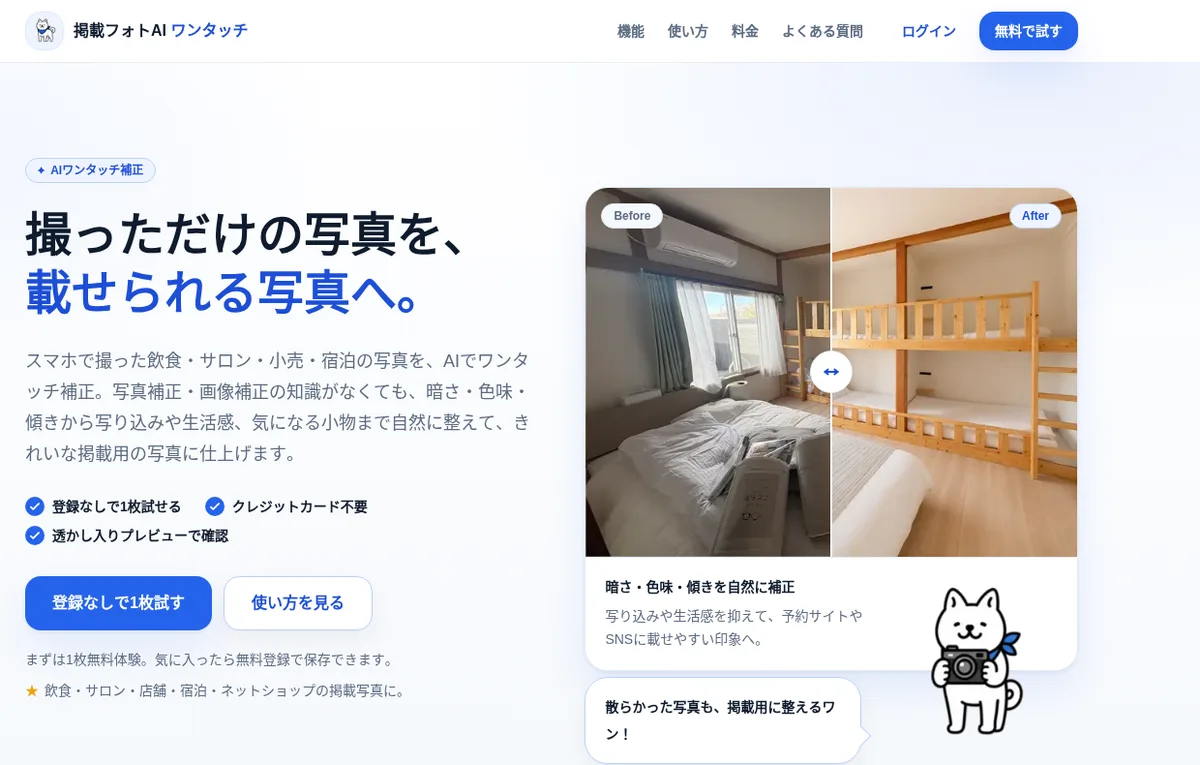
Source: 掲載フォトAI ワンタッチ official website (the same applies to the images below)
Pricing
You buy one-off credits for just the photos you need; there is no monthly fee (the site says monthly plans will be added). One credit lets you save and download one photo in high quality without a watermark. All prices include tax and are as of October 2026.
| Plan | Price (tax incl.) | Photos | Per photo | Includes |
|---|---|---|---|---|
| Free trial | ¥0 | 1 | ― | No sign-up. Up to a low-resolution watermarked preview |
| Sign-up bonus | ¥0 | 1 | ― | 1 credit on new registration, to save your first photo without a watermark |
| Trial (お試し) | ¥300 | 3 | ¥100 | High-quality download, commercial use, 30-day storage |
| Light (ライト) | ¥980 | 10 | ¥98 | Same as above |
| Bulk (まとめて) | ¥1,500 | 20 | ¥75 | Same as above |
- Buying credits requires free registration (no credit card needed to register). Payment is by credit card, processed by Stripe
- Purchased or used credits are generally non-refundable, and refunds are generally not given because the result differs from your taste
- However, if a system fault consumed a credit without delivering a result, the corrected image cannot be saved or downloaded, or there was a payment problem, the operator may return the credit or refund after checking
Sources: Pricing, Specified Commercial Transactions Act notice, Terms of use
How to use
-
Upload a photo
Pick one photo taken on your phone. JPEG, PNG, WEBP, HEIC and HEIF are supported, up to 20 MB per photo. iPhone HEIC files work as is and are converted to standard JPEG on upload.
-
Choose the industry and finish
Select the industry and correction type. If unsure, choose "おまかせ整え" (auto tidy), which also tones down stray objects, lived-in mess and scattered items for listing.
-
Compare before and after
The AI corrects the photo in a few tens of seconds, and you compare the result in a watermarked preview. If it is not what you wanted, you can redo it once per photo for free.
-
Register and save
If you like it, register for free and use a credit to save it in high quality without a watermark. Your first photo is free with the sign-up bonus credit.
-
Download before it expires
Photos are deleted automatically when they expire: 24 hours for free-trial photos, 7 days for unpurchased photos after sign-up, and 30 days for purchased photos.
Sources: How-to guide, FAQ
Fixing "too dark" and "too messy," naturally, one photo at a time
Wantouch does not create new images; it brings the photo you took closer to something that "looks natural when published." The official guide lists common problems before posting and how the correction handles them.
01Fix brightness and color
Corrects lighting problems common in smartphone photos.
- Dark or backlit — Brightens photos taken indoors or by a window without blowing out highlights
- Blown-out highlights and crushed shadows — Balances areas that are too bright or too dark
- Color cast — Restores natural color when lighting makes the photo yellowish or bluish
- Tilt — Straightens photos taken at an angle
02Tone down stray objects and clutter
Makes things that do not belong in a listing less noticeable, in photos you cannot retake.
- Everyday items — Vacuum cleaners, cardboard boxes, cables, stepladders and the like
- Mess — Unmade beds and things left lying around
- Consistency — Matches brightness and color across several photos (from the vacation rental use case)
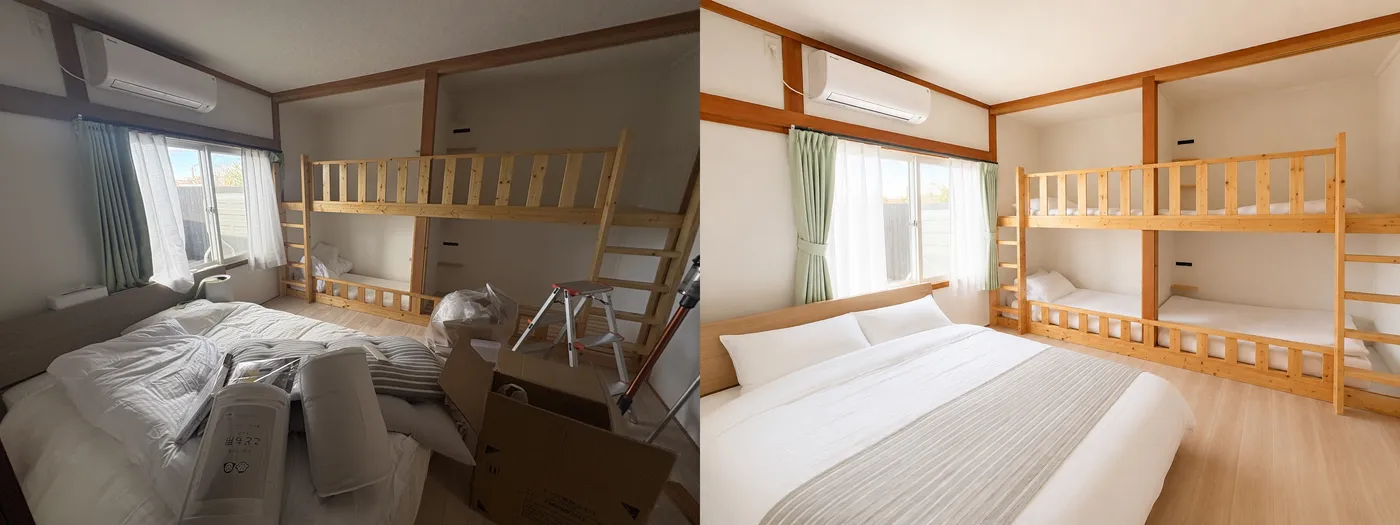
The operator explains that removing unwanted objects is one way of approaching listing quality, and that it does not make edits that differ greatly from reality. The terms of use prohibit uploading "images intended to cause misunderstanding through AI correction," and ask users to check that the corrected image matches the actual condition before publishing it. For property and room photos, the premise is that you review whether the facilities and condition shown match reality before posting.
The official FAQ also notes that, because the processing is automatic, unwanted objects may not disappear completely depending on the photo, and the result can differ each time even for the same photo.
Use by industry
The website has use-case pages by industry, covering typical photo problems and where the photos are posted.
| Industry | Common problems | Example destinations |
|---|---|---|
| Vacation rentals and inns | Dark rooms, unmade beds and clutter, blown-out windows | Booking sites such as Airbnb, own website, Google Business Profile |
| Shops and salons | Dark or color-cast store and treatment photos | Booking sites, Google Business Profile |
| Restaurants | Dark or dull food and menu photos | Tabelog, Google Maps, social media |
| Products and services | Dark product photos, blown highlights, color-cast backgrounds | E-commerce and flea-market sites such as Mercari, BASE and Rakuten |
| Real estate | Dark rooms, blown-out windows, tilt | Portals such as SUUMO, own website |
Sources: Use by industry, Vacation rental and inn photos
Who makes it
Wantouch is a Japanese service developed and run single-handedly by a sole proprietor with experience in both design and advertising production and in company management. The operator, 池渕 拓允 (based in Hokkaido), worked on design and advertising production at an advertising agency, then served as a director of a bus company in Hokkaido, handling management and operations. The operator now runs the sole proprietorship Arenge Work, offering design, website production and digital transformation support.
On why they built it, the operator writes that "the same product or shop can come across completely differently depending on a single photo," while it is not realistic for small businesses to hire a professional to shoot or retouch every listing photo. The operator says they check and improve the results and wording themselves every day.
The notice under the Specified Commercial Transactions Act names "Arenge Work" as the seller and 池渕 拓允 as the business manager. The address and phone number are disclosed without delay on request. Inquiries go to support@wantouch.jp, with support hours of 10:00 to 17:00 on weekdays (Japan time).
Sources: About the operator, Specified Commercial Transactions Act notice
How photo data is handled
According to the privacy policy, uploaded images are sent to OpenAI in the United States for AI correction. Supabase is used for the database, authentication and image storage, with data kept in a region in Japan. Images are stored privately, and time-limited URLs are issued only for viewing and downloading. The operator says images will not be reused for advertising or other purposes without the user's permission.
Photos of people may be used only with their consent, and users are asked not to upload images showing personal or confidential information.
Sources: Privacy policy, FAQ
Pros and cons
Pros
- Try one photo with no sign-up or credit card, and save your first photo free after registering
- No monthly fee; buy only what you need, from 3 photos for ¥300
- Corrects brightness, color and tilt and tidies stray objects and clutter in one step
- Built specifically for listing photos: rentals, shops, restaurants, products and real estate
- One free redo per photo
- Commercial use is allowed
- The operator's name, background and legal seller notice are public
Cons
- You choose an industry and finish and leave the rest to the AI, rather than directing fine adjustments yourself
- Unwanted objects may not disappear completely, and results can vary each time
- Storage periods are short (30 days after purchase), so download early
- Refunds are generally not given for results that differ from your taste
- Images are sent to OpenAI in the United States for correction
- Run by one person; support is by email only (weekdays 10:00 to 17:00)
- The interface is in Japanese only
Reviews and reputation
The website does not publish user reviews or case studies (as of October 2026). The operator shares photo tips on Instagram, X and note. The site's guides explain how to brighten photos, fix backlighting and color casts, and remove lived-in clutter and stray objects.
How it differs from other AI photo editors
| Service | Strength | Difference from Wantouch |
|---|---|---|
| 掲載フォトAI ワンタッチ | Brightening and tidying listing photos of shops, inns and properties while staying true to reality | ― |
| Photoroom | Removing and replacing backgrounds to make e-commerce product photos | Centered on cutting out products and rebuilding the background. Wantouch tidies the whole scene, such as a room or shop interior |
| Remini | Enhancing blurry or old photos | Centered on image quality. Wantouch focuses on brightness, color and tidying clutter |
| Picsart | All-round photo and video editing | Broad features you choose yourself. Wantouch only asks for the industry and finish |
| Roomvana | Redrawing a room's interior in another style | For interior ideas and visualization. Wantouch does not make edits that differ greatly from reality |
FAQ
Q. Can I use 掲載フォトAI ワンタッチ for free?
A. You can try one photo, up to a watermarked preview, without signing up. Register for free and the bonus credit lets you save your first photo without a watermark. After that, credits start at 3 photos for ¥300 (tax included).
Q. How much does it cost?
A. Trial: 3 photos for ¥300; Light: 10 for ¥980; Bulk: 20 for ¥1,500 (all tax included). There is no monthly fee.
Q. Does it work with smartphone photos?
A. It is designed for smartphone photos, including iPhone HEIC files.
Q. Will unwanted objects always be removed?
A. Not always. It aims to tidy away stepladders, cardboard boxes and everyday clutter naturally, but depending on the photo, they may not disappear completely.
Q. What if I don't like the result?
A. You can redo (re-correct) each photo once for free. A redo is not guaranteed to match what you want.
Q. Can I use the photos commercially?
A. Yes, for photos you own the rights to, for listing shops, inns, products and similar. The operator notes that it does not guarantee passing a platform's review or increasing customers or sales.
Q. How long are corrected photos kept?
A. Purchased photos are deleted after 30 days, unpurchased photos after sign-up after 7 days, and free-trial photos after 24 hours.
Sources: FAQ, Terms of use
The information on this page is based on what was published on the official website as of October 2026. Please check the official website for the latest specifications and pricing.