
Roomvana
: How to use it, features, and the business problems it solves
Add bookmark
What is Roomvana?
Roomvana is an AI interior design tool: upload one photo of a room, pick a style, and it redesigns the space while keeping the real walls, windows and layout in place. Beyond restyling in 23 styles, it can repaint walls, try wallpaper, refinish cabinets, virtually stage empty rooms, remove or add furniture, and redesign exteriors, roofs and yards. It runs in the web browser and as an iOS app and is free to try (designs are watermarked). Paid options are one-time credit packs (from $14.99 for 30 credits, never expiring) or a membership at $9.90/month or $59.99/year. The interface is in English.
Business problems it solves


About "Roomvana"
What is Roomvana?
Roomvana is an AI interior design tool that turns a single photo of a room or house into a photorealistic picture of how it could look after a makeover — you just upload the photo and choose a style. It redraws furniture, colors, materials and decor while keeping the walls, windows, doors and layout in place, so what you get is not "some nice room" but a preview of how your own room could change.
Besides restyling whole rooms, it handles partial changes such as repainting walls, trying wallpaper and refinishing cabinets, virtual staging of empty rooms, removing or adding furniture, and redesigning exteriors, roofs and yards — all in one service. It runs in the web browser and as an iOS app, and you can try it for free after signing up (for example with a Google account). The interface is in English.
Japandi, Scandinavian, Modern and more
Paint, staging, yard and more
30 credits, never expire
One credit per image
One photo in, a before/after of your own room out
The workflow is just three steps: take (or upload) a photo → pick a style → generate. No measuring, floor plans or mood boards are needed.
Each generation (one credit) returns two options to choose from. You can compare before and after with a slider, save the result, or redo it in another style.
In the iOS app you can start by uploading a photo from the home screen, or jump straight to tools such as Clear a room, Add furniture, Furnish a room, Garden design, Exterior, Surfaces (change only floors, walls, etc.) and One area.
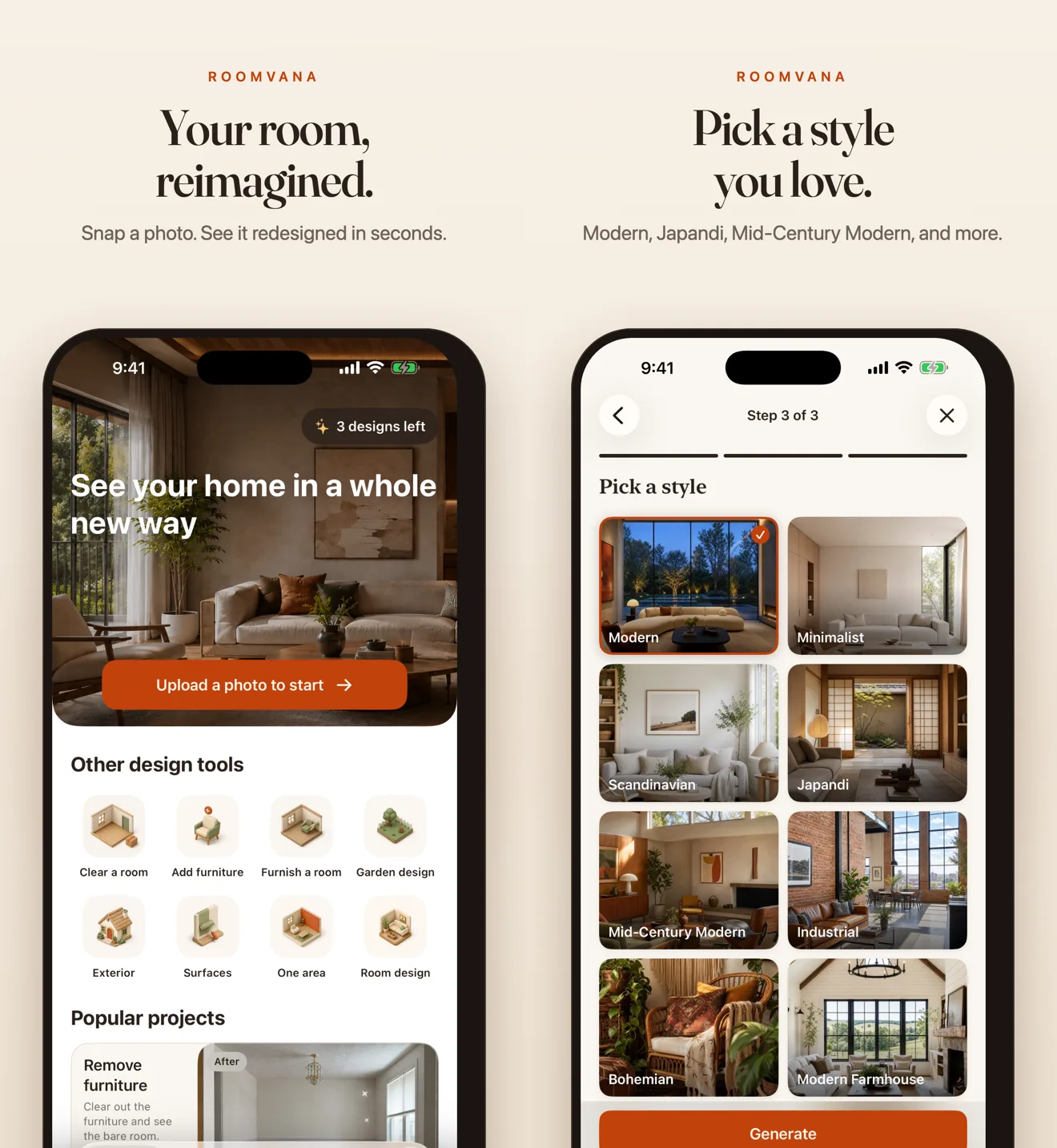
Source: Roomvana official website and Roomvana on the App Store (applies to the images below as well)
How to use
-
Take a photo and sign up
Take one photo of the room, house exterior or yard you want to change. You can try styles on sample photos without an account, but using your own photo requires a free account (no card needed).
-
Choose a tool and a style
To redesign a whole room, use "Redesign a room" and pick one of 23 styles. There are also task-specific tools, such as repainting only the walls, furnishing an empty room or changing the exterior color.
-
Generate and compare
Two options appear within seconds. Compare before and after; if you don't like them, try another style or keep editing the result (each further edit also uses one credit).
-
Save and share
Download the design you like, and upscale it to 4K for one credit. You can also create a share link to show it to others. Designs made for free carry a watermark.
Features
01Inside
From restyling a whole room to changing a single surface or piece of furniture.
- Redesign a room — Redraw the whole room in one of 23 styles
- Paint your walls / Try wallpaper — Try only a new wall color or wallpaper
- Repaint cabinets — Refinish kitchen and other cabinets
- Stage an empty room — Virtual staging that furnishes an empty room
- Remove furniture / Add furniture & decor — Show the room cleared out, or place furniture and decor
- Floor plan to 3D — Turn a floor plan into a three-dimensional preview
02Outside
The house exterior and the yard — for exploring ideas before talking to a contractor.
- Redesign the exterior — Restyle the whole exterior
- Paint the house / Try a new roof — Try new siding colors, or roof colors and materials
- Reimagine your yard — Redesign the front yard, backyard, patio or garden
- Change one area — Change only the area you specify
03Saving and managing
Revisit your designs and export them in a usable form.
- My designs — Designs are stored in a private gallery and can be deleted at any time
- 4K upscale — Upscale the design you like to 4K for one credit
- Share links — Designs become public only when you create a link yourself
Supported rooms include kitchens, bedrooms, bathrooms, living rooms, dining rooms, closets, basements and laundry rooms. Styles include Modern, Minimalist, Scandinavian, Japandi, Mid-Century Modern, Industrial, Bohemian, Modern Farmhouse, Coastal, French Country, Modern Luxury and 2026 Trends.
Compare colors and materials outside and in the yard, too
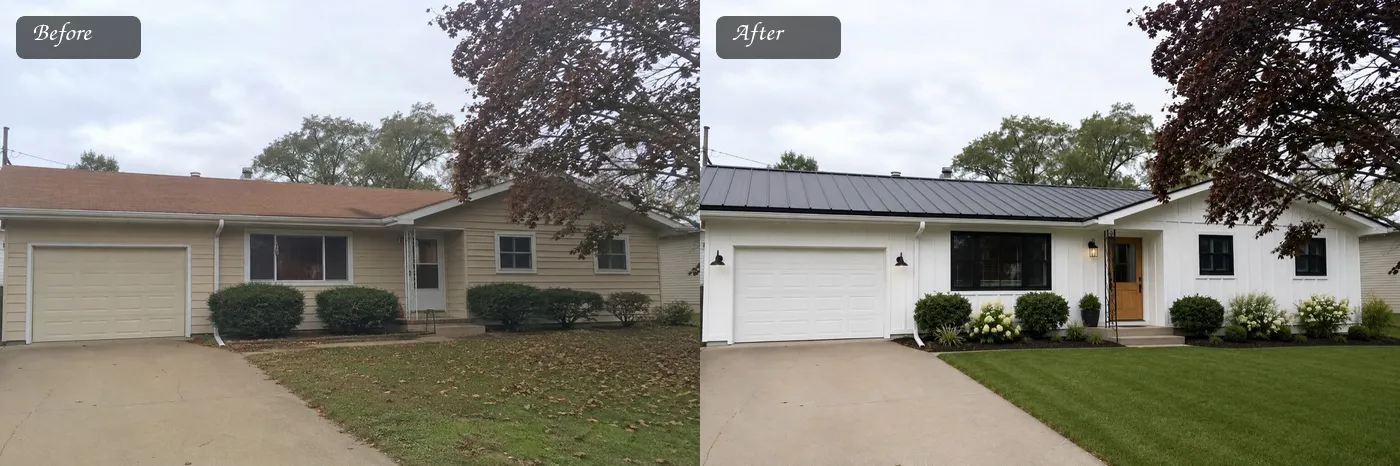
This example changes the siding color, roof, front door, window frames and plantings in one go. The official site suggests trying ideas on a photo of your house before calling a contractor, or boosting curb appeal before selling.
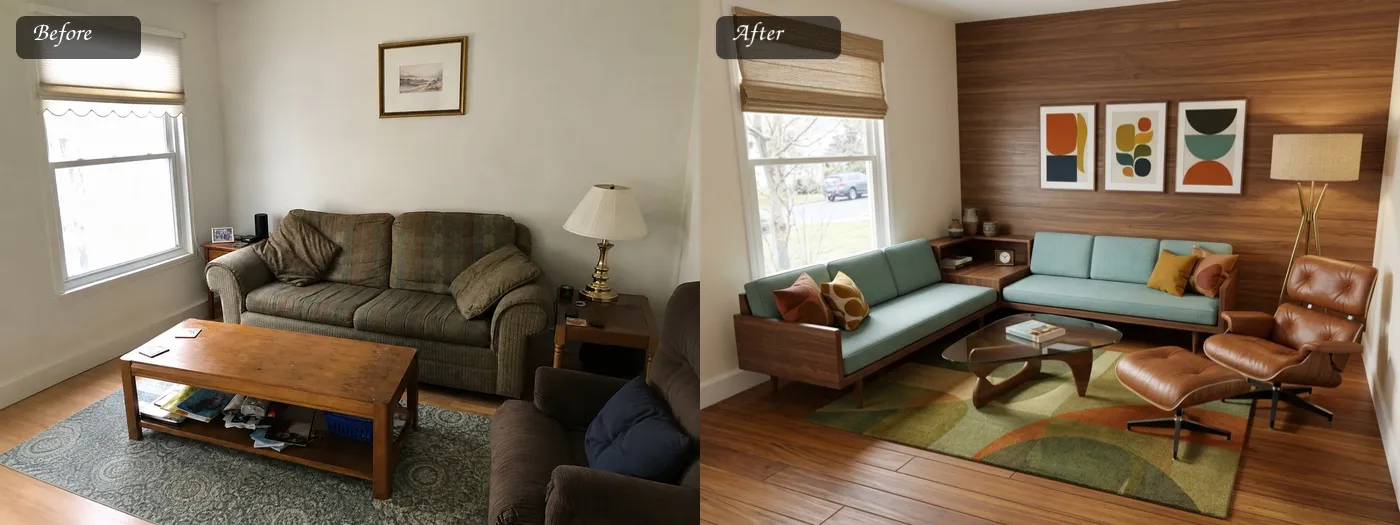
Keep in mind that generated images are previews. Roomvana's own terms note that colors on a screen are not exact, so you should check a physical sample before buying paint.
Pricing
You try it for free, then choose between one-time credit packs and a membership. One credit covers one design (two options) or one 4K upscale; continuing to edit a result also uses one credit.
| Plan | Price (USD) | Credits | What you get |
|---|---|---|---|
| Free | $0 | — | Try it on your own photos. Watermarked, standard resolution, personal use only. No card needed |
| One Room | $14.99 (one-time) | 30 ($0.50 per credit) | No watermark, commercial use, 4K upscales, never expire |
| Whole Home | $29.99 (one-time) | 100 ($0.30 per credit) | Same as above. Labeled "Most popular" |
| Renovation | $59.99 (one-time) | 300 ($0.20 per credit) | Same as above. For big projects or more than one home |
| Membership (monthly) | $9.90/month | — | For people who design every week (stagers, agents, designers). 4K upscales included |
| Membership (yearly) | $59.99/year ($5.00/month) | — | Same as above |
Based on the official pricing page as of October 2026. Whether prices include tax is not stated. In the iOS app, the App Store listing shows the membership at $9.99/month and $59.99/year, slightly different from the web ($9.90/month). The number of generations included in the membership is not published.
- Credit packs are one-time payments, not subscriptions. Credits never expire
- Once you buy any pack, every new design is watermark-free and comes with commercial usage rights
- The membership can be canceled at any time and stays active until the end of the paid period. Web payments are processed by Stripe
How Roomvana differs from other AI interior design tools
| Aspect | Roomvana | Interior AI | Canva |
|---|---|---|---|
| Main use | Redraw photos of your own room, house and yard | Restyle room photos, virtual staging | General-purpose design (not interior-specific) |
| Scope | Interiors + exteriors, roofs, yards, surface-level repaints | Mainly interiors; also renders from sketches | Image generation and editing in general |
| Pricing model | Free trial + one-time credits (no expiry) / membership | Subscription | Free plan + subscription |
| Platforms | Web, iOS | Web | Web, desktop, mobile |
| Japanese UI | No (English) | No (English) | Yes |
Roomvana stands out because you can try "the whole house" — exterior, roof and yard included — with the same steps, and because you can pay once instead of subscribing. For someone who just wants to explore a makeover once, that costs less than a monthly plan.
- If you want a tool specialized in restyling room photos with even more styles, see Interior AI
- For business use that analyzes and classifies large volumes of property photos, see Restb.ai
- To turn makeover ideas into flyers or proposal decks, see Canva
- For e-commerce image editing such as swapping product-photo backgrounds, see Photoroom
Operator and data handling
Pros and cons
Pros
- Keeps walls, windows and layout, so the result works as a preview of your own room
- Covers not only interiors but also exteriors, roofs and yards in one service
- One-time credits never expire, so no subscription is required
- Each generation gives two options, and a slider lets you compare before and after
- States clearly that your photos are not used to train AI
Cons
- English only; no Japanese interface
- Free designs are watermarked, standard resolution and not for commercial use
- Colors and textures in generated images may differ from reality (the official terms recommend checking physical samples)
- The membership's generation limit and whether prices include tax are not published
- iOS only; no Android app (as of October 2026)
FAQ
The information on this page is based on what was published on the official website as of October 2026. Please check the official website for the latest specifications and pricing.