Eng-Helper
: How to use it, features, and the business problems it solves
Add bookmark
What is Eng-Helper?
Eng-Helper is an AI English-correction keyboard for iPhone and Android from Float Co., Ltd. of South Korea. In any app—messages, email, social media—you type English (Japanese mixed in is fine) and tap "Correct"; natural English and alternative phrasings appear above the keyboard, and a tap inserts your pick into the text field. It explains why each change was made in 12 languages, including Japanese. The first two weeks are free, then a monthly subscription (¥500 on the Japanese App Store) gives unlimited corrections and explanations.
Business problems it solves

About "Eng-Helper"
What is Eng-Helper?
Eng-Helper is an AI English-correction keyboard (iPhone and Android) from Float Co., Ltd. (플로트 주식회사) of South Korea. In any app with a text field where you write English—messages, email, social media—you just press the keyboard's "Correct" button, the corrected English appears above the keyboard, and a tap inserts it into the field.
Each change comes with an explanation of why it was made, readable in Japanese and other languages, so it helps you stop repeating the same mistakes rather than only fixing them. It suits both work that involves writing email and chat in English and English study.
Fewer steps than asking a chatbot
When you ask a chatbot such as ChatGPT to fix your English, you go back and forth: select and copy the sentence, switch apps and paste, copy the fixed sentence, return and replace the original. The official site counts these steps as 7 with a chatbot versus 2 with Eng-Helper (press Correct, tap the corrected sentence).
Fixing with a chatbot
- Long-press to select all → copy
- Switch to the chatbot app, paste and write "fix this"
- Copy only the fixed sentence from the reply
- Return to the messaging app, delete and paste
Fixing with Eng-Helper
- Press the keyboard's "Correct" button
- Tap the corrected sentence shown above the keyboard (it goes straight into the field)
Step counts are based on the official site.
The developer writes on the official site, "Asking a chatbot every time was a hassle, so I built it myself." The product is focused on a single point: finishing corrections without leaving the app you are typing in.
How to use
- Install the app Get "Eng-Helper" from the App Store or Google Play. No account is needed.
- Enable the keyboard On iPhone, follow the in-app checklist: Settings → General → Keyboard → Keyboards → Add New Keyboard → Eng-Helper, then turn on "Allow Full Access" (corrections need an internet connection). On Android, tap "Get started" to open settings, turn on Eng-Helper and select it as your keyboard. The official guide says it takes about a minute.
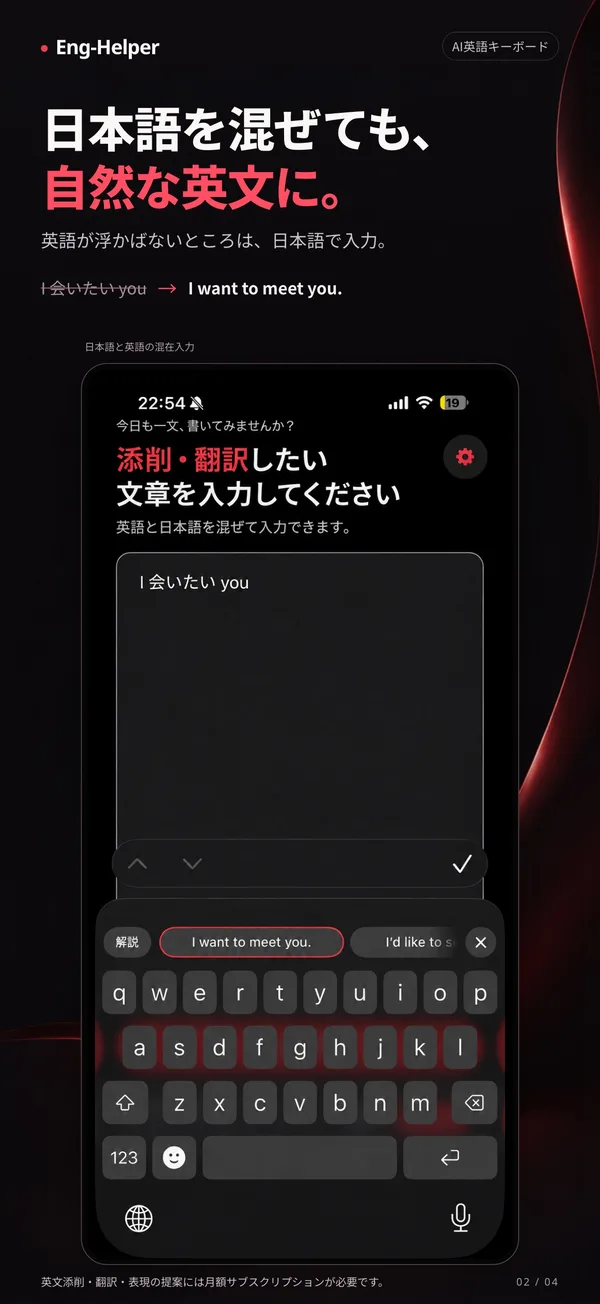
- Type English and press "Correct" In any app, type your English and tap the red "Correct" button. Parts where you can't think of the English word can be typed in Japanese, and it will still produce natural English.
- Pick a suggestion to insert it The corrected sentence and alternative phrasings appear above the keyboard; tap the one you like to insert it. You can keep using the keyboard while viewing the results.
- Check the reason with "Explain" Tap "Explain" next to a corrected sentence to see the reason for each change. You can change the explanation language anytime in settings.
The corrected English appears right above the keyboard—no need to leave the app you are typing in.
The screen on the right shows the result after typing English and pressing "Correct".
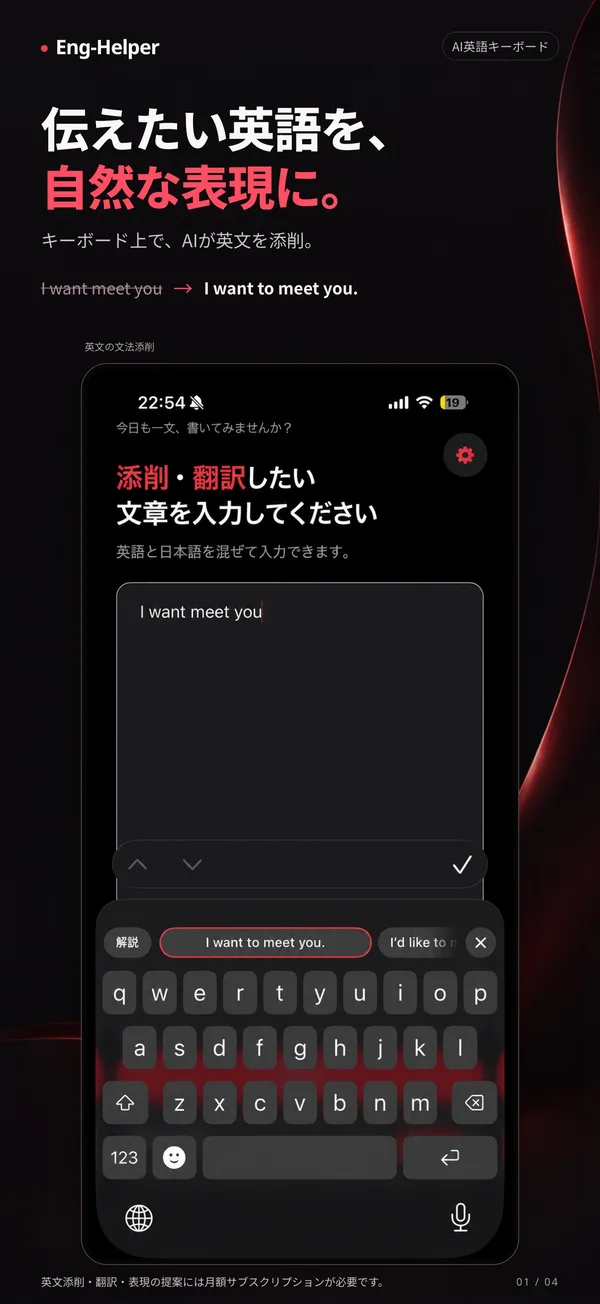
Source: Eng-Helper - 英語添削キーボード (App Store) (same for the screen images below)
Features
01Fix
Turns your English into natural expressions right inside the text field.
- Sentence correction — fixes grammar errors and unnatural phrasing into natural English
- Alternative phrasings — lists several rewrites suited to the situation so you can compare and choose
- Japanese-mixed input — even if you write some parts in Japanese, it produces English
- Tap to apply — the chosen sentence goes straight into the field
02Learn
Instead of fixing and moving on, it lets you read the reasons.
- Translation and explanation — explains the meaning of the fixed sentence and why each part changed (e.g. "You need 'to' when a place follows 'go'")
- Explanation language — choose from 12 languages: Japanese, Korean, English, Chinese, Vietnamese, Thai, Spanish, Portuguese, Indonesian, Italian, French and Turkish
03As a keyboard
It also works as an everyday keyboard.
- Works in any app — the same button appears in messengers, email, social media—any field where you write English
- Clipboard and favorites — quickly enter recently copied or frequently used text from the keyboard (stored only on the device)
- Comfortable typing — long-press the space bar to move the cursor; double-tap space for a period
Where you can't think of the English word, just type it in Japanese. Mixed input like "和会いたいyou" is turned into natural English.
Pricing
There is a single plan, with no limit on corrections or explanations. Payment and cancellation are handled through the App Store or Google Play.
| Plan | Price | Details |
|---|---|---|
| Free trial | ¥0 (2 weeks, first sign-up only) | Unlimited corrections and explanations, same as Premium. You register a store payment method when starting; cancel within the period and you pay nothing |
| Eng-Helper Premium | ¥500/month (as shown in the in-app purchases section of the Japanese App Store) | Auto-renewing monthly subscription. Unlimited corrections and explanations |
- The official site shows "₩2,900/month", which is the Korean price. The site notes that "the store shows the price for your region," and the Japanese App Store lists "Eng-Helper Premium ¥500" (checked October 28, 2026)
- Please check the Google Play price on the store's purchase screen
- When the free trial ends, the monthly fee is charged automatically
How your text is handled
Because a keyboard app touches what you type, data handling matters. The privacy policy (effective October 27, 2026) states:
- Only text you send with the Correct/Explain buttons goes to the server; what you normally type is not sent
- Correction is turned off in password fields
- Correction/explanation text is sent to the OpenAI (US) API to generate results. Under OpenAI's API policy it is not used for model training and is kept up to 30 days for abuse monitoring before deletion
- Servers and databases are on AWS in Japan (Osaka region)
- Clipboard history and favorites are stored only on the device and are not received by the company
- No account; name, email and phone number are not collected. Payments are processed by Apple and Google
- Not intended for children under 14
On Android, turning the keyboard on shows the standard notice that "this input method may be able to collect all the text you type," but the company states that "only the text you ask to correct is sent to the server and is not used for any purpose other than correction."
About the provider
Float Co., Ltd. (FLOAT) is a South Korean company. Besides Eng-Helper it runs the Four Pillars (saju) AI app "INTA," the course "SAJU Academy" and the API "HRUM." Its corporate site lists awards such as the "AI Platform Grand Prize" at Korea's SME and Mid-sized Enterprise Innovation Awards (Herald Business, 2025).
The seller is listed as "Float Co.,Ltd" on the App Store and "Float co., Ltd." on Google Play, matching the company name in the privacy policy. Google Play shows 500+ downloads (as of October 28, 2026).
Pros and cons
Pros
- Corrections are finished without leaving the app you're typing in—no copy-and-paste round trips
- Explanations in Japanese make it useful for learning English too
- Writing with some Japanese mixed in still produces English
- No account required, and keyboard-specific care such as disabling correction in password fields
Cons
- There is no ongoing free plan; after the 2-week trial it's a monthly subscription
- For polishing long texts or adjusting the tone of a whole document, proofreading tools used in document editors are a better fit
- Correction requires Full Access and an internet connection
- The Japanese App Store still has few ratings and reviews, so there is little user feedback to go on
How it differs from other English-correction tools
| Product | Where you use it | Strengths | Price (as listed on each product page at the time checked) |
|---|---|---|---|
| Eng-Helper | Smartphone keyboard (any app) | Correction completes inside the text field; explains the reasons in Japanese | 2 weeks free → ¥500/month (Japanese App Store) |
| Grammarly | Browser extension, desktop/mobile apps, Office integration | Real-time detection of English grammar, spelling and tone | See product page |
| Wordtune | Browser extension, editors | Strong at paraphrasing and changing tone | See product page |
| DeepL | Web, apps, API | Mainly translation; also DeepL Write for proofreading | Free version; Individual from ¥1,380/month (tax incl.) |
| TalkMe | English conversation app | Builds English through speaking practice and grammar feedback | Free to use; Premium available |
- If you mostly write documents on a PC and want thorough proofreading of whole texts, consider Grammarly or Wordtune
- If you want to turn text written in Japanese into English, the translation-focused DeepL fits better
- If you'd rather practice speaking than writing, compare the conversation apps TalkMe and Speak
- If you often write chats and email in English on your smartphone and want to fix and send on the spot, Eng-Helper takes the fewest steps
FAQ
Q. Is Eng-Helper free? A. First-time subscribers get 2 weeks of unlimited corrections and explanations for free. After that it's a monthly subscription (¥500 on the Japanese App Store). Cancel during the trial and you won't be charged.
Q. Does it support Japanese? A. The app and the official site are available in Japanese. Explanations can be shown in Japanese, and parts typed in Japanese are turned into English.
Q. Which apps does it work in? A. Any app where you can type English with a keyboard—messages, email, Instagram and so on.
Q. Is everything I type sent to the server? A. No. Only text you send with the "Correct" or "Explain" buttons is sent, and correction is off in password fields. Results are generated with OpenAI's API, and the privacy policy states that the data is not used for model training.
Q. How do I cancel? A. On iPhone, cancel from Subscriptions in your Apple ID settings; on Android, from Subscriptions in Google Play.
The information on this page is based on what was published on the official site, the App Store, Google Play and the privacy policy as of October 2026. Please check the official site for the latest specifications and pricing.