EPIK
: How to use it, features, and the business problems it solves
Add bookmark
What is EPIK?
An AI photo and video editing app from SNOW Corporation of South Korea (part of the NAVER group and the maker of SNOW and B612), listed in app stores as "EPIK エピック - AI写真&動画編集". It combines AI tools such as image enhancement, AI skin retouching, AI cutout, an eraser, AI filters, hairstyle and expression changes, and AI Video that turns a single photo into a moving clip with full editing features including color adjustment, curves, batch editing, makeup, face and body retouching, templates and collages. It supports Japanese and is free to use on iPhone, iPad, Mac and Android. EPIK PRO is listed on the Japanese App Store at ¥900/month or ¥3,900/year, among other options.
Business problems it solves

About "EPIK"
What is EPIK?
EPIK is an AI photo and video editing app from SNOW Corporation of South Korea. In the App Store and Google Play it is listed as "EPIK エピック - AI写真&動画編集" (EPIK – AI photo & video editor). The store description says it lets you "edit photos easily with professional editing tools and powerful AI technology," and it offers AI tools such as image enhancement to make photos sharper, AI skin retouching to cover skin blemishes, AI cutout for people and objects, an eraser for unwanted parts, AI filters for creating your own character, and hairstyle and expression changes.
Beyond AI tools, EPIK brings full photo editing such as color adjustment, curves, local adjustments and batch editing, makeup and face and body retouching, and templates, collages and stickers together in one app. The Google Play description calls it "an all-in-one photo editing app where you can use every editing feature, from portraits to color adjustment and effects," and it also supports RAW files. SNOW Corporation also makes the camera apps SNOW and B612.
How to use it
- Install the app: Download it free from the App Store (iPhone, iPad, Mac) or Google Play (Android)
- Pick photos or videos: Open the photo you want to edit. Batch editing lets you select several photos at once
- Fix with AI tools: Sharpen blurry photos with image enhancement, remove photobombers with the eraser, or cut out people and objects with AI cutout
- Finish people and color: Apply makeup, skin and face retouching and a filter in one go with Looks, then fine-tune color with color adjustment and curves
- Decorate and save: Finish with stickers, text, templates or collages, save, and share to social media
Fix, erase and transform with AI
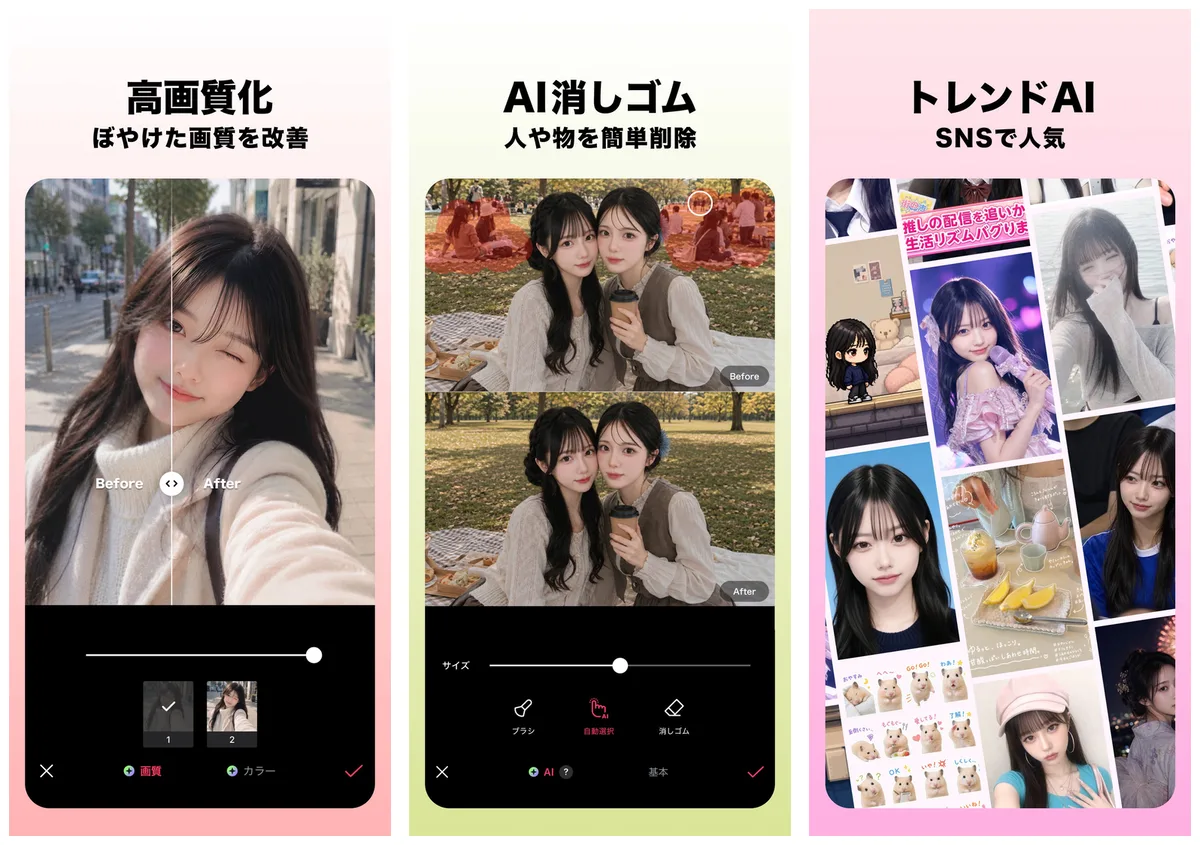
EPIK's AI tools cover both touching up photos and transforming them. On the touch-up side, image enhancement raises sharpness and resolution (a new enhancement model was added in a July 2026 update), and the eraser removes unwanted people and objects. Since a September 2026 update, the eraser can also remove clothing wrinkles and shadows naturally. AI cutout works not only on people but also on objects and animals. AI background extension was improved in an April 2026 update to generate more natural results.
Source: Japanese App Store: EPIK エピック - AI写真&動画編集 (the following images are from the same source)
On the transformation side, AI filters let you create your own character in a variety of styles. AI filters have been renewed as "AI Studio," and AI effects can be chosen from a dedicated tab (already announced in the December 2025 version). In June 2026, AI Video was added, which creates a realistically moving video from a single photo. The official website promotes "AI Yearbook" with the line "time-travel to 1990s America," and the App Store in-app purchases also include Yearbook items.
Try hairstyles and makeup on your photos
Portrait retouching is extensive too. Looks applies makeup, skin and face retouching and a filter in one tap, and from there you can fine-tune smile-line and acne removal, 3D face retouching and separate left/right adjustments, and body shape and leg length.
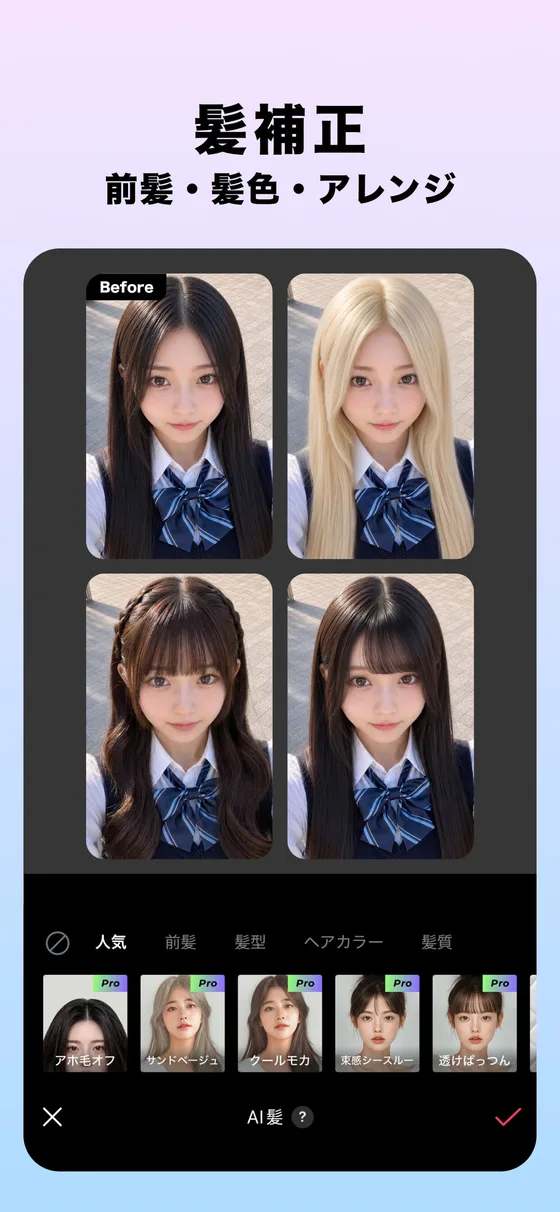
With hair color and hairstyle, you can try bangs, hair colors and styling on your photo. As of October 2026, "Hair Fitting," which lets you try layered cuts, bobs and new bangs with a single photo, is promoted as an App Store event. In 2026, EPIK also added face size, which shrinks only the face (July), double-chin correction and auto retouch, which applies several beauty features at once (August), and batch beauty editing for applying beauty retouching to multiple photos at once (September).
Features
01AI tools
Features that fix or redraw photos with AI.
- Image enhancement — Raises sharpness and resolution for higher-quality photos
- AI skin retouching — Covers skin blemishes
- AI cutout — Cuts out people, objects and animals
- Eraser — Removes unwanted parts, plus clothing wrinkles and shadows
- AI filters and AI effects — Create your own character in various styles
- Hairstyle and expression — Change hairstyles and facial expressions
- AI Video — Creates a moving video from a single photo
- AI background extension — Extends the background with AI generation
02Professional photo editing
Features for fine-tuning color and composition.
- Color — Color adjustment, curves, coloring and local adjustments
- Mood — LUX, texture, grain, brilliance and vignette
- Composition — Crop, rotate, flip, distortion, resolution and horizon adjustment
- Batch editing — Edit multiple photos at once
- Skin graft and copy — Naturally fix or copy specific areas
03Portrait retouching
Makeup plus face and body retouching. It also works on faces in videos.
- Looks and auto retouch — Apply makeup, skin, face and filter adjustments together
- Skin — Smile-line removal, AI skin retouching, acne removal, dark-circle removal and skin tone
- Face retouching — Touch retouch, 3D face retouching, separate left/right adjustments, face size, double chin and contour
- Makeup — Styles, paint and fine-tuning
- Body shape and leg length — Adjust body shape in full-body photos, one person at a time even in group photos
- Hair color and hairstyle — Change your hairstyle for a new look
04Decorate, create and video
- Filters, effects and lighting — Set the mood
- Stickers, text, paint and shapes — You can also make your own stickers and filters
- Templates, collages and AI Scrap — Thousands of templates and scrapbooks from multiple photos
- Carousel — Edit several photos as one story and save it as a video
- Video features — Mosaic that automatically tracks people, retro clips, face retouching in video and a video brush
Pricing
EPIK is free to download, and according to the store listing it contains ads and offers in-app purchases. The App Store subscription section lists the contents of EPIK PRO as "scrap, filters, stickers, partial color, AI skin retouching, effects, image enhancement and makeup."
In-app purchases shown on the Japanese App Store (checked October 30, 2026)
| Item | Price |
|---|---|
| EPIK PRO 7日間登録 (7 days) | ¥270 |
| EPIK PRO 1カ月登録 (1 month) | ¥900 |
| EPIK PRO 1年登録 (1 year) | ¥3,900 |
| EPIK PRO 1年登録割引 (1 year, discounted) | ¥3,500 |
| EPIK PRO | ¥3,900 |
| Yearbook Standard LE / Yearbook PRO Express LE | ¥500 |
| Yearbook Express LE | ¥800 |
| AI Yaerbook Express (as written in the store) | ¥1,500 |
| AI Christmas Limited Edition | ¥150 |
The App Store list shows EPIK PRO items for each period plus a discounted item. Check the in-app purchase screen to see which items are offered to you. The App Store does not describe what the Yearbook and Christmas items contain.
Sources: Japanese App Store, EPIK Paid Service Terms
Reputation and privacy
On the Japanese App Store, EPIK is rated 4.7 out of 5 (93,000 ratings) and ranked 55th in the Photo & Video category. On Google Play it is rated 4.2 (638,000 reviews) with more than 50 million downloads (all checked October 30, 2026). Google Play reviews include praise for detailed color editing, while one review (2023) notes that some features that used to be free became paid.
The App Store privacy section shows, as declared by the developer, that IDs may be used to track users across other companies' apps and websites, and that user content such as photos and videos may be collected for app functionality. In Google Play's data safety section, the developer declares that no data is shared with third parties and that you can request data deletion, while data is not encrypted. Since this is a photo app, it is worth checking each store's privacy section before installing if you have concerns.
How it differs from other photo editing apps
What sets EPIK apart is that it brings full photo editing such as color adjustment, curves and batch editing, AI tools such as enhancement, the eraser and AI filters, and makeup and face retouching together in one smartphone app. While SNOW from the same company is a camera app for enjoying shooting, EPIK is an app for editing the photos you have taken.
| Product | Strengths | Platforms | Pricing (as listed on each product page) |
|---|---|---|---|
| EPIK | Full photo editing such as color adjustment and batch editing; enhancement, eraser and AI filters; makeup and face retouching | iPhone, iPad, Mac, Android | Free to use. EPIK PRO ¥900/month, ¥3,900/year, etc. (Japanese App Store) |
| SNOW | Shooting with AR effects and AR makeup, beauty retouching, AI Hair and AI Style | iPhone, Android | Free to use. SNOW VIP from ¥990/month or ¥3,600/year (Japanese App Store) |
| Meitu | Selfie and portrait retouching (enhancement, skin, slimming and body retouching), eraser, AI image editing | iPhone, iPad, Android | Free to use. Meitu VIP ¥1,190/month, ¥5,400/year, etc. (Japanese App Store) |
| Picsart | AI photo editing such as background and object removal, and image and video generation with AI models | iOS, Android, web, Windows | Free to start. Web Pro ¥2,429/month |
| Wink | Video and photo enhancement (HD, 4K), retouching people in video, automatic subtitles | Mobile, web, Mac, Windows | Free on mobile; VIP from ¥1,200/month etc. on the Japanese App Store |
| Fotor | AI photo editing and design templates, AI image and video generation with models from several companies | Web, iOS, Android, Windows, Mac | Free; Pro from ¥999/month (¥492/month billed annually) |
Other products' prices are as listed on their product pages at the time of checking. Please see each product page and official site for current pricing.
If you want to enjoy effects and makeup while shooting, compare SNOW; if selfie retouching is your main use, Meitu. If video enhancement and retouching are your focus, consider Wink, and if you want to generate images and videos with many AI models, Picsart and Fotor are also options.
Frequently asked questions (FAQ)
Q. Can I use EPIK for free? A. Yes. The app is free to download, and you can buy EPIK PRO and other items through in-app purchases. EPIK PRO is listed on the Japanese App Store at ¥270 for 7 days, ¥900 for 1 month and ¥3,900 for 1 year, among other options.
Q. Does it support Japanese? A. Yes. The App Store lists 12 supported languages including Japanese, and the store description is in Japanese.
Q. Can I use it on a computer? A. The App Store says it supports Macs running macOS 13.0 or later with an Apple M1 chip or later. No Windows version is offered. It is available on iPhone, iPad and Android.
Q. How is it different from SNOW? A. Both are SNOW Corporation apps. SNOW is a camera app for enjoying shooting with AR effects and makeup, while EPIK is an app for editing the photos and videos you have taken with color adjustment, AI tools and retouching.
Q. Who operates it? A. SNOW Corporation of Seongnam, Gyeonggi-do, South Korea. In Japan there is SNOW Japan株式会社 (Shinagawa, Tokyo).
The information on this page is based on what was published on EPIK's official website, the App Store, Google Play, the EPIK Paid Service Terms and SNOW's corporate site as of October 2026. Please check the in-app screens for the latest features and pricing.