Fotor
: How to use it, features, and the business problems it solves
Add bookmark
What is Fotor?
An all-in-one AI photo editing and image generation tool from Everimaging (the contracting party under its terms is HONG KONG EVERIMAGING SCIENCE AND TECHNOLOGY CO., LIMITED). Besides background removal, object erasing, upscaling, face retouching, collages and design templates, it generates AI images and videos with models such as Nano Banana Pro and Seedance, and is available in Japanese on the web, iOS, Android, Windows and Mac. Basic is free (no commercial use, watermarked); paid plans are Pro ¥999/month (¥492/month billed annually), Pro+ ¥2,899/month and Max from ¥6,300/month, and AI generation uses monthly credits.
Business problems it solves



About "Fotor"
What is Fotor?
Fotor is an all-in-one AI photo editing and image generation tool from Everimaging. In one service it covers basic edits such as brightness and color adjustment, cropping and filters; AI edits such as background removal, object erasing, upscaling and face retouching; design with collages and templates; and AI image and video generation from text or images.
Besides the web (browser) version, there are apps for iOS, Android, Windows and Mac, and it can be used through a Japanese website (fotor.com/jp) and Japanese-language apps. Fotor's company page says it has more than 800 million users, over 3 billion photo edits, and is used in more than 200 countries and regions.
Recently Fotor has broadened its positioning to an "AI Vibe Marketing Platform" for product visuals and marketing videos, and it also offers "Fotor Agent," which creates video ads and product videos from briefs and assets (at the time of checking, the Fotor Agent page was in English).
How to use it
- Create an account Sign up on the Fotor Japanese site with an email address, Google or Facebook. On the free Basic plan you can use the basic editing features and some templates and assets.
- Choose a feature and upload an image Pick a feature such as background removal, magic eraser or AI upscaling from "Popular features" on the top page or from the menus (photo editing, AI image, AI video, design), then drag and drop your image. On a smartphone, choose a photo in the app.
- Edit or generate with AI Background removal and object erasing run once you select the target. For AI image and video generation, enter text (a prompt) or an image, choose the AI model and generate. Generative AI features use credits.
- Export and share Export the finished image. The free Basic plan exports standard-quality JPG, PNG and PDF with a watermark; paid plans export high-quality JPG, PNG and PDF and transparent PNG without a watermark. Work is saved to the cloud and syncs across devices.
- Upgrade if needed On the pricing page, choose Pro, Pro+ or Max (individuals) or Team (businesses). Monthly and annual billing are available, and cancellation must be requested at least 24 hours before the next renewal.
Erase, cut out and retouch with AI on your phone
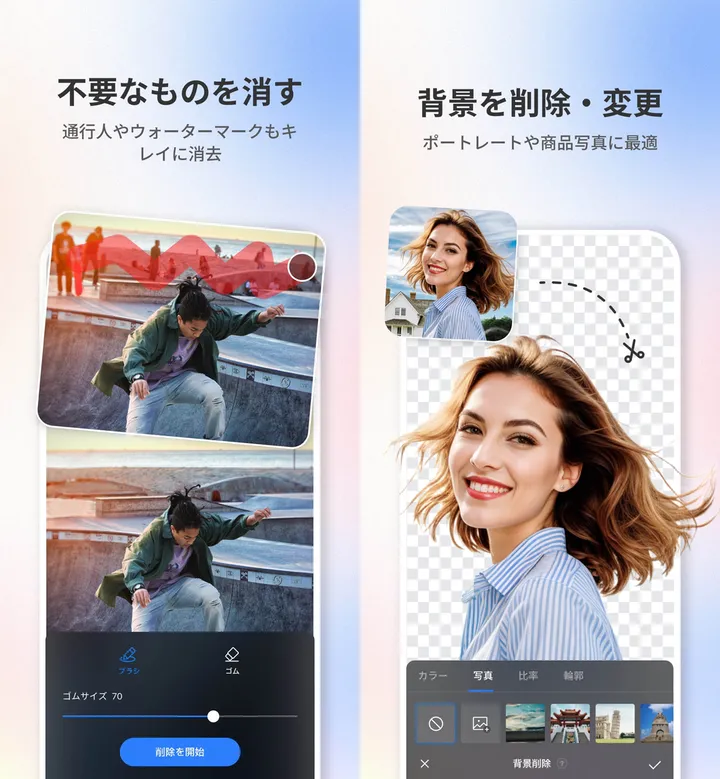
The app has an eraser that removes passers-by or unwanted objects when you trace over them (adjust the brush size and tap "start removing"), and a feature that removes the background of a person or product and replaces it.
For background replacement, you can pick a new background from the color, photo, ratio and outline tabs. Fotor presents it as suitable for portraits and product photos.
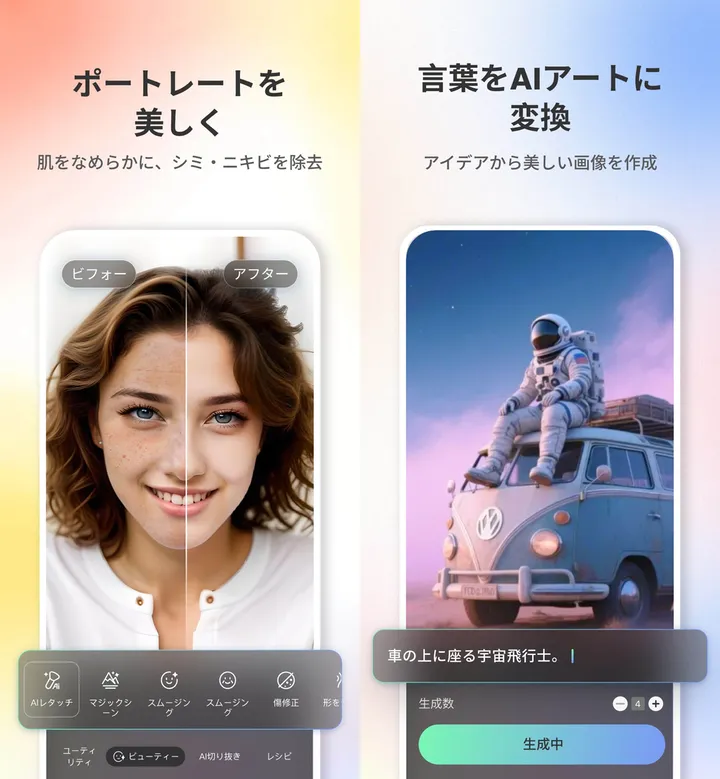
For portrait retouching, you can use AI retouch to smooth skin and remove blemishes and acne, plus smoothing and blemish repair, while comparing before and after.
AI image generation creates images when you type text such as "an astronaut sitting on a car" and choose how many to generate. According to the web pricing table, you can choose image models such as Nano Banana Pro, GPT Image, Seedream, FLUX and Midjourney, and video models such as Seedance, Kling, Veo and Hailuo.
Source: Fotor screenshots on the App Store (Japan)
Features
01Photo editing and AI editing
Features for fixing and polishing photos. Part of the editing suite requires a paid plan ("full editing suite" on the pricing table).
- Basic editing — Brightness, contrast and other adjustments, crop, resize, filters, effects, text and borders
- AI editing — Background removal, magic eraser, text removal, AI upscaling, unblur, photo restoration and colorization, sky replacement, AI image extender, AI replace
- Faces and people — Face retouching such as skin smoothing, changing hairstyles, expressions and clothes, AI avatars, AI headshots
- Batch editing — Edit multiple images at once (paid). AI batch editing for background removal and replacement is on Pro+ and Max
02AI image and video generation
Generation uses credits, and each model has a set credit cost.
- AI image generation — Creates images from text or images. Per image, classic and GPT Image 1 Mini cost 1 credit and Nano Banana Pro costs 15 credits (pricing page table)
- AI video generation — Creates videos from text or images. Per 5 seconds, Seedance 2.0 costs about 35 credits and Kling 3.0 about 25 credits; Veo 3.1 costs about 250 credits per 8 seconds
- Product visuals — Generation for e-commerce and ads, such as fashion model try-on images, ghost mannequins, product videos and UGC-style videos
- Fotor Agent — Creates video ads, product demos, explainers and more from briefs, assets, documents and links, fully editable afterward. The number of AI Agent chats and tasks depends on the plan
03Design, assets and storage
Image editing and design work share the same account.
- Design — Make posters, flyers, cards, logos, wallpapers and more from templates; collages; AI slide generation (Pro+ and Max)
- Assets — Stock photos, stickers, icons and fonts. All templates, assets, effects and fonts require a paid plan
- Brand kits — Register multiple brand kits (Pro+ and Max)
- Cloud storage and sync — Basic 512MB, Pro 2GB, Pro+ 100GB, Max 500GB, synced across devices
Pricing
The pricing page shows prices in Japanese yen (the page does not state how tax is handled, so check at checkout). For individuals there is Basic (free) and three paid plans, Pro, Pro+ and Max; for businesses there are Team and Enterprise.
Plans for individuals
| Plan | Monthly billing | Annual billing | Monthly credits | Main features |
|---|---|---|---|---|
| Basic | Free | Free | Limited free credits | Basic editing, some templates and assets, 1 concurrent generation, 50 AI Agent chats and 1 task, 512MB cloud, standard-quality export (watermark and ads) |
| Pro | ¥999/month | ¥5,900/year (¥492/month) | 100 | Full editing suite, batch editing, AI portrait tools, all templates and assets, 10 concurrent generations, 2,000 AI Agent chats and 2 tasks, 2GB, high-quality and transparent PNG export, no watermark or ads |
| Pro+ | ¥2,899/month | ¥9,296/year (¥775/month) | 300 | Everything in Pro plus AI batch editing (background removal and replacement), multiple brand kits and AI slide generation; 30 concurrent generations, 4,000 chats and 5 tasks, 100GB |
| Max | From ¥6,300/month | From ¥21,168/year (from ¥1,764/month) | 1,000–50,000 | Everything in Pro+ plus 50 concurrent generations, 10,000 chats and 10 tasks, 500GB |
Max lets you choose the monthly credit amount, and the price changes with it.
| Max credits (monthly) | Monthly billing | Annual billing |
|---|---|---|
| 1,000 | ¥6,300/month | ¥21,168/year |
| 2,000 | ¥12,600/month | ¥39,648/year |
| 5,000 | ¥17,500/month | ¥89,880/year |
| 10,000 | ¥30,300/month | ¥174,048/year |
| 20,000 | ¥62,200/month | ¥360,920/year |
| 50,000 | ¥146,670/month | ¥855,400/year |
Plans for businesses
| Plan | Price | Features |
|---|---|---|
| Team | ¥13,610/seat/month (monthly), ¥9,524/seat/month (annual, ¥114,285/year) | Shared workspace for 2–10 members, shared pool of 3,000 credits per seat per month, discounted credit top-ups, 100 concurrent generations, 1,000GB team cloud |
| Enterprise | Contact sales | Unlimited members, custom credits per seat, custom models, rollover of unused credits, priority processing, custom SSO |
At the time of checking (October 24, 2026), annual Pro+, Max and Team showed a "30% OFF" label (Pro+ showed ¥1,107/month and Max with 1,000 credits showed ¥2,520/month struck through). Whether a discount is offered and for how long changes over time, so check at checkout.
There are also subscription plans for credits only (from 200 credits/month at ¥10,300/year on annual billing) and one-time AI headshot packages (20 photos ¥2,950, 40 photos ¥4,440, 80 photos ¥5,900).
How credits work: Subscription credits are issued monthly based on your payment date, not all at once, even on annual plans. Unused credits roll over for up to 5 months while the subscription stays active, and expire when the subscription ends after cancellation. Credits bought as a one-time purchase are valid for 2 years. Fotor's support explains that AI generation is not unlimited even on paid plans, and once credits run out you need to buy more or upgrade.
Cancellation and refunds: Canceling stops automatic renewal, and you can use the service until the end of the paid period. The terms of service say you should request cancellation at least 24 hours before the period ends to avoid the next charge, and that paid subscription fees and credits are not refunded (if credits are bought through the App Store or Google Play, those stores' payment and refund policies apply).
Sources: Fotor pricing page, Fotor Support (credits and refunds), Terms of Service (as of October 24, 2026)
Commercial use and the operating company
Sources: Fotor Terms of Service (updated September 18, 2026), Can I Use Fotor for Free?, App Store (Japan)
How Fotor differs from other AI photo editing apps
Fotor combines AI photo editing, design templates and AI image and video generation using models from several companies in one account across web, mobile and PC. For individuals, annual Pro starts at ¥492/month, and how much you can generate depends on each plan's monthly credits.
| Aspect | Fotor | Picsart | Meitu | Canva |
|---|---|---|---|---|
| Focus | AI photo editing + design + AI image and video generation | Photo and video editing + generation with 180+ AI models | Selfie and photo retouching | Design creation with templates |
| Devices | Web, iOS, Android, Windows, Mac | iOS, Android, Web, Windows | iPhone, iPad, Android | Web, apps |
| Price | Free; Pro ¥999/month (¥492/month annual) and up | Free; Pro ¥2,429/month (about ¥1,699/month annual) and up | Basic use free; VIP ¥1,190/month or ¥5,400/year | Free; Canva Pro from ¥11,800/year |
The other columns reflect what each product page states as of its check date.
If you want to edit both photos and videos on your phone and try many AI models, compare Picsart; for selfie retouching, compare Meitu. If you mainly make designs such as flyers and presentations, Canva is an option, and for processing backgrounds of many online-store product photos, Photoroom.
Pros and cons
Pros
- Handles AI photo editing, design and AI image and video generation in one account
- Works on web, iOS, Android, Windows and Mac, with cloud sync of your work
- Has a Japanese website and apps, and prices are shown in yen
- Annual Pro for individuals starts at ¥492/month (¥5,900/year), and paid plans allow commercial use
Cons
- Free Basic adds watermarks and ads and cannot be used to create commercial works
- AI generation uses credits and is not unlimited even on paid plans; higher-end models consume more
- Paid fees and credits are generally not refunded
- The support center and the Fotor Agent page are in English
Reputation and track record
On the App Store (Japan), Fotor has 43,000 ratings in the Photo & Video category with an average of 4.6 out of 5 (as of October 24, 2026). Fotor's company page cites more than 800 million users, over 3 billion photo edits and more than 200 countries and regions.
App Store reviews include praise that it allows detailed edits and is easy for beginners, but also complaints that after the move to monthly subscriptions, filters and other items bought earlier became unavailable and fewer filters are free. Before buying, it is safest to check in the pricing page's comparison table whether the features you want are free or require a paid plan.
FAQ
Can I use Fotor for free? Yes. After creating an account, the free Basic plan lets you use basic editing and some templates and assets. However, exports are standard quality with a watermark, and you cannot create works for commercial use (as of October 2026).
How much does Fotor cost? For individuals, Pro is ¥999/month (¥5,900/year), Pro+ ¥2,899/month (¥9,296/year) and Max from ¥6,300/month (from ¥21,168/year). Team for businesses is ¥13,610 per seat per month (¥9,524/month on annual billing) (pricing page as of October 24, 2026).
What are credits? Points used for AI image generation, AI video generation and similar features. Pro gets 100 per month, Pro+ 300 per month and Max 1,000–50,000 per month, and unused credits roll over for up to 5 months.
Can I use it in Japanese? Yes. There is a Japanese website (fotor.com/jp), and the iPhone app supports Japanese. Support center articles and the Fotor Agent page are in English.
Can I use it commercially? On a paid plan, works created during the subscription period can be used commercially. Free accounts are limited to personal, non-profit use.
Will I get a refund if I cancel? Generally no. Canceling stops the next renewal, and you can use the service until the end of the paid period. Cancel at least 24 hours before the renewal date.
The information on this page is based on what was published on the official website as of October 2026. Please check the official website for the latest specifications and pricing.