
Meitu
: How to use it, features, and the business problems it solves
Add bookmark
What is Meitu?
An AI photo editing and selfie retouching app from Meitu, Inc. (Xiamen, China; listed on the Hong Kong Stock Exchange). It offers image enhancement, skin, face-slimming and body retouching, an eraser for unwanted people and objects, AI image editing where you select an area and describe the change in text, and face and body retouching for videos, with a Japanese interface. Free to start on iPhone, iPad and Android; Meitu VIP is listed on the Japanese App Store at ¥1,190 per month or ¥5,400 per year.
Business problems it solves


About "Meitu"
What is Meitu?
Meitu (known in China as 美图秀秀, Meitu Xiuxiu) is a photo editing app that uses AI for editing photos and retouching selfies. On the Japanese App Store it is distributed as "Meitu - 写真加工とAI加工カメラ" (photo editing and AI camera), and the store description calls it a photo editing and AI camera app for natural-looking enhancements. From a single phone you can enhance blurry photos, retouch skin, face shape and body, erase people and objects that got into the shot, redraw parts of a photo with text instructions using AI image editing, and retouch faces and bodies in videos.
The provider is Meitu, Inc., headquartered in Xiamen, China. According to its company overview, it was founded in 2008 and released the Meitu app the same year, and it has been listed on the Main Board of the Hong Kong Stock Exchange since 2016 (stock code 1357.HK). The company also offers the video enhancement app "Wink" and the selfie camera "BeautyCam", and reports that as of December 31, 2025, its products had 276 million monthly active users worldwide (100 million of them outside Mainland China). The seller is shown as Meitu Technology Co., Ltd. on the App Store and Meitu (China) Limited on Google Play.
Meitu is also included in the mobile app list of the 6th edition of "Top 100 Gen AI Consumer Apps", published in March 2026 by the US investment firm a16z.
34K ratings
Photo & Video
Google Play
Store figures are from the Japanese App Store and Google Play listings (checked October 21, 2026). Rankings change daily.
How to Use
- Install the app Install "Meitu" from the App Store (iPhone and iPad, iOS 15.0 or later) or Google Play. The app can be displayed in Japanese.
- Choose a photo or take one with the camera Load the photo or video you want to edit. You can also retouch while shooting with the in-app camera.
- Retouch and edit with AI Pick from enhancement, skin, face and body retouching, the eraser, filters and more. With AI image editing, select the area you want to change and type an instruction, and that part is redrawn.
- Save and share Save the finished photo or video and post it to social media. If you want to subscribe to Meitu VIP, you purchase it inside the app.
Features
01Features listed as "popular" in the stores
These are the features listed as "5 popular features to know" in the App Store and Google Play descriptions.
- AI Flash — Adds a retro-camera texture and light so that even photos taken in dark places look atmospheric
- Enhance — Sharpens blurry photos and old images in one tap
- Face and slimming retouch — Natural-looking skin retouching plus face-slimming and body shaping
- Photo editing and eraser — Removes unwanted people and objects and applies filters
- Video editing — Retouches faces and skin in videos in real time for vlogs and more
02Redraw photos with AI
Features announced in the App Store update history (2026).
- AI image editing — In automatic mode, change the weather, pose or outfit in one tap. In manual mode, select the area to edit and enter a prompt to redraw anything from the background to accessories
- Text editing — Automatically reads the text in an image; enter what you want it to say and a rewritten image is generated
- AI mosaic — AI automatically detects people (passers-by), backgrounds and unwanted objects and applies a mosaic in one tap
- AI art and effects — Apply AI art styles and effects to photos, Live Photos and videos and save them
- AI nails — Uses AI to add nail designs to photos of your hands
03Detailed face, hair and body retouching
A growing number of retouching tools work not only on photos but also on videos and Live Photos.
- Skin and makeup — Per-person skin tone adjustment, concealer, makeup repair, colored contact lenses and more. In group photos, each face can be adjusted separately
- Hair — AI hair thickening, hairline and parting fixes, flyaway removal, root volume and more
- Body shaping — Face slimming, double chin, shoulders, upper arms and thighs, with "background protection" to keep the background from warping
- Video retouching — Removes wrinkles and smile lines in videos, reshapes the body, adjusts hair color and shine, and removes watermarks
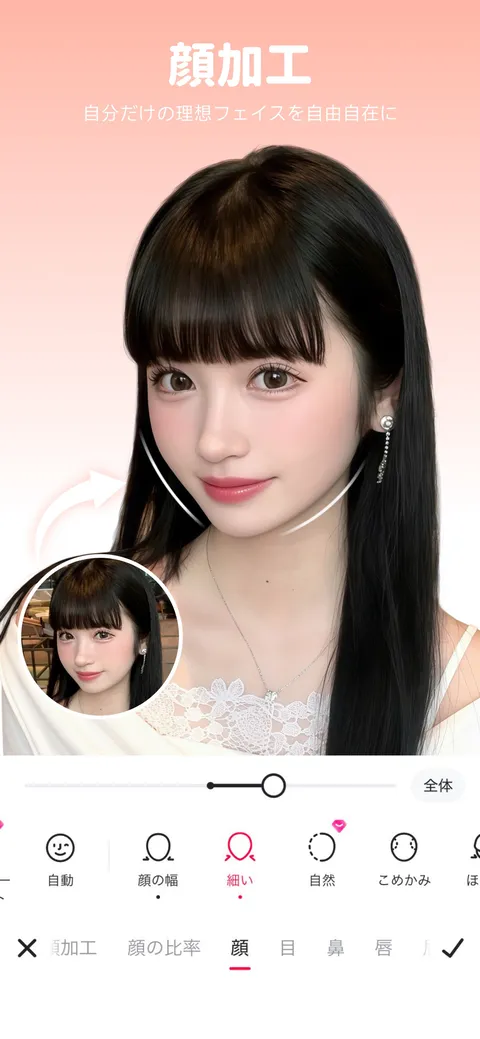
For face retouching, you choose items such as "顔の幅" (face width), "細い" (slim), "自然" (natural) and "こめかみ" (temples) and adjust the strength with a slider. Tabs for each part, such as "顔の比率" (face ratio), "顔" (face), "目" (eyes), "鼻" (nose) and "唇" (lips), run along the bottom, and a small view of the original photo lets you compare before and after.
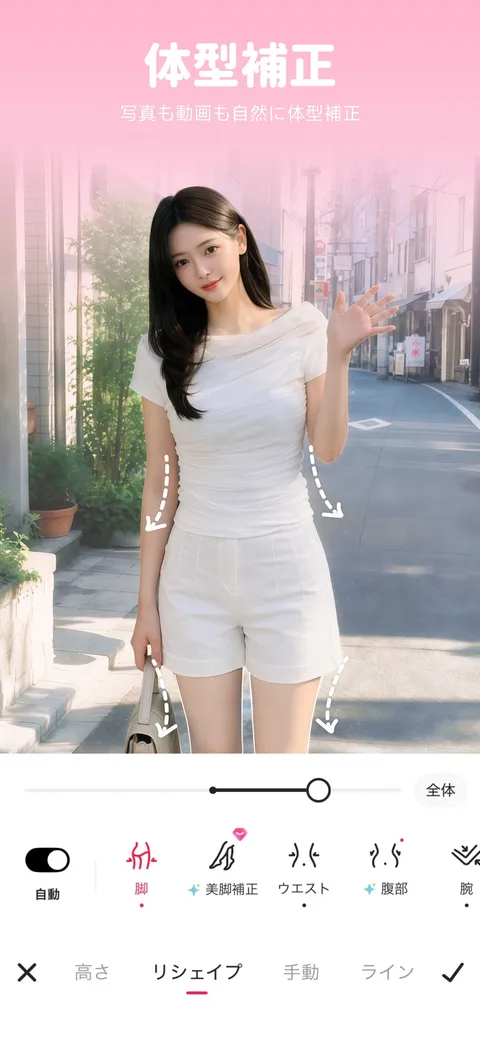
For body reshaping, you choose items such as "脚" (legs), "美脚補正" (leg shaping), "ウエスト" (waist), "腹部" (belly) and "腕" (arms) and adjust them with a slider. There is an "自動" (auto) toggle and tabs for "高さ" (height), "リシェイプ" (reshape), "手動" (manual) and "ライン" (line). The store screenshot is captioned "写真も動画も自然に体型補正" (natural body reshaping for both photos and videos).
Pricing
Meitu is free to download and its basic features are free to use. According to the store listings, the app contains ads and offers in-app purchases (Meitu VIP).
In-app purchases shown on the Japanese App Store (checked October 21, 2026)
| Item | Price |
|---|---|
| Meitu VIP - monthly plan | ¥1,190 |
| Meitu VIP - yearly plan | ¥5,400 |
| Monthly Auto-renew VIP | ¥1,070 / ¥1,190 |
| Yearly Auto-renew VIP | ¥3,790 / ¥4,300 / ¥4,800 |
The App Store list contains several VIP items at different prices. Check which price applies on the in-app purchase screen when you buy. Neither the official website nor the store descriptions list which features VIP includes or what is available for free.
Sources: App Store (Japan) Meitu, Google Play Meitu
Pros and Cons
Pros
- Enhancement, skin and body retouching, the eraser and AI image editing all in one app
- Similar retouching can be applied not only to photos but also to videos and Live Photos
- Fine control, such as adjusting each face separately in a group photo
- Japanese support and frequent updates (the App Store history shows new features added almost every month)
- Operated by Meitu, Inc., which is listed on the Hong Kong Stock Exchange, so the operator is clearly identified
Cons
- There is no official list of what is free and what requires VIP
- The App Store shows several prices for the same VIP, so you need to check the price on the purchase screen
- The free version shows ads
- The terms of service and privacy policy linked from the store are in English
Reviews and Reputation
Meitu is rated 4.5 out of 5 on the Japanese App Store (34K ratings) and 4.3 on Google Play (over 1.4 million reviews) as of October 21, 2026. Store reviews praise the quality of the edits, ease of use and the doodle and mosaic tools, while others say too many features are paid or express unease that the terms of service and privacy policy are in English.
The App Store privacy section shows, as declared by the developer, that identifiers (such as device IDs) may be used to track you across other companies' apps and websites, and that user content such as photos and videos may be collected. Since this is an app that handles your photos, it is worth checking the privacy section in the store before installing if this concerns you.
How Meitu Differs from Other Photo Editing Apps
Wink, also from Meitu, Inc., is a video-first app: it is strong at video enhancement (HD and 4K), retouching people in videos and automatic captions, and it also has web and desktop versions. Meitu focuses on photo editing and selfie retouching, and stands out for features that "redraw" photos, such as AI image editing (select an area and describe the change in text) and text editing. Compared with other photo and image editing apps:
| Product | Strengths | Platforms | Pricing (as stated on each product page) |
|---|---|---|---|
| Meitu | Selfie and portrait retouching (enhancement, skin, face and body reshaping), eraser, AI image editing | iPhone, iPad, Android | Free to use; Meitu VIP from ¥1,190/month or ¥5,400/year, among other prices (App Store Japan) |
| Wink | Video and photo enhancement (HD, 4K), retouching people in videos, automatic captions | Mobile, Web, Mac, Windows | Mobile app is free to use, VIP from ¥1,200/month and other prices; Wink Web Standard from $15/month |
| Picsart | AI photo editing such as background and object removal, plus image and video generation with 180+ AI models | iOS, Android, Web, Windows | Free to start; web Pro ¥2,429/month |
| Remini | Enhancing blurry and old photos, creating portraits from selfies | iOS, Android, Web | App is free to use (with ads); paid plan prices vary by user |
| Photoroom | Background removal and replacement for product photos, batch editing (for e-commerce) | Web, iOS, Android (Shopify integration, API) | Free plan available; Pro from ¥825/month (billed annually) |
| CapCut | Video editing (auto captions, background removal, AI image/video generation) | Mobile, PC, browser | Free to start; CapCut Pro from ¥1,080/month or ¥9,900/year on the App Store (Japan) |
| Canva | Template-based design of all kinds (social posts, presentations, videos, etc.) | Web (online) | Free plan available; Canva Pro ¥11,800/year |
Other products' prices are as stated on each product page at the time of checking. Please check each product page and official website for the latest pricing.
Meitu suits you if you mainly retouch selfies and portraits on your phone. If video quality and retouching people in videos are your focus, compare Wink; to restore old or blurry photos, Remini; to also generate images and videos with AI, Picsart; and to polish product photos for an online shop, Photoroom.
FAQ
Q. Is Meitu free? A. Yes. The app is free to download and its basic features are free to use. There is also a paid subscription, Meitu VIP, shown on the Japanese App Store at prices such as ¥1,190 per month and ¥5,400 per year. There is no official list of what the free version covers.
Q. Does it support Japanese? A. Yes. The app is displayed in Japanese, and the App Store and Google Play descriptions are also in Japanese.
Q. Can I use it on a PC? A. The App Store lists iPhone and iPad as supported devices, and the Android version is available on Google Play. We could not find a PC version of Meitu on the official website or in the stores. If you want to edit videos on a PC, Wink from the same company has a desktop version.
Q. Who operates it? A. Meitu, Inc. (美图公司), headquartered in Xiamen, China. It has been listed on the Hong Kong Stock Exchange since 2016 (1357.HK).
The information on this page is based on what was published in the company profile, the App Store and Google Play as of October 2026. Please check the in-app screens for the latest specifications and pricing.