

FASHN
: How to use it, features, and the business problems it solves
Add bookmark
What is FASHN?
A fashion-focused visual AI platform that turns a garment's product image into a photo of an AI model wearing it. It supports virtual try-on (Product to Model), model swap, pose/background changes, and video, and quickly produces lookbook, ad, and product-page imagery. API integration lets you embed try-on into apps and e-commerce. Free 10 credits, Basic from $19/mo.
Business problems it solves




About "FASHN"
What is FASHN
FASHN is a fashion-focused visual AI platform that turns a garment's product image into "a photo of someone wearing it." Upload a flat-lay or mannequin shot of a garment, and it generates an image of an AI model wearing it naturally. Aimed at brands, e-commerce, and creators, it quickly produces visuals for lookbooks, ads, and product pages (PDPs) as well as try-on experiences, and supports model swapping, background changes, video, and API integration.
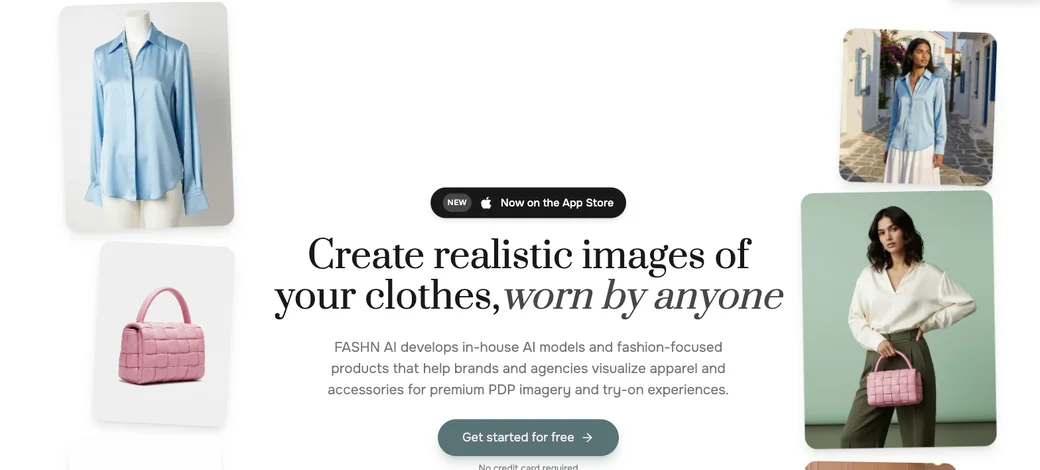
Source: FASHN official site (the image below is from the same source)
Turn product images into "worn" photos
The centre of FASHN is creating photos of a model wearing your garment. You can mass-produce visuals from just a flat-lay image, without arranging models or a studio. Several features cover different needs.
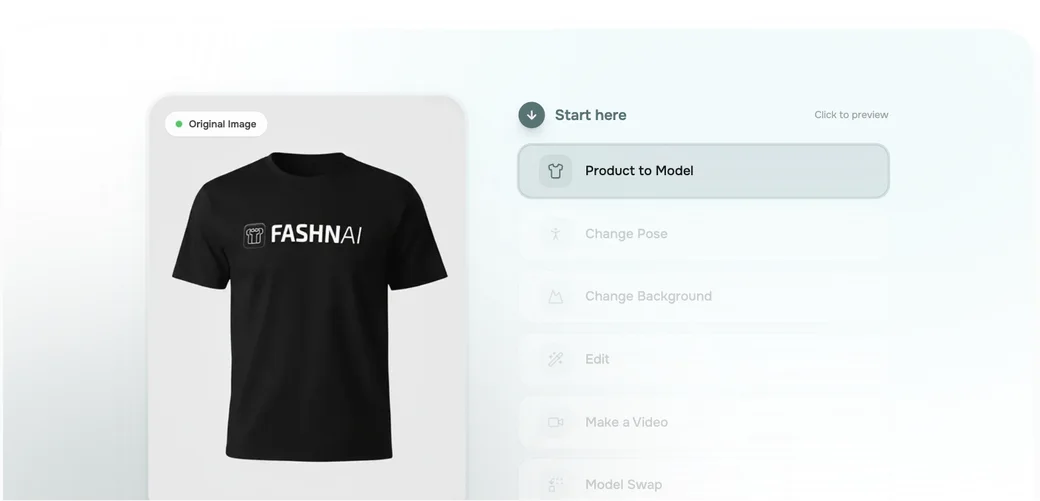
01Dress & swap
- Product to Model (virtual try-on) — Generate a photo of an AI model wearing your garment
- Model Swap — Put the same garment on a different model
- Model Creation — Generate an original AI model
02Direct
- Change Pose / Change Background — Change the pose or the background
- AI Image Editing — Partial edits and 4K upscaling
- Make a Video — Turn the worn result into a short video (up to 720p–1080p)
03Integrate
- Face References — Upload/create your own faces (higher plans)
- API integration — Embed try-on into your own app or store
How to use
-
Create an account
Create an account on the official site (fashn.ai). You can try 10 credits for free.
-
Upload images
Upload a model image (real photo or AI-generated) and a garment image (flat-lay, worn photo, etc.).
-
Choose a category
Select the garment category — tops, bottoms, one-pieces, and so on.
-
Set options (optional)
Set options as needed, such as preserving the background or adjusting hands and feet.
-
Generate
Run generation and review the virtual try-on. You can also swap the model or background, or make a video.
Features
01Create
- Virtual try-on (Product to Model) — Generate model-worn photos from a garment image
- Model Swap / Model Creation — Swap models or generate original models
- AI Image Editing — Partial edits and up to 4K upscaling
02Direct & extend
- Change Pose / Change Background — Change pose and background
- Make a Video — Turn worn images into short videos
- Face References — Specify your own faces (higher plans)
03Integrate
- API — Embed try-on into your app or e-commerce
- Mobile app — Also available on the App Store
Pricing
You can try 10 credits for free. Beyond that are credit-based monthly plans, in USD.
| Plan | Monthly | Credits | Highlights |
|---|---|---|---|
| Free | $0 | 10 | A free allowance to try it |
| Basic | $19 | 200/mo | All core tools, 4K upscaling, 720p video, 3 concurrent, 2 members |
| Pro (popular) | $49 | 750/mo + 50/day | 1080p video, 6 concurrent, 5 members, priority support |
| Agency | $99 | 1,500/mo + 100/day | Face References, 11 concurrent, 10 members, priority feature requests |
Pricing is credit-based, and Basic starts at $19/month (the free allowance is 10 credits). Basic also offers top-up credits ($0.10/credit, valid 12 months). Video resolution, concurrent generations, and team size differ by plan, so choose by your needs. Prices may change, so confirm the latest on the official site.
Pricing is based on the official pricing page (USD) as of August 2026.
How it differs from other tools
FASHN differs from general image generators and product-photo editors in that it is a fashion-specific AI focused on "putting clothes on." It bundles features tied directly to apparel production — virtual try-on, model swap, pose/background changes, and more.
| Aspect | FASHN | General image generation | Product-photo editors |
|---|---|---|---|
| Strength | Worn garment images, virtual try-on | Broad image generation | Background removal, cleanup |
| Input | Garment + model | Prompt | Existing product photos |
| Notable | Model Swap, Face References, API try-on | General expression | E-commerce editing |
| Best for | Apparel, e-commerce, agencies | General production | Mass product photos |
For general image generation, Midjourney and Leonardo.Ai; for e-commerce product-photo editing, PhotoRoom is nearby. If you want to mass-produce worn visuals and try-on experiences without model shoots, the fashion-specialised FASHN is a strong choice.
FAQ
Q. Is FASHN free to use?
Yes. You can try 10 credits for free. For ongoing use, subscribe to a Basic ($19/mo) or higher plan.
Q. What images do I need?
A garment image (flat-lay, mannequin, or worn photo) and a model image (real or AI-generated). With Model Creation, you can generate the model itself with AI.
Q. Can I make videos?
Yes. You can output worn results as short videos (up to 720p–1080p depending on the plan).
Q. Can I embed it into my site?
An API is provided, so you can integrate virtual try-on into your own app or e-commerce site.
Q. Can I use it commercially?
It is designed for brand and e-commerce use. Check the latest terms of service for the scope of use.
Information on this page is based on what was published on the official site as of August 2026. Features and pricing may change, so check the official site for the latest.







![[2026 Edition] Must-Know AI Tools for E-Commerce Managers: 7 Tools for Automating Product Image Editing and Virtual Model Try-Ons](/_next/image?url=%2Fimages%2Farticles%2Fai-tools-for-ec-managers.png&w=3840&q=75 "[2026 Edition] Must-Know AI Tools for E-Commerce Managers: 7 Tools for Automating Product Image Editing and Virtual Model Try-Ons")