
POZR
: How to use it, features, and the business problems it solves
Add bookmark
What is POZR?
POZR (POZR AI) is an AI fashion photo app for Shopify stores from CoolioDev, a development studio in Long Beach, California. Using your store's product photos as reference, you choose from 17 AI models and 8 studio lighting setups to create on-model images of clothing, hats and bags, then add them to a product's image gallery in one click. It also offers rotation shots, scene photography, storefront lookbooks and video generation (Pro). Pricing: Free (10 image credits/month) / Starter $19.99/month / Pro $49.99/month, and the interface supports Japanese.
Business problems it solves



About "POZR"
What is POZR?
POZR (POZR AI) is an AI fashion photo studio for brands and e-commerce teams selling clothing and accessories on Shopify. Using the product photos already in your store as reference material, it dresses AI models in your garments, hats and bags, and lets you send the resulting images straight to your product pages. It is developed by CoolioDev (Coolio Dev), a development studio in Long Beach, California, and launched as a Shopify app in June 2026.
On apparel product pages, flat lays and mannequin shots rarely convey fit or mood, yet booking a model shoot for every new release means paying for a studio, models and sample shipping. POZR aims to replace that step by turning the product photos you already have into on-model images in minutes. Its Japanese site's tagline translates to "The shoot budget you save goes straight to profit."
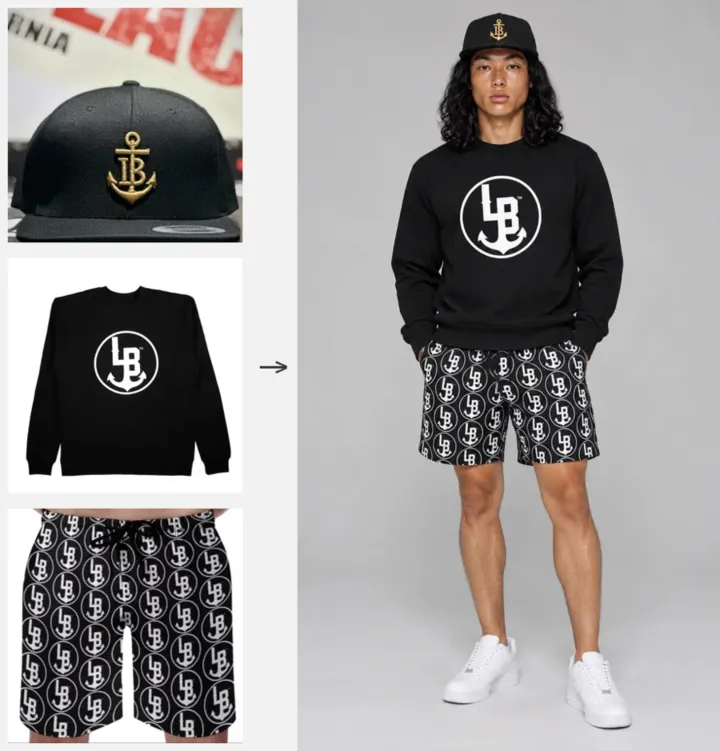
Source: example on the POZR official site (product photos from the brand Stay Anchored and the shot generated from them)
Features
- Studio (on-model image generation) Dress AI models in products imported from Shopify and render on-model images. Every shot uses your own product photos as reference images, so prints, logos and colors carry through, according to POZR. You can edit the results or reshoot with a different model or lighting.
- Quick Shoot Pick products from accessories, hats, tops, bottoms, shoes and props, then choose the model and shot in a single flow.
- Rotation shots Show the same look (outfit) from different angles—front, side and back. Useful when you want product pages to show the back or the side silhouette.
- Eight studio lighting setups Choose from softbox, ring light, golden hour, palm shadows, vintage catalog, low key, rim/backlight and neon duotone. All eight are available on the Free plan.
- Shopify import Import your catalog directly from the Shopify admin. POZR detects categories automatically, sorts photos by angle, and can generate missing angles (back, sides, etc.).
- Saved outfits Save outfits you have put together and reapply the full look to another model or shoot in one tap. The number you can save depends on the plan (Free 2 / Starter 10 / Pro 100).
- Shoots and scene photography (Starter and up) Create stills of models wearing your clothes on location, based on short footage of a set. Use it when you want street or outdoor atmosphere rather than a white studio background.
- Director (video, Pro) Create short video clips by specifying the model, outfit and shot, such as "@Kai wears @tee and leans on @car at golden hour." According to the Shopify pricing table, the Pro plan includes video takes powered by Seedance 2.5 and beta video features (Genjutsu 720p and Aleph 2.0).
- Apply to product Add finished photos to a Shopify product's image gallery in one click. Every generated image is yours to review and approve before it goes live.
- Lookbooks (Pro) Collect shots into a lookbook and publish it as a store page by placing the "POZR Lookbook" block in your theme. Shoppers can go straight from the lookbook to purchase.
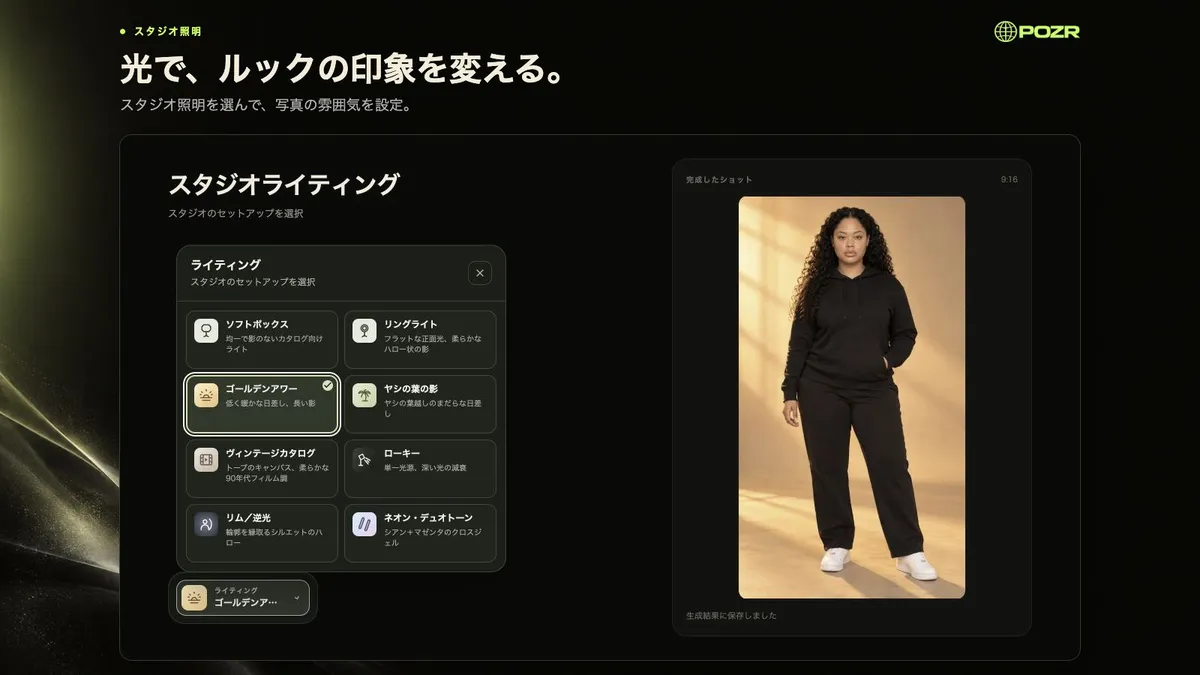
Source: screenshot from POZR's Shopify App Store listing (Japanese UI)
How to use
- Try it free on the official site Enter your store address (Shopify or any website) on the official site and POZR imports your products. Choose up to three items (tops, bottoms, hats, bags, etc.), a model and lighting, and it creates one shot for free. No app install, upload or card required.
- Install the app on Shopify Install "POZR — AI Fashion Visuals" from the Shopify App Store and import your product catalog.
- Choose products, model and shot In Studio or Quick Shoot, choose the products to dress, the model, and the lighting or scene, and generate images. If you are not happy, change the model or lighting and reshoot.
- Publish to product pages Review the finished images and add them to the product's image gallery in one click. On the Pro plan you can also publish a lookbook of your shots to the store.
You can also see the workflow in the official Japanese demo video at the top of this page.
Pricing
Charges are billed in US dollars through your Shopify account (every 30 days). The following reflects the Shopify App Store listing as of October 2026.
| Plan | Monthly (excl. tax) | Image credits | Main features |
|---|---|---|---|
| Free | $0 | 10/month | 1K resolution only, 2 saved outfits, 100 MB storage, 7-day retention, slower queue, watermark |
| Starter | $19.99 | 200/month | 1K and 2K resolution, Shoots (scene renders), 10 outfits, 2 GB storage, permanent retention, extra credit purchases |
| Pro | $49.99 | 500/month + 180 video | 1K/2K/4K resolution, Director (video), Shoots, storefront lookbooks, 100 outfits, 10 GB storage, priority queue |
- Credit usage: A 1K image costs 1 credit, a 2K image 2 credits, and a 4K image (Pro) 4 credits. GPT Image edits cost 2 credits each (4 credits at 4K on Pro). Beta Genjutsu 720p video is listed at 17 credits per second.
- Watermark: According to the official FAQ, paid plans provide images without a watermark.
- Refunds, if any, are handled under Shopify's refund policies (per the Terms of Service).
Pros and cons
Pros
- Create on-model images from product photos you already have (flat lays, table shots, photos of people wearing them) without a model shoot
- Everything from importing Shopify products to publishing on product pages happens inside the admin
- The interface supports Japanese, and there is an official Japanese demo video
- You can try one shot with your own products for free before installing (no card required)
- Extends beyond product pages to rotation shots, scene photography, lookbooks and video
- Starts with a Free plan; paid plans are affordable, from $19.99/month
Cons
- As a Shopify app, it cannot be used with other e-commerce platforms or marketplaces (Rakuten, Amazon, etc.)
- Pricing is in US dollars, so the cost in yen varies with exchange rates
- The Free plan is limited to 10 credits/month at 1K, with a watermark and 7-day retention, so a paid plan is effectively required for production product pages
- Video and lookbooks are Pro-only
- A new app launched in June 2026, with no user reviews or case studies yet
- Generated images can differ from the real product in details (fabric texture, fine logos, fit), so checking before publishing is essential
Reviews and reputation
As of October 2026, the app has no reviews on the Shopify App Store, and we could not find user reviews or case studies elsewhere. It was launched on June 3, 2026.
The official site shows, as an example, product photos actually used by the Long Beach apparel brand "Stay Anchored" (a cap on a table, a T-shirt worn by a person, a tote bag on the floor, etc.) alongside shots POZR created from them. Since you can try one shot with your own products before installing, the most reliable approach is to check how well it reproduces your own product photos.
Note that AI-generated on-model images may not match how the garment actually fits. Before publishing them on product pages, check that colors, patterns and shapes match the real item, and consider noting that the image is AI-generated to avoid misleading buyers.
POZR vs. other AI model image tools
| Product | Key features | Best for |
|---|---|---|
| POZR | Shopify app; importing products and publishing to product pages and lookbooks all happen in the admin | Shopify apparel sellers who want to cut down on photo shoots |
| FASHN | Virtual try-on and model image generation from garment images | Creating on-model images regardless of e-commerce platform |
| Provei.AI | Try-on image generation for apparel e-commerce | Showing shoppers how items look when worn |
| FlairAI | Design tool for product photos, on-model photos and product videos | Creating product photos and ad assets beyond apparel |
| Pic Copilot | All-in-one e-commerce tool: background removal, virtual try-on, product videos | Creating assets for multiple channels such as Amazon and Shopify |
If you want to add images directly to your Shopify product pages, POZR fits; if you want model images regardless of sales channel, standalone tools such as FASHN or FlairAI are the alternatives.
FAQ
Q. Can I use it without a Shopify store? The app is Shopify-only. The free trial shot on the official site also works with a website address, but publishing to product pages and shooting with credits require a Shopify store.
Q. Is it available in Japanese? Yes. The app and official site support 12 languages, including Japanese. An official Japanese demo video is also available.
Q. How much does it cost? There are three plans: Free (10 image credits/month), Starter ($19.99/month, 200 credits) and Pro ($49.99/month, 500 image + 180 video credits). Billing is in US dollars through your Shopify account.
Q. Will the clothes look different from my actual products? POZR uses your product photos as reference images and says it reflects prints, logos and colors. Because the images are generated, details can still differ, and you can reshoot any shot you are not happy with. Always review images before adding them to product pages.
Q. Who owns the generated images? The Terms of Service state that you own the assets generated from your own source images. However, POZR does not warrant that outputs are unique or non-infringing.
Provider
POZR is developed and provided by CoolioDev (Coolio Dev), a development studio in Long Beach, California. CoolioDev builds web, app and 3D products, and the Shopify App Store developer listing also shows CoolioDev (Long Beach, CA, US). The Terms of Service are governed by California law, and inquiries go to email (bill+pozr@cooliodev.com).
The information on this page is based on what was published on the official site and the Shopify App Store as of October 2026. Features and pricing may change; please check the official site and the Shopify App Store listing for the latest information.