
映え偏差値
: How to use it, features, and the business problems it solves
Add bookmark
What is 映え偏差値?
A free AI photo-scoring service run by Inbayse Inc. in Saga Prefecture, Japan. Upload a photo, illustration, or AI image and it scores beauty, quality, and social media appeal, then shows a deviation score (average 50), percentile, ranking, and an AI comment. No login required; Photo / AI Photo / Illustration / AI Illustration / 3DCG are ranked separately.
Business problems it solves



About "映え偏差値"
What is 映え偏差値 (Bae Hensachi)
映え偏差値 (read "Bae Hensachi"; also BAE SCORE) is a free AI photo-scoring service: upload a photo, illustration, or AI-generated image, and AI scores it on three dimensions — beauty, quality, and social media appeal — then shows where it stands among all submissions as a deviation score (average 50), percentile, and ranking. It is run by Inbayse Inc. (インベイズ株式会社) in Saga Prefecture, Japan; scoring and joining the rankings are free, and you can use it without logging in. Results appear in tens of seconds, together with a breakdown of the three metrics and an AI comment.
Its role is to turn the vague feeling of "I think this photo is good, but how does it look objectively?" into a relative value measured against other submissions. As of October 2026, the service remains in operation.
It breaks "a good image" into three parts and scores each
Rather than judging "is this photogenic" as a single blur, the service splits the evaluation into three axes. A single overall score gives you nothing to act on, but knowing which axis is low tells you what to fix next.
Beauty covers composition, color, and overall impression; quality covers resolution, brightness, and finish; social media appeal covers shareability and eye-catching power. The first two measure completeness as an image, while social media appeal stands on a different axis entirely.
In practice, an image can score high on beauty yet low on social media appeal, or the reverse. Splitting into three axes lets you judge whether an image fits its intended use.

Source: \u6620\u3048\u504f\u5dee\u5024 official site (the screen below is from the same source)
Separating image types is what makes the comparison meaningful
Scoring AI-generated images, hand-drawn illustrations, and real photographs on the same scale would not produce a meaningful comparison. \u6620\u3048\u504f\u5dee\u5024 has you pick an image type at upload — Photo / AI Photo / Illustration / AI Illustration / 3DCG / Not sure — and the rankings are separated by type. "Not sure" is there for cases you cannot classify.
That is also why it uses a deviation score: rather than an absolute point total, it converts the image's relative position among all submissions to a scale with an average of 50. Above 50 means above average; the 60s mean near the top. The percentile display works on the same principle.
The AI score itself is always the same for the same image, but the deviation score depends on comparison with all submissions, so it is updated daily and can move over time.
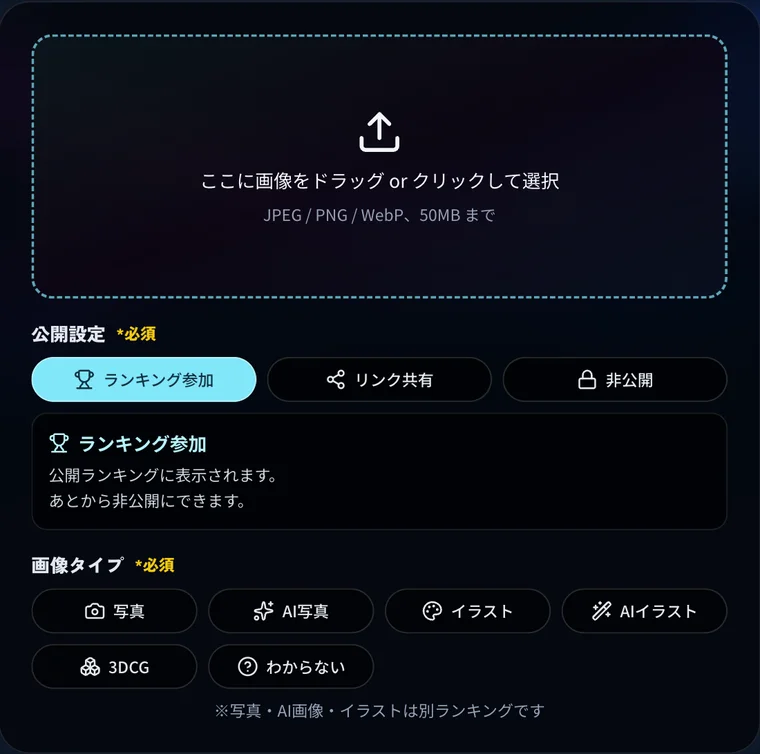
As the screen on the left shows, the upload area, visibility setting, and image type all sit on a single screen, and the whole flow completes there without a login step.
How to use
-
Upload an image
JPEG, PNG, or WebP, up to 50MB per image. No account registration or login is needed.
-
Choose a visibility setting
Select from "Participate in ranking (public)," "Only people with the link," or "Fully private." If you do not want to appear in the ranking, choosing private lets you receive only the score.
-
Select the image type
Choose from Photo / AI Photo / Illustration / AI Illustration / 3DCG / Not sure. If you cannot classify it, "Not sure" is fine. Your image is evaluated relative to others of the type you select.
-
Check the result
Within tens of seconds, the deviation score, percentile, and ranking position are shown along with a breakdown for each of the three axes and an AI comment.
-
Delete it if you want to
You can delete a submission from the browser you posted with, from My Gallery, or via the deletion link issued when you post. Deleting from another device requires the deletion link, which expires after a certain period (the official FAQ gives 30 days as an example).
Features
01Score
- Three-axis AI analysis — Beauty (composition, color, impression), quality (resolution, brightness, finish), and social media appeal (shareability, eye-catching power) scored separately
- Deviation score and percentile — Relative position within the pool of submissions of the same image type
- Reproducible scoring — The same image receives the same score (the deviation score is updated daily against all submissions)
- AI comment — Results include a comment with hints for improvement
02Compare
- Rankings by image type — Photo / AI Photo / Illustration / AI Illustration / 3DCG tallied separately
- A bucket for unknown types — "Not sure" is available when you cannot classify the image
- Rankings by period — 24 hours, weekly, monthly
- BAE Rate — A per-user "photogenic power" indicator based on the ratings of their top submissions, shown in nine colors from gray to rainbow, with per-category and overall rankings
03Control visibility
- Three visibility levels — Public / link-only / fully private
- Deletion link — Issued at upload; works without logging in (expires after a period)
- My Gallery — Lists your submissions and lets you delete them
Pricing
| Plan | Price | Included |
|---|---|---|
| Free | ¥0 | AI scoring, three-axis analysis, AI comment, deviation score / percentile / ranking display, rankings by period, BAE Rate, visibility settings, deletion |
The official FAQ states that "both scoring and joining the rankings are free, and you can post without logging in." As of October 2026, no paid plan is offered. The site displays ads (its privacy policy mentions ad services including Google's).
FAQ
Q. Is 映え偏差値 free?
Yes. Scoring and joining the rankings are free, and no paid plan is offered (as of October 2026).
Q. Do I need to create an account?
No. You can upload and receive a score without logging in. The terms of use note that some features may require user registration or authentication.
Q. Who operates it?
Inbayse Inc. (インベイズ株式会社; Kanzaki, Saga Prefecture, Japan; Representative Director 吉村 貴志; founded 2015), as stated on the operator information page of the official site.
Q. What AI does it use for scoring?
According to the official FAQ, it partly uses image-analysis models such as the LAION Aesthetic Model and CLIP. The operator page explains that each of the three dimensions is evaluated by a dedicated AI model and the total score is converted into a deviation score.
Q. Can I delete an image after posting it?
Yes — from the browser you posted with, from My Gallery, or via the deletion link. Deleting from another device requires the deletion link; if you lose it, the operator generally cannot delete the post for you, so keep it. The link expires after a certain period (the official FAQ gives 30 days as an example).
Q. Can I get a score without appearing in the rankings?
Yes. Selecting "link sharing" or "private" keeps your image out of the rankings while still returning the score. You can change the visibility later.
Q. Can AI-generated images be scored?
Yes. Image types include "AI Photo" and "AI Illustration," which are tallied in rankings separate from real photographs and hand-drawn work.
Q. Does the score change if I post the same image repeatedly?
The AI score stays the same for the same image. However, the deviation score is updated daily against all submissions, so its value can change over time.
How it differs from other image tools
映え偏差値 neither generates nor edits images — it evaluates images you already have. That is where its role diverges from other AI image tools.
| Aspect | 映え偏差値 | Image generation AI | Design tools |
|---|---|---|---|
| Role | Evaluating existing images | Creating images | Editing and laying out images |
| Input | An image you have | A prompt | Assets and templates |
| Output | Deviation score, percentile, three-axis analysis | A generated image | A finished design |
| Price | Free | Typically free tier plus subscription | Typically free tier plus subscription |
| Account | Not required (login available) | Required | Required |
On the generation side, Midjourney and ImageFX are representative; on the editing and design side, Canva is. It is often used alongside them to objectively check how a generated image turned out.
Information on this page is based on what was published on the official site as of October 2026. Please check the official site for the latest specifications.