

hakaru.ai
: How to use it, features, and the business problems it solves
What is hakaru.ai?
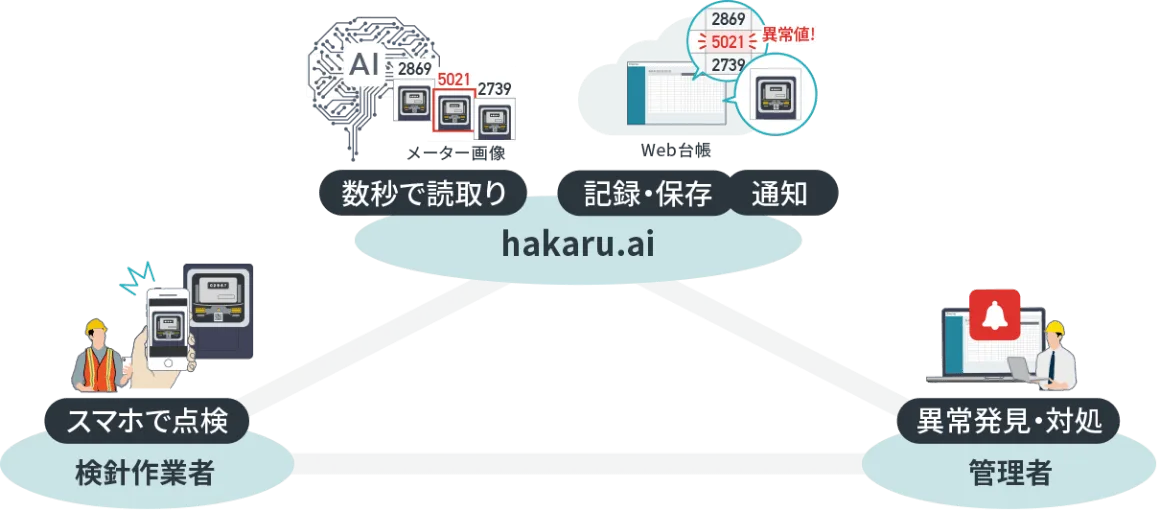
hakaru.ai byGMO is a meter-reading and inspection efficiency service from GMO GlobalSign Holdings K.K. (listed on the TSE Prime Market). Just photograph a meter with the smartphone app: AI reads the value from the image, records it automatically in a web ledger, and raises an alert when a value falls outside its threshold. It supports analog (round, square, horizontal-scale), digital, and rotary/counter meters, so old meters can stay in place. An "Inspection API" plan offers the reading function alone via API. No initial fee; the Standard plan is from ¥220 per meter per month plus a system fee from ¥11,000 per month (tax included, as of November 2026). The month you sign up is a free trial.
Business problems it solves


About "hakaru.ai"
What is hakaru.ai?
hakaru.ai byGMO is a meter-reading and inspection efficiency service: photograph a meter with a smartphone, and AI reads the value and records it automatically in a web-based ledger. It is provided by GMO GlobalSign Holdings K.K. (listed on the Tokyo Stock Exchange Prime Market), a member of the GMO Internet Group.
It replaces the usual routine of reading a gauge by eye, writing the value on paper and typing it into Excel later, with a single step in which the photo itself completes the record. Existing analog meters can be used as they are, so its main users are factory and building sites where investing in smart meters is difficult. A beta version was released in summer 2018 and the commercial version launched in January 2019.
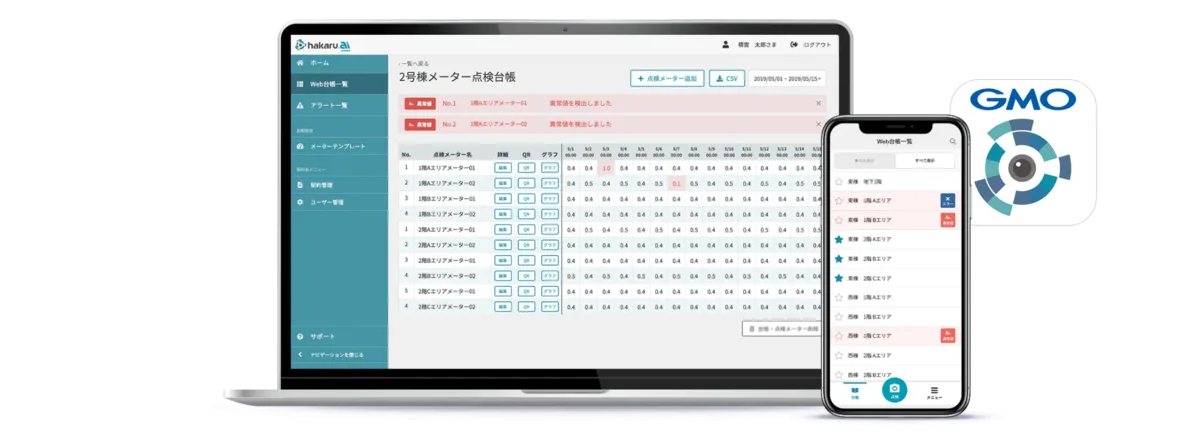
Source: hakaru.ai official site (same for the images below)
How to use it
- Apply for the free trial Create an account from "無料トライアルお申し込み" (free trial application) on the official site. The month in which the account is issued is the free trial period, and all features are available. When it ends the account is simply suspended; it does not switch to a paid plan automatically.
- Register meters in the web ledger and attach QR codes In the web ledger on a PC (Google Chrome recommended), register the meters to inspect and the recording frequency (once a month, once a day, or several times a day). Print the QR code generated for each meter and stick it near the meter. Codes can be printed on a TEPRA label printer from the smartphone app or on your own printer from the web ledger.
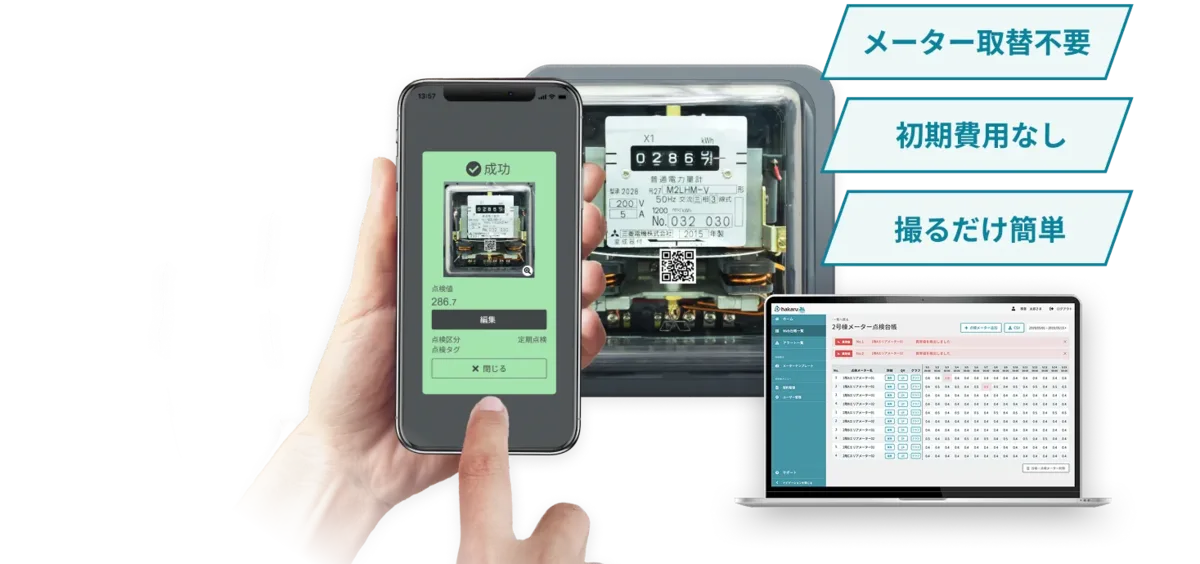
- Photograph the meter with the smartphone app Using the free app for iOS or Android, shoot so that the QR code and the meter appear together. The AI reads the value from the image and records it in the web ledger together with the photo. In places without a signal, you can shoot offline and send the images once the connection returns.
- Check the ledger and export the data Managers can see inspection progress, missed inspections and abnormal values at a glance from a PC. Values can be downloaded as CSV and photos in bulk, so they can be kept as evidence of the inspection.
The official site describes a path to full operation of about two to three months, with a dedicated contact verifying and adjusting the setup after the trial.
Features
01Reading and recording
The AI finds which part of the photo to read on its own and turns it into a number.
- AI meter reading — Image recognition based on deep learning, with correction for photos taken at an angle. The company states the accuracy is "on par with the human eye" and that it has learned from more than 200,000 meter images
- Automatic recording in the web ledger — The value and the photo are saved together. Recording frequency can be once a month, once a day, or up to 24 times a day (hourly)
- Offline inspection — Photos taken where there is no signal are stored in the app and sent and analyzed once the connection is back
- Inspection notes and list inspection — Inspectors can add notes alongside the photo and value, and pick items to record from the ledger list
02Management and anomaly detection
Inspectors on site and managers elsewhere see the same data at the same time.
- Abnormal-value alerts — When a reading falls outside the threshold set for that meter, an alert appears on both the manager's PC and the inspector's smartphone
- Monitoring — Shows inspection progress, missed inspections and abnormal values for each ledger in one view
- Graphs and usage calculation — Recorded values can be graphed, and the difference from the previous reading (usage) and the previous year's usage can be shown
- CSV and image download — Values export as CSV and photos as a ZIP
03Integration and options
The reading function alone can also be built into other systems.
- Inspection API — A plan that calls only the AI meter-reading function via API. The specification is published on GitHub (a hakaru.ai account is required)
- Ledger API (option) — Pulls inspection data recorded through the app and web ledger into your own core systems via API
- Facility inspection items (option) — Create non-meter inspection items (checklists, lamps, condition checks, etc.) and record them as text or photos. Up to five choices per item
- Excel report integration (option) — Pours hakaru.ai inspection data into your existing Excel report templates for output
- SAML and TEPRA integration — Supports single sign-on (GMO Trust Login can be used free of charge) and QR code printing on TEPRA
Supported meters
The official site lists the following five types. There is said to be no restriction on manufacturer or model, though some meters may not be readable depending on the environment.
| Type | Examples |
|---|---|
| Analog / round | Round needle gauges such as pressure and temperature gauges. Meters with two or three needles can be read; you choose which value to save |
| Analog / square | Indicating electrical instruments such as ammeters |
| Digital meters | Seven-segment and other digital numerals (confirmed up to 8 digits; decimal points recognized) |
| Rotary / counter | Watt-hour meters, water meters, etc. (confirmed up to 8 digits; no setting for decimals) |
| Analog / horizontal scale | Horizontal-scale manometers, etc. (beta support according to the FAQ) |
According to the FAQ, it does not support level or flow meters that measure by the position of a float, or reading text such as the multiplier or product number printed on a watt-hour meter.
Pricing
It is a monthly service, and every plan has an initial fee of ¥0. The pricing table on the official pricing page is shown below; amounts include tax. (The pricing table itself does not state tax, but the example on the page for manufacturers (factory facility management) of "¥33,000 per month (tax included) for 100 meters read once a month" matches ¥11,000 + ¥220 × 100, and the reference price on the page for building maintenance companies is also marked tax included.)
| Plan | Recorded once a month | Recorded once a day | Recorded once an hour |
|---|---|---|---|
| Standard (pay per meter) | ¥220 per meter/month + system fee ¥11,000/month | ¥220 per meter/month + system fee ¥33,000/month | ¥330 per meter/month + system fee ¥33,000/month |
| Volume Pack (flat rate by meter-count pack) | Packs of 300, 500 or 1,000 meters + system fee ¥11,000/month | Packs of 200, 300 or 500 meters + system fee ¥33,000/month | Packs of 100, 200 or 300 meters + system fee ¥33,000/month |
| Inspection API (reading function only) | 5,000 or 10,000 calls/month range + system fee ¥33,000/month | — | — |
- The page for building maintenance companies gives a reference price for the Volume Pack: 300 meters read once a month cost ¥0 initial fee and ¥44,000 per month (tax included). The same page says 300 meters or fewer fall under the pay-per-meter plan
- The pricing page does not show amounts for the other packs or the Inspection API call fees (only the meter and call ranges). Entering a plan and meter count in the "お見積りシミュレーション" (quote simulation) on the pricing page sends you a simple quote as a PDF
- On every plan, user accounts, inspection ledgers and the number of app users are unlimited, and AI model updates, system upgrades and cloud data storage are free
- On the Inspection API, the reading function is temporarily unavailable once the contracted monthly call count is exceeded. During the free trial, up to 50 calls are allowed
Options (used in combination with a plan)
| Option | Price (tax included) |
|---|---|
| Facility inspection items | ¥11,000/month per 100 items created |
| Excel report integration | ¥22,000/month (initial file registration fee charged separately) |
| Ledger API | ¥33,000/month |
Track record and reputation
According to the official site, it is used mainly at manufacturing plants and building maintenance sites, and customer interviews are published for Kobe Steel, ROHM, JR East Building Tech, Kanden Facilities, ORIX Facilities, Taisei, Seibi, Harima B.Stem, Ryosa Buildware, NTK and Fujikai Building Service. For use at production-line plants, the company cites a 45% reduction in previous working time.
Here are a few comments from customer interviews published on the official site (translated from Japanese).
"Meter-reading work has become more than about 30% more efficient, and the field staff are pleased that they can concentrate on other work instead." (Kanden Facilities Co., Ltd., Technology Planning Department)
"Two years ago we decided not to adopt it, but in this trial the reading accuracy was very high, improving to about 98%, so we judged that it would move us forward in solving our issues." (Ryosa Buildware Co., Ltd., Tokyo Branch, Building Management Dept. 1)
"It read digital and analog meters, and even water meters, automatically without any problem. I was genuinely impressed." (JR East Building Tech Co., Ltd., Building Business Headquarters)
The official site also lists a 2019 Good Design Award (business software category) and the "ASPIC Chairman's Award" in the AI category of the ASPIC IoT, AI and Cloud Awards 2018.
Pros and cons
Pros
- Existing meters can stay in place. Preparation is just printing and attaching QR codes, so you can start without stopping the site
- The value and photo are saved to the ledger the moment you shoot, reducing transcription errors and omissions and serving as inspection evidence
- ¥0 initial fee, with no limit on users or ledgers
- The reading function alone can be built into your own system via API
Cons
- Each meter still has to be photographed. The FAQ says recording by video or continuous capture is currently not supported, and reading several meters in one shot is something they will consider in the future (not a current feature)
- It cannot read float-type level or flow meters, or text such as the multiplier on a watt-hour meter
- For the Volume Pack only a reference example is published (300 meters, monthly recording, ¥44,000/month incl. tax); other packs and the Inspection API must be checked by quote
- Payment is by bank transfer only (per the implementation flow page)
How it differs from other AI-OCR and image-reading services
hakaru.ai specializes in reading meter indications, not text on forms. If the goal is digitizing forms, AI-OCR services are the candidates.
| Item | hakaru.ai | DX Suite | SmartRead |
|---|---|---|---|
| What it reads | On-site meters (analog, digital, rotary, etc.) | Forms, including handwritten and non-standard ones | Printed and handwritten documents (fixed, semi-fixed and free-form) |
| Input | Photographed with a smartphone app | Form images and files | Document images and files |
| Output | Web ledger (alerts by threshold) | Digitized data exported to systems | Excel/CSV export, API and RPA integration |
| Price | ¥0 initial; from ¥220 per meter/month + system fee from ¥11,000/month (tax incl.) | Lite from ¥40,000/month (excl. tax) | Cloud edition from ¥360,000/year (excl. tax) |
Details of other products are as of the dates checked on each product page.
For reading internal documents, also compare AI inside and Document Force.
FAQ
Q. How much does hakaru.ai cost? A. The initial fee is ¥0. The Standard plan costs ¥220 per meter per month (¥330 for hourly recording) plus a system fee of ¥11,000 or ¥33,000 per month depending on recording frequency (tax included). For many meters there is the Volume Pack (reference example: ¥44,000/month incl. tax for 300 meters recorded monthly), and for the reading function alone there is the Inspection API plan.
Q. Can I try it for free? A. Yes. The month in which your account is issued is a free trial, and you can try every feature. The Inspection API is limited to 50 calls during the trial. When the trial ends the account is simply suspended, with no automatic billing.
Q. Can it read old analog meters? A. Yes. It supports round and square analog meters, digital meters, rotary meters and horizontal-scale meters (beta), with no stated restriction on manufacturer or model. The site advises shooting from the front where possible and blocking reflections with your hand or an anti-glare sheet.
Q. What if smartphones are not allowed in the factory? A. The FAQ recommends using dedicated devices (Android, iPhone, iPod or iPad) with other apps and functions restricted.
Q. Can inspection data be imported into other systems? A. Besides CSV download, the optional Ledger API (¥33,000/month) lets you integrate recorded data via API. For the reading function alone, there is the Inspection API plan.
Q. Can it be used in English? A. The display languages are Japanese and English, switched by the device or browser setting.
The information on this page is based on what was published on the official website as of November 2026. Please check the official website for the latest specifications and pricing.