

Document Force
: How to use it, features, and the business problems it solves
Add bookmark
What is Document Force?
A business-automation AI service for companies that reads needed information from documents arriving as PDF, image, email, or fax, and automates matching, judgment, transcription, and output as one workflow. Beyond AI-OCR, it automates the steps after reading. No-code Japanese business instructions, API integration, ISO 27001 compliant. Pricing by quote with free validation.
Business problems it solves





About "Document Force"
What is Document Force
Document Force is a business-automation AI service for companies that reads the needed information from documents arriving as PDF, image, email, or fax, and automates matching, judgment, transcription, and output as a single workflow. Rather than stopping at AI-OCR (character recognition), its defining strength is that it automates "the steps after reading" too. You register business instructions in Japanese with no code, so frontline staff can drive automation. It is ISO 27001 compliant and runs on AWS.
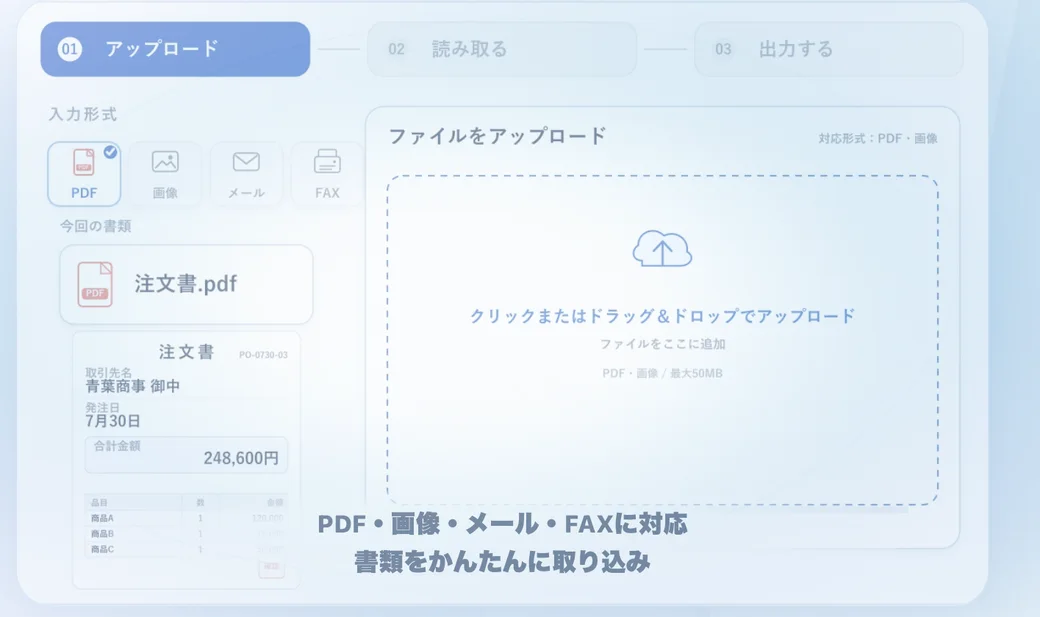
Source: Document Force official site
It doesn't stop at "reading"
Typical AI-OCR centres on "turning documents into text," but Document Force automates the matching, judgment, transcription, and output that come after as one connected flow. You can hand off the "post-reading processing" that people used to do by hand.
Import documents
Upload documents arriving as PDF, image, email, or fax — structured or unstructured
Extract fields with AI
High-accuracy OCR extracts and sorts needed fields (client, date, amount, line items)
Match, judge, transcribe, output
Match and judge the content, transcribe to other systems, and automate document creation and API integration
Because the post-reading steps can be defined in Japanese, no-code, teams can automate their workflows on their own.
How to use
-
Contact / request validation
Reach out via "consult on free validation" or "contact" on the official site. You can request free validation using your own documents.
-
Register business instructions in Japanese
With no code, register the business steps in Japanese (fields to read, matching, where to transcribe, etc.).
-
Upload documents
Import PDF, image, email, or fax documents; the AI analyses the content and processes it per your instructions.
-
Integrate with other systems
Set up API integration to hand data automatically to internal tools and external systems.
-
Use the results
Put the extracted, organised data and auto-created documents straight to work in daily operations.
Features
01Read
- High-accuracy OCR — Extracts needed fields with high accuracy, structured or not
- Many input formats — PDF, image, email, fax
- Auto-sorting — Automatically classifies and organises uploaded documents
02Automate the downstream
- Match, judge, transcribe — Matches and judges read content and transcribes to other systems
- Document creation — Auto-creates proposals, contracts, etc. from extracted data
- Japanese no-code instructions — Register business steps in Japanese to automate
03Connect and protect
- API integration — Data integration with internal tools and external systems
- Team use & permissions — Multiple users, per-department access controls
- Security — ISO 27001 compliant, runs on AWS
Pricing
Pricing is by quote (as a B2B service, individually quoted by document types, volume, and number of users). Before adopting, you can request free validation using your own documents.
| Item | Details |
|---|---|
| Monthly fee | By quote (individual estimate) |
| Document volume | By quote |
| Users | By quote |
| Free validation | Yes (check accuracy and processing time with your documents) |
| Security | ISO 27001 compliant |
Since pricing isn't public, the practical first step is a free validation to see how far your documents can be automated. Results and processing time vary by document content, page count, image quality, and matching conditions. Contact the company for onboarding and cost details.
Pricing information on this page is as of August 2026. Confirm the latest cost and plans on the official site.
How it differs from other AI-OCR / document tools
Document Force differs from typical AI-OCR in that it automates not only "reading" but the work "after reading." It goes beyond turning documents into text to make matching, judgment, transcription, and output a single flow.
| Aspect | Document Force | Typical AI-OCR |
|---|---|---|
| Main scope | Reading + matching, judgment, transcription, output | Mainly turning documents into text |
| Setup | Japanese no-code business instructions | Mainly registering form templates |
| Inputs | PDF, image, email, fax | Varies by product |
| Integration | API integration through the downstream | Mainly output (CSV, etc.) |
For comparison focused on text extraction, AI inside (DX Suite) and DX Suite; for invoice processing, invox; and for post-extraction workflow automation, Make and n8n are nearby. If you want to automate end to end from reading through the downstream, Document Force is a strong choice.
FAQ
Q. What documents does it support?
Documents arriving as PDF, image, email, or fax. It handles not only structured formats but unstructured documents too.
Q. How much does it cost?
By quote. It is individually estimated by document types, volume, and number of users. Trying your own documents via free validation first is recommended.
Q. Do I need programming?
No. You can register business steps with Japanese no-code instructions, so frontline staff can drive automation.
Q. Can it integrate with existing systems?
Yes. Via API integration, it hands data automatically to internal tools and external systems.
Q. Is it secure?
It is ISO 27001 compliant and runs on AWS. Multiple-user use and per-department access controls are configurable.
Information on this page is based on what was published on the official site as of August 2026. Features and pricing may change, so check the official site for the latest.
Frequently compared services


Articles featuring Document Force
[2026 Edition] Boosting Accounting Efficiency with AI | A Complete Guide to Automating Bookkeeping, Document Processing, and Budget Reports
An introduction to AI tools that transform accounting workflows — from automating journal entries and AI-OCR document processing to auto-generating budget-vs-actual reports. Covers the latest solutions available today.
![[2026 Edition] Boosting Accounting Efficiency with AI | A Complete Guide to Automating Bookkeeping, Document Processing, and Budget Reports](/_next/image?url=%2Fimages%2Farticles%2Fai-accounting-tools.png&w=3840&q=75 "[2026 Edition] Boosting Accounting Efficiency with AI | A Complete Guide to Automating Bookkeeping, Document Processing, and Budget Reports")
[2026 Edition] 6 AI Tools to Solve HR and Admin Challenges | Streamlining Interviews, Attendance, and Employee Surveys
From automating candidate interviews and aggregating time-and-attendance data to designing employee surveys — a use-case-by-use-case look at AI tools that support HR and administrative teams.
![[2026 Edition] 6 AI Tools to Solve HR and Admin Challenges | Streamlining Interviews, Attendance, and Employee Surveys](/_next/image?url=%2Fimages%2Farticles%2Fai-hr-admin-tools.png&w=3840&q=75 "[2026 Edition] 6 AI Tools to Solve HR and Admin Challenges | Streamlining Interviews, Attendance, and Employee Surveys")