

SmartRead
: How to use it, features, and the business problems it solves
Add bookmark
What is SmartRead?
An AI-OCR service for businesses provided by Cogent Labs, Inc. (Minato-ku, Tokyo). Using an in-house AI engine, it reads printed and handwritten text and handles everything from automatically sorting mixed documents to Excel/CSV export and integration via API and RPA (UiPath, BizRobo!, WinActor). It supports fixed-format, semi-structured and unstructured documents and comes in cloud and on-premises editions. Pricing: cloud Small ¥360,000/year, Standard ¥960,000/year, Enterprise ¥2,400,000/year; on-premises from ¥2,400,000/year (excl. tax, no initial fee, 1-year contract). Free trial up to 500 pages.
Business problems it solves



About "SmartRead"
What is SmartRead?
SmartRead is an AI-OCR service for businesses provided by Cogent Labs, Inc. (Minato-ku, Tokyo). It reads both printed and handwritten text from paper documents, scanned images and PDFs and turns it into data. The company describes it as going "beyond AI OCR" and positions it as an IDP (intelligent document processing) solution that handles sorting → reading → exporting documents in a single flow.
Character recognition is powered by an AI engine the company developed in-house using deep learning. Even when you upload different types of documents together, SmartRead identifies and sorts them page by page, and the results can be exported as Excel, CSV or searchable PDF, or passed to downstream systems via API or RPA. In addition to the cloud edition, there is an on-premises edition that runs without connecting to external networks.
How to use
- Start with the free trial or an inquiry The free trial on the official site lets you process up to 500 pages. After you apply, a staff member checks your needs and situation, and the account is issued in about one week. Individuals and existing customers are not eligible. A full deployment goes through inquiry → hearing → proposal and quote → contract.
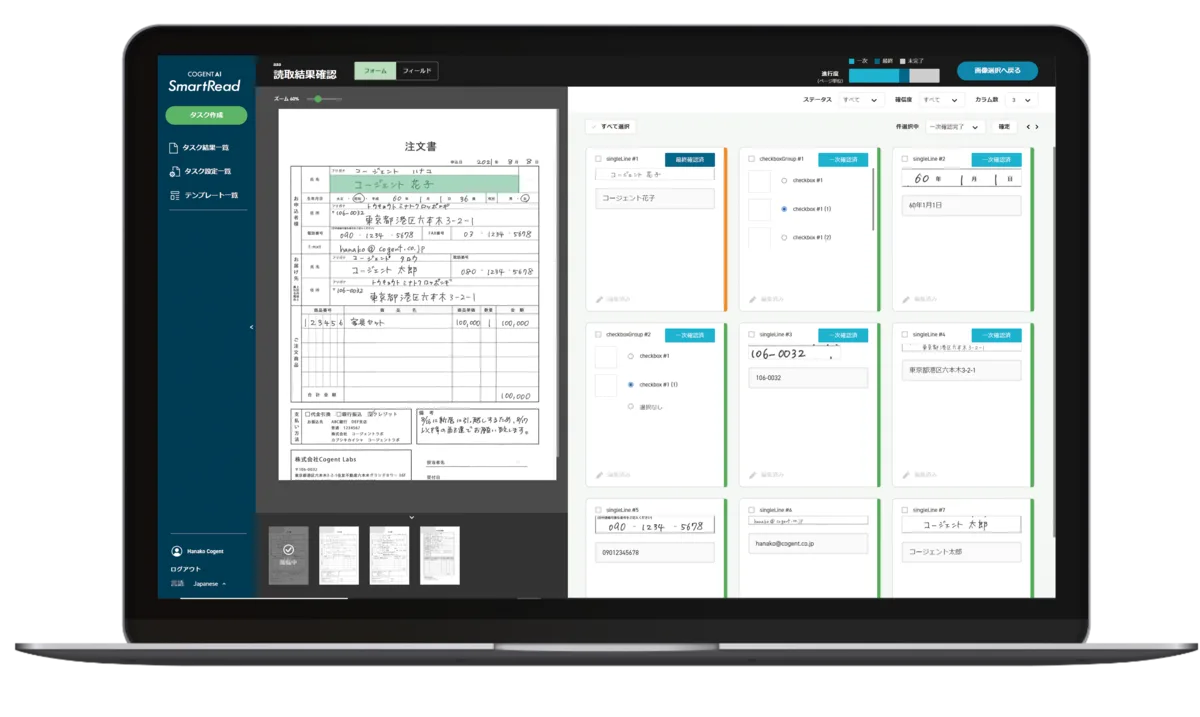
- Register a template of the documents you want to read as a "task" In the browser, you simply click the positions on the document you want to read to define the fields. If you register templates of the documents you want sorted as a "task," the sorting setup is done too. Tasks can be reused within a group.
- Upload documents in bulk When you upload a mixed set of files, the AI distinguishes them by layout and type, sorts them and goes straight on to reading. Orientation, skew and distortion are corrected automatically, so faxed documents can be handled the same way.
- Review and correct the results Sorting errors are fixed by drag and drop. Reading results are checked on the "Smart Verify" screen by comparing them with the image, and corrections can be made using only the keyboard.
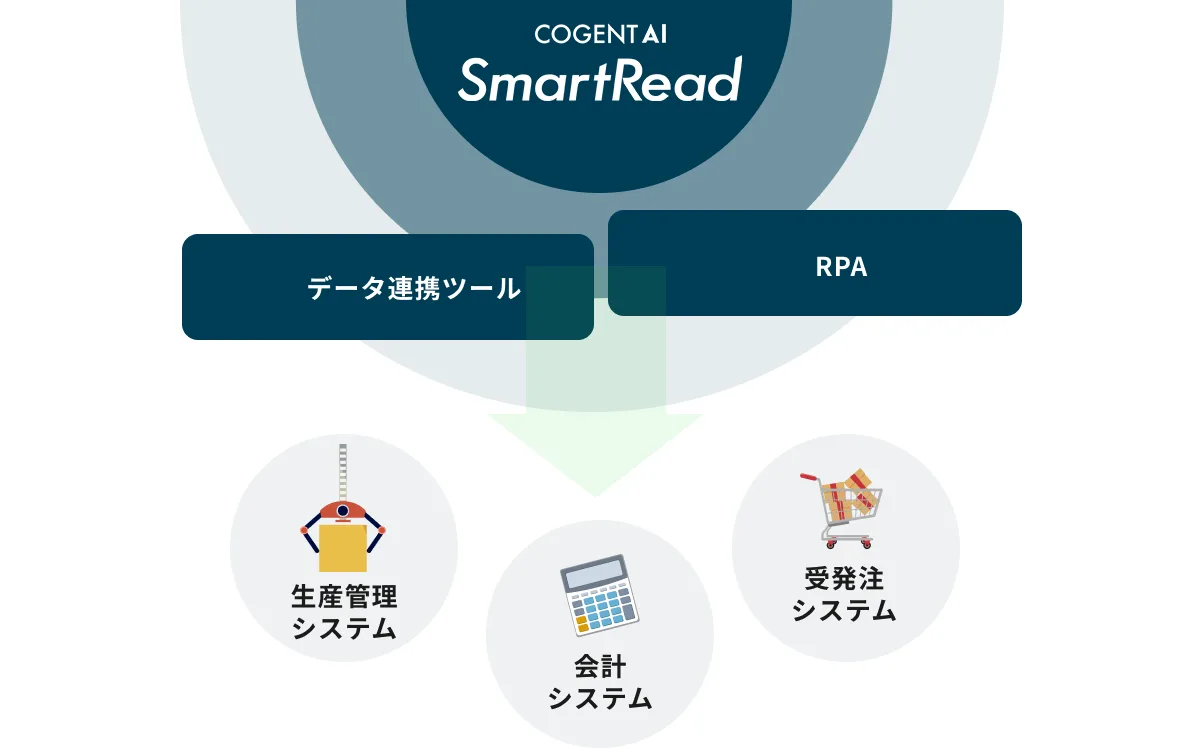
- Export or integrate Download the results as Excel, CSV or searchable PDF, either as separate files per document or merged into one. To automate daily processing, use the Web API, the RPA connectors or "SmartRead AutoLoader," which watches folders.
Features
01Sorting
- Automatic sorting (standard) — Identifies each page in a mixed set of documents by layout and type, including subtle layout differences that are hard for people to spot
- From sorting straight to reading — After you confirm the sorting results, processing continues to reading
02Reading
- Printed and handwritten text — Hiragana, katakana, kanji, numbers, the alphabet and symbols, even faded print. Also handles multi-line text, checkboxes and skipping text struck through with double lines
- Fixed, semi-structured and unstructured — Extracts the information you need even from documents without a set format, such as order forms, application forms and internal materials
- Automatic correction of orientation, skew and distortion — Documents scanned in random orientations, or distorted or shrunk by fax, can be read as they are
- No pre-training needed — Users do not need to teach the AI characters; SmartRead keeps improving accuracy on its side
03Review and management
- Smart Verify — A review screen that shortens the time spent checking and fixing results, with keyboard operation
- List views and search — Manage templates, tasks and results in lists, with progress shown in real time
- User and group permissions — Assign groups and roles to each user to limit what they can see; usage can be checked per user and group
04Export and integration
- Excel, CSV and searchable PDF — Output per document or merged into one file
- Web API — Call SmartRead from your business applications and build it into your workflow
- RPA connectors (free) — Call data-entry processing from UiPath, BizRobo! and WinActor scenarios
- SmartRead AutoLoader — A program that automatically passes files in a specified folder to SmartRead and saves the results to an output folder, without development
To set up reading, you just click the positions you want to read on the document displayed in the browser. The review screen is designed so you can easily compare the document image with the reading results. Templates, tasks and results are managed in lists with search and filtering. The company says many customers value how easy it is to use without training frontline staff.
It sorts documents before reading them, so no manual pre-sorting is left
Even after introducing AI-OCR, people often still have to sort incoming documents by type. SmartRead has sorting as a standard feature: for documents with a set format, such as purchase orders, application forms and surveys, you register the format once and SmartRead identifies each page of a batch upload. Sorting also has its own unit price on the pricing table (¥1–2 per automatic sort), so the product is designed to be used together with reading.
On reading accuracy for handwritten and printed text, the company cites 99.2% based on its own evaluation data, noting that it does not guarantee this recognition rate for every document.
Pricing
The cloud edition has three annual plans, and the on-premises edition starts at ¥2,400,000 per year. All plans have no initial fee, a one-year contract and invoice payment (official pricing page, as of November 2026; all prices exclude tax).
| Plan | Annual fee (excl. tax) | Per field (with text) | Auto-sorting | Approx. pages processable |
|---|---|---|---|---|
| Small (cloud) | ¥360,000 (≈¥30,000/month) | ¥2 | ¥2 | About 18,000 |
| Standard (cloud) | ¥960,000 (≈¥80,000/month) | ¥1.5 | ¥1 | About 64,000 |
| Enterprise (cloud) | ¥2,400,000 (≈¥200,000/month) | ¥1 | ¥1 | About 240,000 |
| On-premises | From ¥2,400,000 (≈¥200,000/month) | Consult | Consult | Consult |
For the three cloud plans, the same amount as the annual fee becomes a "free allowance per year," and the unit prices above are deducted from it. Fields without text are ¥0, and full-text reading (up to A3) is ¥15 per page (in SmartRead Classic, sizes larger than A4 are ¥30). The page counts are examples for fixed-format documents with 10 fields read. There are no overage charges for month-to-month fluctuations; only if you exceed the annual volume is an additional fee adjusted based on the remaining months and expected volume. The on-premises edition requires a maintenance fee separate from the annual fee. All plans include a customer portal and individual onboarding.
"SmartRead PLUS+," which delivers data checked by operators, is priced per unit.
| Item | Price (excl. tax) |
|---|---|
| Initial fee | ¥0 |
| Automatic sorting | From ¥1 |
| Per field | From ¥3 |
| Per page (unstructured) | ¥5 |
| Document pickup, scanning, data processing (options) | On request |
For unstructured documents, both per-page and per-field fees apply. If you send sample documents, they will estimate an approximate price for free.
For documents you can't leave entirely to AI, "SmartRead PLUS+" delivers human-checked data
If you also want to cut the work of checking results in-house, there is the new service "SmartRead PLUS+." Using a "human-in-the-loop" approach in which specialist operators supervise and correct the AI's sorting and reading, you simply hand over documents and receive data ready to use. Document pickup, scanning and data processing are available as options.
Operations are carried out by specialist operators at NX Wanbishi Archives, an information-asset management company (and one of Cogent Labs' major shareholders), under a partnership.
Track record and reputation
The official site lists 30 companies and organizations that have agreed to be named, including Asahi Mutual Life Insurance, At Home, Gunma Prefecture, Sugi Pharmacy, Sendai Bank, SOMPO Oaks, Timee, Tajima Bank, TOPPAN, transcosmos, FANCL and Yanmar. Cogent Labs says it has provided document processing with its own AI since 2017 and has processed more than 700 million pages for central government ministries and major financial institutions (including contracted pages), according to its press release of October 15, 2026.
01Eliminating manual entry
- Hankyu Travel — In BPO work contracted from local governments and others, manual entry of handwritten applications expected to take about 15 minutes per case was reduced to under 1 minute of scanning. The "table extraction" feature, usable without creating templates, put it to work right after introduction
- Asahi Kyohan — Order-entry workload during busy periods reduced to almost zero
- Wellness — Up to about 70% less work digitizing unstructured health check reports with more than 100 fields
02Combining with RPA and data integration
- Entry — About 3,000 hours of work per year saved through RPA integration, cutting labor costs by 50%
- FANCL — Order processing 5x faster by linking with the data integration platform "DataSpider Servista"
- Takagi — Combined with data conversion tools and RPA, expecting an effect of 3,894 hours per year
- Nissen Credit Service — Up to more than 75 hours per month saved across multiple departments
In the Hankyu Travel case study (published May 19, 2026), the person in charge, having compared other OCR products, said the deciding factor was "a good balance of cost and usability, which dispelled all our concerns." Figures in case studies are examples of each company's results; the official site notes that results vary with the work and documents involved.
Security and data handling
- Encrypted communication and access restrictions: Communication between users and SmartRead is encrypted with TLS 1.2. IP address restrictions and password expiry settings are standard
- Certifications: It has obtained ISO/IEC 27017, the cloud security standard, and also holds ISO/IEC 27001 certification. It obtained the PrivacyMark on July 8, 2026
- Documents that can't leave the company: The on-premises edition runs without connecting to external networks and can be installed on existing private clouds or virtual environments without a GPU. The company recommends the on-premises edition for high-volume processing of documents containing confidential or personal information
How it differs from other AI-OCR tools
SmartRead stands out for handling sorting and reading in a single screen and for fixed annual pricing (with a free allowance). Because the bill does not change with monthly fluctuations, budgets are easy to plan on a yearly basis.
| Aspect | SmartRead | DX Suite | invox 受取請求書 | Document Force |
|---|---|---|---|---|
| Target | Documents in general (fixed to unstructured, handwritten) | Forms in general (handwritten, unstructured) | Received invoices | Various documents and ledger management |
| Strength | Sorting is standard, free RPA connectors, on-premises edition available | AI agents automate the steps before and after | From data entry to payment and journal entries | Matching and transcription after reading |
| Pricing | From ¥360,000/year (excl. tax, fixed annual) | From ¥40,000/month + overage (excl. tax) | From ¥980/month + ¥50–100 per item (excl. tax) | On request |
*Columns for other products reflect what is stated on each product page as of its check date.
- If you want AI agents to automate handwritten and unstructured forms including the steps before and after, see DX Suite (provided by AI inside)
- If you want to focus on receiving invoices and hand off payment and journal entries, see invox 受取請求書
- If you want to build matching and transcription after reading without code, see Document Force
- If you want to cover accounting tasks such as expense reimbursement and invoice receipt in one suite, see バクラク
FAQ
Q. How much does SmartRead cost?
A. The cloud edition is ¥360,000/year (Small), ¥960,000/year (Standard) and ¥2,400,000/year (Enterprise); the on-premises edition starts at ¥2,400,000/year (all excl. tax, no initial fee, 1-year contract). In the cloud edition, unit prices such as ¥1–2 per field are deducted from a free allowance equal to the annual fee.
Q. Can I try it for free?
A. There is a free trial that processes up to 500 pages. It is for businesses, not individuals. The account is issued about one week after you apply. A paid trial is also available, for example if you want to try it without showing your forms to staff.
Q. Can it read handwriting?
A. Yes. It reads hiragana, katakana, kanji, numbers, the alphabet and symbols, whether printed or handwritten. The recognition rate on the company's evaluation data is 99.2%, but this is not guaranteed for every document.
Q. Can it connect to RPA or internal systems?
A. It offers a Web API and free connectors for UiPath, BizRobo! and WinActor. There is also "SmartRead AutoLoader," which automatically processes files placed in a folder.
Q. What if documents can't be sent to an external cloud?
A. The on-premises edition "SmartRead On-Premises" runs without connecting to external networks. No GPU is required, and the usability is the same as the cloud edition.
Q. How does it differ from COGENT AI?
A. COGENT AI is a managed AI service announced by Cogent Labs on October 15, 2026. It automates everything from receiving documents to reading, matching, review, approval and integration with core systems, through processing flows designed for each company, with the company also running the operations. Pricing is quoted individually based on work, volume and steps. SmartRead is an AI-OCR in which you upload documents yourself and read and export them.
The information on this page is based on the official website as of November 2026 (product page, features page, pricing page, SmartRead PLUS+ page, free trial page, case studies and news) and on Cogent Labs, Inc.'s company profile and press releases. Pricing, features and terms may change, so please check the official website for the latest information.