
Image to Prompt
: How to use it, features, and the business problems it solves
Add bookmark
What is Image to Prompt?
Image to Prompt is a web tool that turns a reference image into prompts for AI image generators. Upload an image and it analyzes nine aspects—subject, composition, lighting, color, style and more—then writes six prompts at once: general-purpose plus versions for Midjourney, FLUX, Stable Diffusion, ChatGPT Image and Nano Banana. You can edit and copy the results on the spot and save them to History when signed in. Try three images free without signing up; paid options are a one-time $4.99 pack (300 credits) and Pro at $9.90/month (English only).
Business problems it solves



About "Image to Prompt"
What is Image to Prompt?
Image to Prompt is a web tool that turns a reference image into text prompts you can hand straight to an AI image generator. Upload one image and it breaks it down across nine aspects—subject, composition, lighting, color, materials, style, mood and more—then writes six prompts at once: one general-purpose version plus versions for Midjourney, FLUX, Stable Diffusion, ChatGPT Image and Nano Banana.
It is made for moments like "I want an image with the feel of this photo, but I don't know how to put it into words." You can try up to three images without signing up, and you can edit and copy the generated prompts on the spot. The interface and the generated prompts are in English.
Midjourney, FLUX and more
Subject, composition, light, color, etc.
Once per browser
Never expire
How to use
-
Add an image
Drag an image into the box on the top page or pick one with "Choose Images." You can also paste from the clipboard or enter the URL of a publicly accessible image. JPG, PNG and WebP are supported, up to 10 MB each.
-
Let the AI analyze the image
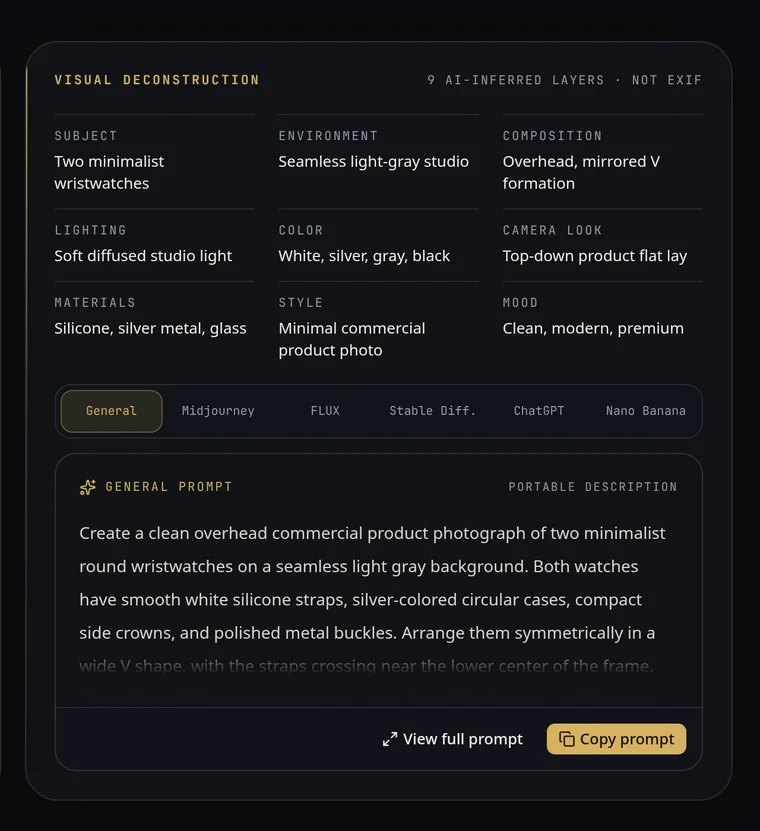
Analysis starts once you add an image, and the result appears split into nine items: subject, environment, composition, lighting, color, camera look, materials, style and mood.
-
Pick the tab for your image generator
Switch between the General, Midjourney, FLUX, Stable Diffusion, ChatGPT Image and Nano Banana tabs to see the prompt for the model you use. All six are included in a single analysis (one credit).
-
Edit and copy
You can rewrite the prompt right there. When it's ready, copy it with "Copy prompt" and paste it into your image generator. If you are signed in, the result and your edits are saved to History.
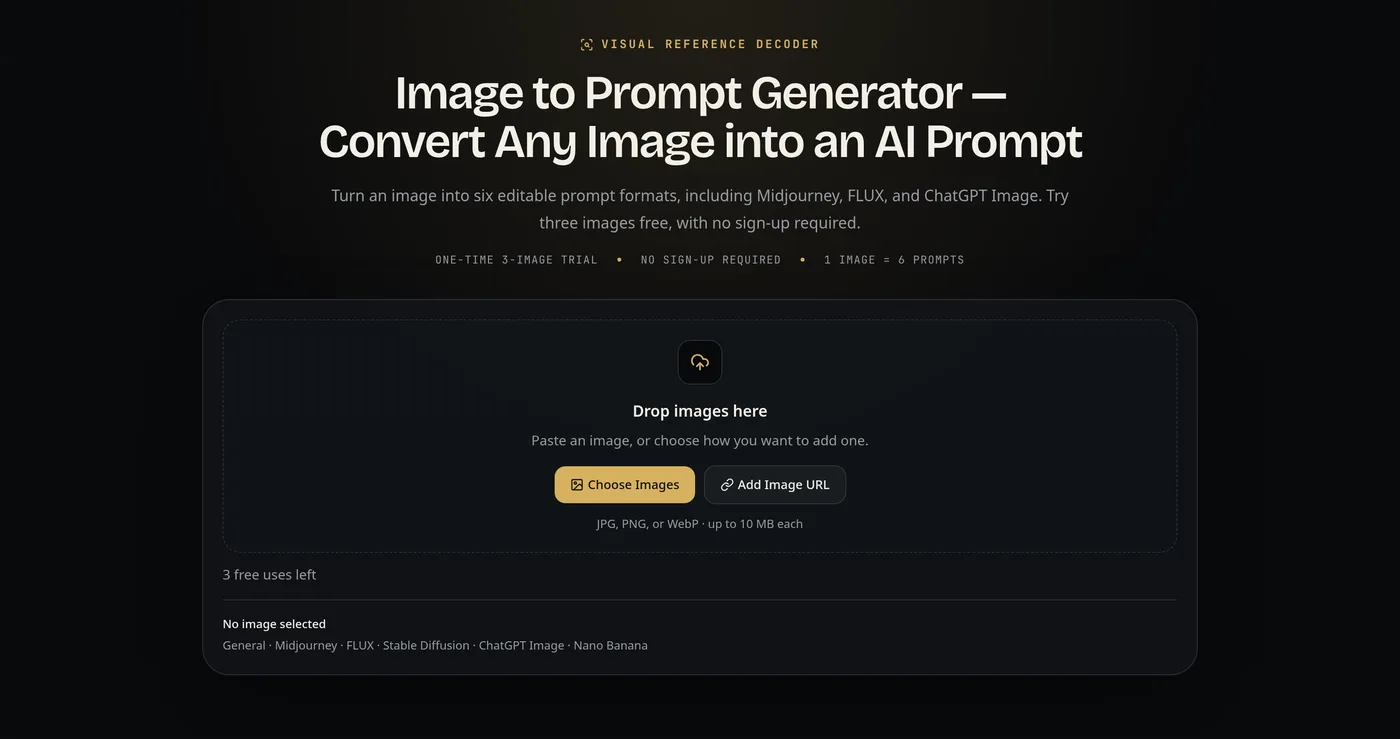
Source: Image to Prompt official site (same for the screenshots below)
The same image, rewritten in the style each model understands
Different image generators respond best to different prompt styles: Midjourney likes short strings of directions plus parameters, Stable Diffusion likes separated tag-like elements, and ChatGPT Image and Nano Banana like written briefs.
Based on one analysis, Image to Prompt writes six prompts independently to match these differences. In the official example, the same product photo of wristwatches becomes a direction with --ar 4:5 --style raw parameters for Midjourney, a comma-separated list of elements for Stable Diffusion, and a written brief for ChatGPT Image describing what to show, how to place it and what to leave out.
The nine analysis items stay on screen, so you can compare which element went where in the prompt as you refine it.
Features
01Analyzing the image
Puts what can be read from the image into words across nine aspects.
- Nine-item analysis — subject, environment, composition, lighting, color, camera look, materials, style and mood
- Three ways to add images — file upload, clipboard paste and public image URLs
- AI Image Analyzer — a separate tool for when you only want the analysis, without prompts
02Writing prompts
Creates six prompts together from a single analysis.
- General — a portable description you can take to any tool
- Midjourney — concise art direction with parameters
- FLUX — spatial language for objects, actions and relationships
- Stable Diffusion — structured, separated detail
- ChatGPT Image — a written brief for generation or editing
- Nano Banana — precise instructions defining reference roles, what to preserve and what to edit
03Refining and keeping
Polish the results and come back to them later.
- Prompt editing — rewrite on the spot before copying
- History — when signed in, save and compare results and edits
- Batch analysis — on the Pro plan, analyze multiple images at once
Pricing
| Plan | Price | Credits | Main contents |
|---|---|---|---|
| Trial (no sign-up) | Free | 3 images | Once per browser. Does not refill daily |
| Free (account) | Free | 5 credits (granted once on registration, never expire) | Six prompt formats, History. One image at a time |
| BASIC | $4.99 (one-time) | 300 credits (never expire) | No auto-renewal. One image at a time |
| Pro | $9.90/month | 1,000 credits per month (expire at period end) | Unlimited-size batch queues, saved History and edits |
(Based on the official pricing page as of October 8, 2026. Pro is shown as 50% cheaper when billed yearly.)
Each image analysis uses one credit, and all six prompt formats are included in that one credit. Payments are handled by Creem as merchant of record. According to the terms, consumed credits are non-refundable, while duplicate charges and similar issues are handled individually via support.
How your images are handled
Only upload images you have the right to use. Avoid confidential material or other people's work used without permission.
What to know about accuracy
The official site explains accuracy as follows.
- Accuracy depends on how clear and detailed the reference is. The tool infers and describes visible elements; it does not recover the image's original prompt
- Camera descriptions such as "85 mm lens" or "shallow depth of field" are inferred from appearance, not read from EXIF metadata
- Using the generated prompt does not guarantee an identical image, because each image generator interprets prompts differently
It is best seen not as a tool to reproduce an existing work, but as one that translates the direction of a reference image into words as a starting point for your own work.
How it differs from AI image generators
| Aspect | Image to Prompt | Midjourney | Stable Diffusion | FLUX |
|---|---|---|---|---|
| Role | Creates prompts from images (does not create images) | Image generation service | Image generation model | Image generation model |
| Input | Reference image | Text prompt (reference images also possible) | Text prompt | Text prompt |
| Output | Six text prompts | Images and video | Images | Images |
| How they combine | Creates prompts for each tool | Paste Image to Prompt's Midjourney version | Paste the Stable Diffusion version | Paste the FLUX version |
Image to Prompt does not replace an image generator; it is a tool for working out what to ask and how, one step before. People who create images with Midjourney, Stable Diffusion, FLUX and similar tools use it to save the effort of turning the nuances of a reference image into a prompt.
FAQ
Q. Is Image to Prompt free?
A. Yes. You can try up to three images per browser without signing up, and registering grants five credits once. Neither refills daily. For continued use, choose the one-time BASIC pack ($4.99 for 300 credits) or the monthly Pro plan ($9.90 for 1,000 credits a month).
Q. Is it available in Japanese?
A. The interface is English only, and the generated prompts are in English too. Since you just add an image and press a button, little English is needed to operate it.
Q. Which image generators does it support?
A. It creates six prompts: General plus versions for Midjourney, FLUX, Stable Diffusion, ChatGPT Image and Nano Banana. Image to Prompt does not generate images itself, so you paste the prompts into each tool.
Q. Can I recreate the original image exactly?
A. Not necessarily. The official site explains that it infers and describes visible elements and does not recover the original prompt.
Q. Can I use the generated prompts commercially?
A. Yes, in personal or commercial work, subject to the rights of the reference image and the terms of the image generator you use the prompt with.
The information on this page is based on what was published on the official site as of October 2026. Please check the official site for the latest specifications and pricing.