ImageFX
: How to use it, features, and the business problems it solves
Add bookmark
What is ImageFX?
Google's text-to-image tool, now integrated into "Google Flow" (an AI creative studio). Image generation runs on Nano Banana / Nano Banana Pro and video on Veo 3.1 / Gemini Omni. Free to start with a Google account (50 daily credits even on free), with Japanese prompt support. A SynthID watermark is embedded in outputs.
Business problems it solves







About "ImageFX"
ImageFX is now part of "Google Flow." Google has consolidated its image and video FX tools into "Google Flow," an AI creative studio. Visiting the ImageFX URL (labs.google/fx/tools/image-fx) now redirects to Google Flow. Image generation continues via Flow's image models, "Nano Banana / Nano Banana Pro." The following focuses on the current Google Flow.
What is ImageFX (now Google Flow)
ImageFX was Google's text-to-image generation tool. Its capabilities are now integrated into Google Flow, an AI creative studio for video, images, and custom tools, where you generate high-fidelity images and video from text or images. You can start free with a Google account, and Japanese prompts are supported. It has grown from a standalone image generator into a creative environment spanning an AI agent and multiple (image and video) models.
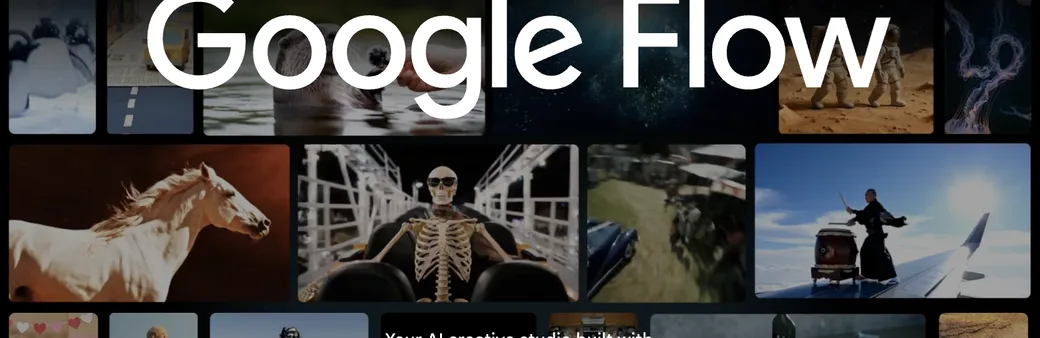
Source: Google Flow (labs.google/fx) (the image below is from the same source)
Image generation runs on "Nano Banana"
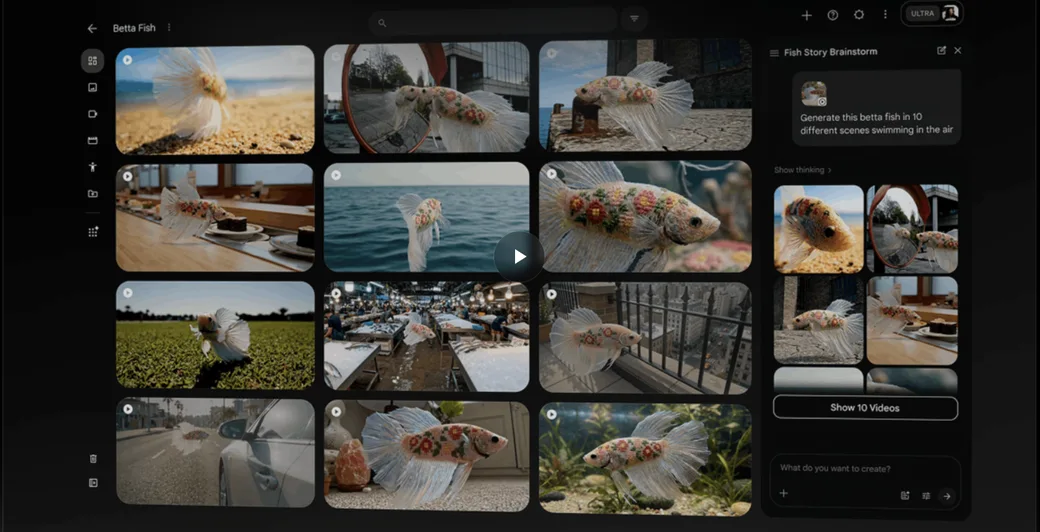
Google's image generation now runs on the image models Nano Banana / Nano Banana Pro. They excel at subject consistency, in-image text rendering, and instruction understanding, and you can go from generation to editing inside Google Flow. Flow also includes an AI agent that works on a project with you and a canvas to organise multiple outputs.
How to use
-
Sign in with a Google account
Go to Google Flow and sign in with a Google account. You can start for free.
-
Enter a prompt
Enter what you want to create as a prompt (English can be more stable). Nano Banana / Nano Banana Pro are used as the image models.
-
Generate images
Run generation to create images from your prompt. You can also tell the AI agent "in a different scene," and so on, to expand variations.
-
Edit and adjust
Use Flow's editing tools to swap parts of a generated image, or adjust size and style.
-
Export
Download finished images and video. A SynthID watermark is embedded in outputs.
Features
01Generate
- Image generation (Nano Banana / Pro) — Strong at subject consistency, in-image text, and instruction understanding
- Video generation (Veo 3.1 / Gemini Omni) — Generate video from text or images too
- AI agent — A creative partner that understands your project and helps generate and iterate
02Edit and refine
- Natural-language editing — Make iterative edits to images and video by conversation
- Flow Tools — Image editor, resizer, shaders, and more — buildable and shareable tools
03Safety
- SynthID watermark — Embeds an AI-origin watermark in generated images
- Japanese support — Japanese UI; Japanese prompts can be tried too
Pricing
Google Flow is free to start with a Google account. For heavier use, a Google AI subscription raises your monthly credits. Amounts are in USD and may vary by region.
| Plan | Monthly | Highlights |
|---|---|---|
| Free | $0 | 50 daily Flow credits. Nano Banana Pro, Veo 3.1, Flow Tools (usage), etc. |
| Google AI Plus | $4.99 | 200 monthly credits. Flow Tools (creation), higher image limits |
| Google AI Pro | $19.99 | 1,000 monthly credits. Also the Gemini app (3.1 Pro), 5TB storage, etc. |
| Google AI Ultra | from $99.99 | From 10,000 monthly credits. 4K upscaling, highest generation limits |
The old ImageFX-era claims of "~30 images/day, no commercial use" no longer match reality. As Google Flow, even the free tier now grants 50 daily credits, and generated images can be used within the terms (a SynthID watermark is embedded). Whether and how commercial use is allowed depends on the plan and terms, so check the [official policies](https://policies.google.com/terms/generative-ai/use-policy) before use.
Pricing and specs are based on official display as of August 2026. Content varies by Google AI subscription tier and region, so check the official site for the latest.
How it differs from other image generation AIs
Google Flow (formerly ImageFX) stands out in that you can start free with a Google account and handle both images and video in one place. Its coverage and ecosystem (integration with Gemini and Google products) differ from tools specialised in image generation alone.
| Aspect | Google Flow (formerly ImageFX) | Image-focused tools |
|---|---|---|
| Scope | Image + video + AI agent | Mainly images |
| Models | Google's own, like Nano Banana / Veo | Each vendor's models |
| Pricing | Free start + Google AI subscription | Varies by product |
| Integration | Integrated with Gemini and Google products | Varies by product |
To compare tools specialised in image generation, Midjourney and Leonardo.Ai; for Google's conversational AI, Gemini; and Whisk, which expands ideas from images, are also worth considering.
FAQ
Q. Can I still use ImageFX?
The standalone ImageFX page now redirects to Google Flow, and its features are integrated into Google Flow. Image generation continues via Nano Banana / Nano Banana Pro inside Flow.
Q. Is it free to use?
Yes. You can start free with a Google account, and even the free tier grants 50 daily Flow credits. For heavier use, a Google AI subscription is available.
Q. Can I use it commercially?
Generated images can be used within the terms, with a SynthID watermark embedded. Whether and how commercial use is allowed depends on the plan and terms, so always check the official policies.
Q. Can I use it in Japanese?
The UI supports Japanese, and Japanese prompts can be tried. Complex phrasing can be more stable with English prompts.
Q. What models are used?
Images use Nano Banana / Nano Banana Pro; video uses Veo 3.1 and Gemini Omni. The lineup is updated over time.
Information on this page is based on what was published on the official site as of August 2026. With the integration of ImageFX into Google Flow, specs, pricing, and the delivery form may change, so check the official site for the latest.