

Julius AI
: How to use it, features, and the business problems it solves
What is Julius AI?
Julius AI is an AI data analysis workspace from Julius AI Inc. in San Francisco. Load a CSV, Excel file, or Google Sheet, or connect databases such as Postgres, BigQuery, Snowflake, and MySQL or ad accounts, then ask questions in plain language: the AI writes and runs code and returns aggregations, charts, and statistical analyses. It can turn results into slides and reports and also builds websites and generates images and video. Free gives 25 daily credits; paid plans start at $20/month (USD, November 2026). The interface is in English, and replies can be set to Japanese.
Business problems it solves


About "Julius AI"
What is Julius AI?
Julius AI is an AI data analysis workspace where you ask questions about spreadsheets and databases in plain language and get analyses, charts, and reports back. You load a CSV, Excel file, or Google Sheet, or connect a database such as Postgres, BigQuery, or Snowflake, then ask something like "Show me the average sales by product category." Julius writes the code, runs it in a cloud execution environment, and returns the result as tables and charts.
The official documentation describes Julius as an AI assistant for statistical analysis, data science, and computation that "uses various large language models, finding the best one for each task, and writes code to analyze your data based on your prompt." Beyond data analysis, the same workspace now also handles research, presentations and reports, website publishing, and image and video generation.
It is operated by Julius AI Inc. in San Francisco, USA (per the privacy policy). The contracting party named in the Terms of Service (updated October 20, 2026) is Caesar Labs Inc., which is also the seller of the iOS app.
25 daily credits (plus 75 on web signup)
$16/month billed annually, in USD
Plus has 16GB
Per the official pricing page and docs
Aggregate, visualize, and run statistical analysis without writing code
The official "Getting Started" guide has four steps: ① upload your data, ② ask what you want to know in plain language, ③ ask for a visualization, and ④ export the results. Because Julius writes and runs Python and other code behind each question, people who cannot write SQL or analysis code can go from aggregating, sorting, and charting to analyses such as ANOVA or training a machine learning model (XGBoost).
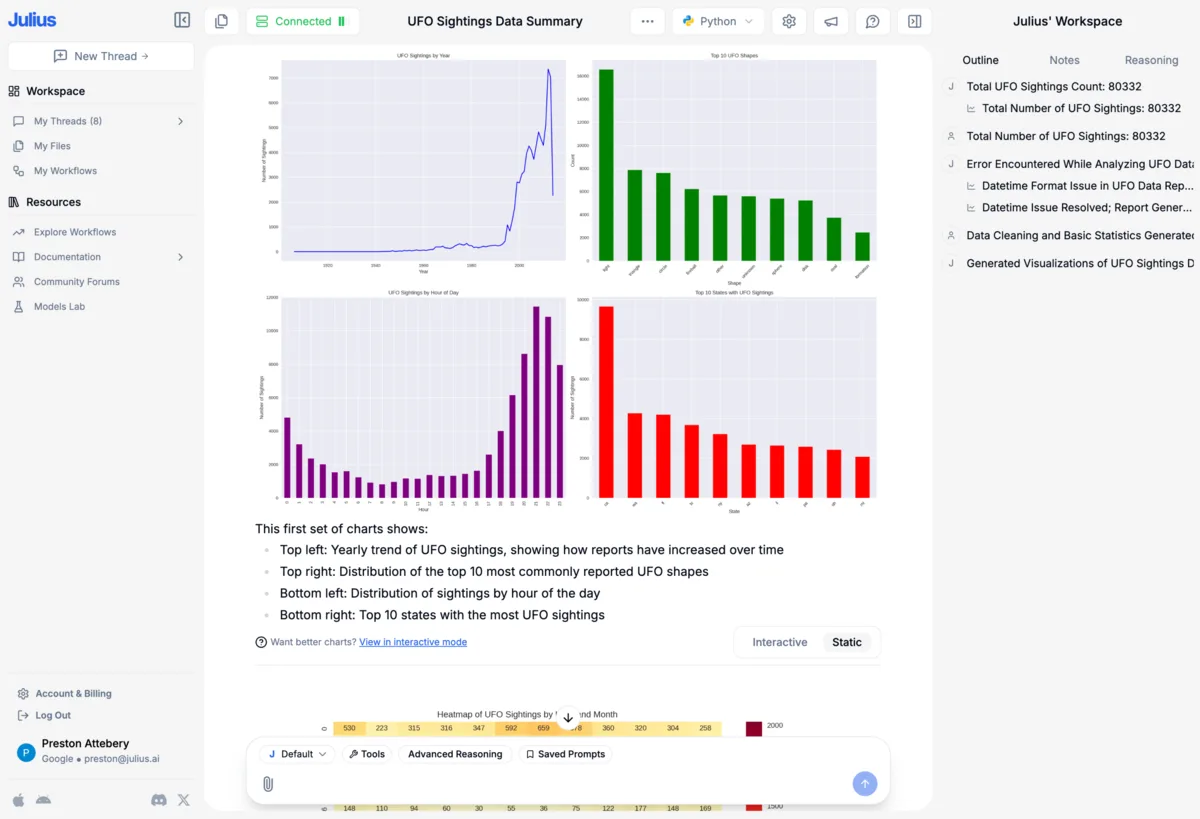
Source: Julius AI official site, "AI for Data Analysis"
- Supported files — Data files such as CSV, Excel (.xlsx, .xls), JSON, Parquet, Feather, SQLite, and SPSS (.sav), plus PDF, text, images, Python, Jupyter Notebooks, R, and SQL files. Google Sheets are connected by pasting a share link
- Multi-sheet Excel — You can refer to individual sheets by name in your prompts
- Large data — The official FAQ says there is no enforced file size limit; the practical limit is what fits in the environment's RAM (up to 32GB). For larger datasets, it suggests connecting a data warehouse such as BigQuery
- Charts — Bar, line, scatter, histogram, pie, and more, drawn with libraries such as matplotlib, seaborn, and plotly. Right-click a chart to copy or save it, and export result tables as CSV or Excel
Connect directly to databases and ad accounts
Instead of uploading files each time, you can use data connectors to query your data where it lives. The official Data Connectors page lists Postgres, BigQuery, Snowflake, MySQL, SQL Server, Supabase, Google Ads, and Meta Ads (Facebook and Instagram), along with Google Drive and OneDrive. You can request other sources through a form.
According to the pricing page FAQ, even for databases with thousands of tables, Julius builds a semantic layer of your schema as you query and selects only the tables relevant to each question. You can also manually filter schemas or provide a data dictionary, and the semantics you define for a data connector can be shared with your team.
Turn analysis results straight into slides and reports
Results can be turned into presentations and reports in the same workspace. The home page shows templates such as board updates, quarterly business reviews (QBRs), investor updates, and campaign updates. According to the pricing page FAQ, if you share your brand guidelines, Julius keeps colors, fonts, and layouts consistent and exports to PPTX, PDF, PNG, or Google Slides. You can also upload existing PowerPoint or Google Slides files to revise them.
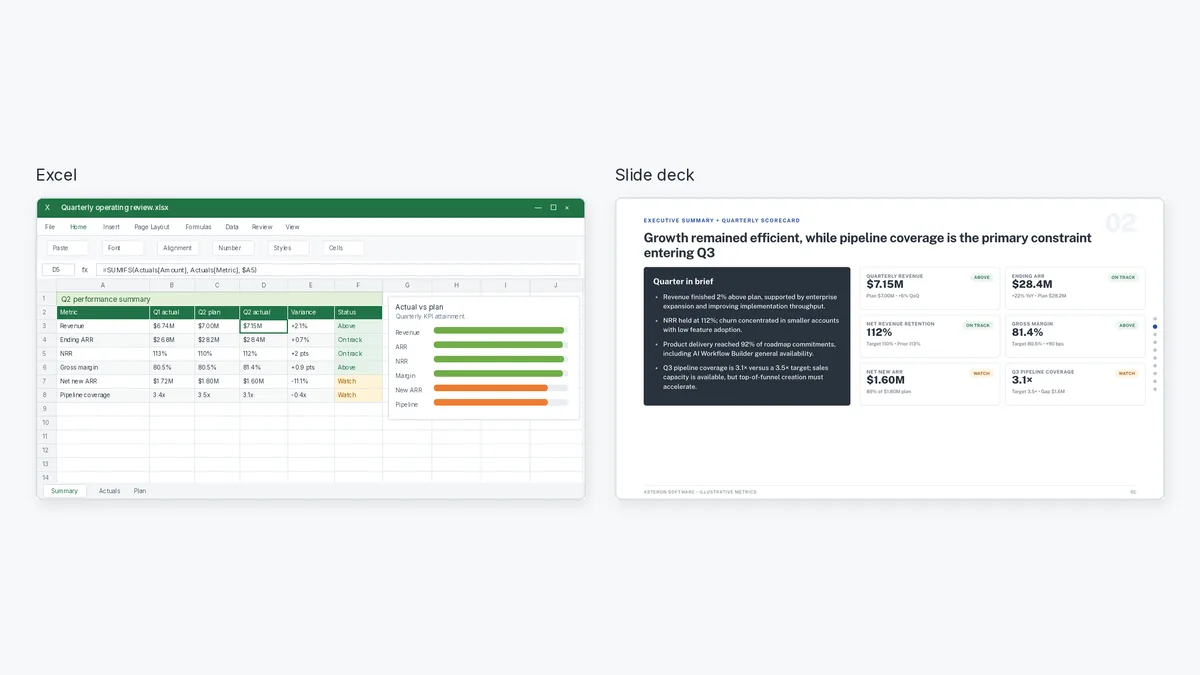
Source: Julius AI official site, "AI for Excel"
Julius also supports building and publishing websites and web apps (paid plans can publish on a custom Julius domain), image generation, video generation, and a browser agent for research.
How to use it
- Create an account Sign up from "Sign Up" on the official site. New web accounts receive 75 one-time welcome credits plus 25 daily credits on the Free plan.
- Load your data Click the "+" icon or drag a file into the conversation. To connect a database, set up a connection from the data connectors screen.
- Ask in plain language Ask things like "Show me the average sales by product category" or "Sort the data by customer age." Julius writes and runs the code and returns the result.
- Visualize Describe what you want to see, for example "Show me a pie chart of sales by region."
- Export and share Ask Julius to export results as CSV or Excel and download them from the link in the chat. Right-click a chart to copy or save it.
Note: The interface is in English. You can change the response language by asking in the conversation, or by saving an instruction such as "Respond in Japanese" under the gear icon → "Customize Julius" (the official docs note this changes Julius's replies, not the language of the app interface).
Features
01Data analysis
Ask questions about files and databases in natural language.
- Execution environment — Writes code for each question and runs it in a cloud container. RAM is 16GB on Plus and 32GB on Pro
- Supported files — CSV, Excel, JSON, Parquet, SQLite, SPSS, PDF, images, Python, Jupyter Notebooks, R, and more
- Charts — Bar, line, scatter, histogram, pie, and more; custom visualizations are also possible
- Scheduled runs — Run recurring analyses automatically. 3 on Pro, unlimited on Business and above
02Data connectors
Connect directly to where your data lives.
- Databases and warehouses — Postgres, BigQuery, Snowflake, MySQL, SQL Server, Supabase
- Ads and storage — Google Ads, Meta Ads, Google Drive, OneDrive, SharePoint
- Semantic Schema Learning — Learns your schemas and business rules as you query and refines how it joins tables. Listed for Business and above in the pricing page comparison table
03Deliverables
Turn analyses and research into finished work.
- Presentations — Builds slides that follow your brand guidelines and exports to PPTX, PDF, PNG, or Google Slides
- Reports and dashboards — Shareable reports built from your data and research
- Websites, images, video — Build and publish websites and web apps, generate images, and create video from text or images. Limited on the Free plan
- Research — Answers with citations, browser agents, and parallel agents (Plus and above)
04Teams
Available on Business and above.
- Collaboration — Invite teammates and work together (up to 50 members on Business)
- Enterprise — For organizations bringing on multiple internal teams. The pricing page FAQ lists SSO, audit logging, and fine-grained RBAC among Enterprise features
Pricing
AI features consume credits. Cost depends on the action type (a simple message versus running an analysis or code), the AI model you choose, and the size and number of steps of the task. The table below reflects the pricing page (USD, checked November 25, 2026).
| Plan | Monthly | Annual (per month) | Credits | Highlights |
|---|---|---|---|---|
| Free | $0 | — | 25 daily (plus 75 on web signup) | Julius Lite models; limited slides, images, video, and websites; Google Drive, OneDrive, SharePoint |
| Plus | $20 | $16 | 2,000/month (24,000 upfront if annual) + 100 daily | Frontier models such as GPT-6.1 Sol and Claude Opus 5.5, 16GB RAM, 7-day file storage, Snowflake, BigQuery, and Postgres connections |
| Pro | $45 | $37 | 5,000/month (60,000 upfront if annual) + 100 daily | 32GB RAM, unlimited parallel agents, 3 scheduled runs, priority email support |
| Business | $450 | $375 | 60,000/month (720,000 upfront if annual) + 100 daily | Teams of up to 50, shared workspace, no table limit in data connections, Semantic Schema Learning, unlimited scheduled runs |
| Enterprise | Contact sales | — | Unlimited | All models, permanent file storage, SSO, audit logs, tailored onboarding |
- Daily credits reset at 00:00 UTC (9:00 a.m. in Japan) and do not accumulate. Usage draws on the daily allowance first
- Monthly credits expire at the end of the billing month, and annual credits granted upfront expire at the end of the annual term; neither rolls over. Purchasing additional credits (top-ups) is not currently supported
- Credits are non-refundable. Subscription refunds are not automatic and are reviewed case by case after you contact team@julius.ai
- Julius does not offer new student or academic discounts. Startup discounts are reviewed on request (a discount is not guaranteed)
- The Business plan description on the pricing page lists "Postgres, BigQuery, Snowflake + more data connectors," while the comparison table on the same page also shows those connections for Plus and Pro. If you are subscribing mainly to connect a database, confirm with Julius before purchasing
How your data is handled
How it differs from other AI data analysis tools and AI workspaces
| Aspect | Julius AI | ChatGPT / Claude (general AI assistants) | Vanna AI | Genspark AI / Manus |
|---|---|---|---|---|
| Main use | Centered on analyzing spreadsheets and databases, through to slides and websites | General conversation: writing, research, coding | An open-source Text-to-SQL framework that generates SQL from natural language | AI agents that handle research through finished deliverables |
| How data comes in | Data connectors to Postgres, BigQuery, Snowflake, MySQL, ad accounts, and more | File uploads and each vendor's integrations (see product pages) | Connects to your own DB and LLM and is embedded in internal apps | See product pages |
| Pricing | Free $0; paid $20–$450/month (USD) | Free plan available; paid monthly plans | OSS is free; Vanna Cloud from $50/month | Free plan available; paid plans are credit-based |
Details for the other products reflect what is on each product page as of their check dates. If your main goal is data analysis and you want to go from questions about files and databases to report slides in one place, Julius AI fits; if you want to embed SQL generation in your own app, Vanna AI fits.
FAQ
The information on this page is based on what was published on the official website as of November 2026. Please check the official website for the latest specifications and pricing.