

Kite
: How to use it, features, and the business problems it solves
What is Kite?
Kite (kite.new) is a design tool where AI agents such as Claude, ChatGPT and Cursor and people design in the same file, on the same canvas. A design is real HTML and CSS, and agents connect through a hosted MCP server (https://kite.new/api/mcp, 61 tools) to make files, draw while you watch, follow your design system and answer your team's comments. Kite runs no model to design and has no AI credits: your agent runs on the plan you already pay for. It has auto layout, components, variables and a pen tool, copies to and from Figma, copies frames as HTML, React or Tailwind, and runs in the browser and as Mac and Windows apps. Pricing: Free (3 files, 200 agent actions a day), Pro $20 per editor/month ($16 billed yearly), Team $35 ($28 billed yearly). The operating company is not disclosed; the founder is Loukman Nacik. The website's top and pricing pages are available in Japanese; the docs are in English (as of November 2026).
Business problems it solves

About "Kite"
What is Kite?
Kite (kite.new) is a design tool where AI agents and people design in the same file, on the same canvas. Agents such as Claude, ChatGPT and Cursor draw into your file while you watch, and your teammates edit the same file at the same time, each with their own pointer. A Kite design is real HTML and CSS, so what an agent writes and what a person draws are the same thing, and you can keep editing it by hand.
Kite itself runs no model to design. Its pricing page puts it as "No AI credits. Bring your agent, pay for people": your agent runs on the Claude, ChatGPT, Cursor or other plan you already pay for, and Kite charges only for the seats of the people who edit files.
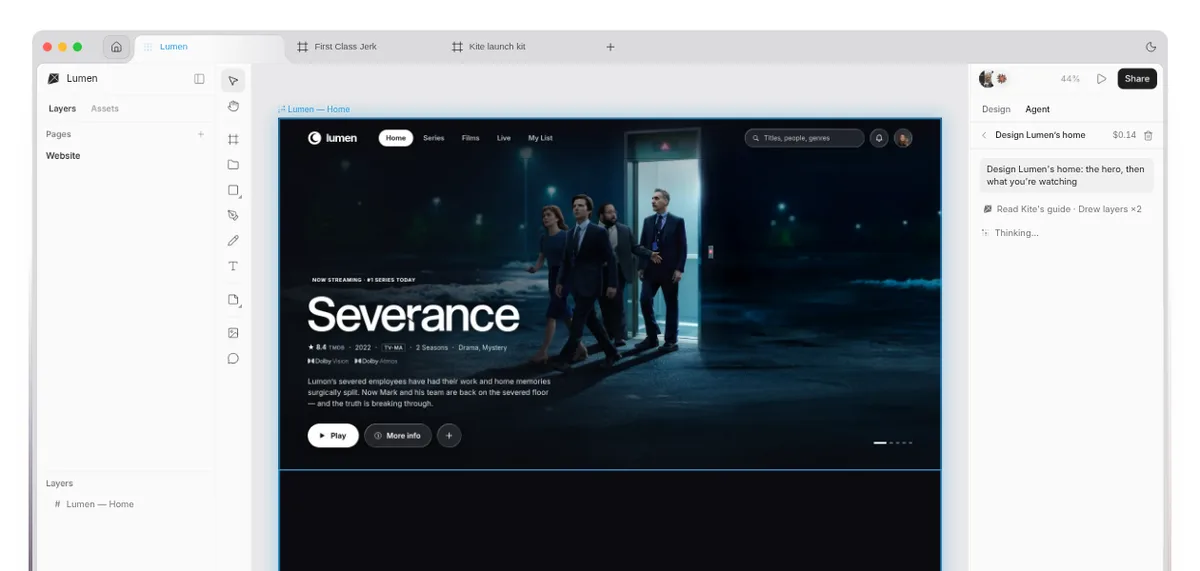
Source: Kite official website (same for the images below)
Note that Kite (kite.new) is not kite.ai. Kite's own FAQ explains that kite.ai is a separate company's AI marketer, and that its prices and features do not apply to Kite.
How to use it
- Create an account Sign up for free from "Start designing" on kite.new. Kite runs in the browser (Chrome, Safari, Firefox and Edge), and there are also apps for Mac (Apple silicon and Intel) and Windows 10 and 11.
- Connect your agent
Claude can add Kite in one click from Kite's page in Claude's connector directory. In other tools, enter
https://kite.new/api/mcpwherever they ask for a connector or MCP server. The first time, a browser window opens: sign in to Kite and click Allow. There is no key to copy. In the Mac and Windows apps, Claude Code, Codex, Cursor and Claude are added in one click with no sign-in. - Ask your agent Tell the agent what you want in its own app, as usual. It makes a Kite file (or opens the one you name), draws into it and gives you the link. While it works, a pill above the canvas shows who is at work and where, such as "Claude is designing Home".
- Finish by hand and ask again in comments What the agent draws is ordinary layers you can edit by hand. To ask for a change, leave a comment that mentions the agent by name, such as "@Claude make this card denser".
A design tool agents can actually draw in
Kite's About page says that today designers paste screenshots into chats, and agents describe designs they can't actually draw. Kite is built not as a chat with a canvas bolted on, or a canvas with a chatbot in the corner, but as one surface where people and agents work on the same thing.
Agents use the tools of Kite's MCP server to read a file, draw by writing HTML, look at the result as a picture to check it, and then say they are finished. According to Kite, there are 61 tools.
The docs have setup steps for Claude, Claude Code, ChatGPT, Codex (CLI and app), Cursor, Gemini, GitHub Copilot CLI, Grok, Manus, Muse, v0, VS Code and Antigravity, and any other MCP client can connect to the same address.
A full design tool for people, too
Kite's website calls it "a real design tool, not a prompt box". It has the tools people need to draw themselves, without handing everything to an agent.
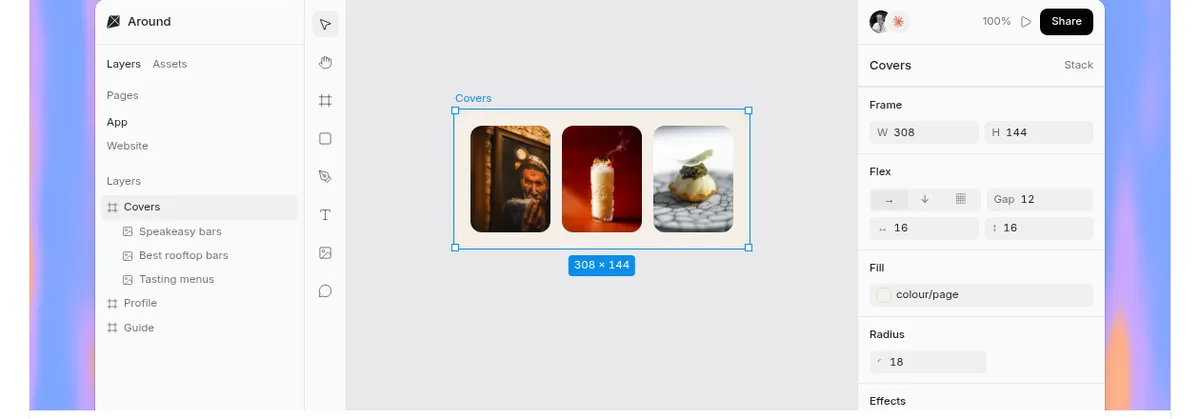
01Editor
From layout to type and effects, everything can be done by hand.
- Layout — Flex (auto layout), CSS grid and constraints. The K key scales a frame and everything in it
- Drawing — Pen, pencil and shapes; combine and outline paths
- Type and fills — Google Fonts, fonts your team uploads and fonts on your computer; gradients, shadows, blurs, shaders and filters
- Components and variables — Components with variants and properties, variables with modes, design systems
02Collaboration
Your team and your agents work in one file at once.
- Live editing — People and agents each have their own pointer, and changes show as they happen
- Sharing and comments — Anyone with the link, or only the people you invite. Viewers can comment, and guests can comment with just a name
- Version history — Save versions and restore any of them (a Pro feature on the pricing page)
03Import and export
Move work to and from Figma and the web.
- Figma — Paste Figma frames in as editable layers, and use "Copy to Figma" to paste Kite frames into Figma
- Kite Capture — A Chrome extension. Click any web page, or part of one, to copy it, and paste it into Kite as frames, text and pictures
- Code and images — Copy a frame as HTML, React or Tailwind. Export PNG, WebP, SVG and PDF, or a whole file as .kite
- DESIGN.md — A DESIGN.md in Google's format comes in with its colours, corners and spacing as variables and its type as text styles (update of November 5, 2026)
In the desktop app, your agent knows which file you have open
The Mac and Windows apps are the same Kite as in the browser, plus a tab for each file, split view, notifications and agents that run on your computer. The app has its own local MCP server, and the agent knows which file you have open, so you can ask for a change without sending a link. In Kite for Mac, a request you leave in a comment is taken on by Claude Code or Codex on your Mac, and a Mac notification tells you when it's done.
According to the changelog, the Windows app was added in the update of October 23, 2026. The download page lists version 0.1.18 for both Mac (Apple silicon and Intel) and Windows (x64) (as of November 2026).
Pricing
| Plan | Billed yearly (per month) | Billed monthly | Main features |
|---|---|---|---|
| Free | $0 | $0 | Unlimited editors and viewers, 1 workspace with 3 files, 200 agent actions a day, everything in the editor, connect any agent |
| Pro | $16 per editor | $20 per editor | Everything in Free, unlimited files and workspaces, unlimited agent actions, version history, your feedback first in line |
| Team | $28 per editor | $35 per editor | Everything in Pro, SSO and SAML, admin controls, custom contracts, dedicated support and onboarding (contact hello@kite.new) |
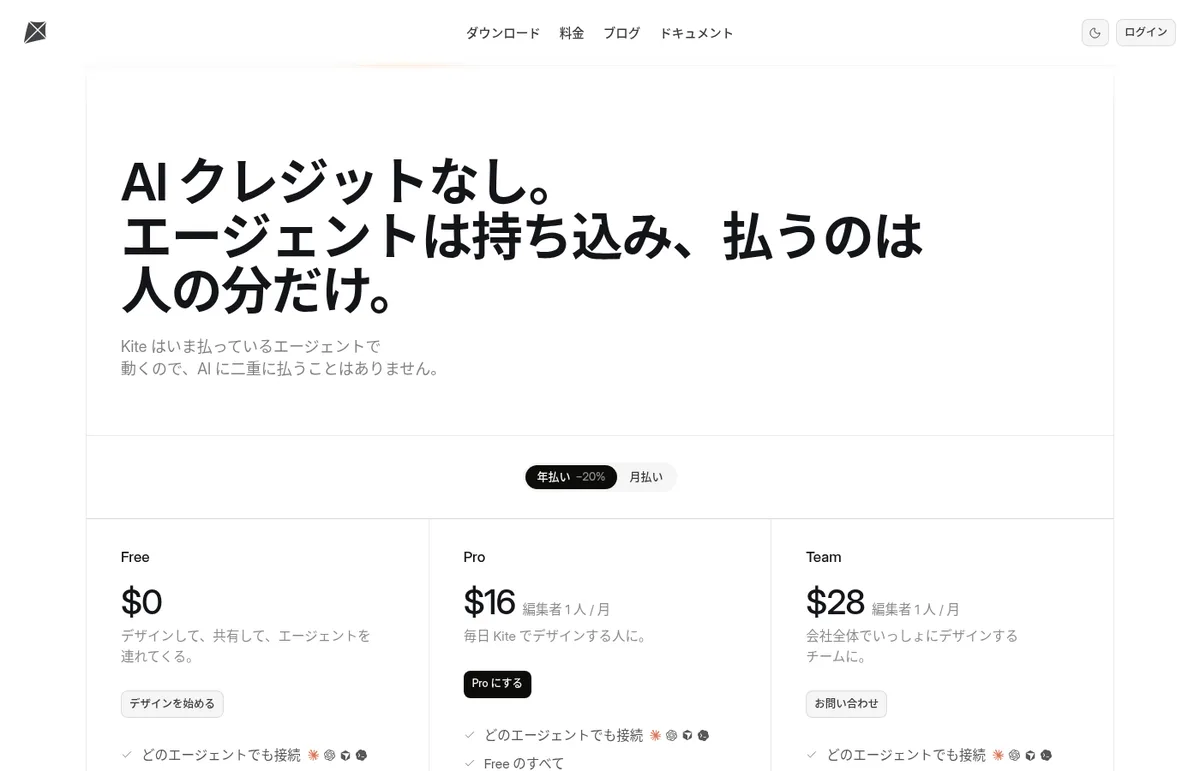
- You pay per editor seat. Viewers are free on every plan
- There are no AI credits. You pay for Claude, ChatGPT, Cursor or other agents separately, to their providers
- Prices are in US dollars. The pricing page and terms do not say whether prices include tax
(As of November 2026, from the official pricing page)
How your data is handled
According to the privacy policy (updated November 2, 2026), your design files are private to you and your workspace until you share them, and Kite does not read them, train on them or sell them. When you connect an agent, Kite receives only what the agent sends to Kite's tools, never your conversation with it. An agent's sign-in token lapses after 7 days, the agent can renew it for up to 90 days, and disconnecting it in Settings under Agents stops it at once.
To see how Kite is used, sessions are recorded while you are signed in, with every text masked and every picture hidden, according to the policy.
How Kite differs from other AI design tools
| Product | Type | How AI is handled | Pricing (guide) |
|---|---|---|---|
| Kite | A design canvas where agents and people draw in the same file | Bring your own agent (MCP). No AI credits in Kite | Free; Pro $20 per editor/month ($16 billed yearly) |
| Figma Make | Figma's prompt-to-code tool | Generates with Figma's AI credits | Starter free; Professional full seat ¥2,400/month (billed yearly) |
| Stitch | Google's AI UI design and front-end generator (beta) | Generates UI and code with Gemini | Free |
| Onlook | A visual editor for React and other web apps | Generates and edits apps with built-in AI | Open-source version is free |
The details for other products are as of the check date on each product page.
Most tools that generate designs with AI use their own AI and credits. Kite suits people who want the agents they already use, such as Claude Code or Cursor, to draw on the same canvas as people.
FAQ
Q. Is Kite free? Yes. The Free plan gives you 1 workspace with 3 files and 200 agent actions a day, with unlimited editors and viewers and everything in the editor.
Q. Do I pay separately for AI? Kite has no AI credits and runs no model to design. Your agent runs on the Claude, ChatGPT, Cursor or other plan you already have, and you pay that provider for it.
Q. Which agents can I use? Any MCP client that supports streamable HTTP and OAuth can connect. The official docs have steps for Claude, Claude Code, ChatGPT, Codex, Cursor, Gemini, GitHub Copilot CLI, Grok, Manus, v0, VS Code and others.
Q. Can I use my Figma work? Yes. You can paste Figma frames into Kite as editable layers, and copy Kite frames with "Copy to Figma" to paste them into Figma as layers.
Q. Is it available in Japanese? The official website's top page and pricing page have Japanese versions. The docs are in English.
Provider
Kite is built by its founder, Loukman Nacik (according to the structured data on the official website and its top page). The terms of use, privacy policy and About page do not give the name or address of an operating company. The contact address is hello@kite.new.
The information on this page is based on what was published on the official website, pricing page, docs, changelog and privacy policy as of November 2026. Features and prices may change, so please check the official website for the latest information.