

Stitch
: How to use it, features, and the business problems it solves
Add bookmark
What is Stitch?
Stitch is an AI UI design and frontend generation tool from Google (beta). From text prompts or images, it generates high-quality UI designs for mobile and web along with the matching frontend code in minutes, and it supports refining designs through conversation as well as exporting to Figma. It is powered by Google's Gemini models under the hood, is free to use, and supports Japanese-language prompts.
Business problems it solves




About "Stitch"
What is Stitch
Stitch is an AI UI design and frontend generation tool from Google (in beta at the time of writing). Simply describe the app or service you want to build in words, or hand it an image, and it generates high-quality UI designs for mobile and web, along with the matching frontend code, in a matter of minutes. Even if you're not a designer or engineer, you can take an idea all the way to a working screen in one go.
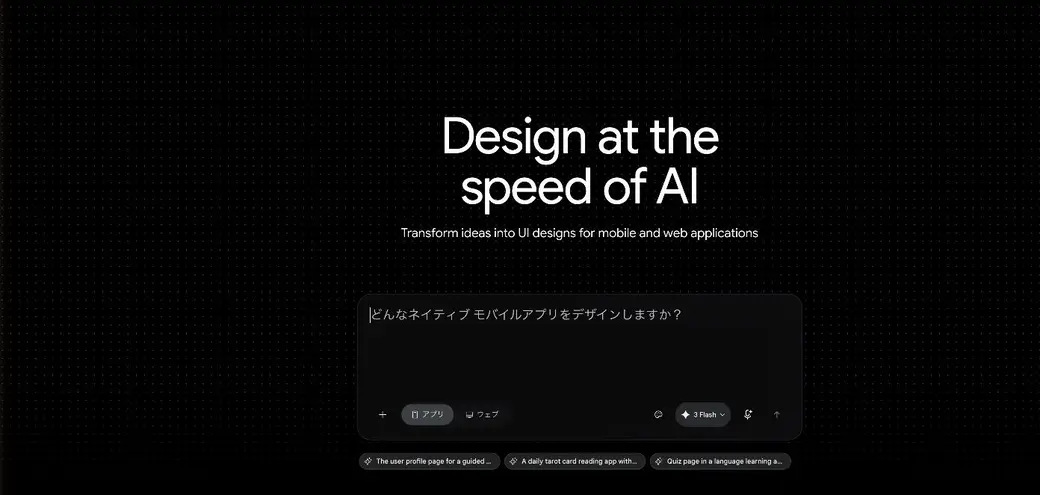
Source: Stitch official site
How to use
It all starts with describing the screen you want to build, in words or with an image.
Choose app or web
Select whether you're building for a mobile app or for the web.
Enter a prompt or image
Describe the screen you want in text, or hand over a sketch or reference image.
Generate the UI and code
In minutes, you get a high-quality UI design and the matching frontend code.
Refine and export
Fine-tune the design through conversation, then move toward implementation by copying the code or exporting to Figma.
Stitch's strength is how dramatically it shortens the first draft of turning an idea into a screen.
Key features
01Generate UI from text and images
Beyond text instructions, you can build designs from hand-drawn sketches or images of reference UIs. It's faster than starting from scratch and lets you give a direction concrete form.
02Support for both app and web
It handles both native UIs for mobile apps and UIs for web apps, so you can switch to suit your use case.
03Output frontend code
It generates not just the design but the matching frontend code, so you can move straight from design into implementation.
04Refine by conversation and export to Figma
After generation, you can revise the design through conversation and export it to Figma to bring it into your existing design workflow. Under the hood, Google's Gemini models power it, and you can choose between a standard mode and a higher-quality experimental mode.
Pricing
Stitch is free to use (a Google Labs beta).
Pricing information is current as of August 2026. Stitch is offered in beta and is free to use. The underlying models come in a standard mode and a higher-quality experimental mode, and there is a cap on the number of generations per month (the cap varies by mode and is subject to change). Check the [official site](https://stitch.withgoogle.com/) for the latest availability and limits.
How it differs from other AI UI tools
Stitch's distinctive appeal is that it's a Google-made tool that produces both UI designs and frontend code from text and images, and can hand off to Figma. It specializes in getting design off the ground fast.
| Aspect | Stitch | Other AI UI / code generators |
|---|---|---|
| Provider | Google (Google Labs) | Various vendors |
| Output | UI design + frontend code | Varies by tool |
| Input | Text + images (sketches OK) | Often text-centric |
| Integration | Export to Figma | Vendor-specific |
| Pricing | Free (beta) | Free tier + paid is common |
If you want to build out a working web app from a prompt, v0 is a close fit; for design templates and banner creation, Canva is nearby. When you want to go from an idea to a UI draft and implementation code in one sweep, Stitch is a strong choice.
FAQ
Q. Is Stitch free?
Yes. It's free to use as a Google Labs beta. The underlying models have a monthly cap on the number of generations, which varies by mode.
Q. Does it output code too?
Yes. In addition to the UI design, it generates the matching frontend code and supports export to Figma.
Q. Can I create designs from images?
Yes. Hand it a hand-drawn sketch or an image of a UI you want to reference, and it can generate a design based on that.
Q. Can I use it in Japanese?
Yes. Beyond writing prompts in Japanese, the working interface itself is localized — the prompt field's guidance text and the app/web toggle render in Japanese. Parts of the landing page, such as the headline and suggestion chips, remain in English.
The information on this page is based on what was publicly available on the official site as of August 2026. Because Stitch is offered in beta, its features, availability, and limits are subject to change. Check the Stitch official site for the latest.



![[2026 Edition] Must-Have AI Tools for Web Designers: 12 Picks | From No-Code Site Building and Asset Creation to Banner Generation and Copywriting](/_next/image?url=%2Fimages%2Farticles%2Fai-web-design-tools.png&w=3840&q=75 "[2026 Edition] Must-Have AI Tools for Web Designers: 12 Picks | From No-Code Site Building and Asset Creation to Banner Generation and Copywriting")