

Figma Make
: How to use it, features, and the business problems it solves
Add bookmark
What is Figma Make?
Figma Make is a prompt-to-code AI tool from Figma, Inc. From instructions in the AI chat or existing Figma designs, it generates working prototypes, web apps, and interactive UI as code, which you can refine with "point and edit" or the code editor and publish at a dedicated URL. Make kits bring in your design system, and Payload and Supabase add databases and authentication. It's included in Figma's Full seat and can be tried on the free Starter plan (150 AI credits per day). In Japan, a Professional Full seat costs ¥2,400/month billed annually or ¥3,000/month billed monthly (as of November 2026).
Business problems it solves


About "Figma Make"
What is Figma Make?
Figma Make is a prompt-to-code AI tool from Figma, Inc., the company behind the Figma design tool. Describe what you want in the AI chat, or attach an existing Figma design, and it generates working prototypes, web apps, and interactive UI as code. According to Figma's help center, it was released as an open beta at Config 2025, Figma's annual conference.
Everything it generates is backed by code and can also be edited visually. In the words of the official site, you can move freely "between code and canvas": build the overall shape with prompts, then fix the details by clicking. Because it can also build a backend with a database, APIs, and authentication, you can go beyond a look-only mockup to a prototype that holds real data.
How to use it
- Create a Make file In Figma's file browser, open Drafts and choose [Make] from [+ Create] in the top right. You create it the same way as any other Figma file.
- Describe what you want in the AI chat Besides typing what you want, you can attach frames and components from Figma Design, reference images, documents, and data files. With "plan mode," you can clarify your goal and produce an editable plan before generation starts.
- Refine while watching the preview Check the behavior in the preview on the right. Use "point and edit" to select an element and change its color, spacing, or text style directly, or ask the AI to change just that element. You can also rewrite the code yourself in the code editor.
- Share and publish You can share the preview with your team or people outside your organization, publish it as a website at a dedicated URL, or assign your own domain. On the Starter plan, you can publish to the public web only if you also publish to the Figma Community.
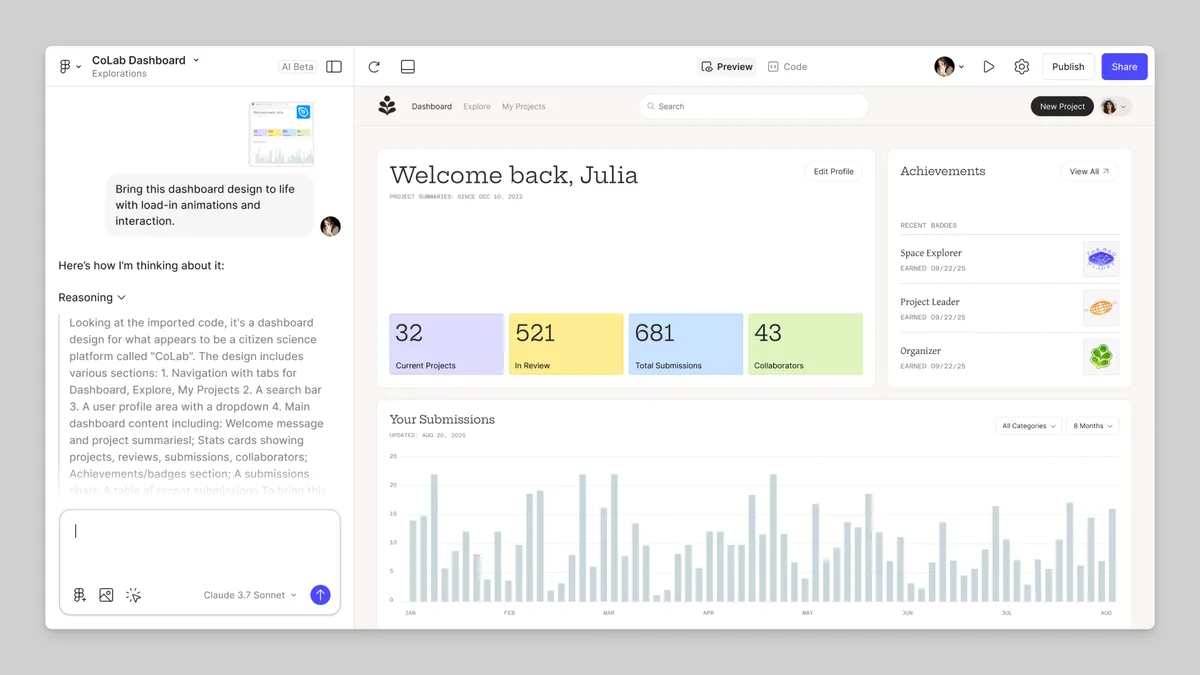
Source: Explore Figma Make | Figma Help Center, Figma Make official site (the same applies to the screenshots below)
Your design system becomes the starting point for generation
Figma Make doesn't start only from a blank prompt. The official site says you can "start from a codebase or design assets, or from scratch."
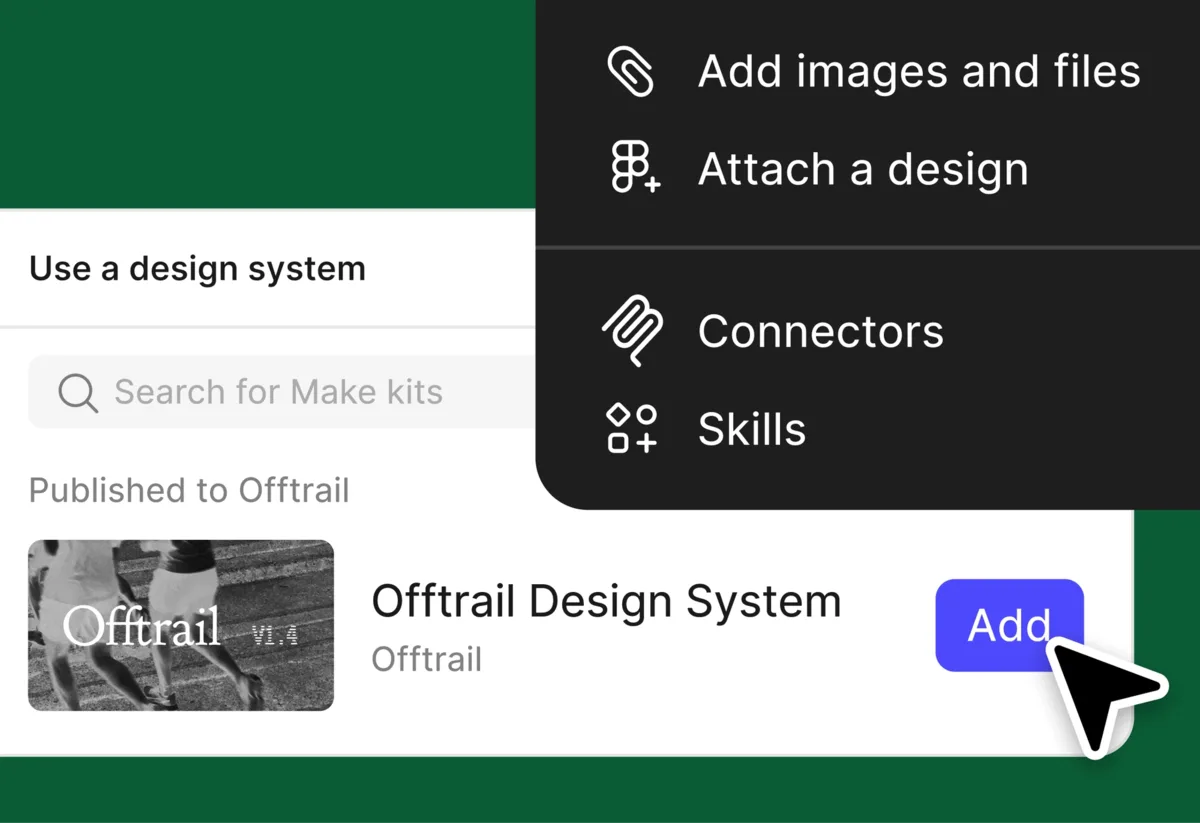
- Attach designs — Attach existing Figma Design frames or components to your prompt and generate based on how they look
- Styling context from libraries — Pull color and text styles from Figma libraries (team libraries are a paid feature, so this isn't available on the Starter plan)
- Make kits — Package your design system as reusable AI context. You can bring it in from npm packages and link Figma frames and PDFs as well
The more a company's design team has already organized its design system in Figma, the more closely the output follows its own components and colors. That's the advantage of living inside a design tool.
Fix details by clicking, finish on the canvas
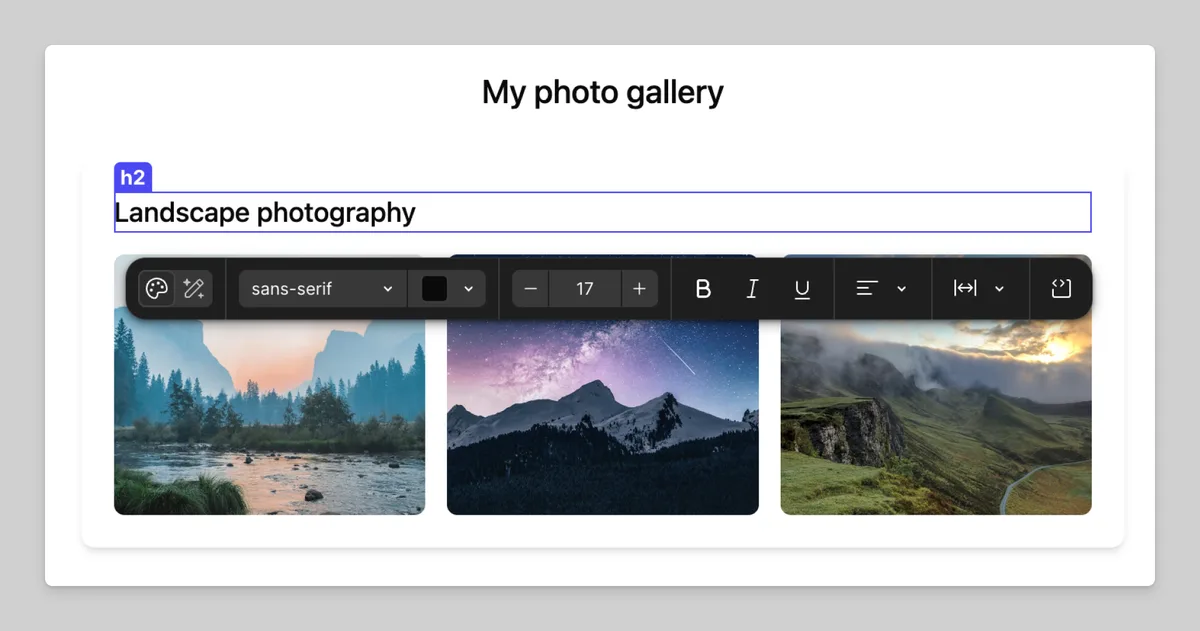
Some details are faster to fix by hand than by rephrasing a prompt again and again. Figma Make covers this with tools.
With point and edit, selecting an element in the preview lets you change its padding, margin, color, and text properties directly, depending on the element type. You can also add annotations to several elements and send all the changes to the model at once.
You can also copy the Make preview as design layers and paste it onto the Figma Design canvas to edit. Designers can finish what was generated with the tools they already use.
Not just the look: data and login, too
Figma Make can build the backend as well as the frontend.
- Payload backend — Natively builds a Payload backend with a database, APIs, authentication, and an admin panel, so content and data live in the same place as the design (presented on the official site as a "built-in CMS powered by Payload")
- Supabase connection — Add user authentication, store user data, connect private APIs, and more
- Environment variables — Manage secrets such as API keys and settings in one place and use them in Make
- Make connectors (MCP) — Connect external tools to bring PRDs, tickets, and other product documents in as context for apps and prototypes. You can also publish custom connectors for use within your organization
Features
01Create
Generate something that works from prompts and existing material.
- Prompting the model — Generate working prototypes and web apps from prompts
- Bringing in designs, adding images and files — Attach Figma Design, reference images, documents, and data files
- Plan mode — Clarify the goal and build a structured plan before generation
- Voice prompts — Describe your idea by speaking
- Templates — Start from Make files published within your organization
02Refine
Finish what was generated with both AI instructions and hands-on edits.
- Point and edit, annotations — Edit selected elements directly, or send instructions in batches
- Code editor — Edit the generated code directly and add your own
- Version history — Restore earlier versions
- Copy as design layers — Paste into Figma Design and edit
- Custom skills — Package frequently used workflows as reusable sets of instructions
03Connect
Hand your design system and external data to generation as context.
- Make kits, library styling context — Bring in your design system
- Payload, Supabase — Add a database, APIs, and authentication
- Make connectors (MCP) — Pull in documents, tasks, and data from external tools
- Environment variables — Manage secrets and settings centrally
04Share and publish
Show what you built and put it out as a website.
- Sharing — Share with separate view-only and edit permissions
- Publishing — Publish to the public web with a dedicated URL or a custom domain
- Password protection — Set a password to narrow who can see your work
- Make on mobile — Access and build with Make from a mobile device
The official site lists "Make for local codebases (beta)," which lets you use Make in your own codebase and ship straight to production, as "coming soon" (as of November 2026).
Pricing
Figma Make isn't sold on its own; it's included in Figma's plans and seats. The Full seat gives access to every Figma product, including Figma Make. AI features use each seat's "AI credits," and for agentic features like Figma Make, consumption varies with the complexity of the request and the model used.
| Plan | Full seat (includes Figma Make) | AI credits on a Full seat | Notes |
|---|---|---|---|
| Starter | Free | 150 per day, up to 500 per month | You can try Make. Collaboration is limited to 3 shareable Make files, team library styles can't be imported, and publishing requires also publishing to the Figma Community |
| Professional | ¥2,400/month (annual) / ¥3,000/month (monthly) | 3,000 per month | Unlimited files and projects |
| Organization (Business) | ¥8,300/month (annual) | 3,500 per month | Make is available when AI features are turned on |
| Enterprise | ¥13,600/month (annual) | 4,250 per month | Admins can turn AI features on or off |
- Dev and Collab seats (e.g., ¥1,800 and ¥450 per month on Professional, billed annually) and viewers get 500 AI credits per month. These seats can try Make inside drafts, but only Full seats can share and publish Make files
- When credits run short, admins can buy more AI credits by subscription or pay-as-you-go, shared across the team. The price of additional credits is shown in the admin dashboard
- Credits included with a seat reset monthly and don't roll over
- Prices are from Figma's Japanese pricing page (shown in yen). Consumption tax and other taxes are calculated based on the billing address (Figma Help, "Guide to billing at Figma")
Pricing is based on the official pricing page as of November 2026 and the pages it links to: How AI credits work and Figma Make FAQ.
How it differs from other AI app and UI builders
| Product | Provider | Best for | Entry price |
|---|---|---|---|
| Figma Make | Figma | Building working prototypes and web apps on top of your Figma designs and design system | Starter free; Full seat from ¥2,400/month |
| v0 | Vercel | Building full-stack web apps from natural language and publishing on Vercel | Free $0 / Plus $30 |
| Lovable | Lovable | Generating web apps with frontend and backend, and publishing them as is | Free (5 credits per day) / Pro $25 |
| bolt.new | StackBlitz | Generating editable code in the browser, including DB, auth, and hosting | Free / Pro from $25 |
| Stitch | Generating UI designs and frontend code from prompts or images, and exporting to Figma | Free (beta) |
Other products' columns reflect what's on each product page as of when it was checked.
The biggest difference is that it lives inside Figma. v0, Lovable, and bolt.new focus on building and publishing apps, while Figma Make generates based on the designs, libraries, and design systems a design team already has, and lets you bring the result back into Figma Design to finish. Teams already using Figma can also start within their Full seats without signing up for another tool.
- To brainstorm designs for free, try Stitch (generated UI can be exported to Figma)
- To go all the way to deployment, try v0, Lovable, or bolt.new
- To edit an existing React app visually, try Onlook
Track record and reputation
The Figma Make site features named comments from people who build products.
"Figma Make has dramatically shortened the process from idea to finished feature, and I can't imagine working without it."
— Brian Muehlenkamp, Product Manager, Ticketmaster
"Tools like Figma Make have let us prototype quickly. It used to take six weeks to go from an idea to something tangible; now it takes just a few hours."
— Vishal Kapoor, SVP of Product, Affirm
The same page shows logos such as Airbnb, Atlassian, Dropbox, Duolingo, GitHub, Microsoft, Netflix, Slack, Stripe, and Zoom under "The products you love are designed in Figma" (these are listed as users of Figma overall).
The quotes above are our translations of the comments on Figma's Japanese site.
FAQ
Q. Can I use Figma Make for free? You can try it on the Starter plan (free). There are limits: 150 AI credits per day and up to 500 per month, collaboration on up to 3 shareable Make files, and publishing only when you also publish to the Figma Community. For ongoing use, a Full seat on a paid plan is the baseline.
Q. Can I subscribe to Figma Make alone? No. Figma products can't be purchased individually; you choose a plan and seats. Figma Make is included in the Full seat, and the same seat also gives you Figma Design, Dev Mode, FigJam, Figma Slides, and more.
Q. Can I publish the apps I build? Yes. The owner of a Make file and people with edit access can publish it to the public web at a dedicated URL, and you can also assign your own domain. Visitors to the published site can't access the original Make file or conversation. On the Organization (Business) plan, admins can turn publishing on or off for the organization.
Q. Can I edit or export the generated code? You can edit it directly in the code editor and add your own code. Full seats can also export code (Dev, Collab, and view seats can do so only inside drafts).
Q. Can I use it with my own codebase? As of November 2026, using Make in a local codebase (beta) is listed as "coming soon." For now, you bring in your design system through npm packages and Make kits.
Q. Is the data I enter used to train AI? In Figma, team and organization admins can manage AI features and content training settings (Help: "Manage AI settings and content training for a team or organization"). Check your admin's settings before working with internal designs.
Figma Make is one of Figma's products
Figma Make isn't a standalone app; it's one product within the Figma platform. With the same Full seat you can use Figma Design for design, Dev Mode for developers, FigJam for whiteboarding, Figma Slides for presentations, Figma Draw for illustration, Figma Sites (beta) for publishing websites, Figma Buzz (beta) for producing on-brand assets at scale, Figma Motion (beta) for animation, and more. AI credits are shared across these AI features.
The information on this page is based on what was published on the official site, pricing page, and help center as of November 2026. Features and pricing may change, so please check the official site for the latest information.