Runcrate
: How to use it, features, and the business problems it solves
Add bookmark
What is Runcrate?
A GPU cloud for AI developers and AI agents from Aeonmind LLC. Rent 20 GPU models such as H100, A100 and RTX 4090 by the hour (most billed by the second), and call 223 models through an OpenAI-compatible inference API. Its MCP server lets Claude Code, Codex and Cursor launch GPUs. Pay as you go from a prepaid balance (from $20, no monthly fee).
Business problems it solves

About "Runcrate"
What is Runcrate?
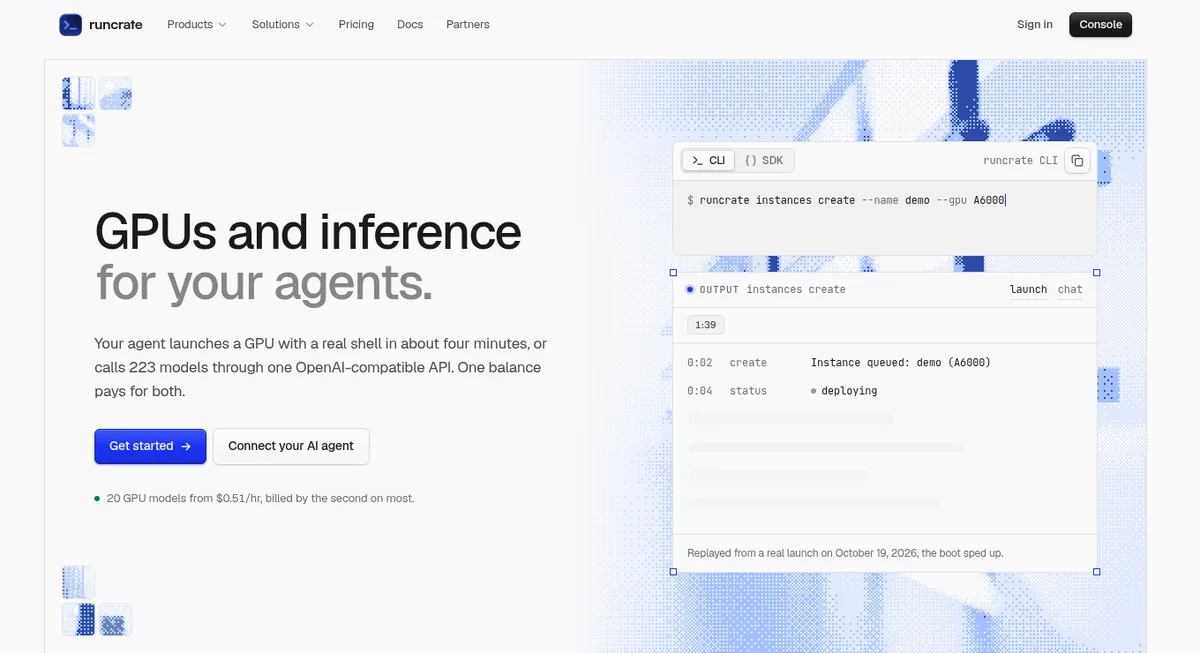
Runcrate is a GPU cloud for AI developers and AI agents, provided by Aeonmind LLC. With one account and one prepaid balance, you can rent any of 20 GPU models (H100, A100, L40S, RTX 4090 and more) by the hour as "instances", and call 223 models through an OpenAI-compatible "inference API".
What sets it apart is that it is built for AI agents as well as people. Add its MCP server to Claude Code, Codex, Cursor and other tools with a single line, and the agent can launch a GPU, run training or inference commands, and shut the machine down when it is done. "Jobs" stop the machine and its billing as soon as the command ends, and monthly budgets per environment keep agents from leaving GPUs running or overspending.
as of October 21, 2026
text, image, video, audio
booting is not billed
no monthly fee or minimum spend
Source: Runcrate official website (the same applies to the screenshots below)
Pricing
There is no monthly fee. Usage is deducted from a prepaid balance (credits). One credit equals one US dollar, and top-ups start at $20. GPUs, the inference API and storage are all paid from the same balance.
The hourly GPU rate is "the lowest live rate", which changes with stock and supplier. The lowest per-GPU hourly rates we checked on October 21, 2026 on the pricing page and the GPU pricing API (/api/gpu-pricing, refreshed every 5 minutes) are below. Prices moved within the same day: the H100 SXM, for example, showed $3.25, $3.38 and $3.55 depending on when we checked. The number of GPUs you can rent per machine also changes with stock (within the same day, the RTX 4090 went from 1 or 8 to 8 only, and the H100 SXM from 1, 2 or 8 to 1, 2, 4 or 8).
| GPU | Memory | Per hour (lowest) | GPUs per machine |
|---|---|---|---|
| V100 16GB | 16GB | $0.51 | 1, 2, 4 |
| RTX 4090 | 24GB | $0.52 | 1, 8 |
| RTX A6000 | 48GB | $0.65 | 1, 2, 4 |
| L40S | 48GB | $1.14 | 1, 2, 4, 8 |
| A100 80GB | 80GB | $1.76 | 1, 2, 4, 8 |
| RTX PRO 6000 | 96GB | $2.54 | 1, 2, 8 |
| H100 SXM | 80GB | $3.25 | 1, 2, 8 |
| H200 | 141GB | $4.24 (billed by the minute) | 1, 2, 4, 8 |
| B200 | 180GB | $12.35 | 8 |
| B300 | 288GB | $14.30 | 8 |
- Payment is by credit or debit card (Visa, Mastercard, American Express), processed by Stripe
- Auto-recharge tops up your balance when it falls below a threshold. When the balance reaches zero, running instances are terminated automatically to prevent debt (storage is not deleted immediately but becomes inaccessible)
- There are no egress fees. There are no volume discounts for larger top-ups
- Credits used for resources are non-refundable
Sources: Pricing, Billing FAQ, Credits, Payment Methods, General FAQ
How to use
-
Create an account and add credits
Add $20 or more from "Billing" in the dashboard. Each workspace has its own balance, and only Owners and Managers can change billing settings.
-
Pick how you want to work
The browser console, the CLI (for example
brew install aeonmindai/tap/runcrate), the Python and TypeScript SDKs, the REST API and the MCP server all do the same things. -
Launch a GPU or call a model
GPUs run as instances you work on through SSH, Jupyter or VS Code in the browser. For the inference API, change the OpenAI SDK's
base_urltohttps://api.runcrate.ai/v1and your existing code keeps working. -
Set guardrails so nothing keeps running
Instances can have a "max runtime" (5 minutes to 7 days) and an "idle stop" (5 minutes to 24 hours). If you just need to run a command, use a "job", which stops on its own when the command ends.
-
Keep files on a volume
Deleting an instance deletes its local disk. Keep datasets and checkpoints on a storage volume and attach it to the next instance you launch.
Ask your agent, and it rents the GPU and gives it back
The biggest difference from other GPU clouds is that Runcrate is designed for use by AI agents. The official MCP server (https://mcp.runcrate.ai/mcp) uses OAuth sign-in, so there is no API key to paste into a config file. In Claude Code, one line adds it:
claude mcp add --transport http --scope user runcrate https://mcp.runcrate.ai/mcp
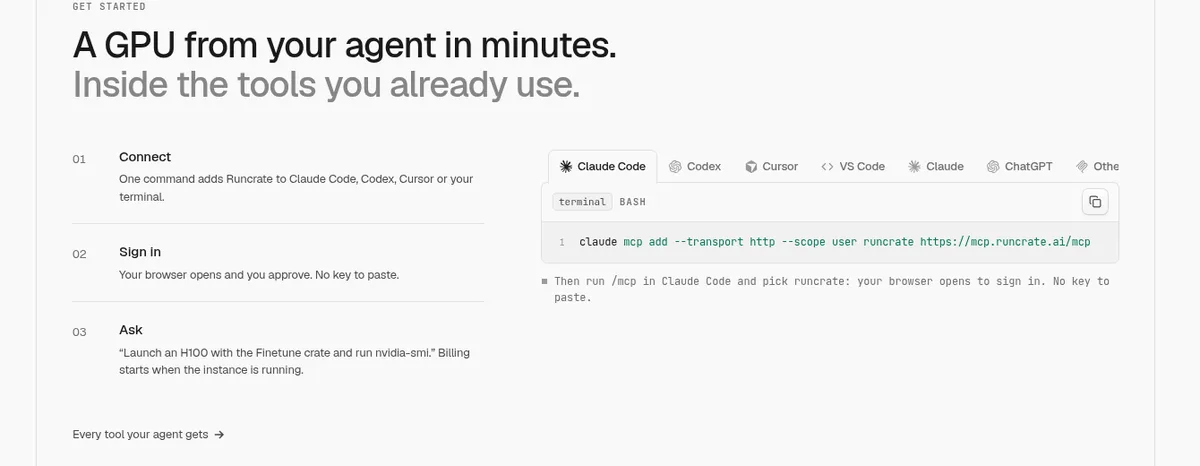
Once connected, you ask in plain words, such as "Run python train.py on an A4000 for at most 2 hours with my volume training-data, then tell me the final loss." According to the official docs, the agent calls the tools in this order:
Find the volume
list_volumes to find the id of training-data
Submit the job
run_job with the GPU, command, max runtime and volume, on a fresh machine
Follow the logs
get_job_logs to read the output, and cancel early if needed
Report back
get_job for the exit code and cost; the machine has already stopped
When the command ends, reaches its max runtime or is cancelled, the machine and its billing stop
There are also safeguards for handing the work to an agent. At sign-in you pick the "environment" the agent works in; with a monthly budget on that environment, the agent cannot switch environments or raise the budget. Ten minutes before a max runtime or idle stop acts, you get an email and a webhook event.
Sources: AI agents, Jobs, Spend guardrails
Features
01Rent GPUs
For work that needs the GPU itself, such as training, fine-tuning and serving models.
- Instances — A named GPU machine rented by the hour, with SSH, Jupyter and VS Code in the browser
- Crates — Ready images with the tools for the job, such as Devbox, Finetune and Inference. No charge beyond the instance
- Jobs — Run one command on its own machine, which stops when the command ends. You can also try several GPUs in order, retry on a replaced machine, or run many copies at once
- Schedules — Run jobs at set times, like cron
- Reserved clusters — For 8 GPUs or more, multiple nodes, or a month or longer: bare-metal clusters with InfiniBand, priced by quote
02Call models
For using hosted models through an API without running your own GPU.
- Inference API — Chat, image generation, video generation, text-to-speech, transcription and embeddings on OpenAI-compatible endpoints. 223 models as of October 21, 2026 (141 text, 31 image, 26 video, 16 vision, 6 speech, 3 transcription)
- Example models — Open models such as DeepSeek, Qwen, Llama, Kimi, GLM and Mistral, plus Claude, FLUX, video models such as Sora 2, Veo and Kling, and Whisper
- Playground — Try models in the browser
03Use it safely as a team
Controls for teams and multiple agents.
- Workspaces and roles — Owner, Manager and Developer. Developers can manage resources but not billing or team settings
- Audit logs — Record who changed what, when, and from which IP address
- Webhooks — Send events such as launches, stops and budget alerts to Slack, Discord and more
- Storage — Volumes are encrypted at rest and private to your workspace, with a built-in file explorer
Launch times are published as measured data
The website publishes the time from a launch request to a running instance, based on 449 launches across 16 GPU models over 30 days (September 19 to October 18, 2026). The median was 4:14; the fastest tenth were running within 2:55 and the slowest tenth took longer than 6:50. Medians by model include 2:59 for the RTX PRO 6000, 3:09 for the H200, 4:14 for the H100 SXM and 5:35 for the A100 80GB. This wait is not billed; billing starts when the instance is running.
Source: Runcrate official website (published as measured on October 19, 2026)
Pros and cons
Pros
- No monthly fee or minimum spend; start with a $20 top-up
- Most GPUs bill by the second, and booting is not billed
- GPUs, the inference API and storage share one balance and one dashboard
- The inference API is OpenAI-compatible; switch by changing
base_url - The MCP server supports OAuth and connects to Claude Code, Codex and Cursor with one line
- Jobs, max runtime, idle stop and monthly budgets prevent forgotten machines and overspending
- No egress fees
Cons
- The interface and docs are English only (the team has published a Japanese introduction on Zenn)
- GPU regions change with availability and are not guaranteed. When we checked the GPU pricing API on October 21, 2026, the only GPU offered in Japan (Tokyo) was the H200
- No free tier; a $20 top-up is required to start
- GPU rates change with stock, even within a day
- When the balance hits zero, running instances are terminated, so long jobs need auto-recharge
- B200 and B300 are offered in 8-GPU units
Reviews and reputation
The website does not publish user testimonials (as of October 2026). The homepage shows logos under "Teams at these organizations use Runcrate".
For Japanese developers, the team published a Zenn article on October 21, 2026, "Claude Code から GPU を借りて学習ジョブを回す(Runcrate MCP サーバー)" (renting a GPU from Claude Code to run training jobs), explaining in Japanese how to connect the MCP server, submit jobs, and use the CLI and inference API. Questions and feedback go to hello@runcrate.ai or Discord.
How it differs from Hugging Face and Ollama
Runcrate handles both "renting GPUs by the hour" and "calling models through an API" from the same balance. There are three broad ways to use open models, each suited to different situations.
| Option | Where it runs | Best for |
|---|---|---|
| Runcrate | Cloud GPUs / inference API | No local GPU, and you want everything from training and fine-tuning to inference calls, including through agents |
| Hugging Face | A hub for publishing and sharing models (also offers inference and compute) | Finding, comparing and publishing models and datasets |
| Ollama | Your own PC | Running open models on your own machine for free |
When agents are involved, Claude Code, Codex and Cursor write the code, and Runcrate provides the GPU that runs it.
FAQ
Q. Can I use Runcrate for free?
A. There is no free tier. It uses prepaid credits, with top-ups from $20. There is no monthly fee or minimum spend.
Q. How much do GPUs cost?
A. As of October 21, 2026, the lowest rates were about $0.51 per hour for a V100 16GB, $0.52 for an RTX 4090, $1.76 for an A100 80GB and around $3.25 for an H100 SXM. Prices change with stock, so check the pricing page or GPU pricing API for current rates.
Q. Am I billed while an instance is booting?
A. No. Billing starts when the instance is running. Most GPUs bill by the second; a few bill in whole minutes, including about 30 seconds of teardown after you delete.
Q. Does it support Japanese?
A. The interface and docs are in English. Many of the models on the inference API handle Japanese, and the official Zenn article shows an example with a Japanese prompt.
Q. Can I use the OpenAI SDK as is?
A. Yes. Set base_url to https://api.runcrate.ai/v1 and use a Runcrate API key, and existing Python or TypeScript code works.
Q. Could an agent overspend on GPUs?
A. The agent works only inside the environment approved at sign-in and cannot spend past that environment's monthly budget. Jobs require a max runtime, and instances can have a max runtime and idle stop.
Q. How is my data protected?
A. According to the official Security FAQ, each instance runs in an isolated container and storage volumes are encrypted at rest. Card details are handled by Stripe and not stored by Runcrate.
Sources: General FAQ, Billing FAQ, Security FAQ, Official Zenn article
The information on this page is based on what was published on the official website as of October 2026. GPU rates change frequently. Please check the official website for the latest specifications and pricing.