Vizcom
: How to use it, features, and the business problems it solves
Add bookmark
What is Vizcom?
An AI design platform for product and industrial designers that instantly turns hand-drawn sketches into photorealistic renders and 3D models. Supports styles, 2D-to-3D generation, video, Live Render, and up to 8K export. Adopted by Ford, Nissan, and more.
Business problems it solves


About "Vizcom"
What is Vizcom
Vizcom is an AI design platform for product and industrial designers that turns hand-drawn sketches into photorealistic renders and 3D models. Its current tagline is "Turn Sketches into Full-Fidelity 3D Renders, Instantly." Adoption is featured at major manufacturers like Ford, Nissan, Honda, Sonos, and GoPro, and it offers a native Autodesk Fusion integration.
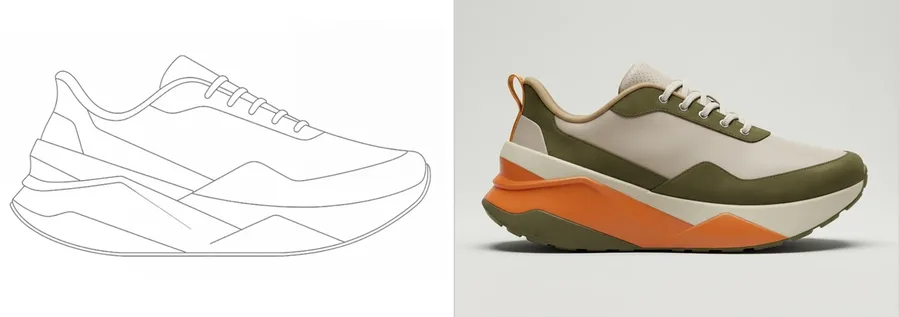
Vizcom's core is turning a rough sketch into a finished-looking image in seconds. You can steer materials and direction with prompts, reference images, and Render Styles, swap colors and parts, and generate form variations — running everything from ideation to refinement in one place.
Vizcom goes beyond "sketch → image": it generates real 3D models from 2D, imports existing 3D models, and exports 3D files. It has also grown into a full platform with video/animation, real-time Live Render, and upscaling up to 8K.
How to use
Draw (or import) a sketch, set a style, and generate — then extend to 3D or video.
Sketch
Draw on the canvas or import an existing sketch image.
Set a style
Direct materials and look with prompts, reference images, and Render Styles.
Generate a render
Produce a photorealistic render; swap colors/parts and make variations.
3D, video, export
Turn 2D into 3D, animate, and export images/video/3D up to 8K.
You own all rights to what you create. Paid-plan data is not used to train AI (free-tier generated images may be used to improve the service).
Key features
01Sketch → render
Turn rough sketches into photorealistic renders. Control materials and palette with prompts, reference images, Render Styles, and Extract Colors / Color Match, and generate form variations or swap parts (Modify). Voice prompting is also supported.
022D → 3D and video
Generate a real 3D model from a flat design that you can render from any angle, and import existing 3D models or export 3D files. It also offers animation, real-time Live Render, and upscaling up to 8K.
03Teams and enterprise
Work as a team with Admin/Editor/Viewer roles, private teams, and a shared asset library. Enterprise adds SSO, audit logs, custom watermarks, centralized billing, and dedicated onboarding.
Pricing
There's a free plan you can start without a credit card. Credits come from a single balance used across all features, reset monthly (purchased add-ons roll over).
| Plan | Price | Credits/mo | Highlights |
|---|---|---|---|
| Starter (free) | $0 | 800 | Basic AI tools, HD export, 10 files |
| Professional | $49/user/mo | 20,000 | 4K export, Live Render, priority queue, unlimited seats |
| Enterprise | Contact sales | Custom | 8K, SSO, audit logs, dedicated support |
| Education | $0 (eligible) | 15,000 | For students/educators, priority queue |
Professional is about 30% off on annual billing (roughly $34/mo effective). You own the rights to everything on all plans, with no separate commercial license required. Credits are consumed differently for images, animations, and 3D (free-tier guide: ~200 images / ~20 3D models). Prices change, so check the official pricing page for the latest (as of August 2026).
How it differs from other design AI
Vizcom stands out because it fits the product/industrial design workflow and handles everything from sketch to 3D and video. That's a different aim from general image AI or tools for flat/graphic design.
| Aspect | Vizcom | Krea | Recraft |
|---|---|---|---|
| Focus | Sketch→render, 3D | Real-time image gen | Design images/vector |
| 3D | 2D→3D gen & import | Limited | None (2D-centric) |
| Target | Product/industrial | General creation | Brand/graphics |
Alternatives to compare include Krea for real-time generation, Recraft for design images and vectors, and the all-in-one Leonardo.Ai. If you want to work from sketch to photorealistic render or 3D along the flow of product design, Vizcom is a strong choice.
Information on this page is based on the official website as of August 2026. Please check the official site for the latest specs and pricing.