

Meshy
: How to use it, features, and the business problems it solves
Add bookmark
What is Meshy?
Meshy generates textured 3D models from text or images in minutes (current model Meshy 7). On top of text-, image-, and multi-view-to-3D, it handles AI texturing, rigging, and 500+ animations, and bridges to Blender, Unity, Unreal, and Roblox. It is operated by Meshy LLC of Sunnyvale, California. The free plan gives 100 credits a month under CC BY 4.0 (commercial use with attribution; downloads capped at 10 models a month), with Pro starting at $20/month. The official pricing page can switch to local currency, and there is a discounted plan for students and educators. Built for game development, XR, and 3D printing.
Business problems it solves



About "Meshy"
What is Meshy
Meshy is an AI tool that generates 3D models from text or images. Write "I want a character like this" in words, or upload a piece of concept art, and a textured 3D model is generated in minutes. It dramatically lowers the barrier to 3D asset creation — for game development, XR, 3D printing, and video production — work that used to require specialist software and skill. The current model is Meshy 7, updated toward reproducing proportions, spatial layout, and surface detail faithfully to the source, from single or multi-view input.
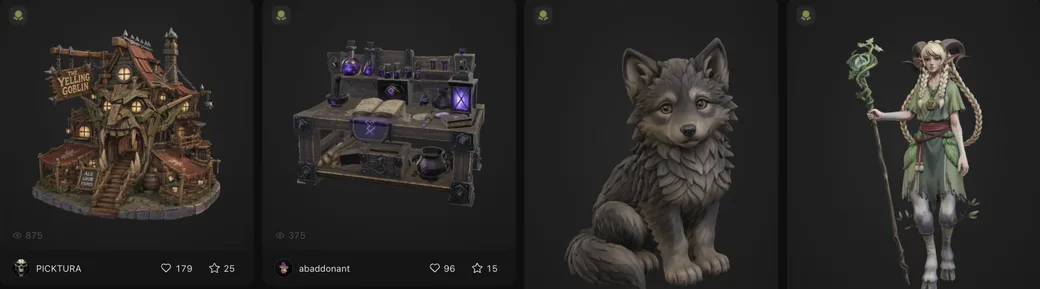
Source: Meshy official site (from community works; the image below is from the same source)
From text, from images — you get 3D
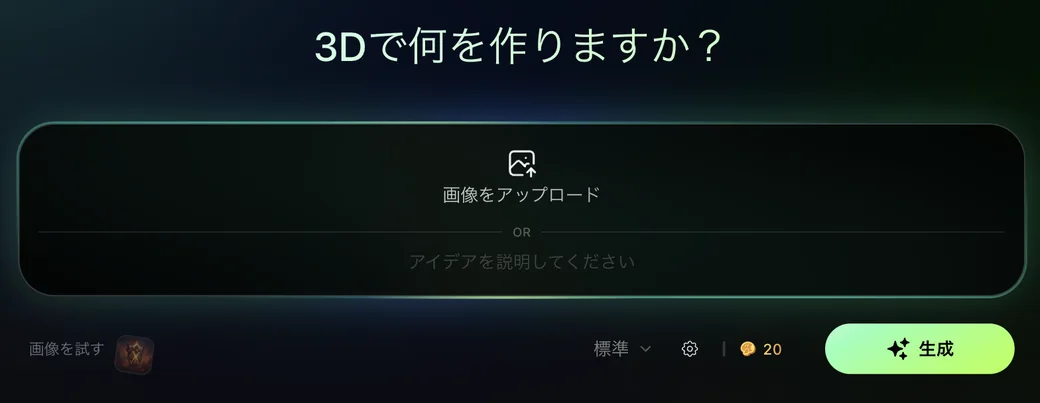
At the heart of Meshy is that you can make a 3D object from words or images without any 3D expertise. It offers several ways to feed it input.
01Text to 3D
Describe what you want in words and it generates a 3D model. It shows previews first, then you refine the one you like into higher detail.
02Image to 3D
Upload a photo or concept art and it builds a 3D form from it — for example, turning a hand-drawn illustration into a 3D character.
03Multi-View to 3D
A greatly upgraded new feature: feed images from several angles and it generates a more consistent 3D model. It stabilises the back and side shapes that tend to be ambiguous from a single image.
04Texturing and animation
AI texturing of existing models, partial texture editing, and remeshing (mesh optimisation), plus rigging characters and animating them with 500+ motions — all in one place.
How to use
-
Create an account
Sign up free on the official site with email or a Google account. No credit card required.
-
Choose an input method
Pick the method that fits your material — Text to 3D, Image to 3D, or Multi-View to 3D.
-
Enter a prompt or image
Describe what you want in words or upload an image. You can also specify an art style (realistic, cartoon, and so on).
-
Pick from previews
Choose the one you like from the generated previews and refine it into higher detail.
-
Add texture and animation
Tidy up the surfaces with AI texturing, and add rigging and animation if needed.
-
Export
Download in OBJ, FBX, USDZ, GLB, STL, or BLEND and bring it into Blender, Unity, Unreal, and the like.
Features
01Create
- Text to 3D — Generate a 3D model from words
- Image to 3D — Build a form from a photo or illustration
- Multi-View to 3D — Raise consistency with images from several angles
- Text to Image — Generate an image to base the 3D on
02Finish
- AI texturing — Add surfaces (PBR) to a model
- AI texture editing — Repaint parts of a texture
- Remeshing — Optimise the mesh, including polygon count
- Rigging & animation — 500+ motions supported
03Connect
- DCC bridges — Blender / Unity / Unreal / Godot / Maya / 3ds Max / Roblox
- Multi-format export — OBJ, FBX, USDZ, GLB, STL, BLEND
- API & 3D Agent — API integration plus MCP / Skill for AI agents
Pricing
Meshy works by consuming monthly credits. Plans split into individual (Free / Pro / Premium / Ultra) and team (Studio / Enterprise). Even the free plan includes 100 credits a month and lets you start under CC BY 4.0 (commercial use with attribution).
| Plan | Monthly credits | Concurrent tasks | License | Ref. monthly price |
|---|---|---|---|---|
| Free | 100 | 1 | CC BY 4.0 (attribution required) | ¥0 |
| Pro | 1,000 (up to 100 assets) | 10 | Full ownership, commercial | ~¥3,084 |
| Premium (popular) | 3,000 (up to 300) | 30 | Full ownership, commercial | ~¥6,168 |
| Ultra | 8,000 (up to 800) | 100 | Full ownership, commercial | ~¥15,420 |
| Studio (team) | 5,500 (up to 400) | 60 | Full ownership, commercial | ~¥10,800 |
| Enterprise | Custom | Custom | Full ownership, commercial | Custom quote |
The free plan is CC BY 4.0, so commercial use requires attribution. To use output commercially without attribution, or to sell it, Pro or above (full ownership) is the prerequisite. Paid plans also add faster generation, free retries, API, and DCC integration.
Reference monthly prices are a guide based on the official site (Japan, JPY) as of August 2026 and include promotional pricing. Meshy runs frequent discounts and prices also vary by billing cycle (monthly/annual), so check the official pricing page for the exact latest figures.
The free plan has a download cap. The official plan comparison lists Free at 10 models a month, with Pro and above unlimited. It is easy to get stuck at "I can generate but I cannot download," so check this during evaluation.
Students and educators get a discount. Meshy offers an official Education Plan: if you are a current student or educator, you can apply for discounted access, including for classroom and research use.
Assets generated through the API have a retention period. Per the official plan comparison, Pro / Premium / Ultra retain them for 3 days, Studio for 14 days, and Enterprise indefinitely. If you automate generation through the API, make sure your own pipeline stores the output.
How it differs from other 3D generation AIs and 3D tools
Building a 3D model by hand from scratch takes specialist software and time, but Meshy's strength is that it produces a "usable starting point" from text or images in minutes. It is also notable for covering the whole chain — texturing, rigging, animation, and integration with various software.
| Aspect | Meshy | Manual 3D software (Blender, etc.) | 2D image generation AI |
|---|---|---|---|
| Input | Text, image, multi-view | Manual modelling | Text, image |
| Output | Textured 3D model | Your own 3D model | 2D image |
| Speed | A starting point in minutes | Takes time and skill | Seconds (but 2D) |
| Finishing | Texturing, rigging, animation | Anything, but by hand | 3D needs a separate tool |
| Integration | Export to Unity / Unreal / Blender, etc. | The tool itself is a DCC | — |
For the same text/image-to-3D generation, Tripo AI and Hunyuan3D are comparison points. For turning product-design sketches into renders, Vizcom; for video generation and 3D scene capture, Luma AI is a nearby field. If you want to mass-produce game assets and prototypes, Meshy is a strong choice thanks to the breadth of its integrations.
FAQ
Q. Is Meshy free to use?
Yes. The free plan includes 100 credits a month. However, its license is CC BY 4.0, so commercial use requires attribution. Commercial use without attribution, or selling the output, needs Pro or above.
Q. What formats can I export?
OBJ, FBX, USDZ, GLB, STL, and BLEND. DCC bridges to Blender, Unity, Unreal, Godot, Maya, 3ds Max, and Roblox are also provided.
Q. Can I use the generated 3D models in a game as-is?
They export with textures, so you can bring them in directly. You can adjust polygon count via remeshing, and add animation with rigging and 500+ motions. It's common to tune them for your use.
Q. Can I use Japanese prompts?
The UI is available in Japanese. Prompts can be more stable in English, so if the result isn't what you expected, try English too.
Q. Where is Meshy based?
The operating company is Meshy LLC, based at Murphy Square, 111 West Evelyn Avenue, Suite 304, Sunnyvale, CA 94086, USA — stated in the footer of the official site.
Q. Is there local-currency pricing?
Yes. The official pricing page has a currency switcher, so you can view prices in your own currency rather than USD alone — unusual for this category. Japanese pricing, for example, shows Pro at ¥3,084/month, Premium at ¥6,168, and Ultra at ¥15,420 (as of August 16, 2026).
Q. Can I cancel, get a refund, and what payment methods are accepted?
The official pricing FAQ has dedicated entries for cancelling a subscription, refunds, accepted payment methods, and obtaining a receipt. Because these terms change, check the official FAQ before subscribing. We do not guess at conditions we have not verified.
Q. Can I sell the 3D models I generate?
On Pro and above, asset licensing is stated as "private & customer-owned," so commercial use without attribution is possible. The free plan is CC BY 4.0 and is not suited to selling. The official FAQ also has a dedicated entry on selling assets on other platforms.
Q. How much does it cost?
Besides the free plan, there are Pro / Premium / Ultra (individual) and Studio / Enterprise (team). Monthly prices vary with promotions and billing cycle, so check the official pricing page for the latest.
Information on this page is based on what was published on the official site as of August 2026. The model generation, features, and pricing may change, so check the official site for the latest.


![[2026 Edition] Must-Know for 3D Modelers: 4 AI Tools for Fast, Automated 3D Model Generation | Luma AI, Meshy, and More](/_next/image?url=%2Fimages%2Farticles%2Fai-3d-modeling-tools-comparison.png&w=3840&q=75 "[2026 Edition] Must-Know for 3D Modelers: 4 AI Tools for Fast, Automated 3D Model Generation | Luma AI, Meshy, and More")