
Omnipart
: How to use it, features, and the business problems it solves
Add bookmark
What is Omnipart?
OmniPart is an AI that generates an "editable 3D model split into individual parts" from a single image (part-aware 3D generation). A SIGGRAPH Asia 2025 project by researchers at the University of Hong Kong, VAST, and others, it outputs 3D separated into parts rather than a single mesh, making it easy to change materials or swap parts after generation. The code and an online demo are open source (MIT License).
Business problems it solves



About "Omnipart"
What is Omnipart
Omnipart (OmniPart) is an AI that generates an "editable 3D model split into individual parts" from a single image. It is a research project by researchers at the University of Hong Kong (HKU), VAST, Harbin Institute of Technology, and Zhejiang University, accepted at the computer graphics conference SIGGRAPH Asia 2025. Whereas typical image-to-3D generation outputs a "seamless single mesh," Omnipart generates 3D that is separated into parts such as head, torso, arms, and legs. This makes it easy to select and re-texture or swap individual parts after generation.
Omnipart is not a commercial service you sign up for and use right away — it is an open-source research project that publishes its paper, code, trained models, and an online demo (as of August 2026). There is a browser-based demo you can try, but it runs on a free research tier, so you may have to wait when it is busy.
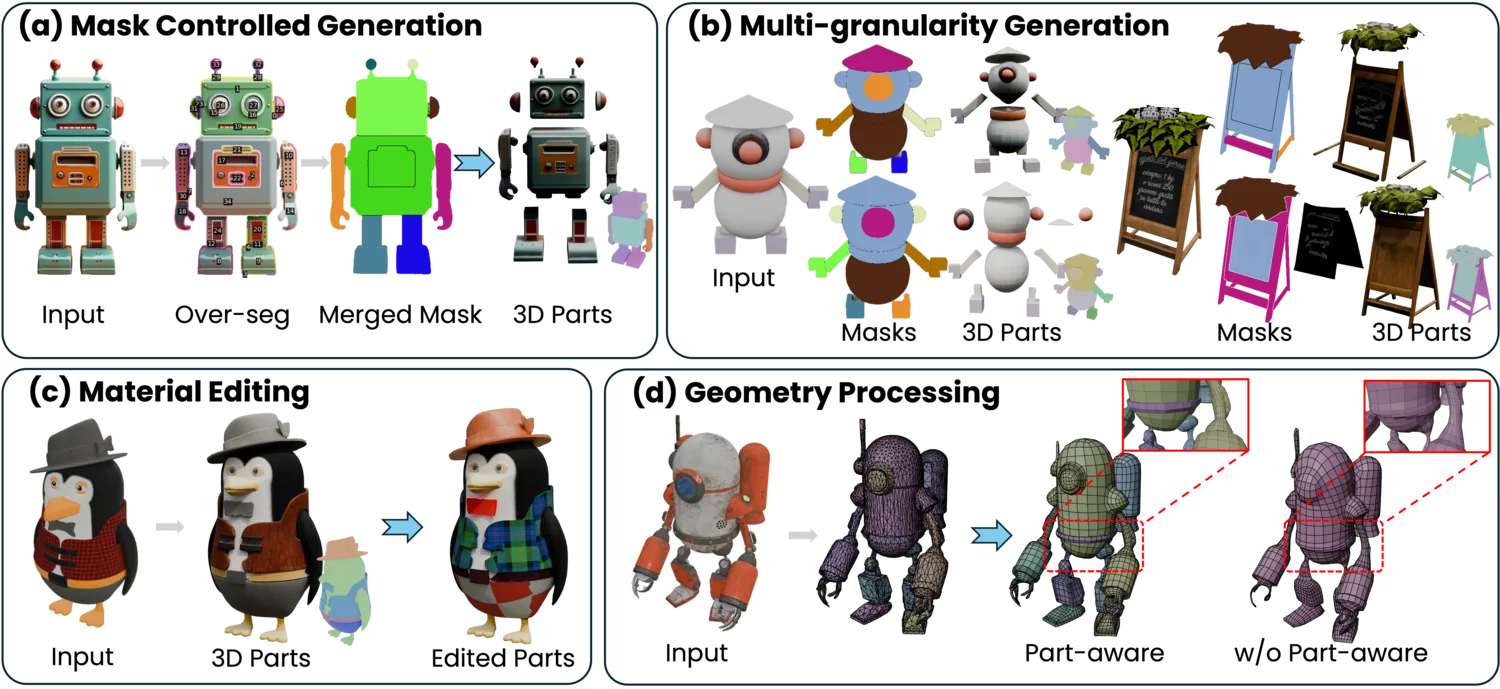
Source: OmniPart project page (subsequent images are from the same source)
Instead of a single solid lump, it comes out separated into parts
Tools that create 3D from images have proliferated, but most output a single connected mesh. That makes edits like "move just the arm" or "change only the clothing's material" difficult, and you often end up regenerating the whole thing. Omnipart generates 3D that is semantically separated into parts from the start, so you can work part by part.
Typical image-to-3D generation
- Output is a seamless single mesh
- Even to fix one part, you often regenerate everything
- Rigging and re-texturing are tedious
Omnipart
- Output is 3D separated by part
- You can swap and edit part by part
- Material editing and geometry processing are easier
How to use
-
Access the project page / demo
From the official project page (omnipart.github.io), open the Hugging Face online demo or the GitHub code.
-
Prepare an image
Prepare a single image showing the object you want to turn into 3D.
-
Specify how to split into parts (optional)
With a 2D mask you can specify "what counts as one part." You can also choose the granularity — split coarsely or finely.
-
Generate
Based on the image and mask, a 3D object separated by part is generated.
-
Edit and use
Change or swap materials part by part and bring it into your production pipeline.
Features
01Generate part by part
From an image, create 3D split into parts.
- Image → part-split 3D — Generate an editable set of 3D parts from a single image
- Semantic separation — Split into meaningful units such as head, torso, arms, and legs
02Control the generation
Specify how it splits and how finely.
- Mask-controlled generation — Specify part boundaries with a 2D mask
- Multi-granularity generation — Choose to split coarsely or finely
03Make use of it afterward
What being split into parts enables.
- Material editing — Change the material and appearance of each part
- Geometry processing — Clean part-aware shape generation (higher quality than ignoring parts)
How it splits things into parts
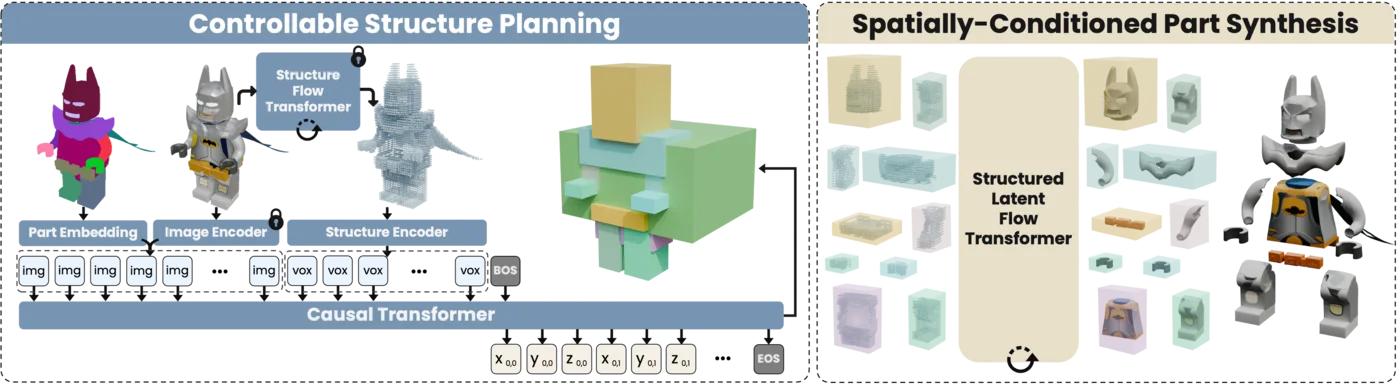
Omnipart does not create 3D from an image in one shot; it generates in two stages. First it plans the structure (layout) — where to place what parts and at what size — and then generates all the parts together, consistently, following that plan. This division lets it produce 3D that is split into parts yet coherent as a whole.
Pricing
Omnipart is free open source released under the MIT License. There are no pricing plans. Commercial use, modification, and redistribution are allowed (attribution required); you can run the GitHub code locally or try the online demo on Hugging Face in your browser.
How Omnipart differs from other 3D-generation AIs
Omnipart is a research project specialized in "creating 3D with an editable part structure." Its aim differs from commercial services that mass-produce finished 3D quickly.
| Aspect | Omnipart | Typical image-to-3D generation |
|---|---|---|
| Output structure | Separated by part (editable) | A single mesh |
| Editing after generation | Swap and re-texture per part | Tends to regenerate the whole |
| Delivery | Open source + research demo | Mostly commercial SaaS |
| Best for | Research and integration into production pipelines | Quick mass production of 3D models |
If you want to mass-produce finished 3D models easily, Meshy or Hunyuan3D are a better fit; to create 3D-like visuals from design sketches, Vizcom suits you. When you want to understand the cutting edge of 3D-generation technology from the angle of "3D you can edit part by part afterward," Omnipart is a useful reference.
The information on this page is based on content published on the official project page and paper as of August 2026. As a research project, availability and demo uptime may change.


