
Kling
: How to use it, features, and the business problems it solves
Add bookmark
What is Kling?
A video-generation AI from China's Kuaishou. Turns text or images into high-quality video; the current Kling 3.0 / 3.0 Omni adds native audio and native 4K output. The console is fully localized but billing is USD-only — US$8.8/month on monthly billing, $79.2/year on annual. Free-plan output is watermarked and not for commercial use.
Business problems it solves


About "Kling"
What is Kling
Kling is an AI that generates high-quality video from text or images. Built by China's Kuaishou, it is known for natural subject motion and consistent physics, and ranks alongside Sora and Veo as a leading video-generation model. It supports both "Text to Video" and "Image to Video" (animating an image you already have), and the current generation, Kling 3.0 / 3.0 Omni, strengthens native audio, element consistency, and native 4K output.
The console is fully localized, including Japanese, but billing is USD-only — there is no local-currency pricing. Note also that the official domain has moved to kling.ai; the old klingai.com redirects there.
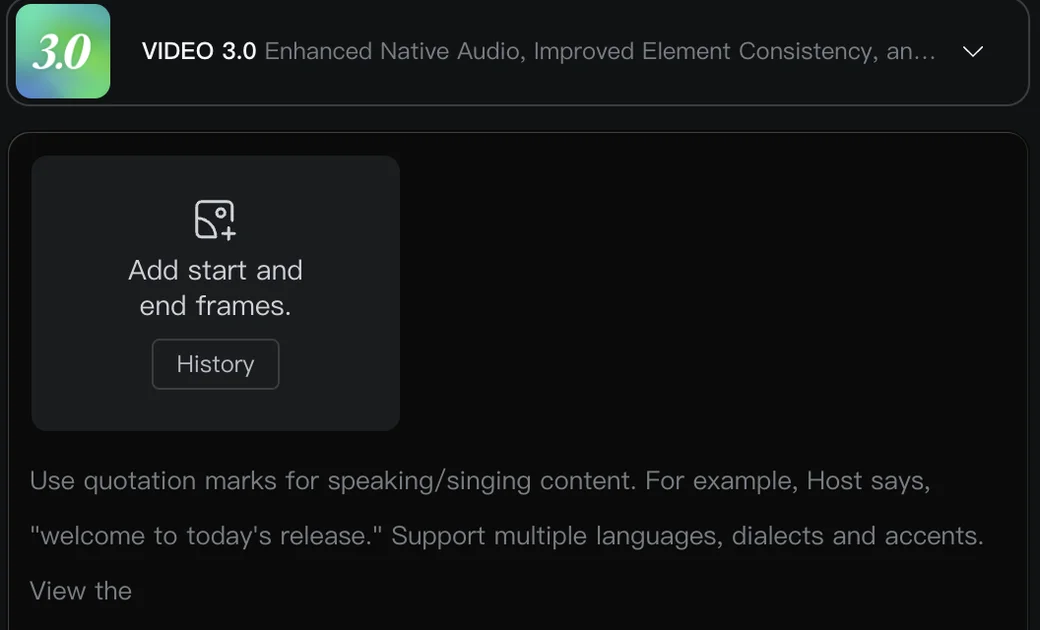
Source: Kling AI official site
Make video from text or from an image
At the heart of Kling is that you can generate moving footage from words or a single image. Write what you want as a prompt, or upload a still image to animate it.
Text / image
Describe the footage as a prompt, or upload an image you have. You can also set start and end frames
Kling 3.0 / 3.0 Omni
Set model, length, aspect ratio, and camera work. Multi-Shot stitches multiple cuts together
Video (with audio)
Generated with native audio and multilingual speech. Refine with Extend and lip-sync, then download
The current Kling 3.0 / 3.0 Omni strengthens native audio, element consistency, and native 4K output. Text in quotation marks is treated as speech/singing and supports multiple languages, dialects, and accents.
How to use
-
Create an account
Create an account on the official site (kling.ai). Signing in grants credits so you can try video generation.
-
Choose an input method (text / image)
Choose "Text to Video" or "Image to Video." You can also set start and end frames.
-
Enter a prompt and settings
Specify the footage as a prompt, and set the model (Kling 3.0, etc.), length, aspect ratio, and camera work. Enclose dialogue in quotation marks.
-
Generate and review
Run generation and the video is output after a while. If you don't like it, adjust the prompt and regenerate.
-
Extend, edit, and export
Refine with Extend, lip-sync, and adding elements, then download.
Features
01Generate
- Text to Video — Generate video from a written prompt
- Image to Video — Animate a still image naturally
- Start & end frames — Set the first and last frames to control motion
- Multi-Shot — Generate footage stitching multiple cuts
02Direct
- Native audio — Multilingual speech / singing with dialects and accents (Kling 3.0)
- Camera & motion control — Specify camera moves and subject motion
- Lip-sync & element addition — Sync mouth movement and add elements after generation
03Scale
- High resolution & longer clips — 720p–1080p plus true native 4K output via Kling Native 4K Video
- Image generation — Generates still (AI) images too, not just video
- API & MCP — Developer API and MCP to embed into your own workflow
Pricing
It is credit-based, and video generation consumes credits (consumption varies by resolution, length, and mode). You can start on the free Basic plan, but commercial use and serious generation assume a paid plan.
What trips people up about Kling's pricing is that each plan has four different prices. There is a list price, two continuing discounts on top of it (12% off monthly, 34% off annual), and a first-month discount of about 30% for new subscribers. That is why write-ups online quote Standard as "$9.99," "$10," and "$6.99" — they are each looking at a different one of the four. On monthly billing, the amount actually charged every month is the "From month 2" column.
| Plan | First month (once) | From month 2 (monthly) | Annual (per year) | Monthly credits |
|---|---|---|---|---|
| Basic (free) | $0 | $0 | — | Granted on login and daily |
| Standard | $6.99 | US$8.8 | $79.2 (list $120) | 660 |
| Pro | $25.99 | US$32.56 | $293.04 (list $444) | 3,000 |
| Premier | $64.99 | US$80.96 | $728.64 (list $1,104) | 8,000 |
| Ultra | $127.99 | US$159.99 | $1,429.99 (list $2,160) | 26,000 |
A short 720p clip runs about 20 credits, so Standard's 660 credits is roughly 33 clips and Pro's 3,000 is roughly 150. Price per 100 credits is $1.06 on Standard and $0.49 on Ultra, so higher tiers cost less per clip.
Videos made on the free plan (Basic) can't be used commercially and carry a watermark. The first-month discount applies once; from month 2 you pay the "From month 2" amount above. Annual plans auto-renew, but the pricing page states that both monthly and annual plans can be canceled at any time. Monthly credits generally do not roll over. A separate Business tier is available.
Pricing is USD-only. The console is localized into other languages, but prices are shown in US dollars throughout (each plan card spells out "US$8.8/month from month 2"), and you are billed at your card's exchange rate. Besides subscriptions there are one-off "Purchase Credits" and "Buy Gift Card" routes, so you can top up credits without a monthly plan.
Prices and credits are based on a hands-on check of the official pricing page (individual plans) as of August 2026. They change with exchange rates, promotions, and plan revisions, so check the official pricing page for the latest.
Reputation
- "Top-class natural motion" and "high Image-to-Video quality" — it is highly rated among video-generation AIs.
- Many creators "use it alongside Sora and Veo," choosing Kling for subject motion and cost.
- On the other hand, some note "fine nuance can be hard to convey" and "credits are consumed quickly."
What to check before adopting it
Kling gets searched alongside words like "safe" and "risk" mainly because its provider is a Chinese company. For the record, Kling is built by Kuaishou Technology, a major Chinese video-platform company listed on the Hong Kong Stock Exchange. It is not an outfit of unknown provenance, but if you plan to use it at work, weigh the following against your own standards.
01How your data is handled
- Inputs go to the server — Prompts and uploaded images are processed in the cloud. Check your internal policy before feeding it unreleased product imagery or confidential assets
- Retention and training use — Confirm retention periods for generated and uploaded assets, and whether they may be used for training, in the terms and privacy policy in force when you sign up
02Rights in the output
- Commercial use is paid-only — Free-plan output is watermarked and not licensed for commercial use. Client deliverables require a paid plan
- Likenesses and existing characters — Animating a real person's photo or recreating an existing character raises publicity and copyright questions independent of Kling's own terms
03Spotting the official site
- The legitimate domain is kling.ai — Search results mix in unofficial look-alike domains branded "Kling 3.0." Check the domain before paying
- No named resellers — No authorized regional resellers are published, so contracting goes through the official site directly
How it differs from other video generation AIs
Video AIs differ in the expressions they excel at and in cost. Kling is often chosen for natural motion, Image-to-Video quality, and cost performance, and its versatility — making video from either text or images — is a strength.
| Aspect | Kling | Other leading models (Sora / Veo / Runway, etc.) |
|---|---|---|
| Strength | Natural motion, Image-to-Video quality | Varies by model in expression and integration |
| Input | Text / image / frames | Varies by tool |
| Audio | Native audio, multilingual speech (Kling 3.0) | Varies by product |
| Cost | Credit-based (free tier; relatively affordable) | Varies by service |
Depending on your use, it is common to compare and combine it with Sora, Veo, Runway ML, and Hailuo. For animating an image you have, or trying a lot while keeping costs down, Kling is a strong option.
FAQ
Q. Is Kling free to use?
Yes. Signing in grants credits so you can try video generation. However, videos made on the free plan (Basic) are watermarked and cannot be used commercially. Commercial use and serious generation require a paid plan.
Q. What languages does it support?
The console is fully localized — menus and even plan names are translated (in Japanese, for example, the tiers read スタンダード / プロ / プレミア / ウルトラ). You can write prompts in your own language, though interpretation accuracy varies by language; pairing with an English prompt is more stable when intent isn't getting through.
Q. What currencies and payment methods are supported?
Pricing and billing are USD-only; there is no local-currency option. Each plan card spells out the recurring amount in dollars ("US$8.8/month from month 2"), and your card issuer converts at its own rate. Alongside subscriptions, "Purchase Credits" and "Buy Gift Card" give you one-off ways to add credits without a monthly plan.
Q. Can I cancel? Are refunds available?
The pricing page states that both monthly and annual plans can be canceled at any time, from the membership page after signing in. Annual plans auto-renew, so cancel before the renewal date if you want to stop. Whether pro-rated refunds are granted on mid-term cancellation is not published. If there's any chance you'd stop partway, start monthly before committing to an annual plan.
Q. Do credits refresh? Do they roll over?
Daily credits refresh every day, and paid members also get a daily grant ("Daily Free Credits for Subscribers"). The monthly credits included in a plan (660 on Standard) generally do not roll over, so they are meant to be spent within the month. If you run short, upgrade or buy credits separately.
Q. Is there an unlimited plan?
No plan offers unlimited generation. Even Ultra is capped at 26,000 credits per month. What is described as "unlimited" is the number of concurrent tasks (all paid plans queue unlimited tasks) and multi-track generation — not the volume you can generate.
Q. What is the latest model?
The current generation is Kling 3.0 and 3.0 Omni, alongside Kling Image 3.0 / 3.0 Omni for stills, Kling Motion Control for facial and body motion, and Kling Native 4K Video for film-grade output. Earlier generations remain selectable at generation time.
Q. Can I use it commercially?
Videos made on a paid plan can be used commercially, and the brand watermark is removed. Free-plan videos cannot. Note that using real people's likenesses or existing characters raises publicity and copyright issues independent of Kling's terms. Always check the latest terms of service before use.
Q. How is it different from Sora and Veo?
Kling is valued for natural subject motion, Image-to-Video quality, and cost performance. Since each model excels at different expressions and costs, it is common to use them by purpose.
Information on this page is based on what was published on the official site as of August 2026. The model generation, features, and pricing may change, so check the official site for the latest.