
Consensus
: How to use it, features, and the business problems it solves
Add bookmark
What is Consensus?
An AI academic search engine from Consensus NLP (US). It finds relevant studies across more than 220 million peer-reviewed papers and summarizes them with citations, shows how much research agrees on a yes/no question with the "Consensus Meter", and runs literature reviews of up to 50 papers with Deep. Answers can be received in Japanese. Free plan available; Pro is $12/month billed annually.
Business problems it solves

About "Consensus"
What is Consensus?
Consensus is an AI-powered academic search engine from Consensus NLP, Inc. in the United States. When you ask a question, it first searches a database of scholarly papers and then summarizes, compares and synthesizes the findings with citations, using only the papers it found as evidence.
It searches more than 220 million peer-reviewed papers, and the database is updated weekly. What the company highlights as the difference from general AI chatbots is the order of operations: "search first, AI second." Because it retrieves real papers before generating an answer, the official help center explains, it does not cite papers that do not exist. If it cannot find enough relevant evidence, it is designed to say so rather than fill the gap with outside knowledge.
According to the official help center and website, more than 10 million researchers, students and clinicians use Consensus, and more than 170 university libraries partner with it (as of October 2026). It was founded in 2021 by Christian Salem and Eric Olson and is now based in San Francisco.
About using it in Japanese: According to the official help center, you can choose the language in which you receive Pro analyses, summaries and key takeaways from the language dropdown in your settings (profile → Settings). Japanese is one of the options. The interface itself is in English, and most of the papers it searches are written in English.
Ask a yes/no question and see how much the research agrees
The feature that gives Consensus its name is the Consensus Meter. When you ask a question that can be answered yes or no, such as "Does creatine improve cognitive function?", the AI classifies the conclusions of the top papers as "Yes", "Possibly", "Mixed" or "No" and shows the proportions as a bar.
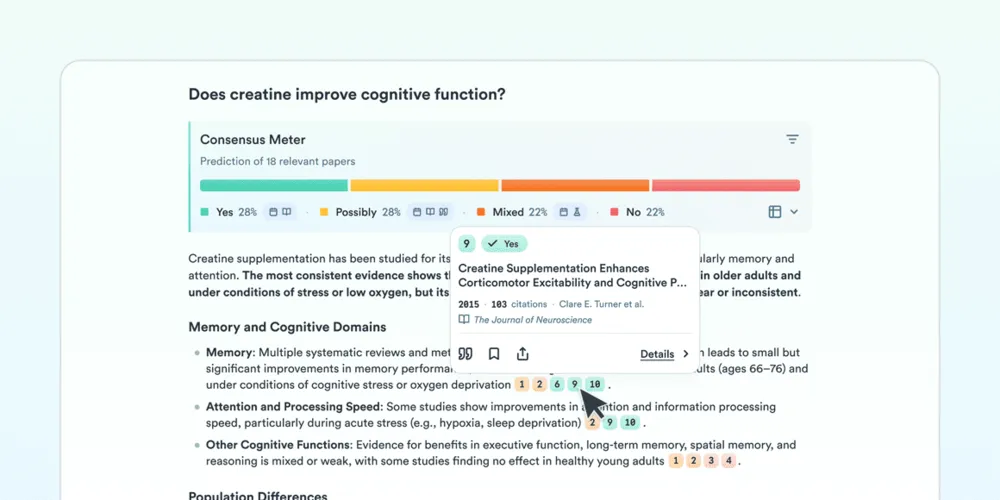
Source: Consensus Help Center (the screenshots below are also from the company's help center)
The meter appears when at least five relevant papers are found and uses up to the top 20. Each paper is labeled so you can check which paper takes which position. Opening "All details" shows four indicators for each position: recency (average publication date), methods (the number of meta-analyses, systematic reviews and RCTs), journals (average SJR score) and total citations.
The company is also clear about the limitations. The meter is a "snapshot" based on 5 to 20 papers and does not reflect all of the research on a topic; the AI can occasionally misclassify results; and it does not always account for details in the question (for example, if you ask whether ibuprofen is safe for adults, a paper finding it safe in children could be classified as "Yes").
Choose how deep to go: Pro and Deep
Pro is the default mode. It summarizes the top papers (up to 20) and answers with in-line citations. You can tell it how to shape the output in plain language, such as "make a table", "group the pro and con cases" or "explain it for an 8-year-old". Answers come with visuals such as a TL;DR header, a Claims & Evidence Table showing the strength of support and the key papers behind each claim, a Research Gaps Matrix highlighting under-researched areas, and a Results Timeline showing when the key papers were published.
For more comprehensive research, switch to Deep. Deep breaks your question into sub-questions, runs up to 20 searches, selects relevant papers from more than 1,000, and builds a literature review based on typically up to 50 papers (up to 100 when needed). It takes a few minutes, and you get an email when it is done.
For general questions it produces a structured review with an introduction, methods, results and discussion; for specific instructions it adapts the format, such as a comparison, critique, reading list or evidence map.
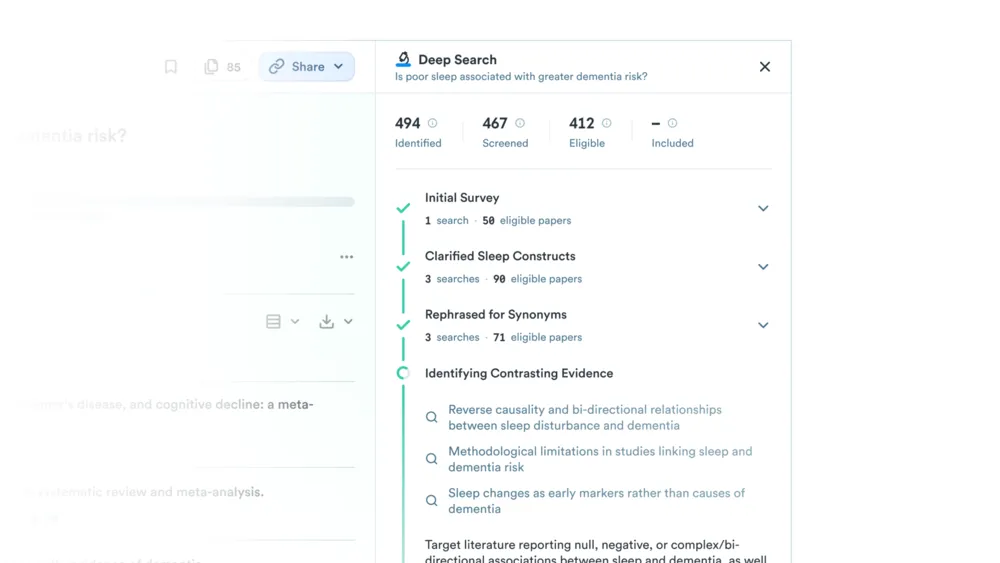
Behind both modes runs the Research Agent. It plans the search steps for your question, combines tools such as citation crawling, DOI lookup, author search and similar-paper search, and applies conditions written in plain language, such as "last 3 years, Q1 journals, sample size over 500", as filters. Follow-up questions carry over the context of the same thread.
If you only want a list of papers without a summary, use Paper Search (formerly Quick Search).
Start common research tasks with one click using Skills
Skills, added on October 5, 2026, are ready-to-run workflows for common research tasks. Choose one from Skills in the search bar and enter your question, paper, claim or draft, and it runs using Deep (each run uses one Deep credit).
01The four Skills
- Literature Review — Builds a structured literature review from a research question. Runs up to 20 searches in parallel, reads up to 100 papers and follows citations
- Citation Snowballing — Starting from one paper, expands to the papers it references and the newer papers that cite it to build a reading list
- Reverse Citation Search — Enter a claim that needs a source and it finds research that supports, challenges or qualifies it
- Verify Citations — Enter a draft with citations and it checks whether each source actually supports the claim it is attached to, showing the passage behind the assessment
Check the evidence behind each citation on the spot
Hover over a citation number in an answer to see the passage from the paper used as evidence for that claim (added in August 2026). A checkmark on a citation means the full text was used for the analysis; no checkmark means the abstract was used.
Full text comes from open-access papers and from publisher partnerships with Wiley, Taylor & Francis, Sage, ACS, APA, AAAS, De Gruyter Brill, Oxford University Press and others. Even when full text is used in the analysis, whether you can read the paper itself depends on your own subscriptions. Retracted papers are marked "RETRACTED" and excluded from AI analyses.
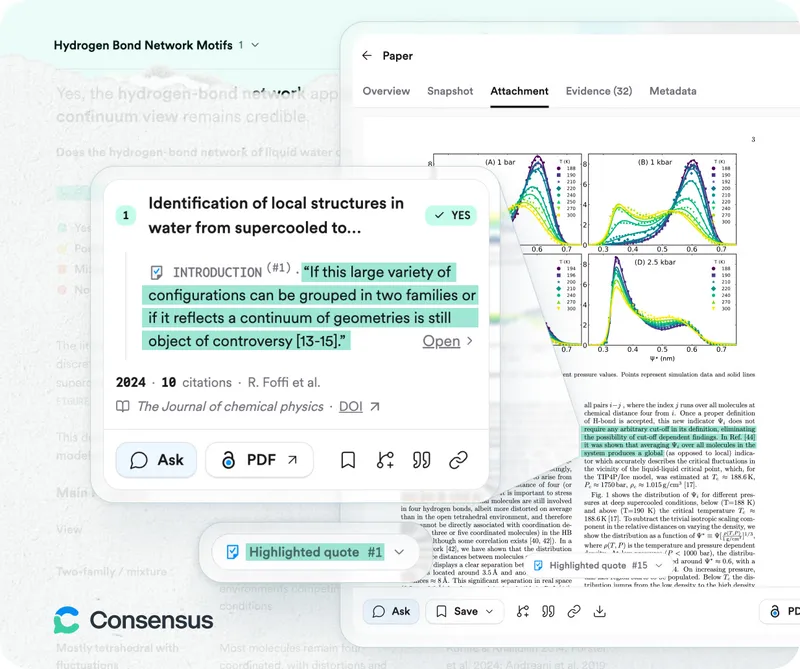
Open a paper's Study Snapshot to see key details such as the population, study design, outcomes, results and sample size. Switch the results to Table View to compare multiple papers side by side on these attributes.
Features
01Find
- Paper search — Combines semantic and keyword search. Search with natural language, keywords, Boolean operators, paper titles, authors or DOIs. Ranking also considers recency, citation count and journal reputation
- Advanced filters — 19 study designs, 44 publishers, human/animal, publication year, citation count, sample size, open access and more. Filters written in plain language are applied automatically
- Medical Mode — Searches only about 8M papers from the top 1,000 medical journals and about 50,000 clinical guidelines
- Citation Graph — Maps how research connects through citations, starting from up to five seed papers
02Read and synthesize
- Pro — Summarizes up to the top 20 papers with citations. Output format can be specified in plain language
- Deep — Analyzes typically up to 50 papers from up to 20 searches and produces a literature review
- Consensus Meter — Shows how much research agrees on a yes/no question
- Skills — Runs literature reviews, citation snowballing, source finding and citation verification as workflows
- Chat with full text — Ask questions across specific papers, collections or your uploaded documents
- Figures in answers — Shows figures, charts and tables from cited open-access papers inside answers (added in September 2026)
03Organize and export
- My Library — Save and organize papers in collections. Share them as viewers or editors, and get suggestions for related papers based on what you saved
- Uploads — Up to 20 PDFs at a time (50 MB each). Besides papers: manuscripts, research proposals, dissertations, clinical protocols and more. Private unless you share a collection
- Import — Zotero (including group collections), DOI, RIS and BibTeX
- Export — Search results as CSV, RIS or a bibliography (APA, MLA, Chicago, Harvard, BibTeX, AMA). Answers as PDF, copy with citations, or LaTeX
04Connect with other AI tools
- ChatGPT, Claude and Microsoft 365 Copilot — Use Consensus paper search from each app or connector (MCP)
- API — Available to everyone since August 2026. Call paper search or create threads from your own tools. API and MCP usage share one monthly pool of calls
How to use
- Create an account Sign up via "Sign up" on the official website. The Free plan lets you try Pro 10 times and Deep 3 times per month.
- Set the answer language Open the profile icon at the bottom left → Settings, and choose your language from the dropdown. The interface stays in English, but analyses, summaries and key takeaways are returned in the language you choose.
- Ask a question Type your question in the search bar and send it (Pro is the default). To see whether research agrees, phrase it as a yes/no question to get the Consensus Meter. For comprehensive research, turn on "Deep" in the search bar; for common tasks, pick one from "Skills". To focus on medical information, choose Medical from the "+" menu.
- Check the evidence Hover over citation numbers to read the supporting passages and open the papers as needed. Check each paper's Study Snapshot for its study design and sample size.
- Save and export Save papers you will use to My Library and export them to your reference manager as RIS or BibTeX.
The official help center lists as limitations that Consensus does not include all research and that the AI can still misread a real paper when summarizing it. It recommends going beyond the quick summary and checking the original papers.
Pricing
Prices on the official pricing page as of October 16, 2026. Prices are in US dollars, and annual billing is cheaper.
Individual
| Plan | Annual (per month) | Monthly | Main features |
|---|---|---|---|
| Free | Free | Free | Paper search (no AI analysis), 10 Pro messages and up to 3 Deep reviews per month |
| Pro | $12 ($144/year) | $20 | Unlimited Pro messages, 15 Deep reviews per month, every research tool, 500 API & MCP uses per month |
| Deep | $45 ($540/year) | $65 | Everything in Pro plus 200 Deep reviews per month and 2,000 API & MCP uses per month |
Team and Enterprise
| Plan | Annual (per month) | Monthly | Main features |
|---|---|---|---|
| Teams | $20 per seat ($240 per seat/year) | $30 per seat | Up to 200 seats. Everything in Pro plus 50 Deep reviews per month, account management, centralized billing, 500 API & MCP uses per month |
| Enterprise | Custom quote | Custom quote | For universities and larger research organizations. Integration with your research library, management of thousands of users, SAML SSO (Okta, Azure AD, OpenAthens, Google Workspace and more), dedicated support |
- Students and faculty with a valid school email, and US healthcare professionals with a valid NPI number, can get up to 40% off (apply via "Claim" on the pricing page).
- API & MCP uses beyond the included amount cost $0.05 each, up to 1,000 per month on Pro and Teams and 10,000 per month on Deep (Free includes 30 per month with no additional usage). Usage resets on the 1st of each month.
- Refund eligibility depends on your subscription type and location; the company says refunds are generally available within a short window after purchase. See the official refund policy for details.
Adoption and reviews
According to the official help center and website, more than 10 million researchers, students and clinicians use Consensus, and more than 170 university libraries partner with it to give students and faculty access. The website shows logos of institutions such as the University of Michigan, Rice University, the University of Virginia, Carnegie Mellon University and McGill University as examples of daily use. In May 2026, the company announced a $30M funding round and said it had more than 2.5 million monthly active users at that time.
The user testimonials on the official pricing page are as follows.
01Student (Jen W.)
"Consensus helps me gather real, peer-reviewed sources. It doesn't write for me, but it sets me up to write with clarity and confidence."
02PhD candidate (Caitlin)
"Consensus saves me countless hours by highlighting the most relevant papers with clear summaries and identifying their study designs. It has become essential to my dissertation workflow."
Pros and cons
Pros
- Because it searches papers before answering, the papers it cites are real, and you can check the supporting passage
- For yes/no questions, the Consensus Meter shows at a glance how much the research agrees
- You can choose the depth, from quick Pro summaries to Deep literature reviews of up to 50–100 papers
- Answers can be set to Japanese
- Individual Pro starts at $12/month billed annually, an accessible price for an academic AI tool, with discounts for students and faculty
- Available from ChatGPT, Claude and Microsoft 365 Copilot, and can be built into your own tools via the API
- The company states that it does not use user data to train AI models
Cons
- The interface is in English and most indexed papers are in English, so it is not suited to finding Japanese-language papers
- Prices are in US dollars
- The Consensus Meter is based on 5 to 20 papers and can misclassify results or miss details in the question
- It does not include every paper, and papers without full-text access are analyzed from their abstracts
- The Free plan is limited to 10 Pro messages and 3 Deep reviews per month, so serious use requires a paid plan
How Consensus differs from other AI research tools
| Product | What it searches | Best for |
|---|---|---|
| Consensus | 220M+ peer-reviewed papers. The Consensus Meter shows how much research agrees | Quickly learning what research concludes on a question, and synthesizing literature with citations |
| Elicit | Academic papers and clinical trials. Supports systematic review workflows | Screening papers against criteria and extracting data into tables |
| Perplexity | The whole web (with sources) | Quickly researching the latest news and web information with sources |
| NotebookLM | Documents you upload | Summarizing and asking questions based only on your own papers and materials |
| ChatPDF | Uploaded PDFs and other documents | Reading a single paper through conversation |
If you want to quickly learn where research leans, Consensus is a good fit; to screen papers and extract data, Elicit; for the latest information on the web, Perplexity; and for working through your own materials, NotebookLM or ChatPDF.
FAQ
Q. Is Consensus free? Yes. The Free plan is free and includes paper search plus 10 Pro messages and 3 Deep reviews per month. Unlimited Pro messages require the Pro plan at $12/month billed annually ($20 billed monthly).
Q. Can I use it in Japanese? The interface is in English, but if you set the answer language to Japanese in settings, you receive analyses, summaries and key takeaways in Japanese. Most of the papers it searches are in English.
Q. Is there a student discount? Yes. Students and faculty with a school email address can get up to 40% off. If your university partners with Consensus, you may also be able to use it through your university.
Q. Can I trust Consensus answers? Answers are based on real papers found by search, and you can check the supporting passage for each citation. Retracted papers are excluded from analyses. However, the company itself says the AI can still misread a paper and recommends checking the original papers for important decisions.
Q. Are my searches and uploaded documents used to train AI? No. The company says it does not use user data to train any AI models, its own or third parties'. Uploaded documents are visible only to you unless you share a collection.
Q. Can I use it from ChatGPT or Claude? Yes. It is available as a ChatGPT app, a Claude connector (MCP) and a Microsoft 365 Copilot app. Usage counts toward the API & MCP allowance of your Consensus plan.
The information on this page is based on what Consensus published on its official website and help center as of October 2026. Features and pricing may change, so please check the official website and pricing page for the latest information.