
Elicit
: How to use it, features, and the business problems it solves
Add bookmark
What is Elicit?
An AI research assistant for researchers from Elicit Research PBC (USA). It semantically searches more than 138 million academic papers and 545,000 clinical trials, and produces reports, data-extraction tables and systematic reviews (screening and extraction) with sentence-level citations. Designed for use in English. Basic is free; Pro is $49/month billed annually (academic plans available).
Business problems it solves

About "Elicit"
What is Elicit?
Elicit is an AI research assistant for researchers provided by Elicit Research PBC (a public benefit corporation) in the United States. Enter a research question, and it helps you find academic papers, read them, extract data into tables and compile an evidence-based report.
It covers more than 138 million academic papers collected from Semantic Scholar, PubMed and OpenAlex, and 545,000 clinical trials registered on the US ClinicalTrials.gov. What the company highlights as different from general AI chat is that every AI-generated claim carries sentence-level citations, and that you work not only in chat but with tables and multi-step workflows. The official site says Elicit is used by more than 5 million researchers (as of October 2026).
It targets fields such as pharmaceuticals, medical devices, academia, policy, consumer goods and materials, and is especially distinctive in automating the steps of systematic reviews (a method of comprehensively collecting the studies on a topic, screening them against criteria, extracting data and synthesizing the results).
About using it in Japanese: The official Help Center states that "Elicit is designed for use in English." Search, summaries and data extraction are optimized for English-language papers, and the sources are predominantly in English. A query in Japanese may return relevant results, and the Research Agent may read or respond in Japanese, but quality varies widely and accuracy is not ensured. Using a language other than English also consumes your usage limit faster. The interface is in English.
Enter a research question and hand off finding, reading and synthesizing papers
Elicit has three entry points: the most flexible Research Agent, the Research Report for a quick overview of a topic, and the Systematic Review for fine-grained control over each step. The Help Center says "most research starts in the Agent."
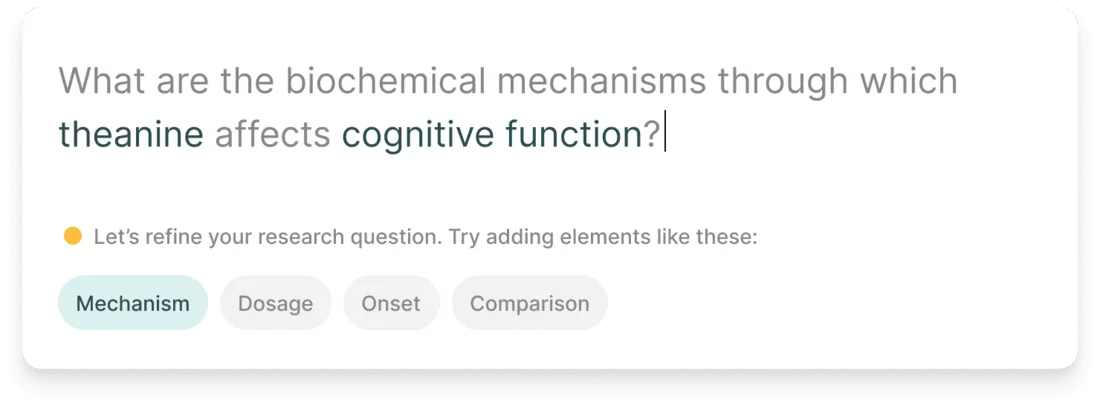
Source: Elicit official website (the same applies to the screen images below)
When you enter a question, Elicit suggests angles—such as "mechanism", "dosage", "onset" and "comparison"—to make it more specific. Instead of searching with a vague question, you can first pin down what you want to know.
The Research Agent draws on Elicit's paper corpus as well as the web, and can take up to 20 uploaded resources per session (PDF, DOCX, XLSX, PPTX, JPG and more). In one session, without switching tools, it goes from finding papers to extracting data from the results, investigating a single study and synthesizing the evidence, and outputs reports, summaries, tables, slides or figures. On September 30, 2026, the formerly separate Find Papers, Extract Data and Chat with Papers became part of the Research Agent.
Find relevant papers without knowing all the right keywords
Elicit uses semantic search, so according to the company you don't need to know all the right keywords to get relevant results. It can find up to 1,000 relevant papers and analyze up to 20,000 data points at once.
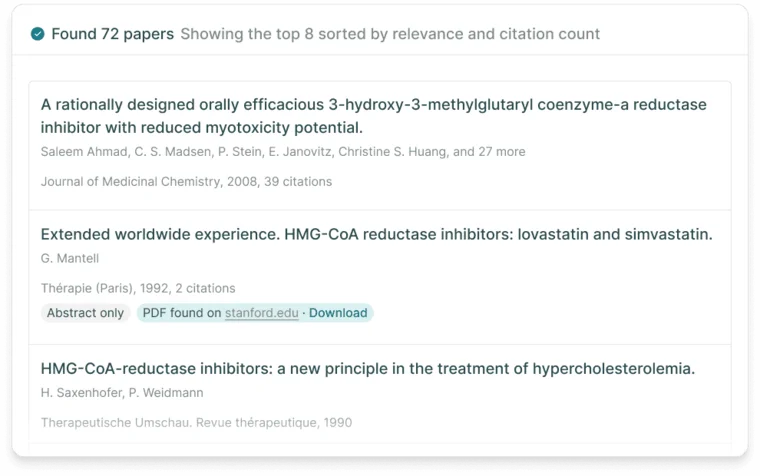
Results are sorted by relevance and citation count, and each paper shows its authors, journal, year and citation count. Where a full-text PDF is found, its location and a download link are shown.
Sources include major publishers such as Springer Nature, Elsevier and Wiley, university presses such as Oxford and Cambridge, societies such as IEEE and ACM, and preprint servers such as arXiv, bioRxiv, medRxiv and SSRN. The corpus is updated weekly.
Automate the "screening" and "extraction" of systematic reviews
The Systematic Review workflow guides you step by step: gathering papers from uploads and Elicit's search, screening them for inclusion or exclusion, extracting data from the papers that make it through, and generating a PRISMA-style report at the end. According to the official site, researchers report up to 80% time savings using Elicit for systematic reviews.
Gather papers
Collect candidates from Elicit's search and your uploads
Screening
Screen by abstract or full text against your criteria; up to 5,000 papers on Pro
Data extraction
Extract the specified columns from included papers into a table
Report
Generate a PRISMA-style report
Elicit positions screening and data extraction as automated, with search and report generation partially supported
On Pro and higher plans, the Elicit Browser Extension for Chrome and Edge uses your institutional logins to fetch full-text PDFs of paywalled papers automatically and add them to the extraction step. Elicit says your credentials never leave your device and are not shared with Elicit.
Carry the papers you find into your next project
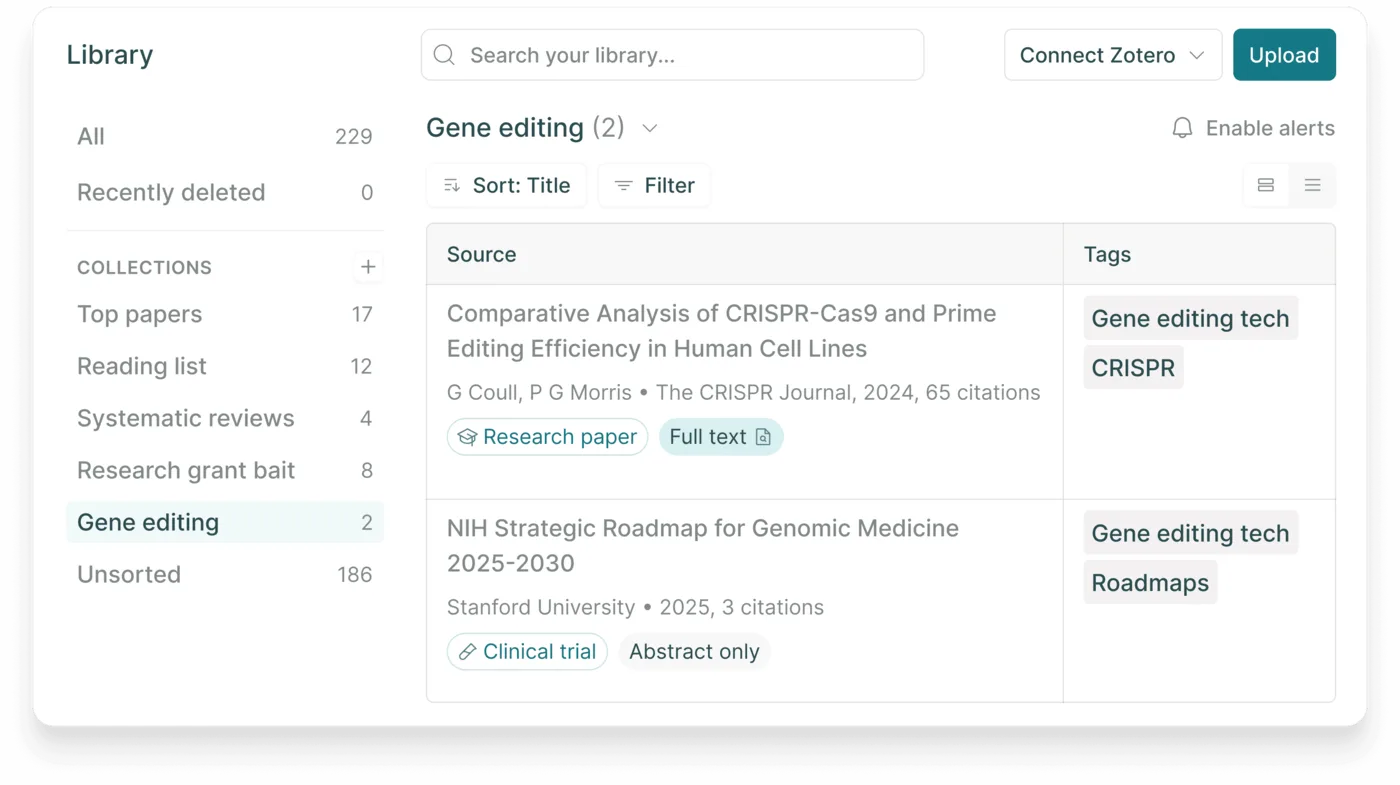
In the Library, you can save papers and resources found in Elicit and organize them with collections and tags. You can also import from Zotero and upload PDFs. Uploaded PDFs are encrypted, remain private to your account and are not added to the Elicit corpus.
In September 2026, the Library was expanded into a shared hub for teams, where researchers and AI agents can work from the same evidence.
With Routines (launched September 30, 2026), you can tell the Research Agent what to keep current—for example, "track newly registered oncology trials." Routines find new evidence, update your work and report back for your review (Pro and above).
Features
01Find
- Paper search — Semantic search across 138M+ papers; sort by relevance or citations and filter
- Clinical trial search — Search trials from ClinicalTrials.gov
- Research Agent — Research based on the paper corpus, the web and uploads (up to 20 per session)
02Read and extract
- Data extraction — Extract specified items from papers as table columns; the number of columns depends on the plan (Pro 20, Scale 30, Enterprise 40)
- Figure extraction — Extract and interpret data from figures in papers (Scale and Enterprise)
- Sentence-level citations — Generated claims cite the relevant passages in the source papers
03Synthesize
- Research Report — A detailed report answering your question with references to the papers used; export to PDF or Word
- Systematic Review — Gathering, screening, extraction and a PRISMA-style report (Pro and above)
- Export — RIS, CSV, BIB, PDF and DOCX
04Keep going and connect
- Library — Save and organize papers, import from Zotero, share with your team
- Routines — Keep research up to date and report new evidence (Pro and above)
- Collaboration — Edit Research Agent sessions together in real time (Scale and Enterprise)
- API and MCP — Call Elicit from your own agents and workflows; usable from MCP clients such as Claude Desktop and Claude Code (Pro and above)
How to use
- Create an account Sign up from "Try for free" on the official site. The Basic plan is free and lets you try paper search, the Research Agent and Research Reports in limited amounts.
- Choose an entry point and enter your research question Choose the Research Agent for broad research, a Research Report for a quick overview of a topic, or a Systematic Review for comprehensive research with defined criteria. Questions are expected to be in English. Add the angles Elicit suggests (mechanism, dosage, comparison, etc.) to make your question specific.
- Check the results and extract what you need Review the search results or the Agent's output, and specify the items you want to extract from papers as columns. Verify generated content against the cited passages.
- Export and save Export reports to PDF or Word and save papers to the Library. Register topics you want to keep following as Routines.
The Help Center lists Elicit's limitations: summaries and extractions can miss the nuance of a paper or misunderstand what a number refers to, and Elicit cannot yet evaluate a paper's trustworthiness (methodological quality or fraud), so it summarizes a bad study just like a good one. For important decisions, checking the original papers is essential.
Pricing
Prices on the official pricing page as of October 16, 2026. In US dollars, per user; annual billing is cheaper. The pricing page has two price lists: "Industry" (companies etc.) and "Academic" (universities, research institutions etc.). According to Elicit's vendor information, it does not charge VAT or sales tax.
Industry price list
| Plan | Annual (per month) | Monthly | Main features |
|---|---|---|---|
| Basic | Free | Free | Limited Research Agent and Research Report usage; paper search, summaries and chat with full text; Zotero import |
| Pro | $49 ($588/yr) | $75 | Standard usage, Systematic Review (screen up to 5,000 papers), 20-column extraction, Routines, extraction from uploaded papers, API |
| Scale | $169 ($2,028/yr) | $279 | 5x Pro's usage, figure extraction, real-time team collaboration, 30-column extraction, admin panel |
| Enterprise | Custom | Custom | Screen 40,000 papers and extract 40 columns, no training on your data by default, SSO/SAML/2FA, custom deployments such as single-tenancy, dedicated customer success |
Academic price list
| Plan | Annual (per month) | Monthly | Main features |
|---|---|---|---|
| Basic | Free | Free | Same as Industry Basic |
| Plus | $11 ($132/yr) | $19 | Standard usage, export to RIS/CSV/BIB/PDF/DOCX, 5-column extraction, clinical trial search |
| Pro | $39 ($468/yr) | $69 | 5x Plus's usage, Systematic Review (5,000 papers), 20-column extraction, Routines, API |
| Scale | $89 ($1,068/yr) | $149 | 9x Plus's usage, figure extraction, collaboration, 30-column extraction, admin panel |
| Enterprise | Custom | Custom | Same as Industry Enterprise |
- Monthly prices are those shown when switching the pricing page to "Monthly".
- The Academic price list appears when you select "Academic" from the dropdown on the pricing page. Complimentary access is not available. There is no separate nonprofit discount; nonprofits are directed to the Academic plans.
- Usage is measured as a monthly usage pool shared across the Research Agent, Research Reports and Systematic Reviews (switched from per-workflow counts on June 30, 2026). Long sessions that read large files or tasks with figure extraction enabled consume more. If you run out, you can still use the Research Agent's paper search until the next period.
- Universities and research institutions can inquire about institutional contracts.
Track record and reputation
The official site says Elicit is used by more than 5 million researchers (as of October 2026). On accuracy, in July 2026 Elicit published an evaluation stating that it outperformed five other search systems on the biomedical question-answering benchmark BioASQ, retrieving more of the papers biomedical experts rely on.
The case studies on the official site are as follows.
01Data extraction accuracy: 99.4%
VDI/VDE used Elicit's data extraction for a systematic review informing German education policy, correctly extracting 1,502 of 1,511 data points (99.4% accuracy). It reports considering 11 times more evidence.
02Clinical development: extracting from 1,600 papers 10x faster
While developing a clinical asset for knee osteoarthritis, Formation Bio used Elicit to assess how end-stage knee osteoarthritis had been defined in clinical trials and previous literature. It reports extracting data from 1,600 papers 10 times faster.
03Pharma consulting: 500 papers, 40 questions
Oxford PharmaGenesis, which advises 8 of the top 10 global pharmaceutical companies, used Elicit to review 500 papers across 40 research questions.
Pros and cons
Pros
- Search focused on academic papers and clinical trials tends to give results better suited to research than AIs that search the whole web
- Generated claims carry sentence-level citations, making them easy to verify against the source papers
- Screening and data extraction for systematic reviews can be automated step by step
- Data extracted from papers can be compared in tables
- Discounted academic price list
- Can be built into your own agents and workflows via the API and MCP
Cons
- Designed for English; quality is not ensured for questions or papers in Japanese, and the interface is in English
- Priced in US dollars; Industry Pro costs $49/month even when billed annually, more than general AI chat
- Usage is a monthly pool that varies with the size of the work, making it hard to estimate in advance
- No feature yet for evaluating a paper's trustworthiness (e.g., methodological quality)
- Elicit focuses on empirical research (such as randomized controlled trials in the social sciences or biomedicine), so suitability varies by field
Elicit vs. other AI research tools
| Product | What it searches | Best for |
|---|---|---|
| Elicit | 138M+ academic papers and clinical trials; supports the systematic review process | Gathering and comparing evidence from papers in tables; speeding up review screening and extraction |
| NotebookLM | Materials you upload | Summarizing and asking questions based only on your own papers and documents |
| Perplexity | The whole web (with sources) | Quickly researching recent news and web information with sources |
| Felo | The whole web (with sources); supports Japanese | Researching in Japanese and creating slides or mind maps |
| ChatPDF | Uploaded PDFs and other documents | Reading a specific paper interactively |
If you want to search academic papers comprehensively and compare evidence, choose Elicit; to work with your own materials, NotebookLM or ChatPDF; to research the latest web information in Japanese, Felo or Perplexity.
FAQ
Q. Is Elicit free? Yes. The Basic plan is free and includes paper search, summaries and chat with full text, plus limited use of the Research Agent and Research Reports. Systematic Reviews require Pro or above.
Q. Can I use it in Japanese? Officially, Elicit is designed for use in English. A Japanese query may return relevant results and the Research Agent may answer in Japanese, but quality varies and accuracy is not ensured. Using a language other than English also consumes your usage faster.
Q. Are there discounts for students and university researchers? Yes. Select "Academic" on the pricing page to see the discounted price list, including Plus ($11/month billed annually). There is no complimentary access or separate nonprofit discount.
Q. Can other people see the papers I upload? No. Uploaded PDFs are encrypted and remain private to your account until you delete them. They are not added to Elicit's paper corpus.
Q. Can I trust Elicit's answers? Answers include sentence-level citations so you can verify them in the source papers. However, Elicit itself lists limitations such as missing nuance or misreading numbers, and it cannot evaluate the quality of the papers themselves. For important decisions, check the cited papers.
The information on this page is based on what was published on Elicit's official website and Help Center as of October 2026. Features and prices may change; please check the official website and the pricing page for the latest information.