ChatPDF
: How to use it, features, and the business problems it solves
Add bookmark
What is ChatPDF?
ChatPDF, from Germany's ChatPDF GmbH, is an AI tool that lets you upload documents like PDFs, Word, and PowerPoint and then summarize, ask questions, and translate them conversationally, like ChatGPT. Answers cite the source page, and it supports cross-file chat across multiple documents. The free plan (2 documents/day) works without sign-up, and paid Plus makes documents and questions unlimited.
Business problems it solves


About "ChatPDF"
What is ChatPDF
ChatPDF is an AI tool that lets you upload documents like PDFs and then summarize, ask questions, and translate them conversationally, like ChatGPT. Run by ChatPDF GmbH (Berlin, Germany), it bills itself as "ChatGPT for research papers." Because answers cite the source page, you can check the original text instantly, and it now supports not only PDFs but Word, PowerPoint, Markdown, and text files. You can try the core features without even creating an account.
It answers by showing "where it's written"
When reading a long document, knowing only the key points—without knowing which page the evidence is on—means you can't take it at face value. ChatPDF attaches the source page number to its answers, and clicking it jumps to that spot. With the document on the left and the chat on the right, you can hold a conversation while verifying the original.
How to Use
-
Upload a document
Open the official site and drag and drop a PDF (Word, PowerPoint, etc. are also supported), or select a file to upload.
-
Ask questions
Type a question in the chat box, and the AI analyzes the content and answers while citing the relevant passage.
-
Ask for a summary or translation
Instruct it to "summarize" or "translate into Japanese" to get a summary or a translation into another language.
-
Group multiple files
Create a folder, add multiple documents, and search and compare across them (Plus allows up to 50 documents per folder).
-
Keep your history
Log in to save your chat history and pick up where you left off.
Features
ChatPDF centers on asking questions, summarizing, and translating documents, plus conversing across multiple files. Bundle documents into a folder and you can ask questions across several related PDFs—financial materials, legal documents, and the like.
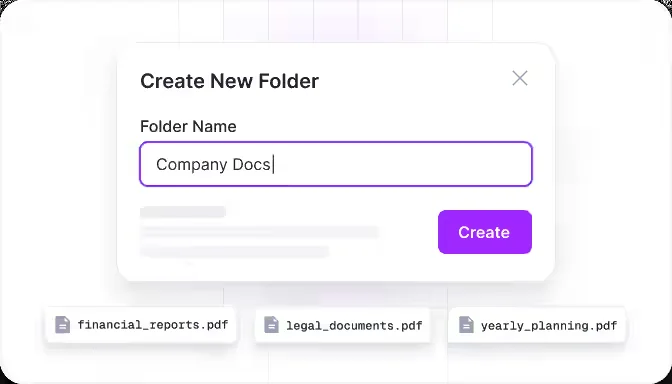
Source: ChatPDF official site (the screenshots below are from the same source)
01Read & ask
- Conversational Q&A — ask the document questions and grasp the key points fast
- Summarize — compress long text into points
- Cited sources — answers include page numbers and link to the original
02Expand
- Translate — translate documents into many languages
- Multi-file (folders) — converse across multiple documents
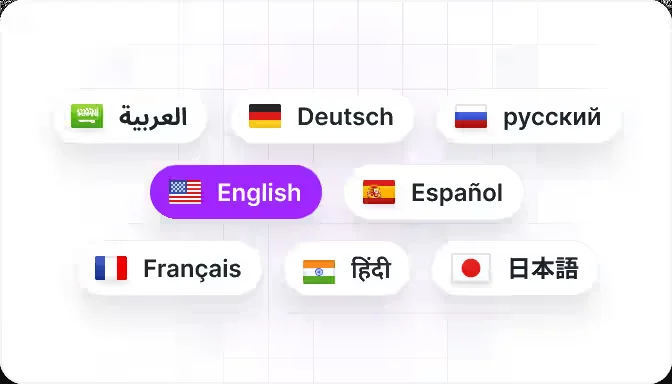
- Multilingual — ask and answer in many languages, including Japanese
03Connect
- API — embed into your own service (api.chatpdf.com)
- Apps — Mac and mobile apps available
Documents work in many languages, and a Japanese UI is provided. You can summarize an English paper in Japanese, or translate a Japanese document for English speakers.
Pricing
There are two tiers: a free plan and the paid Plus. Plus makes the number of documents and questions unlimited (prices are shown by region; Japan sees yen).
| Plan | Monthly | What's included |
|---|---|---|
| Free | ¥0 | Up to 2 documents/day; basic chat; cited answers |
| Plus | ¥1,299 (annual billing ¥649.92/mo ≈ half) | Unlimited documents and questions; 2,000 pages/doc; 50 docs/folder; higher-quality model |
Pricing varies by region in currency and display; from Japan it shows in yen as above. The per-file limit is 2,000 pages / 32 MB (per the API docs). Plus is sometimes described as "50 documents / 1,000 questions per day," but the current Plus is unlimited in both documents and questions. Check the [official site](https://www.chatpdf.com/) for the latest (as of August 2026).
How it differs from other PDF/document AI
ChatPDF's strengths are that it is usable quickly without sign-up, attaches sources to its answers, and supports many languages. For multi-source research or audio summaries, tools with a different design are a better fit.
| Aspect | ChatPDF | NotebookLM | pdftobrainrot |
|---|---|---|---|
| Focus | Ask, summarize, translate documents | Multi-source research / audio overviews | PDF → short video |
| Ease | Start without sign-up; cited | Assumes a Google account | Specialized in video generation |
| Best for | Reading documents fast | In-depth research | Turning study material into video |
NotebookLM (now Gemini Notebook), which answers with citations limited to your own materials and can create audio overviews; pdftobrainrot, which turns PDFs into short explainer videos; and the learning- and memory-oriented memoriq are all comparison points. If you want to quickly make sense of a PDF at hand, ChatPDF is a strong choice.
The information on this page is based on what was publicly available on the official site as of August 2026. Please check the official site for the latest specifications and pricing.