

Cuevane
: How to use it, features, and the business problems it solves
What is Cuevane?
Cuevane is a real-time sales assistant AI for live sales meetings from GlobeZenith OÜ, an Estonian company led by Kounosuke Nakagaki. In desktop Chrome, it listens to the other party in Google Meet, Zoom or Teams calls, classifies what they say as a question, an objection or something not covered in your materials, and within seconds shows a one-liner, a suggested response, a follow-up question and the supporting line from your own registered materials (text) in a small window. When something is not in the materials, it is designed not to make up an answer and instead suggests "I'll check and get back to you". Recordings are not stored and no bot joins the meeting. It supports Japanese and English meetings. Pricing is ¥9,800 per seat per month (excluding tax, AI usage included, up to 30 hours per seat per month); additional seats are ¥6,800, up to five seats; and a 60-day, three-seat pilot costs ¥30,000 (excluding tax). Full refunds are available within 7 days of payment (once per company). There is a no-sign-up demo (6 tries a day) and a free 14-day, one-seat usage key you can request by email (as of November 2026).
Business problems it solves

About "Cuevane"
What is Cuevane?
Cuevane is a real-time sales assistant AI that, during a sales meeting, listens for the other party's questions and objections and shows your "next line" in a small on-screen window within seconds, based on your own registered materials. It is provided by GlobeZenith OÜ, an Estonian company.
Unlike meeting-notes AI, which records and summarizes meetings for later use, Cuevane focuses on suggesting how to respond while the meeting is happening. What it shows is an AI draft; the salesperson decides what to say. Each answer comes with the line from your materials it is based on.
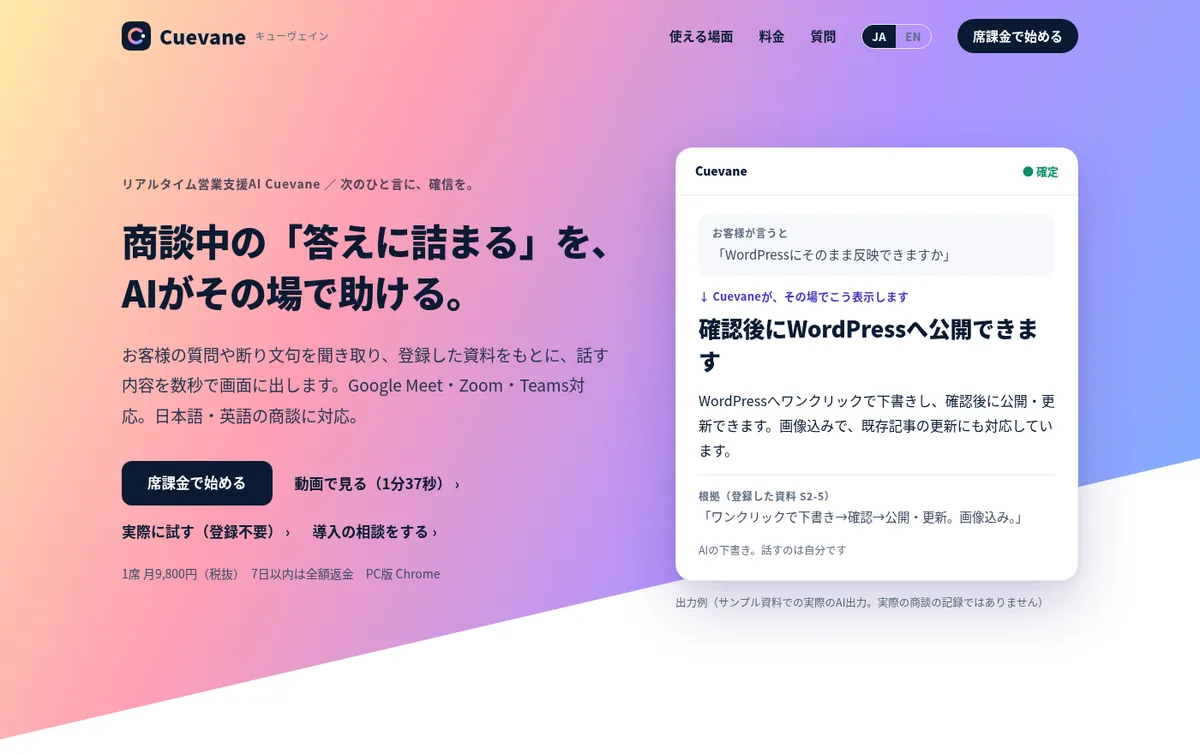
Source: Cuevane official site (also for the images below)
How to use it
- Sign up On the official site, choose per-seat billing (monthly) or the pilot (60 days, three seats) and enter your card on the payment screen (Stripe). A usage key arrives by email, usually within minutes.
- Register your materials Paste in your usage key and register materials such as price lists, service descriptions, FAQs and onboarding steps by pasting text (.md or .txt). PDF, Word and Excel need to be converted to text first. An official template (.md) is available.
- Use it in meetings Open Cuevane in desktop Chrome and join your Google Meet, Zoom or Teams meeting. Audio is captured from the meeting tab in Chrome or from the PC's system audio, so the Zoom and Teams apps work too.
- Let the other party know The company recommends saying at the start of the meeting that you are using AI to transcribe and prepare reference answers and that no recording is kept; the notice text can be copied from the screen.
When it's not in your materials, it doesn't make up an answer
Cuevane listens to what the other party says, classifies it and drafts a response from your registered materials. It ignores small talk.
Listen
Transcribes the other party from the meeting tab's audio in Chrome
Classify
Tells questions, objections, positive signals and small talk apart
Draft
Shows a one-liner, suggested response, follow-up question and supporting line in the small window
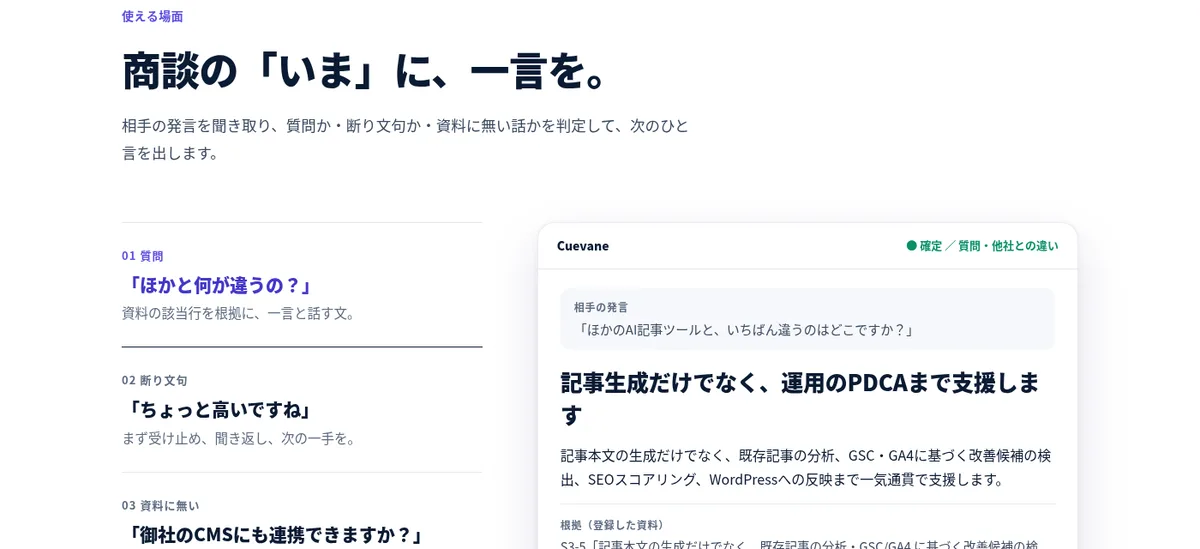
The official site gives examples for three situations.
- Question ("How are you different from others?") — gives a one-liner and a suggested response, citing the relevant line in your materials
- Objection ("That's a bit expensive") — first acknowledges, then asks a follow-up question and suggests the next step
- Not in your materials ("Can you integrate with our CMS?") — doesn't make up an answer; suggests "I'll check and get back to you" and logs it as a follow-up item for after the meeting
In the company's internal evaluation (158 AI-generated utterances), none of the 18 questions not covered in the materials received a made-up answer. For speed, the company reports a median of about 1.2 seconds from the end of speech to the one-liner in an internal text-based evaluation, and about 2.0–2.9 seconds when capturing synthetic speech from a meeting tab (both from the official status page). The company asks users to treat the output as a draft because errors cannot be ruled out.
An optional "bold move mode" (switched per meeting) combines facts from your materials with industry norms and sales practices to produce answers that move the deal forward. Content from outside your materials is marked as general, and the company says it runs checks so that numbers, track records, guarantees or fake deadlines not in your materials are not shown.
Try it without signing up
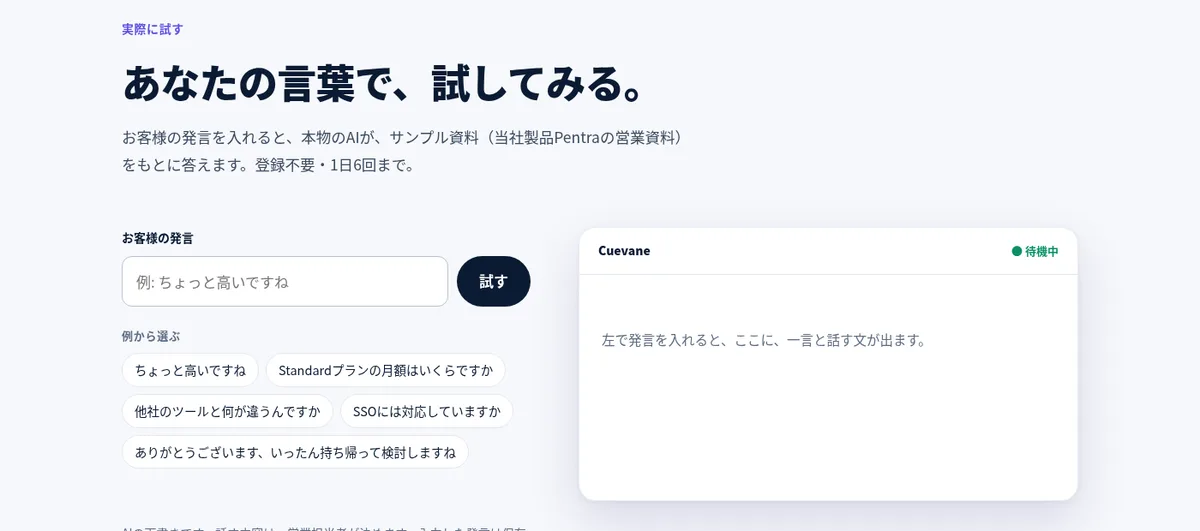
In "Try it" on the official site, enter something a customer might say and the real AI answers based on the official sample materials (sales materials for the company's other service, Pentra). No sign-up is needed, and you can try it up to 6 times a day. The company says the text you enter is not stored.
If you want to try it with your own materials, email info@globezenith.net and the company will send a free usage key for 14 days, one seat and up to 15 hours of total use (once per company). No card is needed; it stops automatically when the period ends and does not convert to a paid contract.
Features
01What it shows during a meeting
Displayed in the small window.
- One-liner — the first thing to say back
- Suggested response — a draft of what to say next
- Follow-up question — a question to ask back after an objection
- Evidence — quotes the line from your registered materials
02After the meeting
The history disappears when you close the screen.
- Meeting memo — "Copy meeting memo" lets you keep the flow, evidence, follow-ups and tallies (no audio or recordings)
- Follow-ups — questions not covered in your materials are kept as items to check later
Pricing
| Plan | Price (excl. tax) | Details |
|---|---|---|
| Per-seat billing | ¥9,800/month for the first seat; ¥6,800 per additional seat (up to 5 seats) | E.g. ¥23,400/month for 3 seats, ¥37,000/month for 5. AI usage included. Up to 30 hours per seat per month. Renews monthly; cancel anytime |
| Pilot | ¥30,000 (one-time) | 60 days, 3 seats, with 90 minutes of setup and a 30-minute consultation. Does not auto-renew |
- A seat is a named user, one per PC on which the usage key is registered. You can switch PCs up to 3 times in 30 days
- "30 hours per seat per month" is the AI usage time counted per PC in one-minute units and pooled across the company's seats. Hitting the limit does not trigger automatic extra charges; the service simply stops for that period
- If you contact the company within 7 days of payment, it refunds the full amount once per company (the first monthly fee for per-seat billing, or ¥30,000 for the pilot)
- Additional work (organizing materials, reviewing settings) costs ¥10,000 per session
- More than 5 seats are handled case by case
(As of November 2026, from the pricing on the official site and the company and terms of sale page)
How your data is handled
According to the official data-handling page, recordings and audio files are not stored, and audio does not pass through Cuevane's servers; transcription is done by Chrome (Google). In the browser version you sign up for online, the text of the other party's remarks and the text of your registered materials pass through the operator's servers (Vercel) to the OpenAI API (USA). The operator says its servers neither store this text nor write it to logs. Calls to OpenAI are made with the do-not-store option, but OpenAI may retain data for up to 30 days for abuse monitoring. Data sent via the API is not used for model training without explicit consent.
Because the full text of your registered materials is sent each time an answer is generated, the company asks you not to include anything that cannot leave your company, such as customer names or unpublished terms. Materials and settings are stored only in your browser.
How it differs from other sales AI tools
| Product | Type | Key features |
|---|---|---|
| Cuevane | Real-time sales assistant AI for live meetings | Suggests the next line in a small window based only on your materials; no recordings kept, no bot in the meeting |
| Salesken | Conversation intelligence | Real-time coaching during calls, AI quality scoring of all calls, deal outcome prediction |
| MiiTel | Voice analytics AI | Records and transcribes phone, web-meeting and in-person conversations and analyzes speaking speed, talk ratio and more |
| amptalk | Japanese sales-meeting analytics AI | Transcribes, summarizes and analyzes meetings and fills in SFA/CRM; AI role-play too |
| Granola | Bot-free AI note-taker | Combines your notes with the transcript to produce meeting notes |
Details for the other products are as stated on each product page at the time it was checked. If you want to record and analyze meetings and train the team, MiiTel or amptalk fit; for a small sales team that wants help answering in line with its materials during the meeting itself, Cuevane fits.
FAQ
Q. Does it record? No recordings are kept, and no bot joins the meeting. However, because the other party's remarks are transcribed and sent to an external AI (OpenAI), the company recommends telling them at the start of the meeting that AI is transcribing. Required consent or notice depends on laws, NDAs, your company's rules and the other company's rules.
Q. Can I try it for free? "Try it" on the official site works without sign-up up to 6 times a day (fixed to the official sample materials). To try it with your own materials, request by email a free usage key for 14 days, one seat and up to 15 hours in total (once per company).
Q. What kind of team is it for? The company lists small sales teams, such as sales outsourcing, SaaS and web production, that have text materials they can share (price lists, FAQs, onboarding steps) and often answer the same kinds of questions about pricing, features and differences from competitors.
Q. What if the AI says something wrong? What it shows is a draft, and the salesperson does the talking. It shows the evidence from your materials and runs checks so numbers and terms not in your materials are not shown, but the company also says errors cannot be ruled out.
Provider
Cuevane is provided by GlobeZenith OÜ of Estonia (address: Sakala tn 7-2, 10141 Tallinn, Estonia). The company was founded in May 2024 by Kounosuke Nakagaki and runs AI development and AI marketing support as well as its own services such as the AI SEO tool Pentra. As an overseas company it has no address in Japan, and inquiries are accepted by email (info@globezenith.net). The terms of sale page is a provisional version updated on 29 October 2026, and the company says it will publish its disclosure under Japan's Specified Commercial Transactions Act and its consumption-tax treatment after review.
The information on this page is based on what was published on the official site (home, company and terms of sale, data handling and status pages) and GlobeZenith OÜ's company page as of November 2026. Features and pricing may change, so please check the official site for the latest information.