
Frank AI Researcher
: How to use it, features, and the business problems it solves
What is Frank AI Researcher?
Frank AI Researcher (Frank) is an AI-moderated customer interview service from Prelaunch Group, Inc. (the company behind the product-validation platform Prelaunch.com) in the US. Describe your research goal and the AI drafts an interview guide; when customers open the link, the AI talks with them by voice, asks follow-up questions, and turns each conversation into transcripts, theme and sentiment analysis, action items, and highlight videos. Japanese can be selected as the interview language (the app itself is in English). It can also be used from Claude, ChatGPT and other AI clients via MCP. Free plan: 60 minutes per month; paid plans from $59/month ($49/month billed yearly) as of November 2026.
Business problems it solves


About "Frank AI Researcher"
What is Frank AI Researcher?
Frank AI Researcher (Frank) is a research service in which an AI moderates customer interviews and then analyzes them for you. You describe what you want to learn, the AI drafts an interview guide, and when a customer opens the link you share, the AI interviewer talks with them by voice and asks follow-up questions based on their answers. Finished conversations appear on the dashboard as transcripts, theme and sentiment analysis, and action items.
Because no scheduling or human moderator is needed, you can interview dozens or hundreds of customers at the same time — people who canceled, people who just signed up, people who tried a new feature, and so on. Frank positions itself as a replacement for traditional interviews, which it says cost $500–$1,000 each.
Frank is run by Prelaunch Group, Inc. (doing business as Frank) in the US, the company behind the product-validation platform Prelaunch.com. The official site states that Prelaunch.com was the Silver Winner of the ESOMAR Award for Breakthrough Research Methodology. The website and the app are in English, but Japanese can be selected as the interview language.
Describe your goal, get an interview guide
To create an interview, you first pick a type. The official documentation groups them into three: "Discovery & Validation" before building something new (exploring needs, concept testing, messaging, pricing and value perception), "Product Experience" during or after development (prototype and usability testing, pre-launch expectations, post-release satisfaction), and "Retention & Growth" after launch (engagement and habits, churn and exit, retention and expansion).
Next, you briefly write what you want to learn. The AI drafts a product brief (what it does, target users, key features, differentiators and so on), confirms the interview length (5–30 minutes) in a chat, and builds a "Research Guide" made up of research goals, a welcome message, and topic-by-topic questions with follow-up guidelines. Each question can be edited, added or removed. Frank says setting up your first interview takes 5–10 minutes.
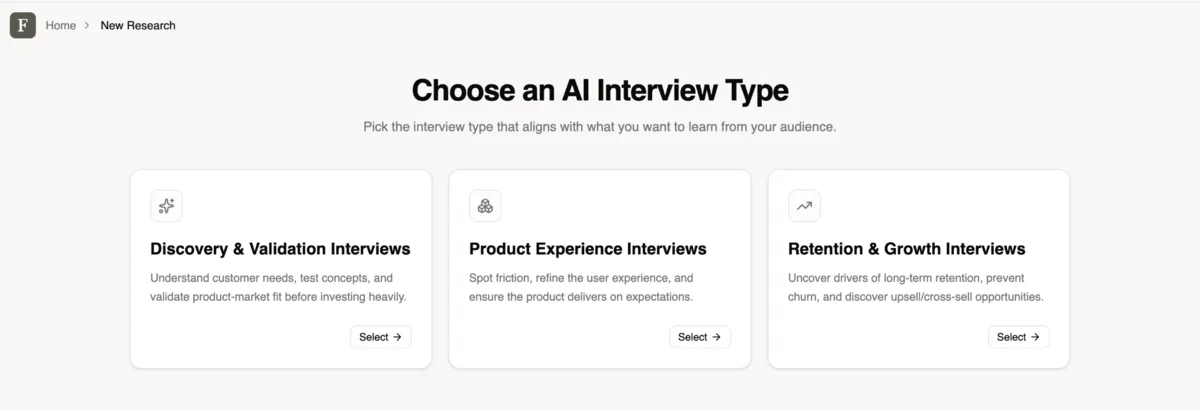
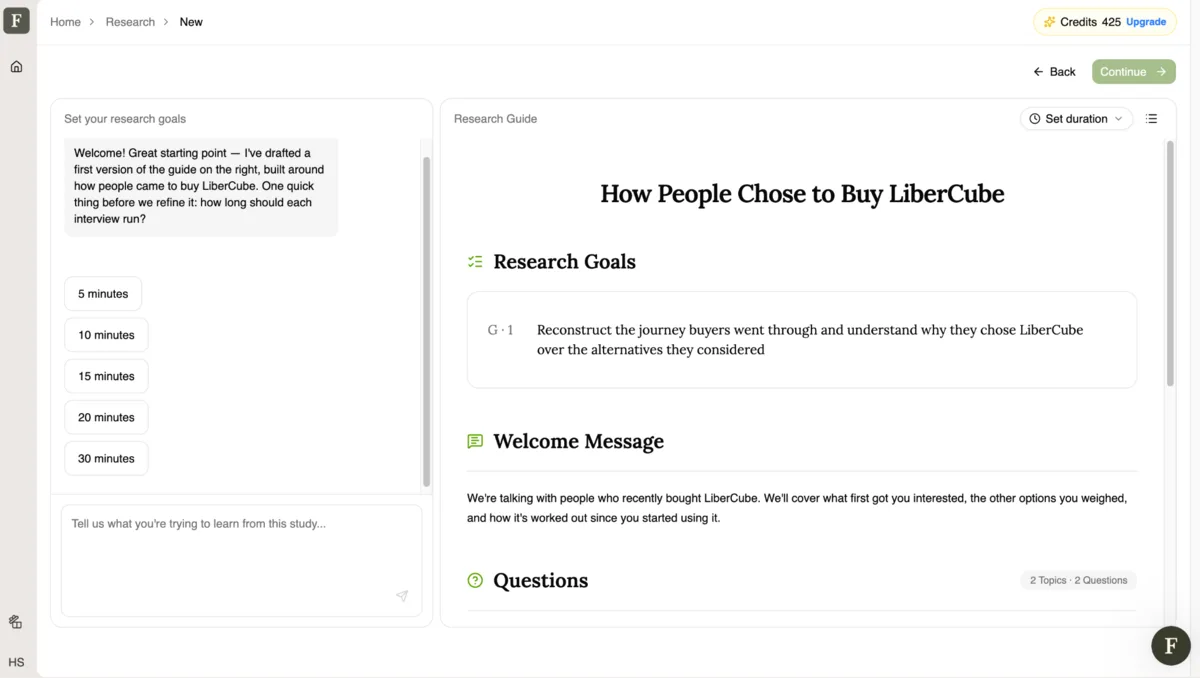
Source: Frank official documentation, "How to Set It Up"
Customers talk with the AI, which digs deeper as they answer
When you publish, a link such as https://app.hifrank.ai/research/… is generated. It works wherever you place it — emails, in-app prompts, cancellation flows — and participants simply open it to start talking with the AI interviewer (you can choose Olivia or Frank) in a video-call-style screen.
After asking the questions in the guide, the AI asks follow-ups based on the answers to get at the reasons behind them. Interview links stay active until you stop them, and as many interviews as your plan allows can run in parallel. Anyone with the link can join, so Frank recommends sending it only to your intended audience. Incentives are optional; you can also send Amazon gift cards from the platform.
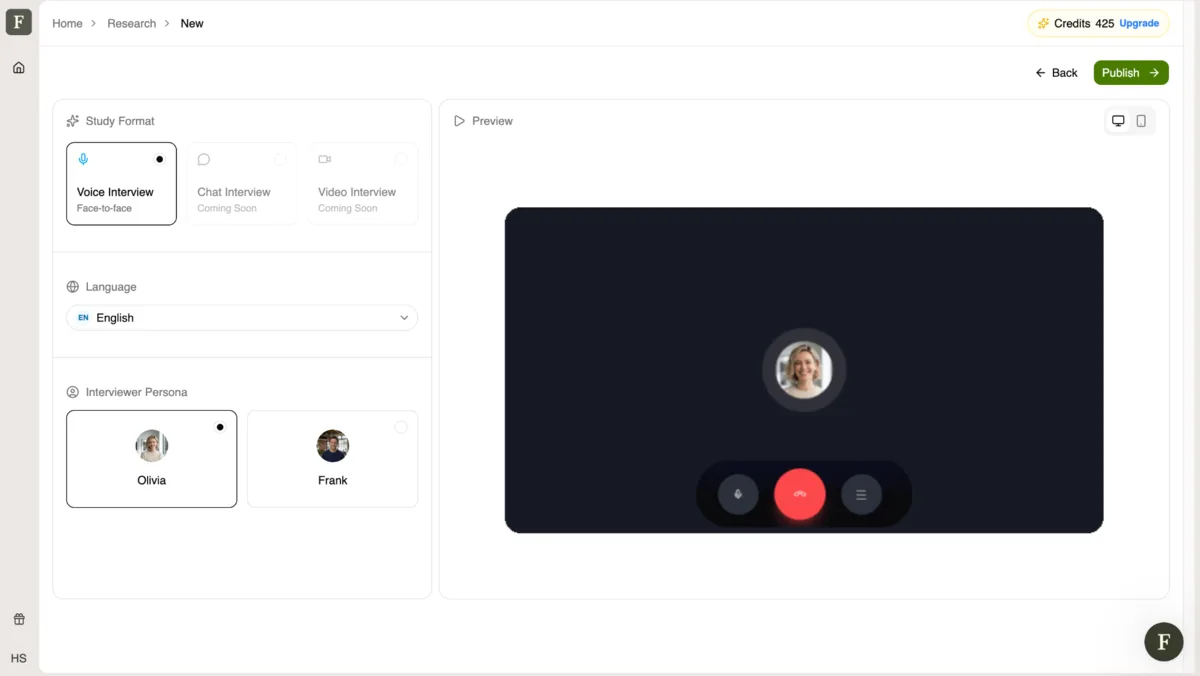
Source: Frank official documentation, "How to Set It Up"
Themes, sentiment and action items from every conversation
As soon as an interview ends, the transcript, analysis and themes appear on the dashboard. You can see themes and sentiment shared across many conversations, quotes from the original answers, and AI-generated action items (with priorities); you can also ask questions of the analytics assistant in a chat, generate charts, and save notable quotes to your notes. Short videos (Reels) summarizing top insights can be created as well.
Frank emphasizes that each summary and theme can be traced back to the original conversations and quotes, so you can later check which customers actually said it. Transcripts, saved quotes and analysis results can be exported.
Create research and read results from ChatGPT or Claude
Frank provides an MCP (Model Context Protocol) server and says it works with compatible AI clients such as Claude, ChatGPT and Gemini. The documentation describes how to connect from Claude Code, the Claude desktop app and claude.ai, and Codex (register the server URL and approve once in the browser — no API key needed).
A connected AI can list studies and interviews, read interviews including transcripts, and create products and studies. Studies it creates remain drafts, and publishing them to participants (which spends credits) requires a separate permission. Frank points out the risk that an AI could follow instructions written by participants inside transcripts, and says it returns transcripts labeled as participant-authored data and keeps publishing behind its own approval.
Features
- Research Agent for guide creation Drafts a product brief and an interview guide from your goal. Questions, follow-up guidelines and the welcome message can be edited
- AI interviewer Talks by voice and asks follow-ups based on answers. Choose Olivia or Frank as the interviewer, and pick the language from options that include Japanese
- Analytics dashboard Themes, sentiment and stats, quotes, action items, interview recordings and transcripts, chat with the analytics assistant, highlight videos (Reels)
- Distribution Shareable links, and a widget you can embed in your website or app (also installable via Google Tag Manager)
- For developers MCP server, public API, webhook
- Security Frank states it is SOC 2 and GDPR compliant. Data is encrypted in transit and at rest. Participants can answer anonymously unless you add a question asking for identifying information
How to use
- Create an account Sign up at hifrank.ai (Google sign-in is available) and click "New research" in the top right of the dashboard.
- Choose an interview type Pick the one that fits your goal from "Discovery & Validation", "Product Experience" and "Retention & Growth".
- Describe your goal and add your product Write a short research goal. If no product is connected yet, enter its name, category, description (up to 1,500 characters) and URL, and the AI drafts a product brief.
- Finalize the guide Choose the length in the chat, review and edit the Research Guide the AI created, then click "Continue".
- Choose format and language, then publish Select the format (voice), the interview language (e.g. Japanese) and the interviewer, then click "Publish".
- Test it yourself before sharing Open the generated link, complete the interview once yourself, check the result on the dashboard, and then send it to customers.
Pricing
Prices on the pricing page are in US dollars. The Terms of Service state that fees are exclusive of taxes (such as VAT and sales tax), which are the customer's responsibility.
| Plan | Monthly billing | Yearly billing | Voice minutes / month | Max interview length | Main differences |
|---|---|---|---|---|---|
| Free | $0 | $0 | 60 min | 10 min | Sentiment and thematic analysis, video reels, unlimited anonymous viewers. No credit card required |
| Starter | $59 | $49/month ($590/year) | 120 min | 20 min | 50 chat conversations, full analytics suite |
| Growth | $199 | $166/month ($1,990/year) | 450 min | 20 min | Unused credits roll over for 30 days |
| Business | $375 | $312/month ($3,750/year) | 950 min | 30 min | Everything in Growth |
| Enterprise | On request | On request | Custom | — | Custom minute pools, SSO, API integration, dedicated support |
- All paid plans include a 14-day free trial, and no credit card is required to start.
- The pricing table lists average per-minute costs of $0.50 (Starter), $0.45 (Growth) and $0.40 (Business).
- 10 credits equal roughly 1 minute of voice interview or 10 chat messages. If you exceed your minutes, you can keep interviewing at your plan's overage rate, and Frank says conversations are never cut off midway.
- Credits on the Free and Starter plans reset monthly.
- Students get 50% off after verifying their status.
- As of November 2026, the home page offers 225 signup credits.
- The Starter plan lists "50 chat conversations," but the setup section of the documentation marks the chat format as "Coming Soon" (as of November 2026).
Pros and cons
Pros
- Interview many customers at once without scheduling, moderating or transcribing
- Write your goal and get an interview guide; the AI also asks the follow-up questions
- Analysis can be traced back to the original answers, making it easy to show evidence internally
- Try up to 60 minutes a month on the Free plan; paid plans have a 14-day trial with no card required
- Japanese can be selected as the interview language
Cons
- The website, app and documentation are English-only
- As of November 2026, only the voice format is available; chat, WhatsApp and video are "coming soon"
- Anyone with the link can participate, so you need to think about how you distribute it to target the right people
Reviews and reputation
The official site features the story of the team at Lumera, who had been building on assumptions and let Frank run customer interviews around the clock to turn conversations into decisions; Frank's official YouTube channel also has a video with Lumera's co-founder. The case studies page includes a win-loss analysis case at TCF. The home page displays figures such as "20% less churn," "56% higher adoption" and "research shortened from 6 weeks to 3 days" (all as stated by Frank, without the conditions behind them).
As of November 2026, there are still few reviews from users in Japan. The surest way to judge the quality of Japanese-language interviews is to try one yourself on the Free plan.
How it differs from other customer research and transcription tools
| Product | Main role | Best for |
|---|---|---|
| Frank AI Researcher | AI moderates customer interviews and analyzes themes, sentiment and action items | Product and marketing teams who want to hear from many customers without extra staff |
| 見える化エンジン | Analyzes and visualizes text-based customer feedback from inquiries, surveys, social media, etc. | Companies that want to analyze customer feedback they have already collected |
| Otter AI | Real-time transcription and summaries of meetings and interviews run by people | People who run interviews themselves and want a record |
| Notta | Transcription and meeting notes with strong Japanese support | People who want records of Japanese meetings and interviews |
| LiteScribe | Transcription and AI summaries of meetings, interviews and video audio | People who want to quickly summarize recorded interviews |
| PeopleX AI面接 | Conversational AI job interviews by a digital human | HR teams who want to delegate first-round interviews |
Transcription tools record interviews conducted by people; Frank differs in that the AI conducts the interview itself. It also differs from AI job-interview tools in who it talks to (customers rather than applicants) and how the results are used (improving products rather than evaluating candidates).
FAQ
Q. Can Frank AI Researcher be used in Japanese? Japanese can be selected as the interview language (according to the setup section of the official documentation), and Frank says it supports 30+ languages. The website, app and documentation, however, are in English.
Q. What can I do for free? The Free plan includes 60 minutes of voice interviews per month (up to 10 minutes per interview), along with theme and sentiment analysis and highlight videos. No credit card is required.
Q. Can I use it from ChatGPT or Claude? Yes, by connecting Frank's MCP server. Frank lists compatible AI clients such as Claude, ChatGPT and Gemini, and the documentation has connection steps for Claude Code, the Claude desktop app and claude.ai, and Codex. Studies created by a connected AI remain drafts, and publishing requires a separate permission.
Q. Is interview data used to train AI? The privacy policy states that Frank does not use customer content or participant data to train models made available to other customers, except as expressly described in the applicable customer agreement or service-specific terms, or with an explicit opt-in or other documented authorization. Data retention depends on your plan.
Q. Who runs Frank? Prelaunch Group, Inc. in the US (located in Wilmington, Delaware), which provides the service under the name Frank. The terms are governed by Delaware law. The contact address is support@hifrank.ai.
The information on this page is based on what was published on the official website as of November 2026. Features and pricing may change, so please check the official website for the latest information.