LiteScribe
: How to use it, features, and the business problems it solves
Add bookmark
What is LiteScribe?
LiteScribe is an AI transcription and meeting-notes service that turns meetings, interviews, and video audio into text and automatically generates AI summaries, topic tags, and action items. No recording bot joins the call: the app captures your computer's system audio directly on your own machine, so nothing shows up in the participant list and — since no meeting URL is needed — in-person conversations are recorded exactly the same way. The desktop builds (Windows, macOS, Linux) add an offline mode (Pro and Business plans) that runs both transcription and AI summarisation on your own computer. Transcription covers 100+ languages and the interface is available in 15 languages including Japanese, with speaker diarization, PDF/DOCX/SRT export, and an AI chat that answers with citations and timestamps. Pricing starts with a permanent free tier of 120 minutes a month with no credit card, and paid plans from US$7.95 per month billed annually. When offline mode is not used, cloud transcription is performed by AssemblyAI in the United States.
Business problems it solves




About "LiteScribe"
What is LiteScribe
LiteScribe is an AI transcription and meeting-notes service that turns meetings, interviews, and video audio into text, then automatically produces AI summaries, topic tags, and action items. Transcription covers 100+ languages, and the interface itself is available in 15 languages, Japanese included.
What sets it apart from other meeting-notes tools is how it records and where the AI runs. No notetaker bot joins your call — the app captures system audio and microphone input directly on your own machine. The desktop app goes further with Local Mode, which runs both transcription and AI summarisation on your own computer, so on that path neither audio nor text ever leaves the device.
No credit card
Auto-detected
Japanese included
Recording happens locally
Nobody sees an extra name in the participant list
Most AI meeting-notes tools record by sending a "notetaker" bot into your Zoom or Teams call. With that approach the tool's name shows up in the participant list, everyone outside your company can see you are recording, and you have to register the meeting URL with the tool first.
LiteScribe instead has the desktop app or the browser extension pick up your computer's system audio directly. Whether the call is on Zoom, Teams, Google Meet, Webex, or Discord, no third party enters the conversation.
Inviting a recording bot
- A bot appears in the participant list
- The meeting URL has to be registered
- In-person meetings are out of scope
Recording on your own device (LiteScribe)
- The other side sees nothing
- No meeting URL is needed
- In-person meetings work the same way
While recording, a colour-coded transcript with speaker labels streams in live, and Ctrl J lets you ask the AI about the meeting mid-call. When the call ends you get a Meeting Health card scoring clarity, ownership, focus, and balance.
Recorded meetings land in a library with speaker counts and automatically generated topic tags. Each row carries a one- or two-sentence AI summary, so even an untitled recording is easy to place.
Search runs over the full transcripts. You can find "the call where we discussed that" by the words spoken rather than by date.
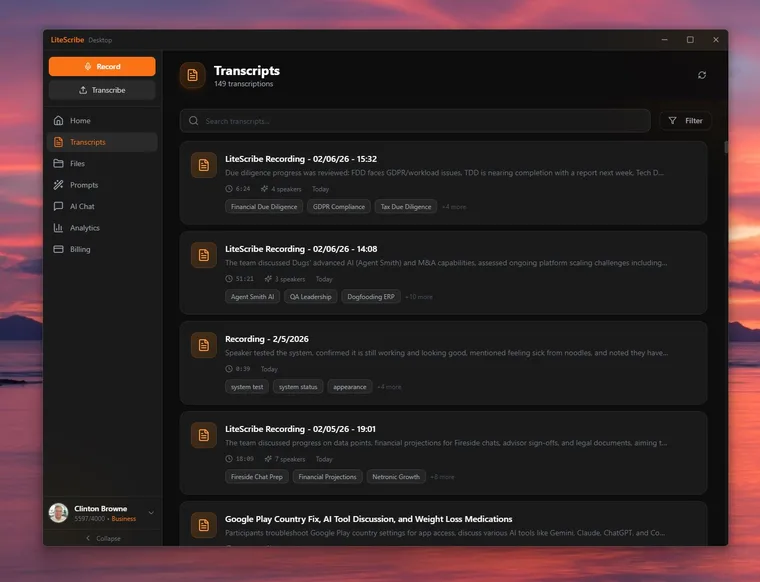
Source: LiteScribe official site (the screenshots below come from the same source)
Turn the Wi-Fi off and transcription keeps going
The desktop app ships with both a speech recognition engine (LiteScribe Local Transcription Engine) and language models (LiteScribe Local LLM Models). Turn on offline mode and not just transcription but summarisation, action extraction, and translation all run on your own CPU or GPU.
- The engine is about 50 MB and a recommended model 1–2 GB — a one-time download, only if you use offline mode
- The app picks a model size to match your RAM and VRAM, and falls back to the CPU when there is no GPU
- You decide per recording whether it stays on the device or syncs to the cloud
Offline mode is a feature of the Pro and Business plans; the free Basic plan does not include it. And when you do not use offline mode, cloud transcription is performed by AssemblyAI in the United States (stated in section 5.1, "Service Providers", of the privacy policy). Storage runs on Supabase / Cloudflare and payments on Stripe. It is more accurate to think of the product not as entirely local, but as letting you choose the path for each recording.
How to use it
-
Create an account
No credit card is required, and you get 120 minutes every month. This is not a trial period — the same allowance comes back next month.
-
Add audio
There are four ways in: drag a file, paste a URL (YouTube, TikTok, Instagram, Twitch, Reddit, and 70+ platforms), pick a file from cloud storage (Google Drive, Dropbox, OneDrive), or record on the spot. Drop in a 4 GB video and the app extracts just the audio first, so the upload is tens of megabytes.
-
Receive the transcript
The language is detected automatically. Speaker labels, timestamps, topic tags, an AI summary, and action items are generated together. PII redaction and a profanity filter can be enabled.
-
Ask the AI
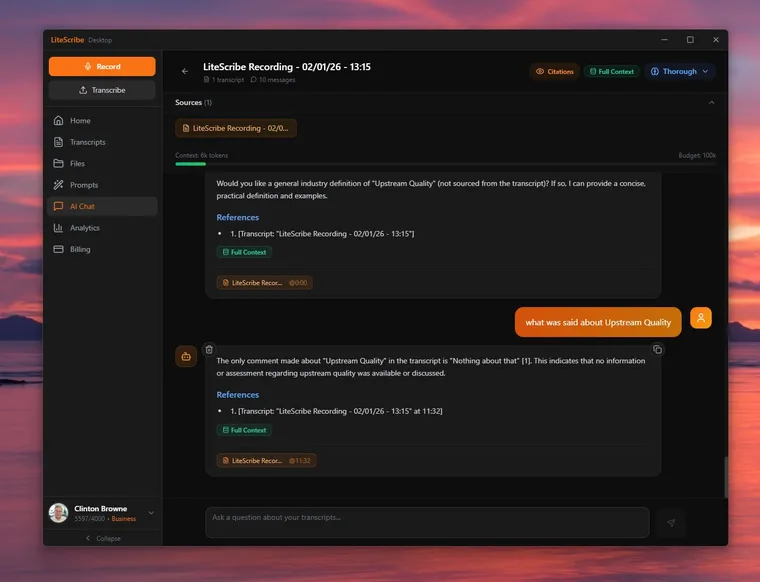
Answers in AI Chat carry the source transcript and timestamp. Knowledge Spaces let you load several meetings or interviews into one workspace and ask questions across all of them.
-
Export and connect
TXT and SRT are available on every plan; DOCX, PDF, and PPTX from Pro upwards. Zapier connects LiteScribe to 8,000+ apps.
AI Chat answers list References showing which transcript and which timestamp they rest on. Clicking one jumps straight to that point.
For settling what was actually said, this kind of cited answer holds up in practice far better than a summary does.
Features
01Getting audio in
Four separate entry points for audio and video, all landing in the same place.
- Files — MP3, MP4, M4A, MOV, AAC, WAV, OGG, OPUS, MPEG, WMA, WMV
- URL import — YouTube, TikTok, Instagram, Twitch, Reddit, and 70+ platforms
- Cloud — browse Google Drive, Dropbox, and OneDrive inside the app
- Meetings — Zoom, Teams, Google Meet, Webex, GoToMeeting, BlueJeans
02Transcription
You are not required to declare the language up front; it is inferred from the audio.
- 100+ languages — auto-detected, with translation into 100+ languages on paid plans
- Speaker diarization — labels and splits the transcript by speaker
- PII redaction and profanity filter — control how sensitive or crude language is handled
03Reading with AI
The transcript is treated as something you question, not just something you re-read.
- AI summaries, topic detection, action items — generated for every recording
- AI Chat — answers with citations and timestamps; Knowledge Spaces work across several transcripts
- Sentiment analysis — tone judged per utterance
- 14+ AI models / BYO LLM — pick from OpenAI, Anthropic, Google, Meta, Mistral and more, or bring your own API key from 11 providers
04Export and integrations
Notes are pushed into the tools you already use rather than left in the app.
- Export — TXT and SRT on every plan; DOCX, PDF, PPTX from Pro
- Zapier — 8,000+ connected apps
- Calendar — read-only access to Google Calendar and Outlook, with reminders for upcoming meetings
- Browser extension — record tab audio and screen on Chrome and Edge
Supported environments
The web, desktop, mobile, and extension clients sync through your account, so a recording made on a phone can be reviewed later on the desktop.
Pricing
| Plan | Monthly (billed annually) | Transcription minutes | What it includes |
|---|---|---|---|
| Basic | Free | 120 min/month | Speaker diarization, TXT and SRT export, URL / cloud / meeting import, Chrome extension |
| Pro | US$7.95 | 1,200 min/month | Everything in Basic plus translation, AI features (summaries, topics, sentiment), DOCX / PDF / PPTX export, offline mode |
| Business | US$14.95 | 4,000 min/month | Everything in Pro plus team collaboration, custom integrations, SSO |
- Prices are in US dollars. The table shows the per-month figure when billed annually; the official pricing page marks Pro as 47% off and Business as 25% off. Monthly billing is also available
- The free allowance needs no credit card and resets to 120 minutes every month rather than expiring after a trial
- Unused minutes do not roll over
- A 30-day money-back guarantee applies
(As published on the official pricing page in September 2026)
Security and data handling
The points that usually come up in a corporate review, as far as they are publicly documented.
| Item | Details |
|---|---|
| Processing path | Offline mode (everything on the device) or cloud (transcription by AssemblyAI in the United States) |
| Storage | Supabase and Cloudflare, with SSL/TLS in transit and encryption at rest |
| Payments | Stripe |
| Using your own API key | Requests go directly to the provider you chose, and that provider's terms and retention policy apply |
| Calendar integration | Read-only for both Google and Outlook; no events are created, changed, or deleted |
| Retention and deletion | Data is kept while the account is active, and deletion can be requested at any time |
| Applicable rights | GDPR (EEA) and CCPA (California) |
Third-party certifications such as ISO/IEC 27001 or SOC 2 were not published as of September 2026. If a certification is a hard requirement for you, confirm this first.
The person behind it
Development is led by founder Clinton Browne. According to the official site he has 30 years in IT, from engineer to CTO/CIO, including CTO of a FinTech company and CIO of a mobile-first challenger bank. He also holds an MBA in Technology Management from The Open University (2016) and lists qualifications such as ITIL Expert and AWS certification.
For a tool built by a small team, what the developer has built before is itself a signal about continuity. In LiteScribe's case that background is published, with a link to LinkedIn on the official site.
How it differs from other AI meeting-notes tools
Even within the same "transcribe the meeting and summarise it" category, tools split on how they record and where processing happens.
| Tool | Meeting bot | Offline processing | Languages | Free tier |
|---|---|---|---|---|
| LiteScribe | None (records on device) | Yes (Pro and up; summaries local too) | 100+ | 120 min/month |
| Granola | None (records on device) | No | Mainly English | Yes (Basic) |
| Sumarii | Invited into the call | No (stored in Japan, zero retention) | Japanese-focused | 3 hours/month |
| Notta | Joins via integration | No (stored in Japan) | Multilingual | Yes (Free) |
| Otter AI | Joins automatically | No | EN, ES, FR, DE, JA, ZH | 300 min/month |
A rough guide to choosing:
- Granola — also bot-free. Choose it if what you value is the way it polishes the notes you took yourself, and full offline operation is not a requirement
- Sumarii — specialised in spoken Japanese, with tools for fixing garbled proper nouns on the spot. Worth comparing if data must stay in Japan
- Notta — Japanese data residency plus SOC 2 and ISO 27001. For organisations where certification is part of procurement
- Otter AI — a long track record in English-speaking markets, with agents for sales and recruiting
Frequently asked questions (FAQ)
The information on this page is based on what was published on the official site as of September 2026. Check the official site for the latest specifications and pricing.