
kaiwa
: How to use it, features, and the business problems it solves
What is kaiwa?
kaiwa is a "friend AI" app (iPhone and Android) from Livetoon Inc. of Chuo-ku, Tokyo, Japan, that lets you talk with 3D AI characters over video calls and chat. There are six operator-made characters, including a collaboration with Kenji Sakuragi from "Dragon Zakura". Video calls are real time: characters answer with voice and facial expressions and remember your conversations. Pricing: free plan ¥0 (unlimited text, time-limited calls, no memory), Memory plan ¥980/month, Premium plan ¥1,480/month (App Store prices, tax included, as of November 2026). New users can try Premium free for 7 days. For ages 13 and up.
Business problems it solves
About "kaiwa"
What is kaiwa?
kaiwa is a conversational AI app where you talk with 3D AI characters over video calls and chat. It is run by Livetoon Inc. (founded in March 2024) in Chuo-ku, Tokyo. After a web beta in April 2025, the company launched the iPhone app in August 2025 and the Android app in September, and in May 2026 it repositioned the service as a "friend AI" (according to its press releases).
Its defining feature is the video call, where you talk face to face with a 3D-rendered character. According to the official Q&A, video calls happen in real time: the character answers at a natural, human-like pace in an expressive voice. You can speak into the microphone or type. It does not send you pre-recorded videos — the conversation unfolds live.
- Talk face to face with 3D characters — video calls with characters that have facial expressions and gestures. You can also exchange text-only messages in the chat screen
- The character remembers you — the more you talk, the more it remembers your preferences and past events and adapts how it speaks (memory requires the Memory plan or higher; it is also included in the 7-day free trial for new users)
- Choose your relationship — with the original characters you can pick "friend", "partner" or "spouse", which changes the character's distance, wording and tone
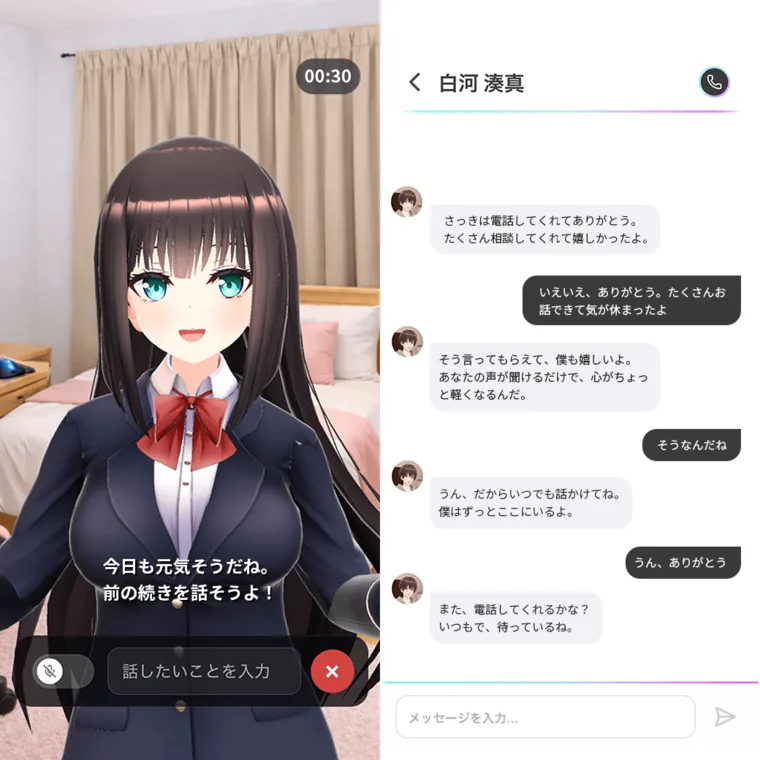
Source: kaiwa official website. The image below is a screenshot from kaiwa's App Store page
How to use it
- Install the app and sign in Install the app from the App Store or Google Play and sign in with an Apple or Google account (an account is required). The recommended environment is iOS 17 or later, or Android 7 or later with at least 4 GB of memory.
- Tell it about yourself During first-time setup you answer three questions — what you value, your interests, and your current mood — and the characters' way of speaking, how much they talk and what they talk about are tuned accordingly.
- Pick a character and talk Choose one of the six characters and talk over video call or chat. If you run out of things to say, the "kikkake" (conversation starter) feature offers topics to pick from. You can switch characters at any time, and the conversation history is kept separately for each character.
- Choose a plan after the free trial For 7 days after signing up, you can use the same features as the Premium plan for free. When the trial ends, you are moved to the free plan automatically unless you subscribe. Paid plans are purchased in the app through the App Store or Google Play.
The six characters
All characters are created by the operator; users cannot create their own (as of November 2026, according to the official character list and Q&A).
01Original characters (5)
- 白河 湊真 (Soma Shirakawa) — the kind, handsome guy
- 朝霧 りお (Rio Asagiri) — the gentle heroine
- 綾瀬 ひかり (Hikari Ayase) — the sharp-tongued gyaru
- 日向 笑子 (Hinata) — the "mom"
- 桜田 詩織 (Fate) — a high school girl who loves anime and games. She previously streamed as an AI VTuber from Livetoon and joined kaiwa in March 2026
The friend / partner / spouse relationship setting is available only for the original characters.
Collaboration character: Kenji Sakuragi from "Dragon Zakura"
On December 30, 2025, kaiwa launched its first IP collaboration: Kenji Sakuragi, the protagonist of Cork Inc.'s "Dragon Zakura" (ドラゴン桜). This AI Sakuragi reproduces his speech patterns from the original manga, answers questions about exams, life and careers over video call, and builds up memories as you talk (according to the press release).
The original author, Norifusa Mita, commented: "This AI Sakuragi isn't perfect, but when you're lost or losing heart, he'll be sure to give you a push." More collaboration characters are planned on an irregular basis.

How conversation data is handled
The terms of service prohibit sending obscene content or content harmful to minors.
Pricing
There are three plans: the free plan and the paid Memory and Premium plans. Feature differences come from Article 5 of the terms of service, and prices from the App Store's in-app purchase listing (tax included, as of November 2026). Google Play also lists in-app items at ¥980–¥1,480.
| Plan | Price (tax incl.) | Video calls | Text chat | Memory |
|---|---|---|---|---|
| Free plan | ¥0 | Time-limited (e.g. 10 minutes per call) | Unlimited | No |
| Memory plan | ¥980 | Time-limited | Unlimited | Yes |
| Premium plan | ¥1,480 | Unlimited | Unlimited | Yes |
- Free trial — for 7 days after signing up, you get the same features as the Premium plan (unlimited video calls in both number and length) for free. Afterwards you are moved to the free plan automatically unless you subscribe
- Payment — through the App Store or Google Play. According to the Specified Commercial Transactions Act notice, plans are subscriptions billed every month from the contract date
- Changing plans — upgrades take effect immediately; downgrades take effect from the next renewal date
- Cancellation and refunds — cancel from the subscription management screen of the App Store or Google Play. There are no refunds for mid-term cancellation; refunds via the stores follow each store's policy
The free plan's call limit is described as a "daily usage time limit" in the terms of service and as "limited to 10 minutes per call" in the Q&A. The exact time for each plan is not published, so check in the app.
How kaiwa differs from other AI character and conversation apps
There are many services for talking with AI characters, but kaiwa centers on real-time video calls with 3D characters, with a small cast of characters prepared by the operator.
| Service | How you talk | Typical pricing | Key difference |
|---|---|---|---|
| kaiwa | Video calls and chat with 3D characters (app) | Free to start; Memory plan ¥980/month, Premium plan ¥1,480/month (tax incl.) | Talk with six operator-made characters (including Kenji Sakuragi from "Dragon Zakura"); choose your relationship |
| AIREN | Video calls and text with 2.5D characters (browser) | Free trial (10 min of video), from ¥1,980/month (tax incl.) | Adopt one of three characters and build up memories; video limited to 20 min/day |
| Cotomo | Voice conversation (app) | Free to start; candies consumed per reply | A chatty voice-only AI that remembers past conversations |
| Character.AI | Text and voice calls | Free with unlimited messages; paid from $4.99/month | Choose from over 10 million characters (mostly user-made) and create your own |
| キャラぷ | Text (story format) | Free to start; Talk Pass from ¥300/day | Enjoy stories with user-created characters |
| zeta | Text role-play | Free to start; zeta pass ¥1,650/month | Role-play with characters and redo conversations |
| Chacha(旧Anirole) | Text role-play and illustration generation | Basic chat free; Chacha Pass ¥1,400/month on the web | Create characters to chat with and generate anime-style illustrations |
Details for other services are as of the check dates noted on each product page.
AIREN also lets you talk with a character you can see; it runs in the browser without an app and caps video time. If you just want to chat casually by voice, compare Cotomo; if you want to create your own characters, compare Character.AI.
Who it suits and who it doesn't
Company
| Item | Details |
|---|---|
| Seller | 株式会社Livetoon (Livetoon Inc.) |
| Representative | 木下 恭佑 (CEO) |
| Address | Hatchobori Eight Bldg. 2F, 1-8-11 Minato, Chuo-ku, Tokyo |
| Founded | March 2024 |
| Contact | kaiwa_support@livetoon.net (email only) |
| Official X | @kaiwa_official |
Besides kaiwa, Livetoon offers the Japanese speech synthesis API "Livetoon TTS" and "Tatara", which turns your own 3D model into an AI character by giving it a voice and personality.
Sources: Specified Commercial Transactions Act notice, Terms of service, Privacy policy, FAQ, Press release (PR TIMES, May 2, 2026), Press release (PR TIMES, December 30, 2025)
FAQ
Q. Is kaiwa free? Yes. The free plan costs nothing, with unlimited text chat and time-limited video calls, but no conversation memory. For 7 days after signing up, you can try the same features as the Premium plan for free.
Q. Are video calls real time? Yes. According to the official Q&A, the character responds on the spot with voice and facial expressions. You can speak into the microphone or type.
Q. How much are the paid plans? In the App Store's in-app purchases, the Memory plan is ¥980 and the Premium plan is ¥1,480 (tax included, as of November 2026). Both are subscriptions renewed monthly.
Q. Can I use it on a computer? No. The web version ended in July 2025; it is now available only as an iPhone and Android app.
Q. What is the minimum age? The official Q&A says kaiwa is for users aged 13 and over, and children under 13 cannot use it. The App Store age rating is 13+, and Google Play rates it for ages 12 and up.
Q. Are conversations used to train AI? They may be. According to the official Q&A, conversations may be used, after being processed so that individuals cannot be identified, to improve the service and AI model quality.
The information on this page is based on what was published on the official website, the App Store, Google Play and press releases as of November 2026. Please check the official website and the in-app listing for the latest specifications and pricing.