
zeta
: How to use it, features, and the business problems it solves
What is zeta?
A South Korean app: an AI character roleplay chat app operated by Scatterlab (Scatter Lab, Inc.) in Seoul (read "zeta"; also called ゼータ or ゼッタ in Japanese). Available on the web (zeta-ai.io), Android and iOS, but according to an official announcement on November 7, 2026, it cannot currently be newly downloaded from the iPhone App Store, and new users are directed to the web version (in-app purchases on already-installed apps work normally again, per a November 9 update). Redo conversations by regenerating or editing replies or with "Start over from here," set up your own "talk profile," and creators decide whether the info box and reply choices appear via the "play system." No read-aloud (voice) feature is officially offered. Basic play is free (with ads); zeta pass costs ¥1,650/month, and Pieces are about 20% cheaper on the web. For users aged 14 and older.
Business problems it solves
About "zeta"
What is zeta?
zeta is a South Korean app. It is developed and operated by Scatterlab (Scatter Lab, Inc.), headquartered in Seoul, South Korea. It is read "zeta" (ゼタ), and is sometimes also called "ゼータ" or "ゼッタ" in Japanese. Even in the Japanese Specified Commercial Transactions Act notation, the seller is the Seoul headquarters, and no Japanese office is listed. Inquiries are handled via the customer support site (support.zeta-ai.io) or by email (contact@zeta-ai.io).
zeta is an AI character roleplay chat app. The company calls it an "AI fiction platform": you choose an AI character or a "plot" (a story setup) made by other users and advance your own story through conversation.
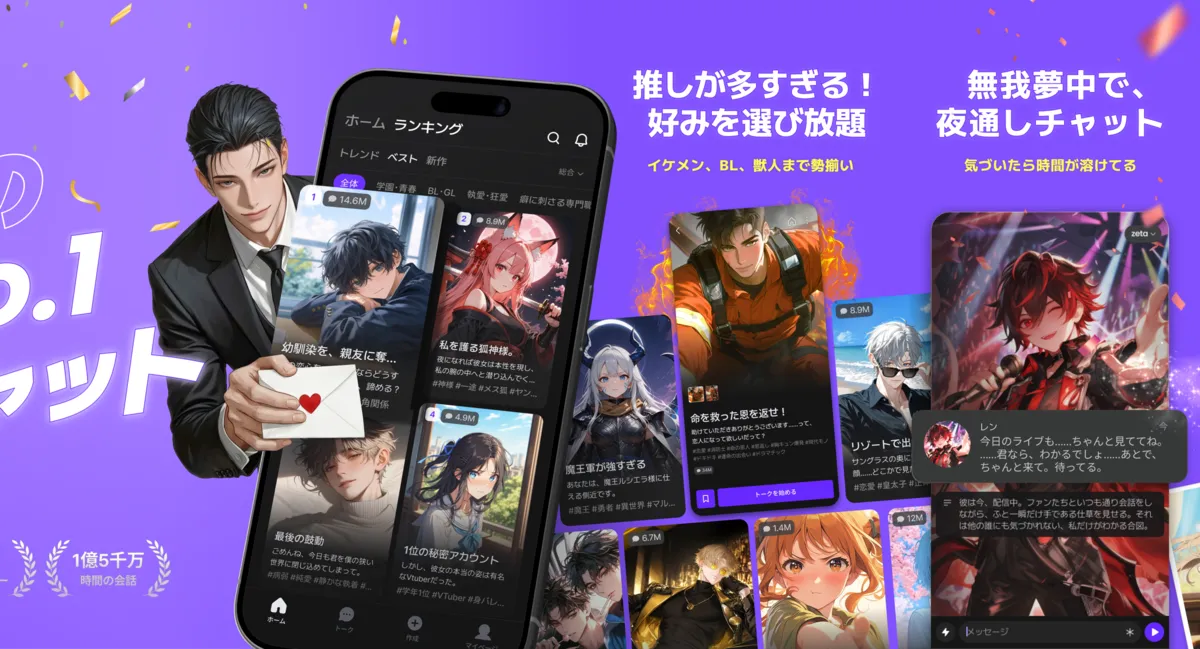
According to the official App Store description, there are more than 3 million characters to talk to, spanning a wide range of genres such as childhood friends, otome-style romance, BL and isekai fantasy. Anyone can create and publish characters and plots, and the app has become popular in Japan for enjoying yume shōsetsu (self-insert fiction) and narikiri (in-character) chats. It is available as iOS / Android apps and as a web version you can use in a browser (zeta-ai.io), with Japanese support. Interaction is centered on text chat; no feature that reads characters' replies aloud is officially offered (as of October 2026).
According to the company's announcement (May 22, 2026, PR TIMES), zeta has more than 2 million cumulative registered users and more than 750,000 weekly active users in Japan, and in April 2026 it ranked first among Japanese entertainment apps by total usage time.
zeta cannot currently be newly downloaded from the iPhone App Store (official announcement of November 7, 2026; as of November 19, 2026, the App Store listing page is still not shown). According to the announcement, already-installed apps keep working, and if you have downloaded it before you can reinstall it from "Apps & Purchases." If you have never downloaded it, you are directed to the web version (zeta-ai.io). An update on November 9 says in-app purchases and subscription renewals are now working normally. No reason has been given, and no link has been announced to the new App Store age rating Apple introduced on November 16 (virtual companions with sexual or romantic content are rated 18+) ([App Store's new age rating and the age limits of AI character chat apps](https://ai-best-search.com/articles/app-store-age-rating-ai-character-chat)).
zeta is for users aged 14 and older. The Terms of Service state that users under 14 may not use the service (the App Store age rating is 13+). Minors generally need a parent's or guardian's consent to use paid services.
How to use
- Install the app and sign up Get the app from the App Store or Google Play, or open the web version (zeta-ai.io), and sign up.
- Find characters and plots Pick a character or plot from the "Trending", "Best" and "New" rankings on the home screen, genre tabs, or a hashtag search.
- Advance the story through conversation Tap "Start talking" and the conversation begins from the scene the creator set up. You can regenerate replies you don't like, edit or delete messages (see "How to redo a conversation" below), and use "Suggested replies" when you're not sure what to say.
- Create your own Enter a name, personality, speaking style and background to create an original character or plot—"done in one minute," according to the App Store description. Register your world's lore and terms in the "lorebook," and they are passed to the AI whenever a keyword comes up.
Features
01Play through conversation
- Roleplay chat — Besides one-on-one chats with a character, there are plots with multiple characters and RPG-style plots where only the world is defined
- Memory — Characters remember what you talked about and what you like, and may even message you first on anniversaries (per the App Store description)
- Model selection — In addition to the basic model, you can choose the higher-tier "koji" and "luca" models, which consume Pieces (an in-app item) for each reply
- Styles and plugins — Adjust narration viewpoint (first person, second person, etc.) and story presentation, or use an info box that shows the date, place, character's mood and more below each reply. Currently limited to the koji and luca models
- zetagram — A plugin that lets you peek at the story characters' social media. Read photos, posts and comments the characters "posted" based on the story (10 Pieces each time)
02Create and publish
- Creating characters and plots — Set a name, personality, speaking style, example situations, a lorebook and more, then publish. Once a plot is published, it cannot be made private again
- Private plots — Free users can have only one plot that only they can talk to; zeta pass makes this unlimited
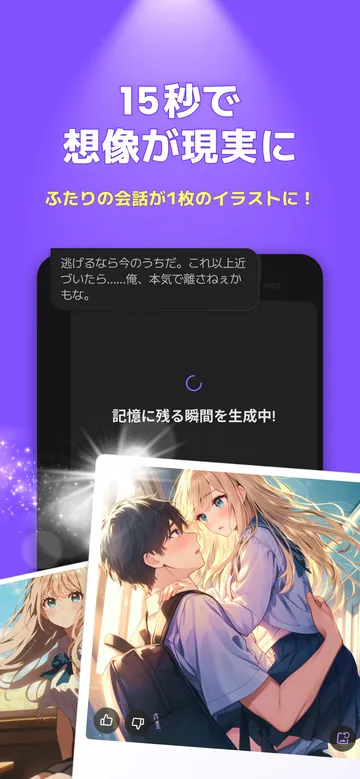
- Snapshots — The AI generates an illustration of a scene based on your conversation (15 Pieces per image; takes about 15–30 seconds). Violent or sexual content cannot be generated. Images you make can be reviewed in the chat room's "Snapshot list"
Source: zeta on the App Store
How to redo a conversation (regenerate, edit, start over from here)
zeta has no dedicated button that rewinds a conversation like a save file. Depending on how far back you want to go, use the following features (based on the official help and the app's on-screen labels).
| What you want | Feature | Notes |
|---|---|---|
| A different version of the last reply | Regenerate | Recreates the character's reply in the same scene. If replies keep coming out similar, the official help suggests regenerating repeatedly or using Edit |
| Fix only part of a reply | Edit | Rewrite the generated message and keep chatting |
| Erase part of the story | Delete | Select the range to delete (up to 200 messages at a time; the intro cannot be deleted) |
| Try a different development from a mid-story scene | Start over from here | Choose it from a message's menu to start a new chat from that point. The original chat is saved and can be resumed via "Resume" (up to 100 saved chats) |
| Mark a scene to return to later | Bookmark | Set it from a message's menu and jump back with "Go to last bookmark" |
On the higher-tier models, regenerating also costs Pieces. Paid models such as koji and luca consume Pieces for every reply, including regenerations. The basic zeta model is free.
How to use and redo Snapshots
A Snapshot turns a scene from your conversation into an illustration. It is not a "save" feature for the conversation, so to redo the conversation itself use "Start over from here" or bookmarks above.
- In the chat room, open the menu of the message whose scene you want illustrated and choose "Snapshot"
- Generate it using Pieces (15 Pieces per image, reduced from 50 in September 2025). You cannot edit the conversation while it is generating
- If you don't like the result, you can regenerate it on the same message. Regenerating deletes the previous image and costs Pieces again
- Images you make can be viewed newest first under the chat room's "More (☰)" → "Snapshot list," where you can also download them or share them in comments (added July 2026)
Source: zeta on the App Store
Creators can turn Snapshots on or off, so they aren't available in every plot. The company notes that because an external image-generation API is used, unexpected scenes are occasionally generated.
Does zeta have a read-aloud (voice) feature?
As of October 2026, zeta's official site, App Store / Google Play descriptions and help center do not mention any feature that reads replies aloud, or voice calls. zeta is a chat where you advance the story in text.
If you want to listen anyway, you can use your smartphone's own read-aloud features (these are device features, not something zeta officially offers).
- iPhone: Go to Settings → Accessibility → Read & Speak, turn on "Speak Screen," then swipe down with two fingers from the top of the screen (Apple Support)
- Android: Go to Settings → Accessibility → Select to Speak, turn it on, then select the part you want read (Android Help)
If talking by voice is the goal, consider Cotomo, which you talk to by voice, or Character.AI, which offers voice calls.
What you can do on the web version
You can use zeta without installing the app by opening zeta-ai.io in a browser on a computer or smartphone. Your account is shared with the app, and you can chat with and create characters. Using it in a browser on iPhone requires iOS 16 or later (official help).
Since September 29, 2026, buying Pieces on the web version costs about 20% less than buying them in the app. Payment options are PayPay, credit/debit cards, Apple Pay / Google Pay and PayPal, processed by CODASHOP (a payment provider). Pieces bought on the web can also be used in the app. zeta pass can also be subscribed to on the web version and cancelled from "My Page > zeta pass management." The November 7, 2026 announcement temporarily directed iPhone users to buy on the web version, but a November 9 update says in-app purchases on the App Store are now working normally.
In-app terms (talk profile, play system)
The zeta app has its own terms for building stories. Below are the ones whose meaning could be confirmed in official announcements and the help center.
| Term | Meaning | Where it is set |
|---|---|---|
| Talk profile (トークプロフィール / 会話プロフィール) | Your ("you, the user") settings within the story. Enter a name, an image and a description for the AI such as tone, personality and background (up to 1,000 characters), and characters reply with that in mind | Edit from the "≡" menu at the top right of the talk room. Turn on "Show talk profile" in settings to display your name and image in speech bubbles |
| Creator-recommended talk profile | A talk profile prepared by the plot's creator to fit the world. You can choose it alongside the ones you made yourself (introduced September 2025) | Chosen when starting a character or plot |
| Play system (プレイシステム) | An item under "Style" when creating a plot. It decides whether the talk room shows an "info box" (a panel below each reply showing the date, place, character's mood and more) and reply "choices" on the user's turn | Plot creation, "Style > Play system" (set by the creator). Players can switch the display on or off from the "≡" menu in the talk room |
The expression "トープロ" does not appear in official announcements or help articles. The official term closest in name is the "talk profile" above.
Sources: zeta official announcements (September 22, 2025 "Creator-recommended talk profile"; January 5, 2026 "Talk profile display"; July 15, 2026 "Character limit for talk profiles"), official help center (showing the info box and choices)
What is zetagram?
zetagram is a plugin that lets you peek at the social media feeds of the characters in a story (launched September 3, 2026). As the story progresses, you get a notification that a character has posted something new, and you can read photos, text and hashtags based on the story so far, plus comments from other characters. What you see in the feed may also be reflected in later conversations.
- Opening a post from a notification and refreshing the feed each cost 10 Pieces
- It works with the koji and luca models, only in plots where the creator has turned the feature on (support for the basic zeta model is planned)
- Refunds are not given based on the quality of generated content
Pricing
Basic play is free, with ads shown between conversations. For people who want to remove ads or create more, there is the "zeta pass" subscription and an in-app item called "Pieces."
| Item | Price (JPY incl. tax, App Store) | Main benefits |
|---|---|---|
| Free | ¥0 | Basic conversations are free; includes ads; one private plot |
| zeta pass | ¥1,650/month | Removes all ads, 200 bonus Pieces every month, unlimited private character creation, faster replies |
| zeta pass 1-day pass | ¥300 | Try zeta pass benefits for one day (no bonus Pieces) |
| Pieces | 200 for ¥300 to 10,000 for ¥15,000 | Used for conversations with the higher-tier models (koji, luca), Snapshots (15 Pieces each), zetagram (10 Pieces each) and more. About 20% cheaper on the web version |
Prices are based on the in-app purchase listing on the Japanese App Store (as of October 2026). While the App Store listing page is not shown, prices can be checked on the in-app purchase screen or the web version's purchase screen. The app sometimes offers a first-month discount on zeta pass. Web prices for Pieces can be checked on My Page on the official site.
Things to keep in mind
zeta is designed to be absorbing—the company itself announced that average weekly usage during Japan's Golden Week holidays exceeded 27 hours (about 4 hours a day). To enjoy it safely, keep the following points from the official terms and policies in mind.
01Overuse and spending
- Screen time — Setting your own daily time limit helps
- Pieces are non-refundable — Purchases cannot be refunded for personal reasons. If a Snapshot generation is interrupted because the conversation changed, the Pieces used are not returned
- Purchases by minors — Paid-service contracts by minors generally require a parent's or guardian's consent, and contracts made without it can be cancelled by the guardian
02Personal information and conversations
- Conversations are used for improvement — The privacy policy states that conversation content you enter (text, images, audio, etc.) is used to improve the dialogue algorithms and develop new services. Pseudonymized usage records are kept for five years to improve the AI dialogue algorithms
- Outside AI providers and overseas transfers — Processing such as response generation is outsourced to providers including OpenAI, Anthropic and Google. Data is transferred to South Korea, where the company is headquartered, as well as to the US and other countries
- Don't share sensitive information — If you enter sensitive personal information such as medical history or sexual orientation in a conversation, you are treated as having consented to its use. Avoid entering anything you don't want known
03The nature of AI and safety
- Answers aren't guaranteed to be accurate — The Terms of Service state that the accuracy of AI characters' responses is not guaranteed. Enjoy what characters say as fiction
- Prohibited uses — Creating plots that inappropriately objectify minors and deliberately circumventing safeguards are prohibited by the terms
- When things are hard — If words related to suicide come up in a conversation, the app shows a message pointing you to sources of support
Pros and cons
Pros
- Choose from more than 3 million characters across a wide range of genres
- Basic conversations are free, with plenty of Japanese-language characters and plots
- Create and publish your own characters and worlds for other users to play
Cons
- The free version shows ads, and the higher-tier models and illustration generation require Pieces
- In long conversations, characters may forget earlier details or go off-script (a frequent point in App Store reviews)
- Conversation content is used to improve the service, and processing is outsourced to overseas providers
Reviews and reputation
zeta is rated 4.4 out of 5 on Google Play (234,000 reviews, as of November 9, 2026) and 4.5 on the Japanese App Store (about 200,000 ratings, as of October 2026; as of November 19, 2026, the App Store listing page is not shown). Reviewers enjoy the feeling of "building a story together with AI" using distinctive characters and plots made by other users, while others complain that it forgets earlier content in long conversations, that updates have tightened content restrictions, and about price changes for the higher-tier models. Regarding complaints about the price of the higher-tier models, the company explains in its official help that high-performance models cost more per turn and that prices are set at a level that lets it keep running the service.
On safety, it's reassuring to check the age requirement (14+), the use of conversation content to improve the service, and the outsourcing of processing to overseas providers in "Things to keep in mind" above before you start.
FAQ
Q. Which country is zeta from? A. It is a South Korean app, developed and operated by Scatterlab (Scatter Lab, Inc.) in Seoul. No Japanese office is listed; inquiries are handled via the customer support site (support.zeta-ai.io) or by email (contact@zeta-ai.io).
Q. What is a talk profile? A. It is your (the user's) name, image and settings within the story. If you write your tone, personality and background, characters reply with that in mind. You can edit it from the "≡" menu at the top right of the talk room. The expression "トープロ" does not appear in official guidance.
Q. What is the play system? A. It is an item under "Style" when creating a plot, deciding whether the talk room shows an info box (a panel below each reply showing the date, place, character's mood and more) and reply choices. Players can also turn the display on or off from the "≡" menu in the talk room.
Q. Why can't I download it on iPhone? A. According to the official announcement of November 7, 2026, zeta cannot be downloaded from the App Store, and no reason has been given. The company says it is working on restoring it and, until then, directs users to the web version (zeta-ai.io). Already-installed apps keep working, and a November 9 update says in-app purchases and subscription renewals are working normally again.
Q. Is zeta free? A. Basic play is free, with ads between conversations. To remove ads you need zeta pass (¥1,650/month) or a 1-day pass (¥300); the higher-tier models and Snapshots require Pieces.
Q. What is the minimum age? A. The Terms of Service require users to be 14 or older. Accounts found to belong to users under 14 may be deleted.
Q. Does zeta have a read-aloud feature? A. As of October 2026, no read-aloud (voice) feature is officially offered. You can have on-screen text read aloud with device features such as "Speak Screen" on iPhone or "Select to Speak" on Android.
Q. How do I redo a conversation? A. Use "Regenerate" for the last reply and "Edit" to fix part of it. To try a different development from a mid-story scene, choose "Start over from here" from a message's menu; the original chat is kept.
Q. Can I redo a Snapshot? A. Yes, you can regenerate it on the same message. Regenerating deletes the previous image and costs Pieces again (15 Pieces per image).
Q. Is there a web version? A. Yes. Open zeta-ai.io in a browser and use the same account as the app. Pieces bought on the web version are about 20% cheaper than in the app.
Q. What is zetagram? A. A plugin that lets you peek at characters' social media posts. Opening a post or refreshing the feed costs 10 Pieces each time, and it works in supported plots on the koji and luca models.
Q. How do I cancel zeta pass? A. At least 24 hours before the next renewal date, cancel from App Store subscriptions on iPhone, Google Play subscriptions on Android, or subscription management in your account settings on the web. The company does not process cancellations itself.
Q. Who operates zeta? A. Scatterlab (Scatter Lab, Inc.; CEO Kim Jongyoon) in Seoul, South Korea. Its notation under Japan's Specified Commercial Transactions Act is published on the official site.
How it differs from Character.AI and other AI character chats
| Service | Highlights | Pricing model |
|---|---|---|
| zeta | Operated by Scatterlab (South Korea). Rich in Japanese characters and plots; storytelling geared to self-insert fiction and in-character chat. Ages 14+ | Free (with ads) + zeta pass and Pieces |
| Character.AI | Operated by Character Technologies (US). One of the largest character libraries in the world, voice calls. Chat limited to users verified as 18+ | Free (unlimited) + monthly plans |
| Chacha(旧Anirole) | A creative community combining chat with anime-style illustration generation, oriented toward mature audiences | USD-based diamonds |
| Cotomo | Developed by Starley (Japan). A voice chat app with a single conversation partner who remembers your talks | Free + pay-as-you-go |
If you want roleplay that feels like reading and writing a story in Japanese, zeta is the pick; to explore a broader, English-heavy character library or talk by voice, compare Character.AI. If you want to write a novel itself, a writing tool like NovelShaft is a better fit.
The information on this page is as of November 2026 and is based on zeta's official site (Terms of Service, Privacy Policy, Specified Commercial Transactions Act notation and announcements), the official help center (support.zeta-ai.io), the official X account (@zeta_officialJP), the Japanese App Store and Google Play listings, and the company's press release as of October 2026. Please check the official site for the latest features and pricing.