Napkin
: How to use it, features, and the business problems it solves
Add bookmark
What is Napkin?
Napkin is a visual-creation tool where you paste text and AI auto-generates diagrams, flowcharts, mind maps, and infographics (from Napkin AI, founded by ex-Google members). It turns the key points of existing text into visuals you can export as PNG/PDF/PPT/SVG for documents and blogs, and supports 60+ languages (including Japanese generation). The free beta has ended; pricing is Free $0 / Plus $9 / Pro $22 (AI-credit based).
Business problems it solves



About "Napkin"
What is Napkin
Napkin is a visual-creation tool where you paste text and AI auto-generates diagrams, flowcharts, mind maps, and infographics. Provided by Napkin AI (founded by ex-Google members, creators of Osmo), it bills itself as "Get visuals from your text." Rather than drawing from scratch, its strength is turning the key points of existing text into visuals, letting you quickly make visuals for documents, blogs, and social.
To use it, paste text and generate with "Autospark." Several visual options are proposed from one piece of text; pick one and freely edit colors, fonts, icons, and layout. You can generate visuals from Japanese text too.
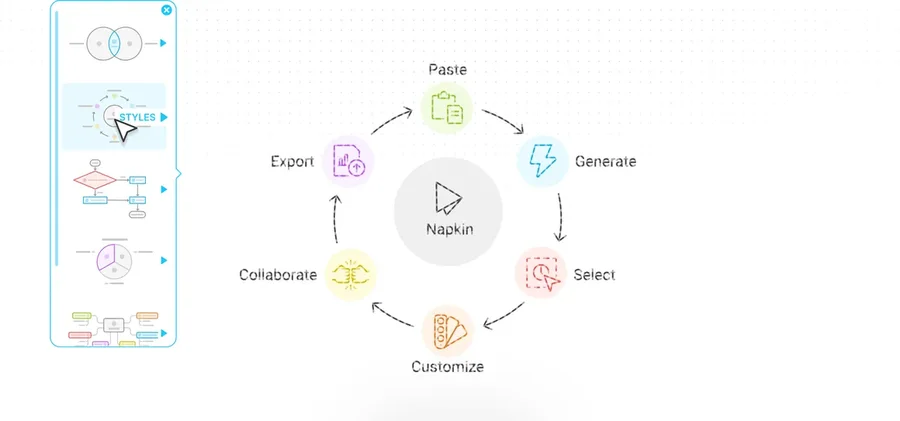
Source: Napkin official site (the screenshots below are from the same source)
Use your visuals directly in materials
Napkin's visuals can be exported as PNG, PDF, SVG, and PowerPoint and used directly in presentations and blogs. Recently it added "Napkin Slides," which generates a full deck. Every visual is editable—you can change the shape and color of elements afterward.
Generated visuals can be dropped into Google Slides or PowerPoint to build your materials. Structures that are hard to convey in text alone—funnels, relationship diagrams—come across at a glance on a slide.
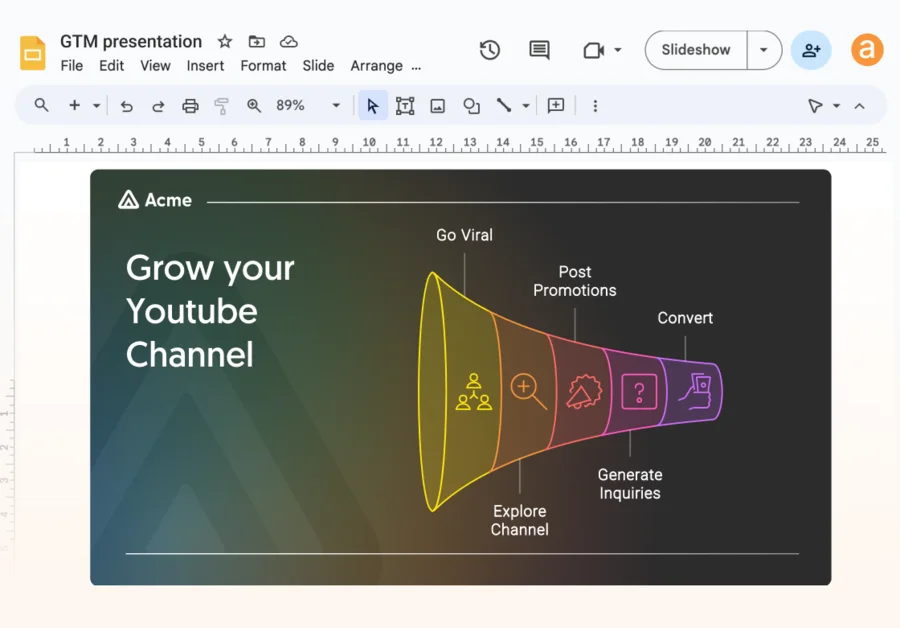
How to Use
-
Register and log in
Sign up for free from the official site with email or a Google account.
-
Paste text
Enter or paste the text you want visualized (file import is also possible).
-
Generate and choose
Generate options with Autospark and pick from several.
-
Edit and export
Adjust colors, fonts, and icons, and export as PNG/PDF (PPT/SVG on paid plans).
Features
01Create
- Text-to-visual generation (Autospark) — diagrams, flowcharts, mind maps, charts
- Napkin Slides — generate a full deck
- File import — import from PPT, DOC, PDF, HTML, MD
02Refine
- Free editing — adjust colors, fonts, icons, layout
- Brand Styles — brand-matched palettes (Plus / Pro)
03Export & share
- Export (PNG/PDF/PPT/SVG) — PNG/PDF unlimited even on Free; PPT/SVG on paid
- Real-time collaboration — co-edit as a team (paid plans)
- 60+ languages — generate in many languages, including Japanese
Pricing
It is free to start, with two paid tiers—Plus and Pro (the beta has ended). Generation is measured in "AI credits," while editing and PNG/PDF export are unlimited even on Free. Amounts are in USD, and annual billing is 25% off.
| Plan | Monthly (per person) | AI credits | What's included |
|---|---|---|---|
| Free | $0 | 500/week | Unlimited editing and PNG/PDF export (Napkin branding shown) |
| Plus | $9 | 10,000/mo | Unlimited PPT/SVG export, 3 Brand Styles, remove branding |
| Pro | $22 | 30,000/mo | Exclusive designs, unlimited custom branding, font upload |
The previously mentioned "free beta / Enterprise by inquiry" differs from the current reality—the beta has ended and it moved to the Free / Plus / Pro paid plans. Generation consumes AI credits (roughly 1 word = 1 credit), granted weekly/monthly. Visual generation is mainly on a desktop browser. Pricing may change, so check the [official pricing page](https://www.napkin.ai/pricing) for the latest (as of August 2026).
How it differs from other diagram/document AI
Napkin's difference is that it specializes in "turning text into visuals," unlike tools that build whole slide decks or general-purpose design tools. It shines when you want to turn text you already have into a clear visual.
| Aspect | Napkin | Gamma | Canva |
|---|---|---|---|
| Focus | Text → visuals/charts | Generate docs, web, social | General-purpose design |
| Input | Existing text | Prompt / outline | Templates |
| Output | Visuals (PNG/PDF/PPT/SVG) | Slides, pages | Any design |
Gamma, which generates whole documents; the general-purpose Canva; and the Japanese-document-specialized Irusiru are comparison points. If you want to quickly turn text you have into visuals, Napkin is a strong choice.
The information on this page is based on what was publicly available on the official site as of August 2026. Please check the official site for the latest specifications and pricing.