Mew.Design
: How to use it, features, and the business problems it solves
Add bookmark
What is Mew.Design?
Mew.Design is an AI design agent that creates posters, flyers, social posts, invitations, menus, infographics, presentations and more from a plain-language description. It generates photos and artwork with image generation, but builds text such as headlines, prices and longer copy as code-generated layouts, so text stays legible and both text and layout remain editable afterward. It supports chat-based revisions (Chat Edit), Click Edit for adjusting selected elements, and "Meows" (skills) that save design instructions for reuse. A Japanese interface is available. The free plan gives 50 credits on signup; paid plans start at $5.69/month. It is operated by MAGOAI LTD in the United Kingdom.
Business problems it solves



About "Mew.Design"
What is Mew.Design?
Mew.Design is an AI design agent that finishes posters, flyers, social posts, invitations, menus, infographics, presentations and more from a description in everyday language. No design experience is needed: ask for "a cute bake sale poster" and options appear within seconds, which you can then refine by chatting.
What sets it apart from typical image generators is that it builds text-heavy designs as "editable layouts" rather than flat images. Photos and artwork come from image generation, while headlines, prices and longer copy are assembled with code generation, so text stays legible and you can change fonts, spacing and type sizes afterward. It is operated by MAGOAI LTD, a company registered in the United Kingdom, and a Japanese interface is also available.
About 5–7 designs, no card
Annual saves two months
Varies by format, size, quality
50 to 10,000 credits a month
Photos as "images," text as "layouts"
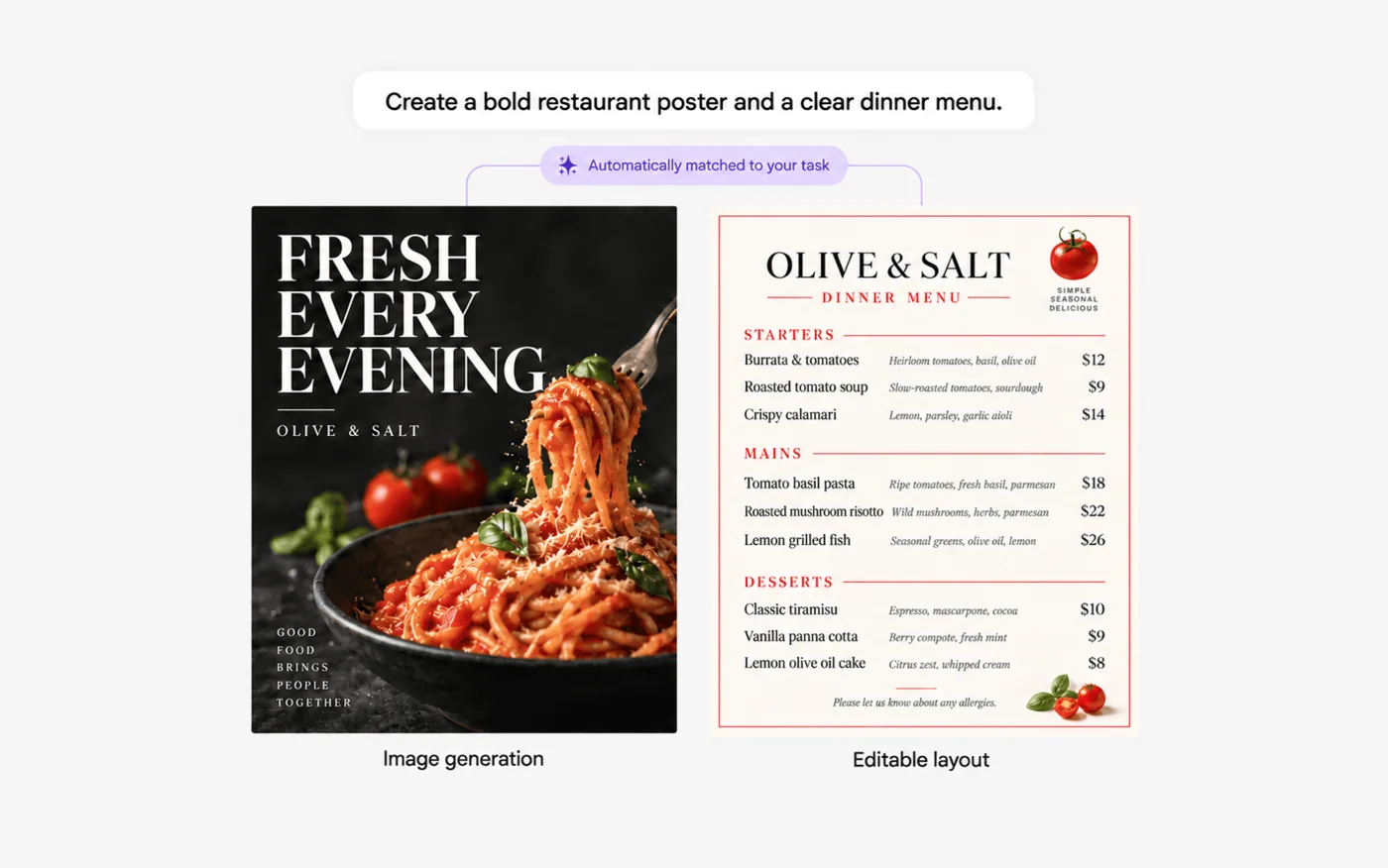
Source: Mew.Design official website (applies to the images below as well)
When you make a menu or flyer with Midjourney or ChatGPT image generation, small text tends to get garbled, and fixing a single word often means regenerating the whole image. Mew.Design looks at the request and chooses the method automatically: mood-driven posters use image generation, while menus and infographics full of prices and headings come out as code-built layouts. You don't need to decide which method to use.
How to use
-
Sign up for free
Sign up with your email address or similar and you receive 50 credits (no card required) — roughly 5–7 designs.
-
Describe what you want
Enter the purpose, content and mood in everyday language, such as "a poster for next week's bakery sale." You can upload reference images or pick a design from the community (Explore) to learn its style. A Meow (skill) that fits the request is selected automatically, and options appear within seconds.
-
Refine by chat or direct editing
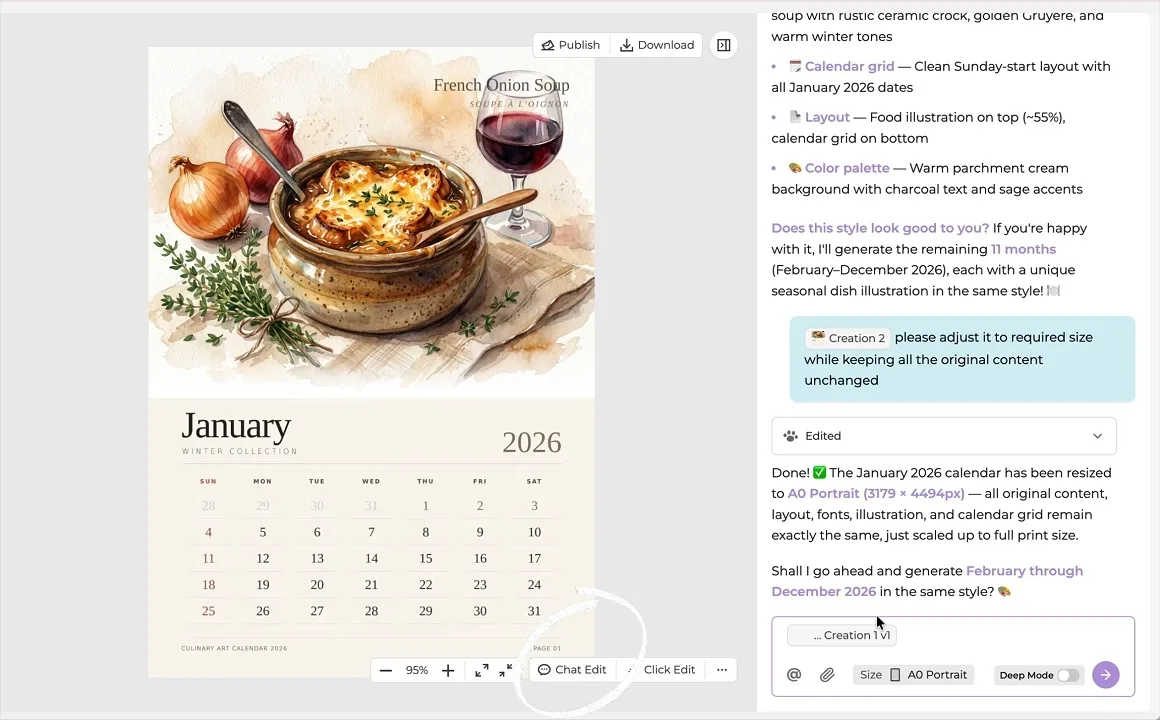
Ask in chat — "make the headline bigger," "use pastel colors" — and the change is applied (Chat Edit). On desktop, supported layouts also let you click individual elements to adjust them (Click Edit). Once one design is done, you can have it build the rest of a series without repeating the brief.
-
Download
Standard-resolution downloads are free for everyone (no credits used). High-resolution images and print-quality PDF exports require a paid membership.
Refine by chat, then take it all the way to print size
The screen on the right shows a calendar with food illustrations being created. The design sits on the left and the chat with the agent on the right. Asked to "adjust it to required size while keeping all the original content unchanged," the agent rebuilds the January page at A0 Portrait (3179×4494px), keeping the layout, fonts and illustration intact.
The agent then offers to generate February through December in the same style, so the style settled on the first page can be extended to the rest of the series. Creating multiple pieces at once is included in paid plans as DeepMode (series and batch creation).
Toggle between Chat Edit and Click Edit at the bottom of the screen to switch between asking for changes in words and selecting elements to fix directly.
Features
01Create
Turn a single description into a design suited to its purpose.
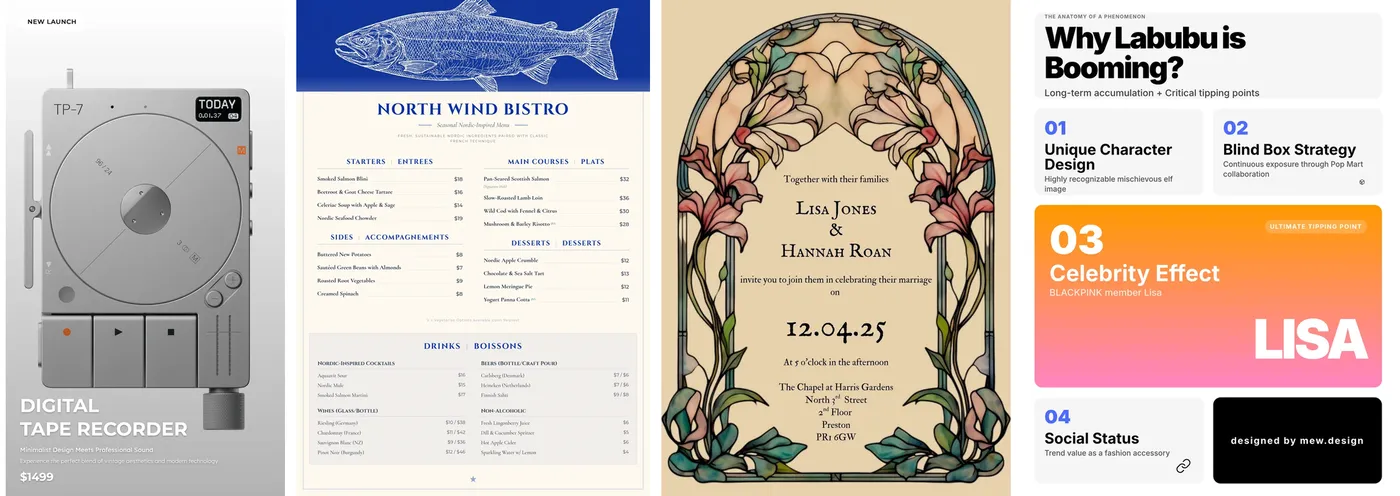
- Design from text — Posters, flyers, social posts, invitations, menus, brochures, calendars, magazine covers, packaging, infographics, academic posters, comics, presentations and more
- Automatic switch between image generation and editable layouts — Text-heavy designs are built with code generation to avoid garbled text
- Learn styles from references and the community — Use your own images or designs from Explore as references
- DeepMode — Create series or multiple pieces in one go (paid)
02Edit
Fix parts of a design instead of regenerating it.
- Chat Edit — Ask for changes to mood, headline or layout in words
- Click Edit — On desktop, select and adjust individual elements (supported layouts only)
- Visual editor — An editing view available on Pro and higher plans
03Reuse
Avoid explaining your design know-how and brand rules every time.
- Meows (skills) — Save preferred styles, layout rules and workflows for reuse. One that fits the task is matched automatically, or you can create your own
- Brand Meows — Store brand colors, fonts and visual guidelines so a team can reuse them for social posts, ads and presentations
- Explore — Publish work to the community. If you enable references, other users can use it as a reference (free or paid, your choice)
Pricing
It is a monthly (or annual) subscription, with credits granted each month and spent on generation. Each design generation uses 2 to 60 credits, depending on image format, size and quality. Downloads do not use credits.
| Plan | Monthly (USD) | Credits | Approx. designs | Highlights |
|---|---|---|---|---|
| Free | $0 | 50 on signup | 5–7 | 100 MB asset storage, standard download |
| Hobby | $5.69 | 500/month | 50–70 | 500 MB, high-res and print-quality PDF, DeepMode |
| Pro | $19.99 | 2,500/month | 250–350 | 2 GB, extended context memory, visual editor. Labeled "most popular" |
| Mega | $35.99 | 5,000/month | 500–700 | 5 GB, priority access to premium AI models |
| Max | $64.99 | 10,000/month | 1,000–1,400 | 10 GB, priority access to premium AI models |
Pricing is from the official pricing page as of October 2026 (USD, monthly billing). Whether prices include tax is not stated.
How Mew.Design differs from other AI design tools
| Aspect | Mew.Design | Lovart | Canva | Ideogram |
|---|---|---|---|---|
| How you create | Describe it and an agent builds the design | Describe it and an agent produces images, video and brand assets together | Pick a template and edit it yourself (with AI features) | Generate images from text |
| Text handling | Text-heavy designs use code-built layouts you can edit later | Editable after generation | Editable as text | Rendered inside the image (strong text rendering) |
| Best at | Menus, flyers, invitations, infographics mixing text and photos | Full brand sets and campaign assets | A wide range of templates for decks, social and print | Logo-like and poster-like images |
| Japanese UI | Yes | No | Yes | No |
Mew.Design differs from Canva in that it designs each piece from your brief rather than having you find and fill a template, and from image generators in that it outputs the text portions as editable layouts. The difference shows in designs where prices, dates and descriptions must be accurate, such as menus and event flyers.
- For an agent that creates images, video and brand kits on one canvas, see Lovart
- To mass-produce decks and social posts as a team starting from a large template library, see Canva
- For a design tool with many Japanese templates, see MiriCanvas
- To create text-in-image visuals as a single picture, see Ideogram
Reputation
The official website features user testimonials such as the following, with real names (some as initials).
"Mew Design is more like working with an AI designer than a standard image generator, which is why I prefer it. Whether it's a social media post, poster, presentation, menu, or product promotion." — Eva Williams (Fixthephoto.com)
"We tested several AI design tools for our animal protection brochures, and Mew Design was the only one that delivered the quality and tone we needed." — Emily Carter (Communications Manager, an animal protection organization in the United States)
Other comments include a German e-commerce manager saying it is "simple enough for our operations team" and that "the editable output saves us a lot of back-and-forth," and a Japanese anime illustrator saying it "understands my creative intent with impressive accuracy." Several comments also mention how quickly support responds. Mew.Design has also been featured on Product Hunt.
Pros and cons
Pros
- Text stays legible even in text-heavy designs, and both text and layout can be edited afterward
- Revisions just require asking in chat, so no design experience is needed
- Meows (skills) store styles and brand rules, saving you from re-explaining every time
- Paid plans start low at $5.69/month, and the free plan includes 50 credits to try it
- A Japanese interface is available
Cons
- The free plan cannot export high-resolution images or print-quality PDFs
- Monthly subscription credits do not roll over and reset to 0 at the end of the cycle
- Credits per design range from 2 to 60, making costs hard to predict in advance
- Click Edit works only on desktop and supported layouts, so not every element can be moved freely
- Refunds are generally not given just because you didn't like a generated result
FAQ
The information on this page is based on what was published on the official website as of October 2026. Please check the official website for the latest specifications and pricing.