
Strawberry
: How to use it, features, and the business problems it solves
Add bookmark
What is Strawberry?
A browser with built-in AI agents from Sweden (Strawberry Browser). AI "companions" that live in the browser use your signed-in sites and 1,975 connectable apps to source leads, update CRMs, research, build slides and reports, and transcribe meetings, while Routines automate recurring work. For macOS and Windows. Intended for business use (companies, sole traders, freelancers); the Free plan includes 500 credits per month and paid plans start at $20/month (USD, excluding tax). No Japanese UI; English only.
Business problems it solves



About "Strawberry"
What is Strawberry?
Strawberry (Strawberry Browser) is an AI-agent browser built by a startup founded in Stockholm, Sweden. AI assistants called "companions" live inside the browser and use the tabs you already have open, the sites you are already signed in to, and the apps you connect, to do work on your behalf: collecting leads, updating your CRM, researching companies, building materials, and taking meeting notes.
The company says its goal is to make AI agents usable not only by people who can write prompts and code, but also by non-technical people. It became free for anyone to download as an open beta in February 2026 and is still labeled BETA today. It runs on macOS and Windows.
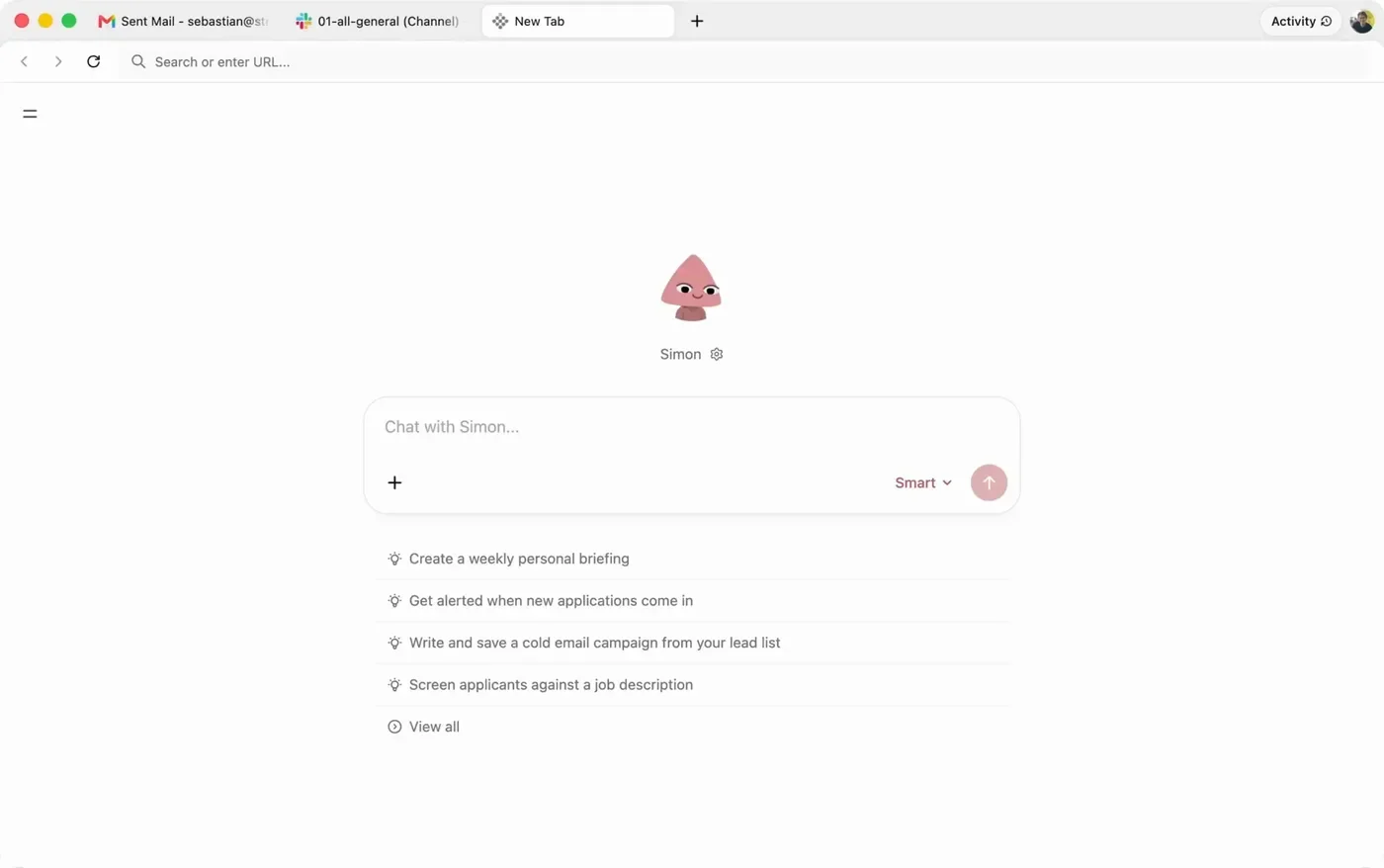
Source: Strawberry official website (applies to the screenshots below as well). Opening a new tab shows a chat box for your companion. The mode label in the image reflects the time the official image was captured
AI that works in the browser you are already signed in to
What sets Strawberry apart is that the AI runs inside your own browser, on your own computer. With agents that run in a separate cloud environment, letting the AI use services that require a login, such as LinkedIn or a CRM, takes extra setup. Strawberry can use your signed-in tabs as the AI's workspace, so according to the official open beta announcement you can hand over a request like "find 20 leads on LinkedIn, check them against the CRM, and start outreach" in a single prompt.
Instruct a companion
Ask in chat, or set up a routine with a trigger such as "when an email arrives" or "every Monday"
Works in tabs and apps
Opens and operates signed-in websites and writes to connected apps such as Gmail, Slack, and your CRM. Several tasks can run in parallel
You approve
Before irreversible actions such as sending an email, an approval request appears above the chat input. Review, edit, and approve
The company says companions ask before taking irreversible actions. The actions that trigger a confirmation are listed in the terms (see "Things to check before adopting it" below).
How to use it
-
Install the desktop app
Get the macOS or Windows version from "Download" on the official website. The Free plan does not require a credit card.
-
Bring over data from your current browser (optional)
During setup you can import bookmarks, passwords, and Chrome extensions from Chrome or another browser. Bringing your usual environment with you means fewer sign-ins to redo.
-
Introduce yourself to your companion
Strawberry starts by asking about your role and how you work, and with your consent it also looks up public information about you on the web, then suggests use cases suited to your job. The official site also offers role-specific guides (Playbooks) for sales, recruiting, marketing, research, and more.
-
Hand off work
Ask things like "Research 30 companies in this industry and put them in a table" or "Find candidates on LinkedIn who match this job description." The companion opens tabs and works on its own; tabs it is using glow in the companion's color.
-
Turn repeated work into routines
Register weekly chores, or tasks like "draft a reply when a certain kind of email arrives," as routines. You can also schedule one-off tasks that run once.
Features
01Delegate — companions
- Browser actions on your behalf — Opens sites, clicks, types, and extracts information. Because it is your own browser, sites that require a login can be used as they are
- Three modes — "Efficient" answers fastest and uses the fewest credits, "Default" is for everyday work, and "Expert" takes its time on complex research (Expert requires a paid plan)
- Model choice — On paid plans, you can choose AI models such as Claude and OpenAI, and the thinking effort, per companion and per mode
- Skills and memory — Save a workflow that worked as a skill, and let the companion remember your habits, people, and projects for the next task
02Automate — routines
- Triggers — Start from a new email, a calendar event, a Slack mention, a form submission, or a schedule
- Conditional runs — Add an "Only if" condition, such as "only invoices from the finance team," so a routine runs only when it matters
- Approval steps — Insert a human check before sending messages or changing important records
03Create and record
- Visual Artifacts — Describe the goal and source material, and it builds slides, research summaries, comparison layouts and simple charts, or one-page explainers. Information from pages behind a login can be used as source material
- Meeting transcription — Records without adding a meeting bot, then produces a transcript, summary, decisions, and to-dos. It tells speakers apart and offers to record when you open Zoom, Microsoft Teams, or Google Meet
- Library — Keeps artifacts, files, and projects in one place for searching and previewing
04Connect and browse
- App connections — The integrations page lists 1,975 connectable apps (Salesforce, HubSpot, Gmail, Slack, Notion, Airtable, and more); WhatsApp support was added in October 2026
- Regular browser features — Chrome extensions, split view, a password manager, a bookmark manager, picture-in-picture, and more
- Search engine — Google Search by default, with other search engines available
Pricing
Regular browsing is always free. Credits are used only when a companion does work (replying in chat, operating the browser, researching, drafting, and so on). Monthly plan credits do not roll over; if you need more, you can buy top-ups at $0.01 per credit ($10 per 1,000 credits), and purchased top-ups do roll over. Prices are in US dollars and, under the terms, exclude tax.
Individual plans consist of Free and three paid plans that differ in credit volume. Paying annually gives you two months free (annual plans returned in the October 21, 2026 update).
For teams, choose a Team plan, where each seat comes with its own credits. Free seats and paid seats can be mixed in the same team.
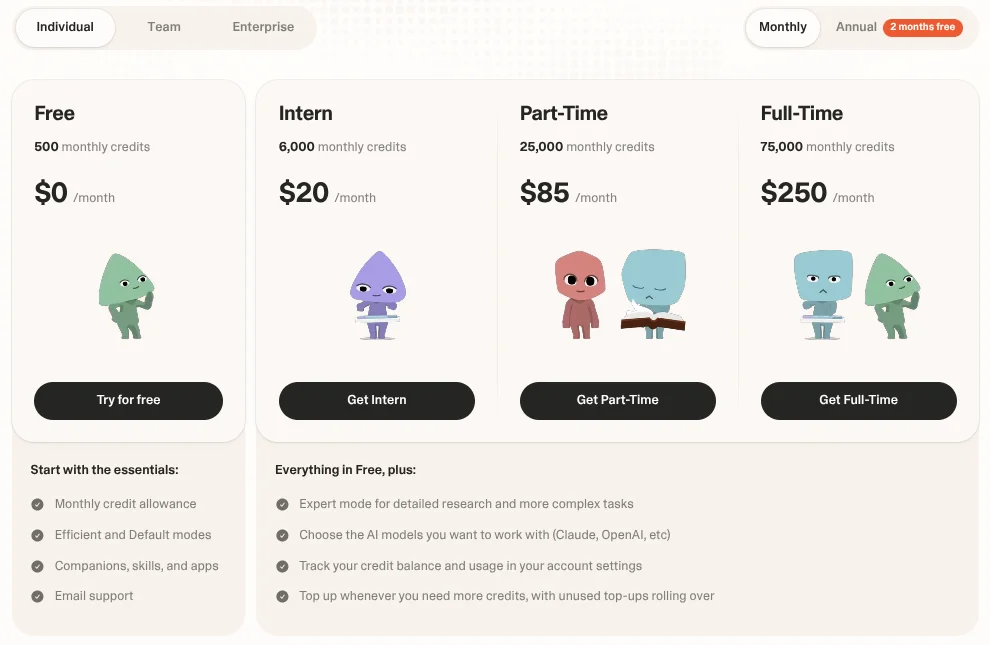
Individual
| Plan | Monthly billing | Annual billing | Monthly credits | What's included |
|---|---|---|---|---|
| Free | $0 | — | 500 | Efficient and Default modes, companions, skills, and apps, email support |
| Intern | $20/month | $200/year ($17/month equivalent) | 6,000 | Everything in Free plus Expert mode, AI model choice, usage tracking, and credit top-ups |
| Part-Time | $85/month | $850/year ($71/month equivalent) | 25,000 | Same features as Intern with more credits |
| Full-Time | $250/month | $2,500/year ($208/month equivalent) | 75,000 | Same features as Intern with more credits |
Team and Enterprise
| Plan | Price (monthly billing) | Monthly credits | What's included |
|---|---|---|---|
| Starter | $35 per seat/month | 10,000 per seat | Everything in Individual plus shared companions, skills, and context, central management of members, billing, and spending, priority support and setup help |
| Standard | $150 per seat/month | 40,000 per seat | Same features as Starter with more credits |
| Ultra | $350 per seat/month | 100,000 per seat | Same features as Starter with more credits |
| Enterprise | Custom pricing | Pooled across the team (rolls over) | Everything in Team plus pooled credits that roll over, invoicing and custom terms, dedicated onboarding, SSO, MFA, passkeys, and audit logs |
Strawberry does not publish how many credits a given task uses. Its explainer page says usage depends on the number of sources, the length of the input, the amount of web activity, verification effort, and so on. The reliable approach is to try representative tasks with the 500 free credits and check the balance in your account settings before choosing a paid plan.
Pricing is based on the official pricing page as of October 25, 2026 (USD, excluding tax; annual prices for Team plans are not shown on the pricing page).
Customers and reputation
The official case studies page (/case-studies) lists four companies: Anthropic, Stripe, Lovable, and EQT. However, each company page shows only headline figures (such as Stripe's "25 hrs/week saved" and "4x more opportunities" and Anthropic's "20 hrs/week saved" and "3x more leads") and no body text describing the work. The pages are also dated December 2024 to January 2025, before the February 2026 open beta, and are not linked from the site menu, so this page treats them only as a reference rather than as track record (checked October 25, 2026).
The official site also shows comments from named users. For example, Marta Mierzejewska, a senior technical recruiter at Zapier, says she uses it to source candidates for very niche roles and finds the Ashby (applicant tracking) connection especially useful. Damian Pawłowski of lablab.ai says it collected more than 270 leads with no manual work and saved him over 10 hours.
On funding, the US venture capital firm General Catalyst officially announced in October 2025 that it led Strawberry's seed round, and Strawberry itself says it is backed by General Catalyst and EQT Ventures.
On the other hand, Strawberry is still in beta. Its release notes show features and screens changing every two to three weeks, and the plan lineup itself changed in October 2026 with the return of annual billing and the addition of Team and Enterprise to the pricing page. All user comments and case study figures are as published on the official website and have not been verified by third parties.
Things to check before adopting it
01Business use only
- Not for personal use — The Business Terms of Service (October 15, 2026 version) limit the service to business use by companies, sole traders, freelancers, and similar, and state that individuals may not register for personal, family, or household purposes. The Free plan is also used under these terms
- Contracting party — The contracting party is the US company Dendrite Systems Inc. (d/b/a Strawberry), and the governing law is that of the State of California. Fees are in USD, exclude tax, and are non-refundable unless otherwise specified
02How your data is handled
- Passwords are encrypted on your device — The company says passwords are encrypted on your device and are never visible to Strawberry or to AI model providers
- Chat history and other content are also stored in the cloud — The Privacy Policy (October 19, 2026 version) says account details and content such as chat history are stored in the cloud, and that the balance between on-device and cloud storage is in transition. Task content is sent to third-party AI model providers for processing
- Not used for training — The terms state that, by default, customer content is not used to train Strawberry's or third-party generative AI models. The company also says it does not sell your data
- SOC 2 Type II — Strawberry maintains a SOC 2 Type II report, which business customers can request under NDA through its Trust Center (trust.strawberrybrowser.com)
- Activity Memory (optional) — A feature that, when enabled, periodically captures screenshots of your screen to keep a record of your work. It is off by default and runs only after you explicitly opt in. The terms ask you to pause it when handling sensitive information
03When delegating actions
- Confirmations cover only certain actions — The terms list sending emails, most destructive file and account deletions, and starting a new agent session among the actions that require approval, and say extending this to payments and external form submissions is "in progress." It is safer to supervise tasks that involve payments or submissions yourself
- Prompt injection is possible — The terms themselves state that the risk of the AI being manipulated by instructions hidden in web pages or emails is not zero, and ask customers not to connect systems where a mistake would be especially harmful, such as banking, brokerage, or healthcare systems
How Strawberry differs from other AI agents and automation tools
| Aspect | Strawberry | Comet | Manus | Zapier |
|---|---|---|---|---|
| Form | Desktop browser with built-in AI agents | Browser with a built-in AI assistant | Autonomous agent running in the cloud | Platform that connects apps for automation |
| Where the AI works | The browser on your own computer (signed-in tabs) | Your own browser | A cloud sandbox | The cloud (each app's API) |
| Strengths | Delegating browser-based work in sales, recruiting, and research, and automating recurring work | Understanding the page you are viewing and acting on it on the spot | Handing over a goal and receiving finished research or materials | Automating fixed workflows (triggers and actions) |
| Pricing model | Free (500 credits/month) / from $20/month (credit-based) | Browser is free | Paid credit-based plans | Free (100 tasks/month) / paid plans |
If you want AI that assists your everyday browsing, Comet fits; if you want to hand a whole project to the cloud, Manus; and if you want fixed integrations to run reliably, Zapier. Strawberry suits sales, recruiting, and research staff who want AI to take over manual work on business sites that require a login (LinkedIn, CRMs, applicant tracking systems, and so on). If you would rather add AI to your existing browser as an extension, consider Sider, and if you only need to collect data from websites, Browse AI.
Frequently asked questions (FAQ)
Q. Can I use Strawberry for free?
Yes. The Free plan includes 500 credits per month, the Efficient and Default modes, and companions, skills, and app connections. No credit card is needed. Regular browsing does not use credits. Expert mode, AI model choice, and credit top-ups are paid-plan features.
Q. How much does it cost?
Individual plans are Intern at $20/month, Part-Time at $85/month, and Full-Time at $250/month, with two months free on annual billing. Team plans come in three tiers at $35, $150, and $350 per seat per month, and Enterprise is custom-priced (as of October 25, 2026, USD, excluding tax).
Q. Does it support Japanese?
The official site and documentation are English only, and no Japanese user interface is offered. Since Japanese is not officially advertised, try it on the Free plan to see how well it handles instructions in Japanese.
Q. Can I use it as an individual?
The terms limit use to business purposes. Sole traders and freelancers using it for their work are covered, but registering for personal, family, or household purposes is not allowed.
Q. Which operating systems are supported? Is there a smartphone app?
According to the official FAQ, it is a desktop app for macOS and Windows. No smartphone app is offered.
Q. Which company operates it?
Under the terms and the Privacy Policy, the operator is Dendrite Systems Inc. of San Francisco (doing business as Strawberry). Its EU establishment is Strawberry Browser AB (formerly Dendrite Systems AB) in Stockholm, Sweden, and the co-founders Charles Maddock, Arian Hanifi, and Sebastian Thunman are based in Stockholm. The website footer reads "© Strawberry Browser Inc."
Q. How is it different from ChatGPT or Claude?
ChatGPT and Claude mainly return answers in chat. Because Strawberry is the browser itself, it can use the pages you have open and the services you are signed in to as context, and carry out actions for you. On paid plans you can choose Claude or OpenAI models inside Strawberry.
Q. Do I need a meeting bot for transcription?
No. Strawberry records and transcribes the meeting itself, so you do not need to add a separate bot to the call. It works with Zoom, Microsoft Teams, and Google Meet, and can tell speakers apart.
The information on this page is based on what was published as of October 25, 2026 on Strawberry's official website (pricing page, feature pages, release notes, and case studies), its Business Terms of Service (October 15, 2026 version), its Privacy Policy (October 19, 2026 version), and the press release in its official press kit. Strawberry is in beta, so features and pricing may change. Please check the official website for the latest information.