Tack+
: How to use it, features, and the business problems it solves
Add bookmark
What is Tack+?
Tack+ is a notch app for the Mac from Pensa Corporation in Canada, developed in France. A panel that opens from a line at the edge of the screen brings together fifteen apps and nine widgets, and its AI features are an assistant that runs on the Mac (Qwen3.5 4B, with 40 actions; requests are not sent to any AI service and it waits for approval before moving or deleting files or sending messages), dictation that writes into any app (nine languages including Japanese), and call transcription and summaries with no bot in the meeting. It supports a Japanese interface and requires macOS 14 or later. The price is US$4.99 a month after a 3-day free trial (as of November 2026).
Business problems it solves
About "Tack+"
What is Tack+?
Tack+ is a notch app for the Mac, published by Pensa Corporation (Ontario, Canada) and developed in France. Push the cursor against a thin line at the edge of the screen and a panel opens, bringing together fifteen apps, such as music, messages, calendar and clipboard history, plus nine widgets.
It has three AI features: an AI assistant that runs on your Mac (using the open model Qwen3.5 4B, without sending requests to any AI service), dictation that writes into any app, and call transcription with no bot joining the meeting. The assistant handles tasks such as tidying files and adding events for you, and always asks for approval before moving, deleting or sending anything. The interface supports Japanese, and the price is US$4.99 a month after a 3-day free trial (as of November 2026).
The line can sit at the bottom or the top of the screen. At the top it merges with the MacBook's camera notch, with the date on one side and the time on the other. Even when closed, the sides of the notch show the song playing, the focus timer, the assistant at work, dictation and calls.
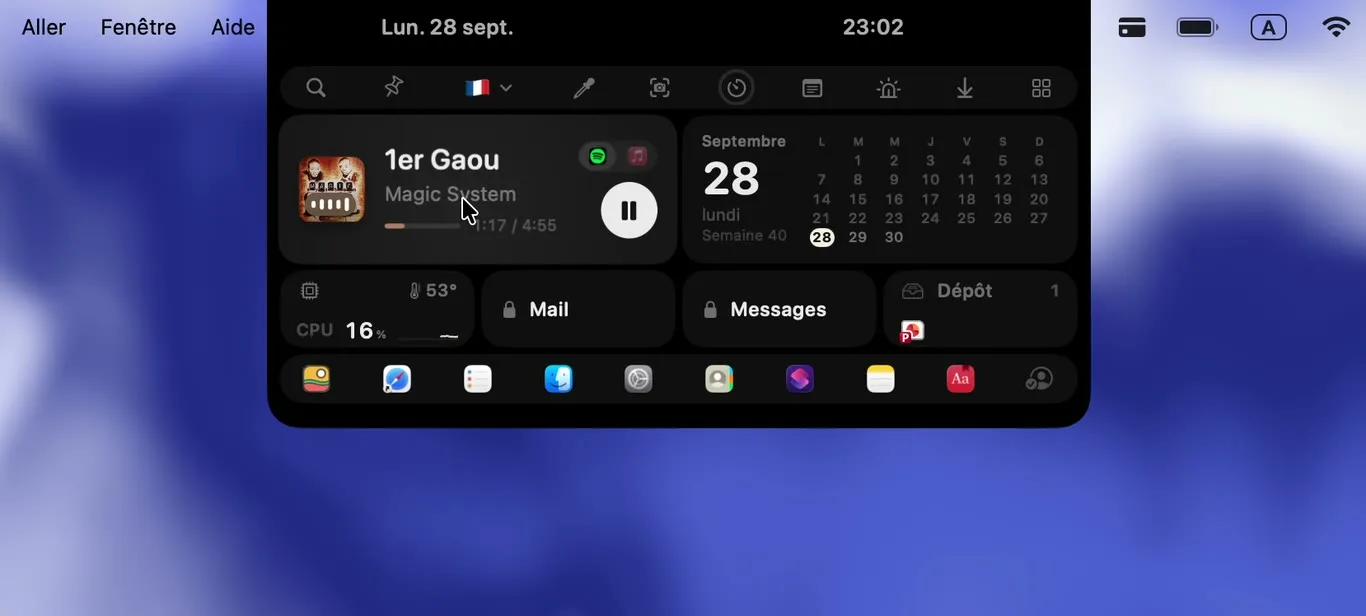
Source: Tack+ official site and press kit (the same applies to the screenshots below)
How to use it
- Download it from the official site and create an account It runs on Macs with macOS 14 or later (both Apple silicon and Intel) and takes about 30 MB on disk. Creating an account in the app starts the 3-day free trial at once. No credit card is needed.
- Choose where the line sits and which cards to use Put the line at the bottom or the top of the screen. The panel can be rearranged like a phone's home screen, and cards you don't use can be removed. The ⌥+Space shortcut also opens and closes it.
- Add the AI assistant (optional) On an Apple silicon Mac, choose "Download assistant…" from the Tack+ menu bar icon, and the 2.74 GB model is downloaded once. Without it, the rest of Tack+ works just the same.
- Speak or ask Hold ⌥⇧Space and speak, and the text appears at the cursor in any app. Ask the assistant something like "sort my Downloads by type", check what it shows, and click "Run".
Ask, and it checks with you before acting on your Mac
The Tack+ assistant is not built for long conversations but for taking short jobs on the Mac off your hands. It has 40 actions (tools), picks the ones that fit your request, carries them out, and answers in the language you asked in.
Before moving, renaming or deleting files, sending a message or emptying the Trash, it shows what it is about to do on a card and does nothing until you click "Run". Deleted items go to the Trash, and the last request can be undone. It never pays, never enters passwords, and does not click or type inside web pages.
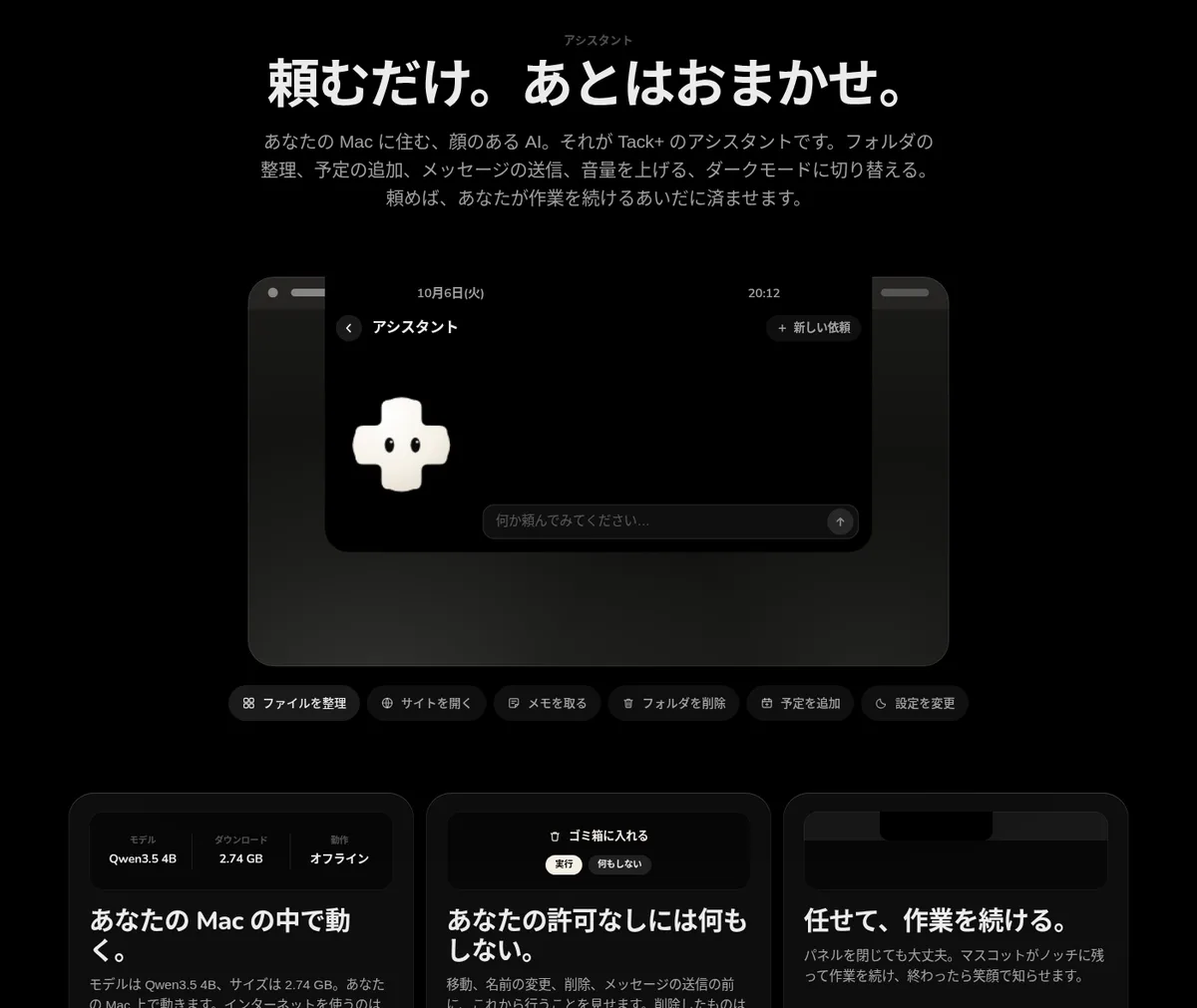
Examples of requests from the official guide:
| Request | What it does | Asks first? |
|---|---|---|
| "Sort my Downloads by type" | Moves files into subfolders such as Pictures, PDFs and Documents | Yes |
| "Find the invoice PDFs" | Searches your folders by name and type and lists what it finds | No (read only) |
| "Put a call in my calendar in 20 minutes" | Adds an event to Calendar at the exact time | No (can be undone) |
| "Message Léa that I'm late" | Prepares an iMessage to that contact | Yes |
| "Summarise this page: (address)" | Reads the text of a public web page and answers from it | No |
Dates and arithmetic such as "in 20 minutes" or "tomorrow at 3 pm" are handled by Tack+ itself, not the model. The company explains that small models are unreliable at arithmetic, and this is what puts events in at the right minute.
Neither your voice nor your calls leave the Mac
01Dictation (since version 1.0.64)
Hold ⌥⇧Space, speak and release, and the text is written at the cursor in any app. Tap once to keep listening hands-free until the next press.
- Nine languages — Japanese, English, Chinese, Korean, French, Spanish, German, Italian and Portuguese
- On-device transcription — macOS speech recognition converts speech to text on the Mac; audio is neither kept nor sent
- Custom shortcut — Any combination, or a single key such as Fn or the right ⌘⌥⌃
02Call transcription (since version 1.0.71)
When Zoom, Teams, FaceTime, Slack, Discord, WhatsApp or a browser starts using the microphone, the notch offers to transcribe.
- No bot — No bot joins the meeting. Each line appears about a second after the speaker stops
- You and them — Separates "You" (microphone) from "Them" (the call's sound; macOS 14.2 or later for the other side)
- Local summary — With the assistant installed, the call is summarised in a few lines and to-dos can be sent to the to-do list in one click
- Only text remains — Audio files are deleted at once; the text is saved in Tack+'s files on the Mac and is not synced
The company asks users to tell participants before starting.
Features
01Fifteen apps
Spotify or Apple Music, Messages or WhatsApp, Calendar, Mail, Safari, Reminders, Recents, System, Contacts, Shortcuts, Notes, Dictionary, Clipboard, Stash and Lighthouse. With the same company's Mac+ installed, sixteen.
- Clipboard history — Every ⌘C adds text, links and colours to the history, restored in one click
- Stash (shelf) — Drag files to the edge of the screen to park them, and drag them out again
- Unified search — Search clipboard, stash, messages, calendar and reminders from one field
02Nine widgets and three tools
Place only the widgets you need, in the size you choose.
- Widgets — Assistant, Weather, Monitor (CPU, memory, temperature), To-do, GitHub, Google Calendar, Clock, Countdown and Month
- Tools — Colour picker, timer and notepad
- Focus — A timer that runs focus and break cycles; the countdown stays visible on the notch when the panel is closed
03Privacy protection
Features that keep the panel's contents from prying eyes.
- Face lock — Opening the panel checks your face with the Mac's camera before showing its contents (Apple's Vision on device, up to five profiles; off by default)
- Partial lock — Lock the whole panel, or only Messages, Mail, Clipboard and Notes
- Data handling — What Tack+ reads, such as messages, calendar and clipboard, never leaves the Mac. Only your account and four settings are synced
Pricing
| Plan | Price | What it includes |
|---|---|---|
| Tack+ Pro | US$4.99 a month (tax calculated at checkout) | Fifteen apps and nine widgets, dictation and call transcription, the AI assistant that runs on the Mac, all updates, on all your Macs |
- There is a 3-day free trial with no credit card (an account is required)
- Cancel any time and keep using it until the end of the paid month. Within 14 days of subscribing, one email gets a refund
- Payment is handled by Polar. Anyone who bought Tack+ before the subscription began keeps a licence that stays valid for good
- The AI assistant comes at no extra cost and without usage limits (an Apple silicon Mac is required)
(As of November 2026, from the pricing section of the official site)
How Tack+ differs from other AI dictation and transcription tools
| Product | Type | How AI is processed | Price guide |
|---|---|---|---|
| Tack+ | Mac notch app (including dictation, call transcription and an AI assistant) | Dictation and transcription by macOS speech recognition; the assistant by a local model on the Mac | US$4.99 a month |
| Superwhisper | AI dictation app (also meeting recording and summaries on Mac) | Choose between local and cloud models | Free plan available |
| Wispr Flow | AI dictation app | Removes fillers and produces polished text | Free plan available |
| Amnis | AI dictation app (replies, rephrasing, translation and summaries by voice) | Offline dictation on Apple silicon Macs | Free plan available |
| Krisp | Call noise cancellation and AI meeting notes | Records, transcribes and summarises without a bot | 7-day free trial, Core $8 a month (billed yearly), etc. |
Details of the other products are as stated on each product page at the time it was checked.
If turning speech into polished, filler-free text is the goal in itself, dedicated dictation apps such as Wispr Flow or Superwhisper offer more features. If meeting recording and notes are the focus, Krisp is also a candidate. Tack+ suits people who want Mac utilities such as the notch and clipboard together with AI features that keep data on the device, in one app for one price.
FAQ
Q. Does Tack+ support Japanese? Yes. The app and site support six languages including Japanese (French, English, Spanish, German, Chinese and Japanese) and follow the Mac's language automatically. Dictation supports nine languages, including Japanese.
Q. Which Macs can use the AI assistant? Macs with Apple silicon (M1 or later) running macOS 14 or later. It is not available on Intel Macs. On the company's development MacBook (M4, 16 GB of memory), a typical request takes about 10 seconds from pressing Return to the answer, and older or busy Macs are slower, according to the company.
Q. Are my requests to the assistant sent anywhere? No. Requests, file names and answers stay on the Mac. It uses the internet only to download the model, and when you ask it to open a site, search the web or read a public page.
Q. Can the assistant delete files on its own? No. Before moving, renaming or deleting, sending a message or emptying the Trash, it shows what it will do and waits for approval. Deleted items go to the Trash, and the last request can be undone.
Q. Does it work on Macs without a notch or on external displays? Yes. It places a line on every connected screen, and the panel opens on the screen where you push the pointer. The display around the camera appears only on screens with a notch.
Who makes it
Tack+ is published by 1001771571 ONTARIO INC. (doing business as Pensa Corporation) in Ontario, Canada, and developed in France (according to the legal notice on the official site). Contact: support@pensacorp.com.
The information on this page is based on what was published on the official site as of November 2026. Features and pricing may change, so please check the official site for the latest information.