Krisp
: How to use it, features, and the business problems it solves
Add bookmark
What is Krisp?
A noise-cancellation app from Krisp Technologies, Inc. (Berkeley, California, USA) that uses AI to remove background noise, other people's voices and echo from calls and meetings in real time. Because it sits between the microphone/speakers and the calling app on Mac and Windows, it cancels noise on both your side and the other side in any app, including Zoom, Teams and Google Meet. It also offers a bot-free AI note taker (recording, transcription, AI summaries and action items) and English accent conversion (transcription covers 16 languages and does not include Japanese, as of October 2026). Pricing includes a 7-day free trial, Core at $8/month and Advanced at $15/month (per user, billed annually). There are also plans for call centers and an SDK for developers.
Business problems it solves



About "Krisp"
What is Krisp?
Krisp is an AI noise-cancellation and meeting AI app from Krisp Technologies, Inc. (Berkeley, California, USA). During online meetings and calls, its AI removes keyboard clicks, barking dogs, nearby conversations and room echo in real time. It not only cleans up noise from your own voice but can also remove noise coming from the other side.
Today Krisp combines noise cancellation with an AI Note Taker that records, transcribes and summarizes meetings without adding a bot, and accent conversion that makes English accents easier to understand, all in one app. According to the official site, Krisp has processed more than 3 billion calls, and Discord's noise cancellation also runs on its AI (as shown on the official site in October 2026).
What to check before using it in Japanese: The official website, help center and app are in English. The 16 languages supported for AI Note Taker transcription and summaries do not include Japanese (help center, as of October 2026). If your goal is minutes for Japanese meetings, also compare the Japanese-capable tools in "How it differs from other AI meeting note tools" below. The official materials do not state any language conditions for noise cancellation.
Sitting between your mic, speakers and any calling app to remove noise
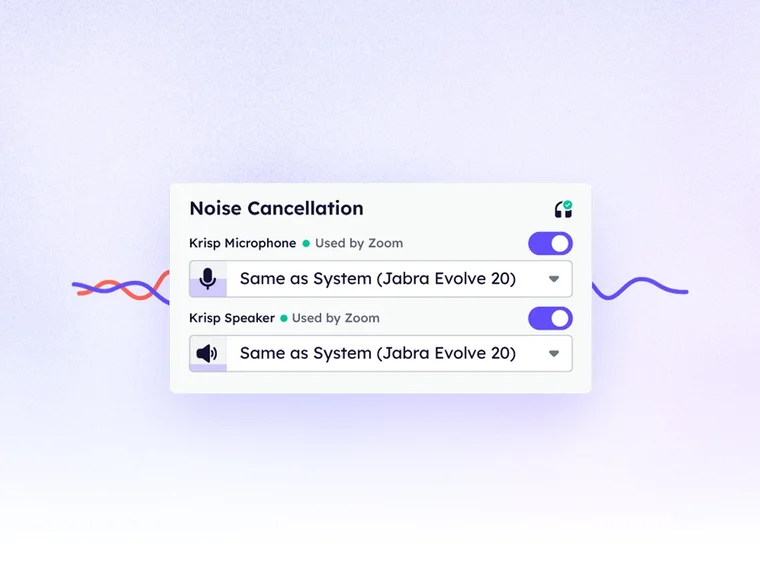
Krisp works not inside the calling app but between your computer's microphone/speakers and the calling app. In the audio settings of Zoom, Microsoft Teams, Google Meet and others, just choose "Krisp Microphone" as the microphone and "Krisp Speaker" as the speaker, and noise is removed the same way in any calling app.
The app has two switches: Cancel my noise, which removes noise on your side, and Cancel others' noise, which removes noise coming from the other side. Noise-cancelling headsets quiet what you hear, but Krisp also removes noise entering your microphone, so the voice others hear from you is clean.
The official site describes noise removal in three parts.
- Voice isolation — Removes the voices of other people nearby and keeps only the speaker's voice
- Background noise cancellation — Removes noise on both your side (outbound) and the other side (inbound)
- Echo cancellation — Suppresses room echo and feedback in real time
Source: Krisp official website (all images on this page are from the same site)
How to use it
- Create an account and install the app Sign up on the official site and download the Mac or Windows app. To use the AI Note Taker, you are asked to connect a Google or Outlook calendar at sign-up (the official FAQ says you can consult the sales team if you prefer not to connect one).
- Set Krisp as the microphone and speaker in your calling app In the audio settings of Zoom, Teams, Google Meet and others, choose "Krisp Microphone" as the microphone and "Krisp Speaker" as the speaker.
- Choose which noise to remove Turn on "Cancel my noise" (your side) and "Cancel others' noise" (the other side) in the Krisp app. Then join meetings as usual, and it works automatically as soon as the call starts.
- Turn on recording and transcription if needed To use the AI Note Taker, choose transcribe only, audio recording, video recording or off for each meeting. After the meeting, the transcript, AI summary and action items are gathered in the dashboard.
Features
01Cleaning up audio
- Noise cancellation — Removes noise on your side and the other side in real time. Unlimited on all plans
- Voice isolation and echo cancellation — Removes nearby voices and room echo
- Accent conversion — Makes English accents easier to understand while keeping the speaker's own voice. Speaker-side supports Indian, Filipino, South African and Latin American accents; listener-side converts the other person's accent (usage time is capped per plan)
02Recording meetings (AI Note Taker)
- Bot-free recording and transcription — Records audio and video without a bot joining and transcribes with speaker separation. Also supports in-person meetings and uploaded audio/video files, and you can choose to record with a bot
- AI summaries and action items — Automatically extracts key points, decisions and tasks. You can ask questions about the meeting through AI chat
- Integrations — Slack, Notion, Zapier, HubSpot, Pipedrive and more. The Advanced plan adds Salesforce and ConnectWise. Through MCP, meeting data can be used from Claude, ChatGPT and Cursor
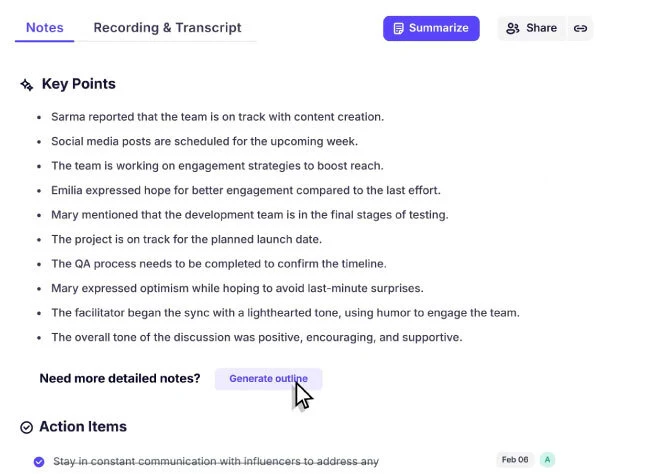
After a meeting, the AI produces notes with key points and action items. If you need more detailed notes, you can have it generate an outline as well.
Transcription and summaries support 16 languages: English, Spanish, French, German, Russian, Italian, Dutch, Polish, Portuguese, Hindi, Czech, Korean, Ukrainian, Danish, Swedish and Norwegian.
03For call centers and developers
- Call Center AI — Noise cancellation for both agent and customer, after-call summaries and usage reports for admins. The higher CC Advanced tier adds real-time voice translation in 60+ languages (including Japanese; add-on), speech analytics such as automatic call scoring, agent assist and voice-fraud detection (add-on)
- Krisp for Developers — SDKs and APIs to build noise cancellation, voice isolation, turn-taking prediction, a voice translation API and more into your own apps and voice AI agents
Pricing
This is the official pricing page as of October 24, 2026 (shown in US dollars). Meeting AI prices are per user per month.
| Plan | Annual billing (per month) | Monthly billing | Main contents |
|---|---|---|---|
| Free Trial | $0 (7 days) | $0 (7 days) | Try paid features for 7 days. No credit card required |
| Core | $8 | $16 | Unlimited noise cancellation, transcription, recording and AI notes; AI chat; accent conversion 1 hour/day; mobile app; MCP integration; 10 GB storage |
| Advanced | $15 | $30 | Everything in Core + accent conversion (speaker side 4 hours/day, listener side unlimited), Salesforce and ConnectWise integrations, admin controls, manager view, 60 GB storage |
| Enterprise | Contact sales | Contact sales | Everything in Advanced + SSO/SCIM, SOC2 report access, choice of data center location, on-device transcription and recording, dedicated account manager, unlimited storage |
- Annual billing — The pricing page labels annual billing "Save 50%" (Core and Advanced cost half the monthly price when billed annually)
- If you only want noise cancellation — According to the official FAQ, there is no separate noise-cancellation-only plan. Every plan includes noise cancellation, and the Meeting Assistant can be turned off
- Payment — Pay with major credit or debit cards. Invoices are available for Enterprise. Volume discounts can be discussed for more than 50 members
- Cancellation — Subscriptions renew automatically; after cancelling, you can use the plan until the end of the paid period
Security and data handling
According to the FAQ on the official pricing page, stored data is encrypted with AES-256 and data in transit with TLS 1.3. Krisp says it is certified for SOC 2 Type II, GDPR and HIPAA and adheres to PCI DSS standards. Meeting data is never used to train Krisp's AI models. Enterprise also lets you choose the data center location and offers on-device transcription and recording.
Adoption and reputation
01Built into calling and meeting platforms
- Discord — The official site says every noise-cancelled call on Discord runs on Krisp's AI
- Twilio, RingCentral and Zoho — Listed on the official site as companies using Krisp's technology. The Japanese virtual office "oVice" also commented that its users can now use Krisp's noise cancellation
02User ratings
- G2 — According to the official site, Krisp is rated 4.7 on G2 (based on verified reviews)
- User voices — The official site features reviews saying, for example, that children's voices and household noise no longer get into calls when working from home, and that being able to remove the other side's noise is useful
For call centers, large BPOs such as Foundever and Startek have contributed comments on the official site. Note that these are reviews shown on the official site, not voices of users in Japan.
How it differs from other AI meeting note tools
| Product | Noise cancellation | Recording method | Japanese transcription | Pricing (as stated on each product page at the time of checking) |
|---|---|---|---|---|
| Krisp | Yes (your side and the other side) | Bot-free (bot recording also available) | Not supported (16 languages) | 7-day free trial; Core $8/month (annual) |
| Otter AI | — | Joins meetings automatically | Supported | Basic free (300 min/month); Pro $8.33 |
| Notta | — | Meeting integrations and file import | Supported (strong in Japanese) | Free ¥0; Premium ¥1,185 (annual, monthly incl. tax) |
| tl;dv | — | Records meetings automatically | Supported (Japanese-specialized model) | Free plan available; Pro ¥36,960 per seat per year (annual) |
| LiteScribe | — | Bot-free (records on the device) | Supported (100+ languages) | 120 free minutes per month |
Krisp's biggest difference is that, while being a meeting note tool, it cleans up the sound of the call itself. If you join meetings from noisy places or struggle with noise from the other person's environment, Krisp fits better than a note tool. On the other hand, if you want to transcribe Japanese meetings into minutes, Japanese-capable Notta, tl;dv or Otter AI, or LiteScribe, which like Krisp records without a bot, will suit that purpose better.
FAQ
Q. Can I use Krisp for free? A. The pricing page offers a free trial that lets you try paid features for 7 days (no credit card required). To keep using it, subscribe to Core ($8/month billed annually) or higher.
Q. Does Krisp support Japanese? A. The official site and app are in English. Japanese is not among the 16 languages supported for AI Note Taker transcription and summaries. Real-time voice translation for call centers supports 60+ languages including Japanese (as of October 2026).
Q. Can I use it with Zoom or Teams? A. Yes. In your calling app's audio settings, choose "Krisp Microphone" as the microphone and "Krisp Speaker" as the speaker. Krisp works between your mic/speakers and the calling app, so it is not limited to specific calling apps.
Q. Can it remove the other person's noise? A. Yes. Turning on "Cancel others' noise" removes noise coming from the other side.
Q. Is there a cheaper plan for noise cancellation only? A. According to the official FAQ, there is no separate noise-cancellation-only plan. Every plan includes noise cancellation, and the AI Note Taker features can be turned off.
Q. Is meeting content used to train AI? A. According to the official FAQ, meeting data is never used to train Krisp's AI models.
The information on this page is based on what was published on Krisp's official website and help center as of October 2026. Please check the official website for the latest specifications and pricing.