Amnis
: How to use it, features, and the business problems it solves
Add bookmark
What is Amnis?
Amnis is an AI dictation app: hold a key and speak, and clean text — with filler words and self-corrections removed — is typed straight into wherever your cursor is. It works in any app, from email and Slack to documents, automatically switches between personal, work and email writing styles depending on the app, and offers a custom vocabulary, Smart Inserts for spoken shortcuts to saved snippets, and voice requests to reply, rewrite, translate or summarize. It runs on Mac, Windows, iPhone and Android, and on Apple silicon Macs dictation works even without an internet connection. The free plan has unlimited dictation (AI formatting up to 2,000 words a week); Pro is ¥1,980 a month or ¥14,220 a year. For users in Japan it is provided by Senolytic Lab LLC (Tokyo).
Business problems it solves

About "Amnis"
What is Amnis?
Amnis is an AI dictation app: hold down a key and speak, and clean text — with filler words and self-corrections removed — is typed straight into wherever your cursor is. It works anywhere you can type, from email and chat to documents. It supports Mac, Windows, iPhone and Android, and on Macs with Apple silicon you can dictate even without an internet connection.
For users in Japan, Amnis is provided and sold by Senolytic Lab LLC (セノリティックラブ合同会社) in Chiyoda, Tokyo (users outside Japan are served by YuniqueS Limited in Hong Kong). The same company also offers Voxtiva, which translates meetings in real time without a bot.
including the free plan
per week on Free
Mac, Windows, iPhone, Android
¥1,185/month billed annually
Figures from the official pricing page and help center (as of October 2026).
"Um" and "no, wait" never make it into the text
In an example on the official website, saying "Um, can we push the design review to Thursday — no, wait, Friday" produces "Can we push the design review to Friday?". Amnis removes hesitations, self-corrections and second thoughts as you speak, and tidies up punctuation, line breaks and even bullet lists before typing.
To use it, click where you want the text, hold Fn on Mac or Ctrl + Win on Windows, speak, and release the key. No special window and no pasting are needed. If you would rather not hold the key, hands-free mode starts recording with one press and stops with another (⌘ + Fn on Mac, Shift + Win on Windows). If the text cannot be typed in, it stays on the clipboard.
Say the same thing, and Slack and email get different wording
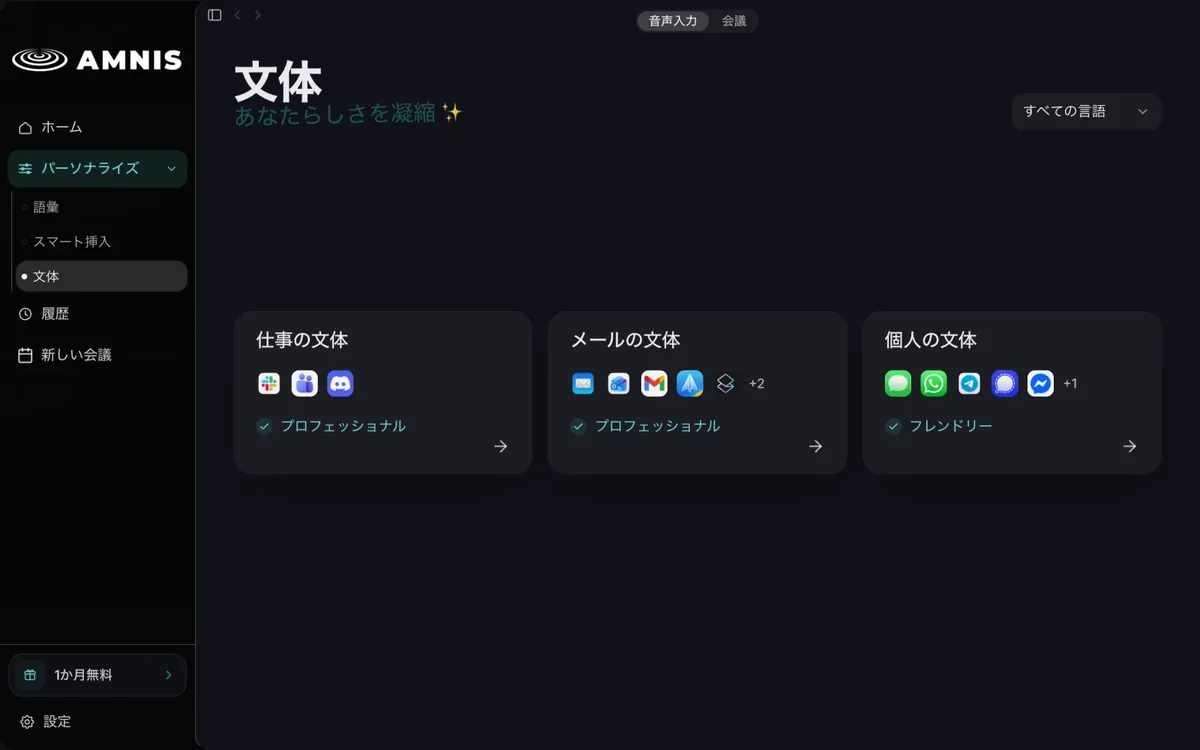
Amnis keeps three writing styles — "Personal", "Work" and "Email" — and switches automatically depending on the app you are typing in.
The personal style is used in Messages, WhatsApp, LINE and the like; the work style in Slack, Teams and Discord; and the email style in Apple Mail, Outlook, Gmail and others. By default, Personal is "Friendly" and Work and Email are "Professional"; you can switch to options such as "Concise and clear" or "Direct and brief". There is also "Find my style": paste two emails you wrote and Amnis picks the closest style (changing styles after setup and this feature require Pro).
Source: Amnis official website and Help (applies to the screenshots below as well)
Teach a name or snippet once, then call it up by voice
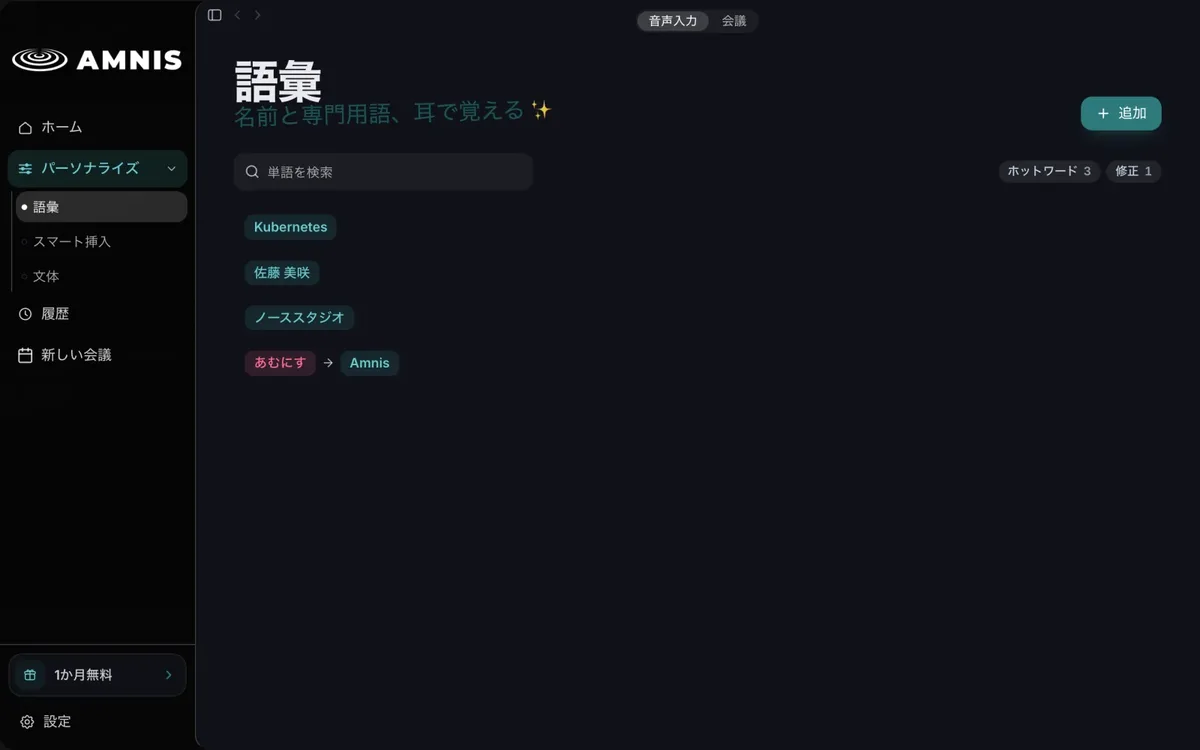
Register people's names, product names and abbreviations in the vocabulary, and Amnis writes them your way. On Mac and Windows, if you correct a name or term right after Amnis types it, Amnis adds it to the vocabulary automatically (a notification appears and you can cancel).
Smart Inserts let you say a short cue such as "my address" to insert a saved signature, booking link or canned reply exactly as registered, without AI formatting. Both the vocabulary and Smart Inserts are available on the free plan and are stored encrypted on your device.
Ask by voice to reply, rewrite or translate
There is also an AI assistant you instruct by voice: hold ⌘ + ⌥ on Mac or Win + Alt on Windows and say what you want. In the website's examples, asking in an empty reply "Reply that Thursday works and I'll send the materials tonight" produces a reply, and saying "make it softer" or "put it in English" over a selected draft replaces it with a rewrite or an English translation. The answer appears in a panel first, and nothing in the app changes until you press "Send". On the free plan, rewriting, translation and note summaries count toward the weekly 2,000 words; Pro removes the limit.
How to use
- Install the app and sign in Download the Mac or Windows version from the official website (the iPhone version is on the App Store). You must sign in with an Amnis account on every device, but signing in does not upload your history.
- Grant permissions (Mac) Two are required: "Accessibility" to type into other apps, and "Microphone" to hear you. On Apple silicon Macs, initial setup asks whether to process "On this Mac" or use "Cloud".
- Click where you want to type and hold the key while you speak Fn on Mac, Ctrl + Win on Windows. When you finish and release the key, the cleaned-up text appears at the cursor. Press Esc while recording to cancel.
- Set up vocabulary, Smart Inserts and styles Register names and snippets you use often, and choose a style for each type of app if needed.
- On iPhone, use it as a keyboard The iPhone version types what you say directly into Notes, Messages, Mail and more from the Amnis keyboard.
Features
01Dictation and formatting
- Dictation in any app — typed right at the cursor; deliberately skips password fields and protected apps
- AI formatting — removes hesitations and corrections, fixes punctuation, line breaks and formatting (2,000 words a week on Free, every time on Pro)
- App-aware formatting and styles — switches automatically between personal, work and email styles
- Hands-free mode — press once to start recording, again to stop
02Personalization
- Custom vocabulary — register hotwords and corrections; learns words you fix (Mac and Windows)
- Context-aware hotwords — also uses names already in the field you are typing in, such as email recipients
- Smart Inserts — insert signatures, addresses and snippets exactly as saved with a short cue
03AI assistant
- Rewrite, translate, summarize notes — ask by voice, check in the panel, then send
- Slack auto-tagging — listed in the comparison table on the pricing page (within 2,000 words a week on Free)
04Privacy
- History encrypted on device — retention: "Until restart", "7 days", "30 days", "90 days" or "Forever" (30 days by default)
- No voiceprints — no voiceprints or biometric identifiers are created from your voice
- Not used for training — not used to train any model, whether Amnis's own or anyone else's
Pricing
| Plan | Price | Main features |
|---|---|---|
| Free | ¥0 | Unlimited dictation, AI formatting up to 2,000 words a week, custom vocabulary and Smart Inserts, offline dictation on Apple silicon Macs |
| Pro | ¥1,980 billed monthly / ¥14,220 billed annually (¥1,185/month) | Everything in Free, AI formatting on every dictation, AI assistant (translate, summarize, rewrite), style changes and app-aware formatting |
| Enterprise | Custom quote | Everything in Pro, consolidated billing, admin privacy settings, team access management, priority support |
- Prices as shown on the official pricing page (October 2026; the annual plan is labeled "4 months free"). The legal notice states that taxes, where applicable, are shown at checkout
- The free plan requires no card
- Payments by users in Japan go through Stripe Japan (credit/debit cards, etc.). You can cancel any time and keep using the plan until the end of the paid period
- An account is generally valid on one desktop device and one mobile device
- The iPhone version is listed on the App Store as free with in-app purchases
Where your voice becomes text
Where transcription happens depends on your device and the "Cloud acceleration" setting (Help: "Where is my voice transcribed?").
| Device | Transcription | Internet |
|---|---|---|
| Apple silicon Mac (Cloud acceleration off) | On the Mac; on the free plan, AI formatting still runs on Amnis's servers | Not needed for dictation |
| Apple silicon Mac (Cloud acceleration on) | Sent to regional Amnis servers for faster, more accurate results | Required |
| Intel Mac | AI formatting in the cloud | Required |
| Windows / Android | Always in the cloud (no switch) | Required |
| iPhone | With Cloud acceleration on, AI formatting in the cloud; off, unformatted transcription | Not needed when off |
Audio and text sent to the cloud are encrypted and used only for the processing you requested. The privacy policy says inference service providers may keep short-term logs or caches for operations or security, without naming those providers. On Mac, Cloud acceleration stays off until you turn it on.
How Amnis differs from other AI dictation apps
| Product | Platforms | Free plan | Offline | Provider |
|---|---|---|---|---|
| Amnis | Mac, Windows, iPhone, Android | Unlimited dictation, AI formatting 2,000 words/week | Yes, on Apple silicon Macs | Senolytic Lab LLC (Japan) |
| Wispr Flow | Mac, Windows, iPhone, Android | 2,000 words/week on desktop / 1,000 words/week on iPhone | — | Wispr (US) |
| Typeless | Mac, Windows, Linux, iOS, Android | Weekly word limit | — | Simply CA LLC (US) |
- If you want to contract with a Japanese company in yen or dictate on a Mac with no network, Amnis is a strong candidate. Even on the free plan, dictation itself has no usage cap
- If you want meeting notes (Notetaker) in the same app, Wispr Flow includes Notetaker (macOS) from its free plan
- If you need Linux, Typeless supports it
- To transcribe and translate meeting audio directly, Voxtiva from the same company is the better fit
Pros and cons
Pros
- Dictation itself is unlimited even on the free plan, with no card required
- Automatically adapts the style to each app; vocabulary and snippets are free
- Offline dictation on Apple silicon Macs, with history encrypted on the device
- Users in Japan can contract with a Japanese company in yen
Cons
- AI formatting on the free plan is limited to 2,000 words a week, and even offline on a Mac, the free plan's formatting runs on Amnis's servers
- Windows and Android always process in the cloud and need an internet connection
- Changing styles and "Find my style" require Pro
- The cloud inference providers are not named publicly
Reputation and reviews
As of October 2026, the iPhone version on the App Store (first released September 14, 2026) has too few ratings for a summary to be shown. The official website lists no customer companies or testimonials; it carries a message from founder Van David Thai: "When you type, you lose the thread. When you speak, you stay on it. Amnis closes the gap between having the thought and having it written." Because dictation itself is unlimited on the free plan, you can check the formatting quality in the apps you use every day before considering Pro.
FAQ
Q. Can I use Amnis for free? A. Yes. Dictation is free and unlimited, and AI formatting is free up to 2,000 words a week. No card is required.
Q. Does it support Japanese? A. Yes. The official website lists 18 languages it writes in, including Japanese (as well as English, Mandarin and Cantonese Chinese, Korean and others). The app interface (web and desktop) can be shown in Japanese, English or French.
Q. Can I use it without an internet connection? A. On a Mac with Apple silicon, turning Cloud acceleration off means dictation needs no internet connection. On the free plan, however, AI formatting runs on Amnis's servers. Windows and Android need an internet connection.
Q. Is what I say used to train AI? A. No. The website states that it is not used to train any model, whether Amnis's own or anyone else's. No voiceprints are created either.
Q. Can a company use it for a team? A. There is an Enterprise plan (custom quote) with consolidated billing, admin privacy settings, team access management and priority support.
This page is based on information published on Amnis's official website (home, pricing, help, legal notice and privacy policy) and its App Store listing as of October 2026. Please check the official website for the latest specifications and pricing.