
Topaz Labs
: How to use it, features, and the business problems it solves
Add bookmark
What is Topaz Labs?
Topaz Labs LLC (Dallas, Texas) makes AI software that enhances images and video. Topaz Video upscales footage up to 16K and handles denoising, frame interpolation, stabilization and SDR-to-HDR conversion; Topaz Photo sharpens, denoises and recovers faces; and Gigapixel enlarges images. They run as Mac/Windows desktop apps, in the browser and on iPhone. The all-apps Topaz Studio costs $399/yr (USD, excluding tax); single apps start at $149/yr for Gigapixel.
Business problems it solves



About "Topaz Labs"
What is Topaz Labs?
Topaz Labs is a suite of AI software for enhancing images and video, made by Topaz Labs LLC of Dallas, Texas, USA. The core apps are Topaz Video (upscaling, denoising and frame interpolation for footage), Topaz Photo (sharpening, noise removal and face recovery for photos) and Topaz Gigapixel (dedicated image upscaling). Besides the Mac and Windows desktop apps, there is Topaz for Web, which runs in the browser, and Topaz for Mobile for iPhone.
It is not a tool for generating new images or video. It is a tool for making your existing photos, footage and AI-generated output larger and sharper while keeping what is there. The official site lists uses such as denoising low-light footage, bringing old archival video up to 4K, and creating slow motion by generating new frames.
Topaz Labs is sold by subscription. According to the official documentation, the former perpetual-license products (Photo AI, Gigapixel AI and Video AI) are no longer sold and have been superseded by today's Topaz Photo, Topaz Gigapixel and Topaz Video. Prices are in US dollars, with the all-apps Topaz Studio bundle and single-app plans.
How to use it
- Choose a plan on the pricing page On the pricing page, choose the all-apps Topaz Studio or a single app. You can pay annually, monthly with an annual commitment, or month to month (Pro plans require an annual commitment).
- Download the app and sign in Get the desktop apps from the downloads page or from My Products in your account. Even after installation, the apps need an internet connection for activation, AI model downloads, updates and cloud rendering.
- Load your media and choose an AI model For video, choose processing such as upscaling, denoising, frame interpolation or stabilization; for photos, use Autopilot (automatic detection) or individual tools. You can switch models to suit the material.
- Check the preview and export Compare before and after, then export. You can choose local rendering on your own computer or cloud rendering on Topaz's servers.
- Use it as a plugin in your editing software Topaz Photo can be launched from Photoshop, Lightroom Classic, Capture One and others, and Topaz Video from After Effects and DaVinci Resolve. There is also a panel for Adobe Premiere Pro.
Video, photos and upscaling — three apps under one subscription
Topaz Video is a desktop app that upscales footage up to 16K and handles denoising, frame interpolation, stabilization, SDR-to-HDR conversion and motion deblur. The official site says it has more than 20 AI enhancement models, including the Starlight series for high-accuracy upscaling.
Tabs at the top of the screen let you try different settings on the same clip and see the applied processing (Enhancement, Frame Interpolation, Stabilization and so on) side by side.
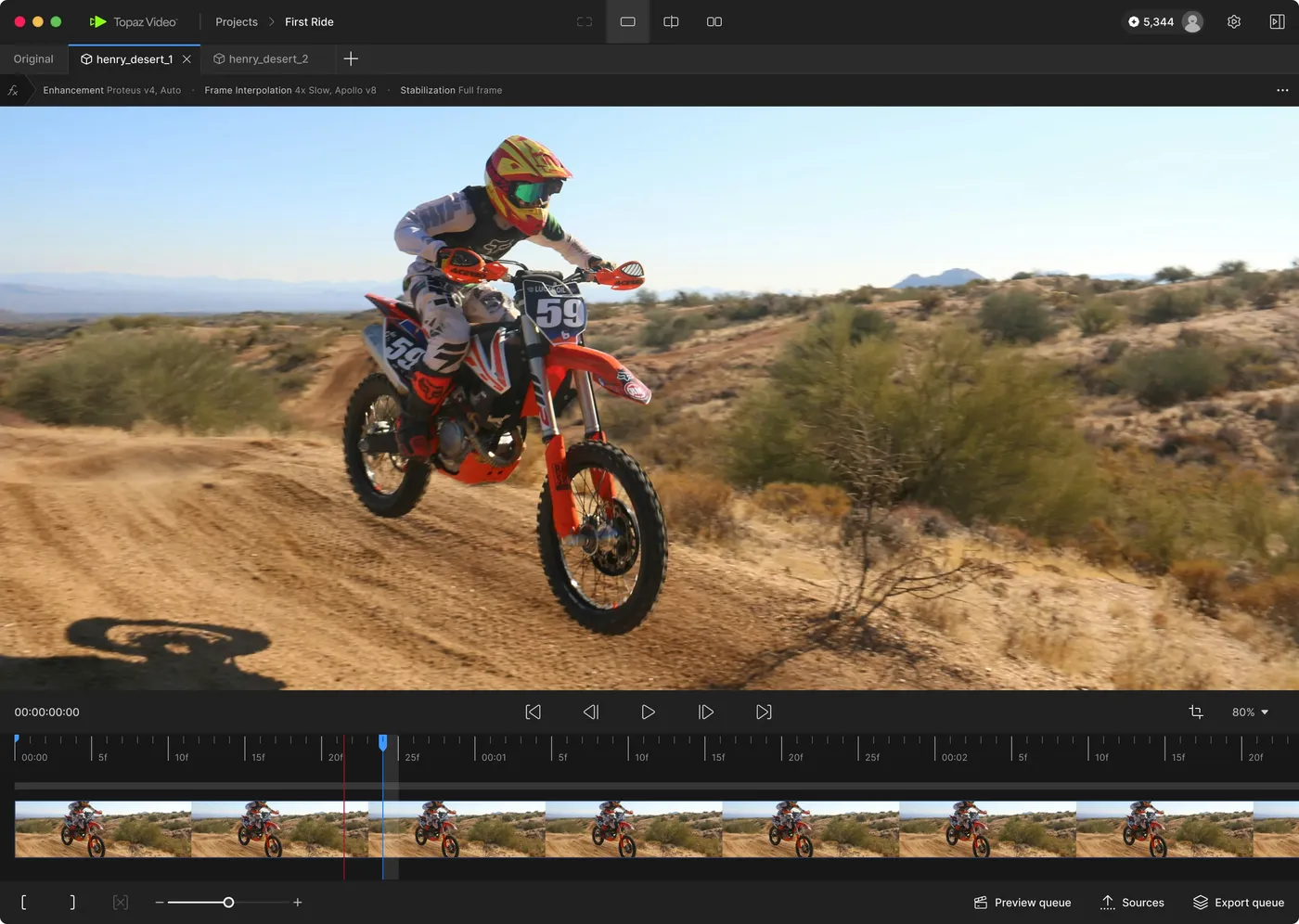
Source: Topaz Labs official website (the following screen image is from the same source)
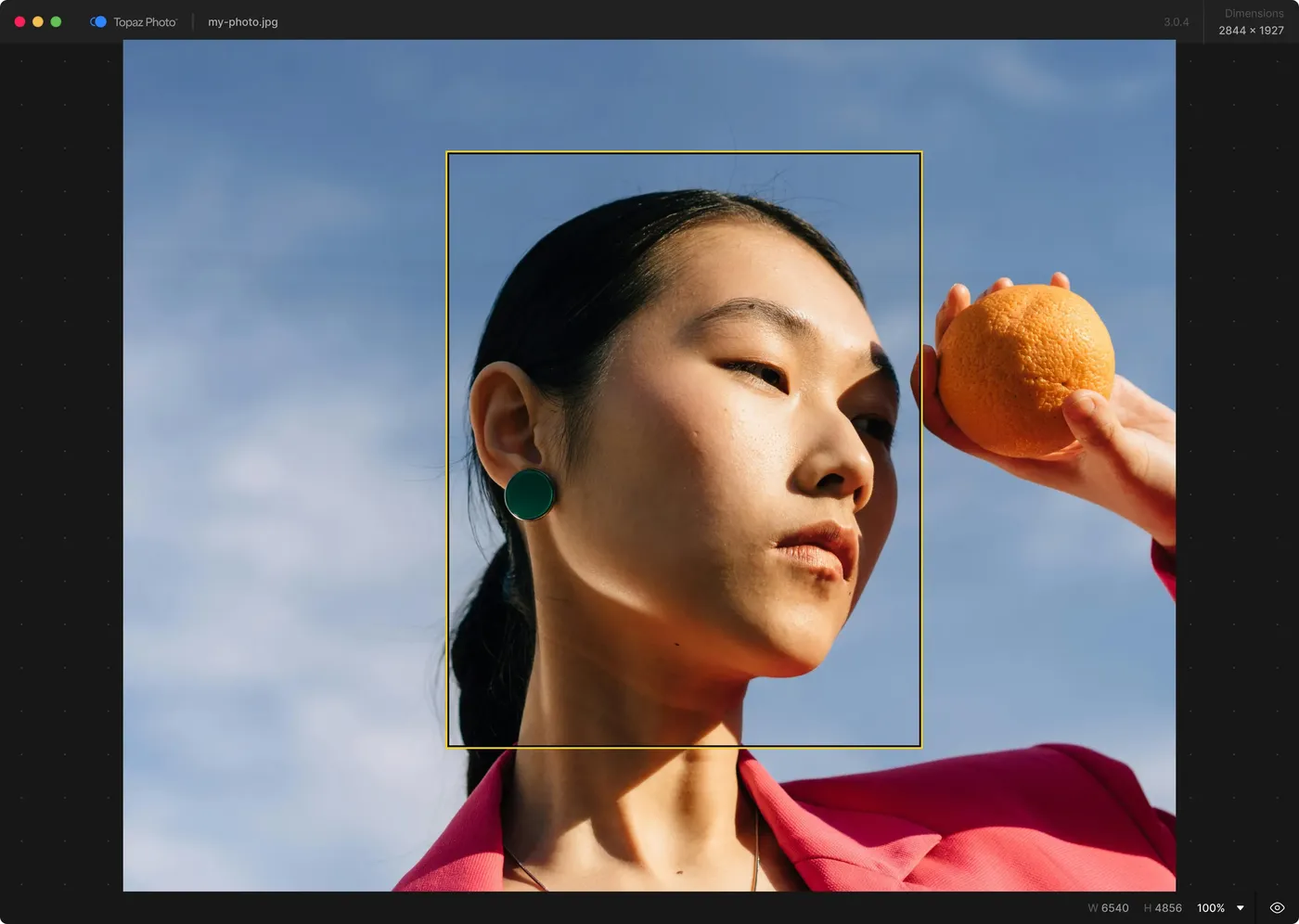
Topaz Photo is a photo enhancement app that combines sharpening, Super Focus (focus recovery), noise reduction, upscaling, face recovery, text recovery, object removal, and lighting and color correction. Autopilot evaluates which enhancements may help, and each setting can be fine-tuned by hand.
Topaz Gigapixel specializes in image upscaling; the official site says it can "upscale almost any image 6x". You can choose models built for different purposes, such as Wonder, Recover and Redefine.
Features
01Topaz Video (video)
A desktop app for Mac and Windows that works on its own or as a plugin for editing software.
- Upscaling — Enlarges footage up to 16K while preserving detail and motion consistency
- Denoise and grain — Removes noise from low-light footage; grain can also be adjusted
- Frame interpolation — Creates new frames for smoother motion and slow motion
- Stabilization and motion deblur — Reduces camera shake and blur after shooting
- SDR-to-HDR conversion — Converts 8-bit footage to HDR
- Plugins — After Effects and DaVinci Resolve, plus a panel for Premiere Pro
02Topaz Photo and Topaz Gigapixel (photos and images)
Both are desktop apps for Mac and Windows; cloud rendering for images is unlimited with an active subscription.
- Topaz Photo — Sharpening, Super Focus, denoising, upscaling, face recovery, text preservation, object removal, and lighting and color correction. Plugins for Photoshop, Lightroom Classic, Capture One and Apple Photos
- Topaz Gigapixel — Dedicated to upscaling: 6x lossless zoom, purpose-specific upscaling models and face recovery. Plugins for Photoshop and Lightroom Classic
03Browser, mobile and developers
There are versions you can use without installing anything, and an API for building the models into your own service.
- Topaz for Web — Upscaling, denoising, unblurring, background removal, colorizing black-and-white photos and more, processed in the cloud from your browser. Available in image and video versions
- Astra — A cloud video upscaler that brings AI-generated and live-action footage up to 4K
- Topaz for Mobile — An iPhone app for enhancing photos (included with the image version of Topaz for Web)
- Topaz Labs API — A developer API for building the image and video enhancement models into your own apps and websites
Pricing
Prices are in US dollars. Depending on your location, taxes such as VAT or sales tax may be added at checkout. Even if a price is shown in your local currency, the purchase is processed in USD, and any conversion fees depend on your card provider (official Currency page).
Topaz Studio (all apps) and business plans
| Plan | Annual | Monthly (annual commitment) | Monthly | What's included |
|---|---|---|---|---|
| Topaz Studio | $399/yr | $45/mo | $69/mo | For personal use. All desktop, browser and iPhone apps, unlimited local rendering, unlimited cloud image rendering, 300 video cloud credits per month |
| Topaz Studio Pro | $799/yr | $79/mo (annual commitment) | — | For commercial teams. Pro licenses for all apps, 600 video cloud credits per month, seat management |
| Enterprise | Contact sales | — | — | For large organizations. 1,000 video cloud credits per month, custom legal and procurement terms, offline and air-gapped use, enterprise-wide SSO, priority support |
Single apps (personal)
| App | Annual | Monthly (annual commitment) | Monthly |
|---|---|---|---|
| Topaz Photo | $199/yr | $25/mo | $39/mo |
| Topaz Gigapixel | $149/yr | $19/mo | $29/mo |
| Topaz Video | $299/yr | $39/mo | $59/mo |
The browser-based Topaz for Web costs $109/yr for the image version (shown next to a struck-through $199/yr; includes Topaz for Mobile) and $199/yr for the video version (shown next to a struck-through $299/yr). Pro single apps for business use are Topaz Photo Pro at $599/yr, Topaz Gigapixel Pro at $499/yr, Topaz Video Pro at $699/yr and Topaz for Web Pro at $329/yr (shown next to a struck-through $599/yr).
At the time of checking (October 24, 2026), discounts were running on Topaz Studio and Topaz Photo. Topaz Studio's annual plan was $199.50 for the first year ($399/yr from the second year), and the first three months of the monthly plans were half price. Topaz Photo's annual plan was also $99.50 for the first year ($199/yr from the second year), and its annual-billed-monthly plan ($12.50/mo, normally $25/mo) and monthly plan ($19.50/mo, normally $39/mo) were half price for the first three months. Whether a discount is offered, and for how long, changes over time, so check the checkout page.
Video cloud credits
Rendering video in the cloud uses credits (rendering on your own computer with the Topaz Video desktop app is unlimited). Topaz Studio includes 300 credits per month, and you can buy more. In the official example, processing one minute of 24 fps video with Starlight costs 6 credits at 1080p and 24 credits at 4K.
| How to buy | Credits | Price |
|---|---|---|
| One-time (packs of 20) | 20 / 400 / 1,000 / 3,000 | $5 / $78 / $158 / $399 |
| Monthly | 80 / 400 / 1,400 / 3,000 | $9.99 / $39.99 / $99.99 / $199.99 (per month) |
Source: Topaz Labs pricing page and Cloud Credits (as of October 24, 2026)
Cancellation, refunds and commercial use
Source: Subscription Cancellation and Refund Policy, How Many Computers Can I Use My Apps On? and the pricing page FAQ (as of October 2026)
Japanese support and system requirements
According to the official documentation, the app whose interface can be shown in Japanese is Topaz Gigapixel (English, Spanish, German, Portuguese, French and Japanese). Topaz says it is working to bring similar language options to Topaz Photo and Topaz Video, which had English interfaces at the time of checking. Support is also in English (support@topazlabs.com).
The Mac version of Topaz Video requires Apple silicon (M-series); Intel Macs, Snapdragon processors, virtual machines, external GPUs and Linux are not supported. The minimum Mac requirements are macOS 13, 16 GB of RAM and 45 GB of free storage, and the high-accuracy Starlight series needs more (for example, 36 GB of RAM on Mac). The refund policy also asks buyers to check their computer against the official system requirements before purchasing.
How it differs from other AI upscalers
What sets Topaz Labs apart is that it centers on desktop apps that process on your own computer, and covers video upscaling, interpolation and stabilization from a single company. The official site cites the fact that files never leave your computer with local rendering as an advantage for professionals handling confidential material.
| Aspect | Topaz Labs | Magnific | Remini | Claid.ai |
|---|---|---|---|---|
| Focus | Image and video enhancement (desktop-centered) | AI creative platform from generation to editing | Photo and short-video enhancement app | Generating and enhancing e-commerce product images |
| Video | Upscaling up to 16K, interpolation, stabilization, HDR conversion | Generation and upscaling (Topaz also available on higher plans) | Short-video enhancement (paid) | Image-to-video generation |
| Processing | Local + cloud | Cloud | App and web | Web and API |
| Price | Studio $399/yr, single apps from $149/yr (USD) | From ¥1,950/mo (billed annually) | Free basic use + weekly/monthly/annual paid plans | Free trial + from $9/mo |
The columns for other products reflect what is stated on each product page as of when it was checked.
If you want generation through finishing under one subscription, compare Magnific, whose higher plans also include Topaz upscalers. For quick photo fixes on a phone, Remini suits better, and for tidying up large numbers of online-store product images, Claid.ai.
Pros and cons
Pros
- Video upscaling, denoising, frame interpolation, stabilization and HDR conversion in one app
- Unlimited local rendering, so media can be processed without leaving your computer
- Fits into existing workflows as a plugin for Photoshop, Lightroom Classic, After Effects, DaVinci Resolve and more
- Even personal plans include commercial use for organizations with under $1M in annual revenue
Cons
- Pricing is a USD subscription, and perpetual licenses are no longer sold
- Topaz Photo and Topaz Video interfaces and support are in English
- Topaz Video needs a powerful computer and does not run on Intel Macs or Linux
- Annual-commitment plans carry an additional fee for early cancellation, and refunds are limited to 2 days after purchase
Track record and reputation
The official pricing page says it is "trusted by over 1 million photographers and filmmakers" and quotes Trustpilot reviews: one reviewer says blurry photos of planes came out perfectly sharp and the software was very easy to use, and another says it saved family photos that had been in soft focus. For Topaz Gigapixel, the official site says it was the first commercially available AI image upscaler, offered since 2019, and has processed over 2 billion images.
The official news page features case studies from generative-AI filmmakers and studios: Primordial Soup, which used Hyperion 2.5 to bring 8-bit generative-AI footage into 10-bit professional finishing; design studio Sarofsky, which blends traditional craft with generative AI; and award-winning generative-AI filmmaker Verena Puhm (published July–October 2026).
Frequently asked questions (FAQ)
How much does Topaz Labs cost? The all-apps Topaz Studio is $399/yr billed annually or $69/mo billed monthly (USD, excluding tax). Single apps start at $149/yr for Topaz Gigapixel, $199/yr for Topaz Photo and $299/yr for Topaz Video (as of October 2026).
Can I use it for free? The pricing page lists only paid subscriptions. You can get a full refund within 2 days of purchase, so if it doesn't suit you, contact support within that window.
Is it available in Japanese? Topaz Gigapixel can display its interface in Japanese. Topaz Photo and Topaz Video had English interfaces at the time of checking.
Is there a one-time purchase option? Not currently. The former perpetual-license products (Photo AI, Gigapixel AI and Video AI) are now "legacy" and have been superseded by the subscription-based Topaz Photo, Topaz Gigapixel and Topaz Video.
Can I use it for work? Personal plans include commercial use for organizations with under $1M USD in annual revenue. Larger organizations need a Pro license (such as Topaz Studio Pro).
What are video cloud credits? Credits used when you render video in the cloud. Topaz Studio includes 300 credits per month. Rendering on your own computer with the Topaz Video desktop app is unlimited.
The information on this page is based on what was publicly available on the official website as of October 2026. Please check the official website for the latest specifications and pricing.