

ZoomMate
: How to use it, features, and the business problems it solves
Add bookmark
What is ZoomMate?
ZoomMate is Zoom's AI teammate: a paid AI agent product that searches across meetings, chats, documents and connected apps such as Salesforce, Jira and Google Drive, and carries work through to agendas, follow-ups, slides, documents and workflow runs. In June 2026 the "Zoom AI Companion" name was retired; features such as meeting summaries remain included at no extra cost in paid Zoom Workplace plans under their functional names. Plans are the free ZoomMate Basic (e.g. summaries in 3 meetings per month) and ZoomMate (¥2,634 per user per month billed annually, excl. tax, with 2,200 AI Credits per month) (as of November 2026, official). ZoomMate itself currently supports English only.
Business problems it solves


About "ZoomMate"
What is ZoomMate?
ZoomMate is Zoom's AI teammate (an AI agent product) that uses the context of your meetings, chats and documents to take work from research to finished slides, documents, follow-ups and workflow runs. It has its own tab in the Zoom Workplace desktop app and on the web, and works with information from Zoom meetings and chats as well as connected apps such as Salesforce, Jira, Google Drive and OneDrive.
How ZoomMate relates to "Zoom AI Companion" (Zoom official blog, June 24, 2026):
- The Zoom AI Companion name has been retired — Meeting summaries, chat compose, transcription, call summaries and the other features that carried the AI Companion name are now built into Zoom Workplace under their functional names, and remain included at no additional cost in eligible paid plans
- ZoomMate is not a new name for AI Companion but a separate paid product — It is a new agentic product built on Custom AI Companion (formerly a paid add-on), offered as an add-on to Zoom Workplace or as a standalone plan
According to Zoom's official community, ZoomMate launched on June 1, 2026 for online and direct customers, in English only. Zoom's Japanese website also offers it for purchase with prices in Japanese yen.
How to use it
- Choose a plan Zoom Workplace Basic (free) includes ZoomMate Basic, a limited version (for example, meeting summaries in 3 hosted meetings per month). Agents, search across connected apps and advanced workflows require a ZoomMate license and AI Credits. Add-ons require a paid base plan (pricing page).
- Open ZoomMate Sign in to the Zoom Workplace desktop app and click the ZoomMate tab in the navigation bar. If you don't see it, open it from More. It is also available on the web.
- Describe the task Type what you want done and add local files, materials from Meetings, Zoom Canvas, Google Drive or OneDrive, skills, and connectors (web, Zoom products, third-party apps). You can also start from templates such as Drive a meeting, Build slides or Draft a document, and use voice input.
- Connect your apps Third-party sources such as Salesforce, Jira and Google Drive must be connected first. For account-level data connected by an admin, only the scope the admin selects is indexed, and content is retrieved according to the permissions in the source system (official AI whitepaper).
- Automate recurring work Register daily briefings, meeting prep and reminders as automations, or chain multiple steps with the workflow builder. Users and admins can check AI Credit usage in their respective screens.
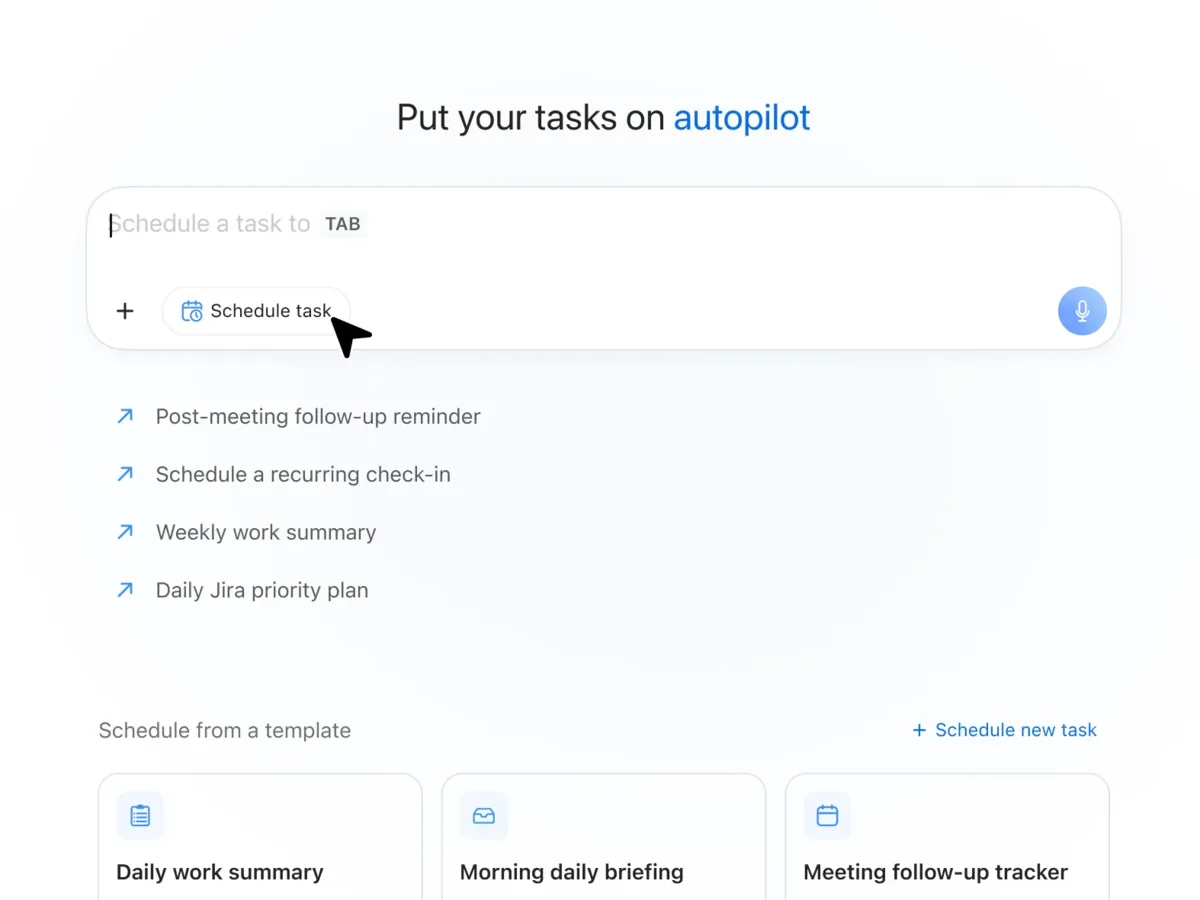 Source: Zoom official website (ZoomMate)
Key features
01Move meeting work forward
- Before and after meetings — Before a meeting, it builds agendas and prep materials from past interactions; afterwards, it handles Salesforce updates, follow-up emails and slide drafts
- My Notes (AI note-taking) — Captures Zoom meetings, third-party meetings and in-person conversations. Unlimited with ZoomMate
- Custom meeting notes — Set the structure and level of detail of meeting summaries in your own format; ZoomMate includes unlimited custom summary templates
- Live audio translation — Translates a speaker's voice into another language during meetings
02Find and research
- Agentic search — Searches across transcripts, chats, documents, contacts and other Zoom content, plus data from connected apps
- Web search — Looks up real-time information, news and research on the web directly from the workspace
- Deep research — Performs thorough, multi-step research across multiple sources
- Memory — Designed to remember your preferences, team context and project history so it can respond appropriately without detailed instructions
03Delegate and create
- AI agents — Use pre-built agents for sales, IT, marketing, finance and more, or build your own with instructions, knowledge sources and connected apps. Chat with them directly in Zoom Chat or @mention them in channels
- Workflows — Templates for weekly status reports, meeting follow-ups and approval routing, plus a workflow builder you can describe in plain language. Workflows can be triggered by events, schedules and messages
- AI Productivity Suite — Turns meeting notes into slides with Zoom Slides, spreadsheets with Zoom Sheets, Word-ready documents with Zoom Paper, and collaborative docs with Zoom Canvas
- Browser actions — Carries out tasks on websites through a local browser extension or a cloud browser hosted by Zoom
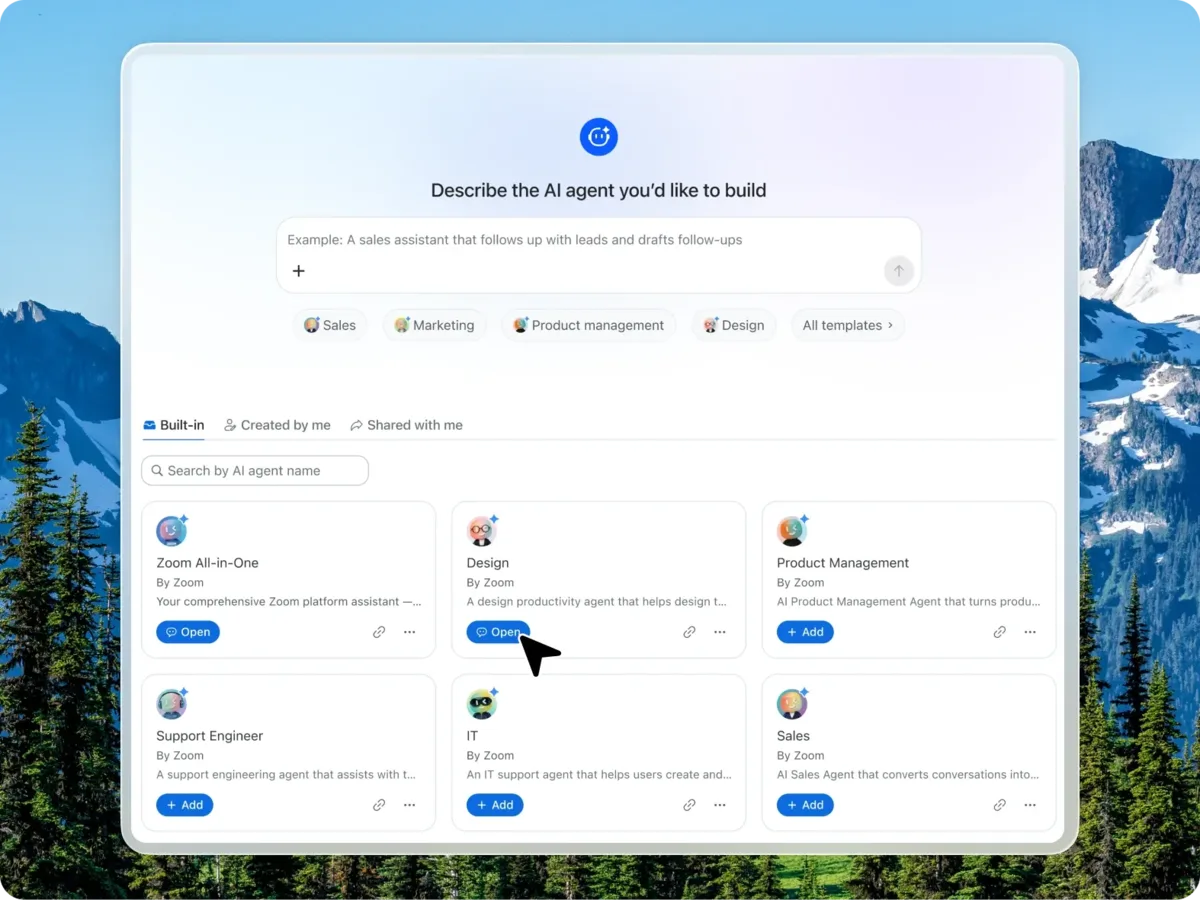 Source: Zoom official website (ZoomMate)
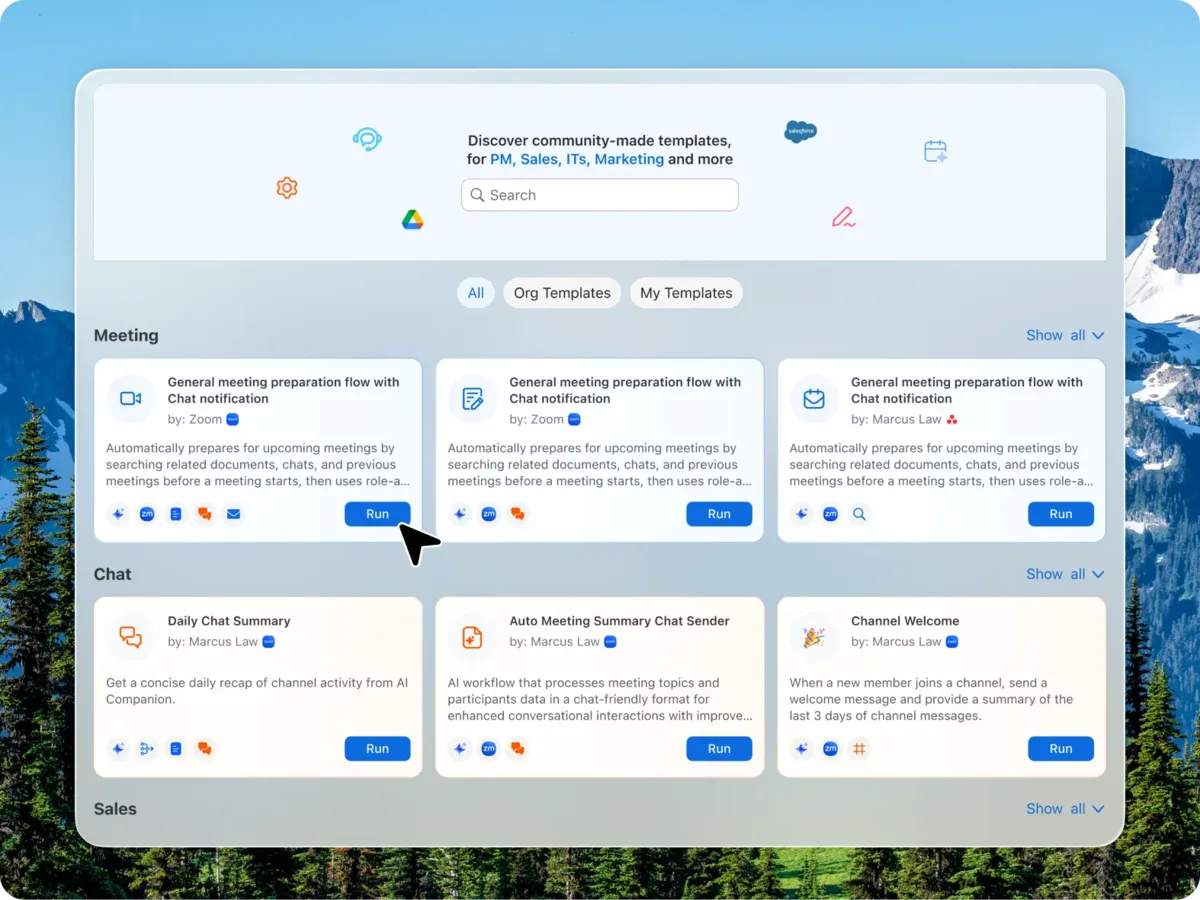 Source: Zoom official website (ZoomMate)
Pricing
ZoomMate comes as the free ZoomMate Basic and the paid ZoomMate. The following reflects the ZoomMate pricing page (Japanese yen display) as of November 9, 2026; prices exclude tax.
| Plan | Price (official) | What's included |
|---|---|---|
| ZoomMate Basic | Free | Limited version included with Workplace Basic. Meeting summaries and in-meeting questions in 3 hosted meetings per month, My Notes 3 times per month, 20 AI queries per month, agentic search over 10 files and 3 meetings in total, 10 runs per month of workflows that run only in Zoom apps, AI writing in Canvas for 3 documents per month |
| ZoomMate | ¥2,634 per user per month (billed annually, paid up front) | Everything in Basic, plus 2,200 AI Credits per user per month, agents (custom agent builder and pre-built agents), agentic search including the web and connected apps, deep research, advanced workflows, Slides, Sheets, Paper and Canvas, live audio translation, and unlimited AI note-taking and custom summary templates |
- The pricing page defaults to "Annual (save up to 16%)", and the ZoomMate product page shows both annual and monthly options. The price above is the annual display; the pricing page notes that it is an annual contract paid up front and that the monthly figure is the annual total divided by 12 for reference
- If you need more AI Credits, you can buy AI Credit packs (from 2,750 credits for ¥3,950 up to 11,500 credits for ¥15,800, excl. tax). Pack credits are valid for 12 months from purchase. Add-ons require a paid base plan
How AI Credits work
According to Zoom's Help Center, AI Credits are consumed by metered features in ZoomMate and the AI Productivity Suite.
- What uses credits — Generating and AI-editing slides, spreadsheets and documents; running workflows that use AI nodes or third-party nodes; building and running AI agents; task execution in ZoomMate; agentic search queries; deep research and more. Consumption varies with the prompt, task complexity, the model used and the amount of data processed
- What doesn't — Many AI features in Zoom Workplace, such as meeting summaries, note-taking, chat compose, call summaries and whiteboard content generation, currently do not consume credits
- Expiry — Monthly credits included in a plan expire on each monthly renewal date and do not roll over. Credits are pooled at the account level, and admins can set per-user limits
For meeting summaries alone, a paid Zoom Workplace plan may be enough
The core features of the former AI Companion are included at no additional cost in paid Zoom Workplace plans. On the Zoom Workplace pricing page (as of November 9, 2026, billed annually, excl. tax), Pro (¥2,237 per user per month) includes unlimited meeting summaries and in-meeting questions, unlimited My Notes, basic AI queries, agentic search, Zoom workflows, and creating custom summary templates (8 per month). Business is ¥2,896 per user per month, and Enterprise is by quote.
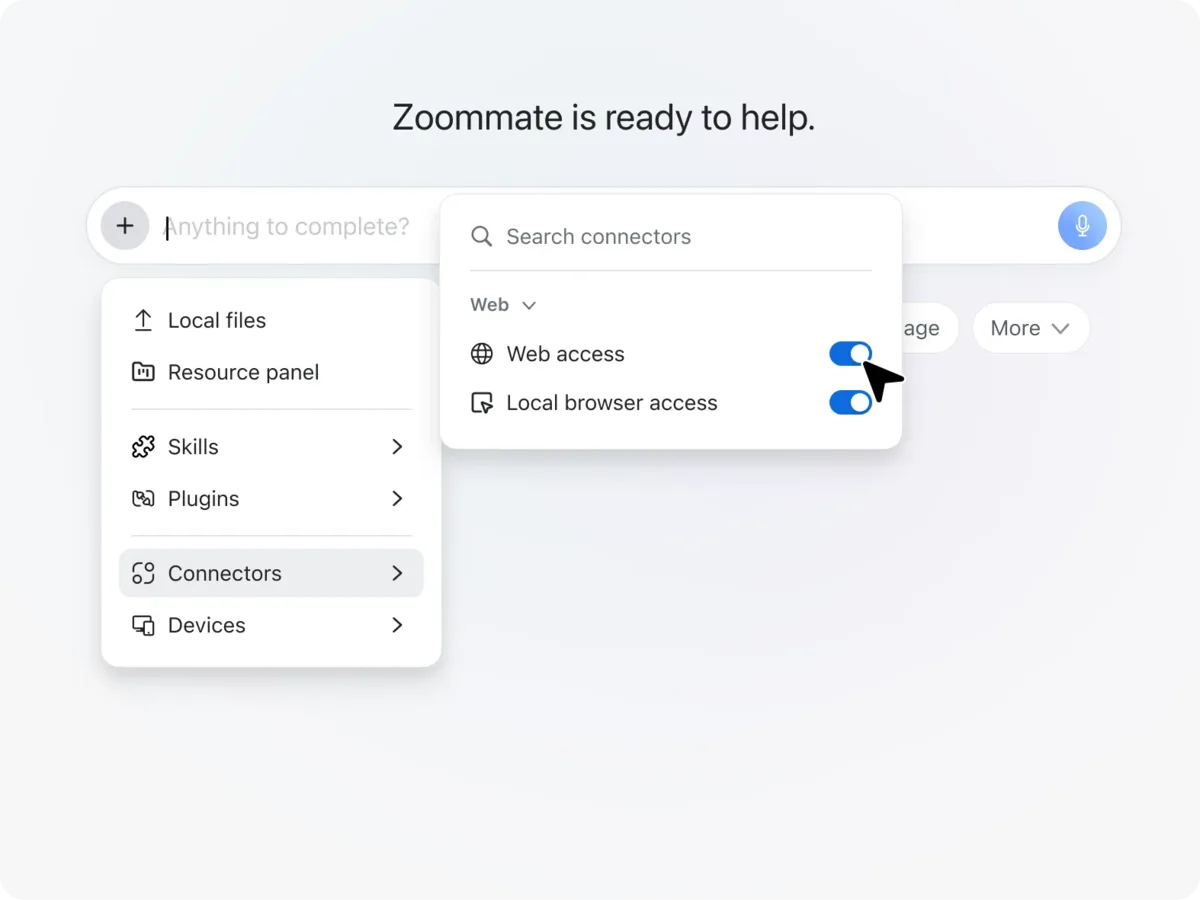 Source: Zoom official website (ZoomMate)
Japanese support
- ZoomMate itself is English only — Zoom's official AI whitepaper (Japanese edition) states that "ZoomMate currently supports English only" and that additional languages are planned. As of November 2026, the support article on using ZoomMate is also available only in English
- Website and pricing in Japanese — The ZoomMate product and pricing pages are in Japanese, with prices in yen
- My Notes transcription supports Japanese — According to the official AI whitepaper, My Notes transcribes 46 languages in Zoom meetings and 12 languages, including Japanese, in in-person and third-party meetings
- Availability — The support article notes that ZoomMate may not be available for select verticals and select regional customers
Data handling
According to Zoom's official AI whitepaper, Zoom does not use customer audio, video, chat, screen sharing, attachments or other communications-like customer content to train Zoom's or third-party AI models. Under the default "federated approach", Zoom combines its own models with models from providers such as Anthropic and OpenAI depending on the feature. Two other deployment options with different data processing and third-party model handling are available by contacting Zoom Support.
Pros and cons
Pros
- Built into Zoom meetings, chat and documents, so you can carry post-meeting work through without switching tools
- Searches across connected apps such as Salesforce, Jira and Google Drive while respecting the source systems' permissions
- Core features such as meeting summaries are included in paid Zoom Workplace plans, so only people who need agents have to add ZoomMate
- The free ZoomMate Basic lets you try the features with limited usage
Cons
- ZoomMate itself currently supports English only, which is too early for teams that want to give instructions and receive answers in Japanese
- Advanced features consume AI Credits, and depending on usage you may need extra credit packs. Monthly credits do not roll over
- Some features (such as project agents) are listed as "coming soon"
Reputation and reviews
ZoomMate launched in June 2026, and no official customer stories have been published yet. Zoom's official blog positions the built-in AI such as summaries as "the intelligence" and ZoomMate as "the action" that carries out what was decided in meetings, emphasizing that both live inside Zoom Workplace with no separate platform to add. It is easy to consider for organizations that already meet on Zoom and want to delegate the work that follows a summary. Until Japanese is supported, however, if your main goal is minutes of Japanese meetings, it is practical to first check whether the summaries and My Notes included in paid Zoom Workplace plans are enough.
FAQ
Q. Has Zoom AI Companion been discontinued? A. The name has. In June 2026 the "AI Companion" name was retired, and features such as meeting summaries, chat compose and transcription are now built into Zoom Workplace under their functional names. They remain included at no additional cost in eligible paid plans (Zoom official blog).
Q. Is ZoomMate the new name for AI Companion? A. No. ZoomMate is a separate paid agentic product built on Custom AI Companion, offered as an add-on to Zoom Workplace or as a standalone plan.
Q. Can I use ZoomMate for free? A. The free Zoom Workplace Basic includes ZoomMate Basic, with limited use of meeting summaries and in-meeting questions (3 hosted meetings per month), My Notes (3 times per month), AI queries (20 per month) and more. Agents and search across connected apps require the paid ZoomMate.
Q. How much does ZoomMate cost? A. The pricing page lists ¥2,634 per user per month billed annually (excl. tax), including 2,200 AI Credits per user per month (as of November 9, 2026). If you run short, you can add AI Credit packs (from ¥3,950).
Q. Can I use it in Japanese? A. ZoomMate itself currently supports English only, and Zoom says more languages are planned. The product and pricing pages are in Japanese, and My Notes transcription supports Japanese.
Q. Is meeting content used to train AI? A. Zoom's official AI whitepaper states that it does not use customer audio, video, chat or other communications-like content to train Zoom's or third-party AI models.
How it differs from other AI meeting assistants
| Service | Type | Best for |
|---|---|---|
| ZoomMate | AI agent built into Zoom Workplace | Delegating slides, follow-ups and workflows beyond summaries, centered on Zoom meetings and chat (currently English only) |
| Otter AI | AI meeting assistant | Recording and summarizing Zoom, Teams and Google Meet meetings, mainly in English |
| Notta | AI transcription and minutes, strong in Japanese | Transcribing Japanese meetings in real time and producing minutes |
| tl;dv | AI meeting recorder and notes | Automating recordings, minutes and CRM updates across multiple meeting tools |
| Read AI | AI meeting assistant | Getting meeting reports and asking questions across email, Slack and more |
| Microsoft Copilot | Microsoft's AI assistant | Organizations working mainly in Teams and Microsoft 365 |
| Gemini Enterprise | Google Cloud's AI agent platform for businesses | Setting up agents that search and research across internal data |
ZoomMate's strength is that it uses the context of Zoom meetings, chats and documents to carry the next steps forward without leaving Zoom. If minutes of Japanese meetings are your main goal, consider Notta; if you use several meeting tools, tl;dv or Read AI; and if your environment centers on Microsoft 365 or Google, Microsoft Copilot or Gemini Enterprise. The other products in the table are described as of the check date on each product page.
The information on this page is as of November 9, 2026, based on Zoom's official website (Japan) — the ZoomMate product page, the ZoomMate pricing page and the Zoom Workplace pricing page — the Zoom official blog (June 24, 2026), the Zoom Help Center (Using ZoomMate, Zoom AI Credits), the official community, and Zoom's AI whitepaper. Pricing and features may change, so please check the official website for the latest information.