
Read AI
: How to use it, features, and the business problems it solves
Add bookmark
What is Read AI?
An AI meeting assistant from Read AI, Inc. in Seattle. It joins Zoom, Google Meet and Microsoft Teams meetings and produces reports with transcripts, summaries, action items and speaking coaching, and its AI search "Ask Read" answers questions across meetings, email, Slack, Teams and more. It connects to ChatGPT and Claude via an MCP server. Meeting reports support 30+ languages, including Japanese. Pricing: Free (5 meetings/month), Pro $19.75/month, Enterprise $29.75/month (per user; 25% off with annual billing).
Business problems it solves



About "Read AI"
What is Read AI?
Read AI is an AI meeting assistant from Read AI, Inc., based in Seattle, Washington. It joins Zoom, Google Meet and Microsoft Teams meetings and automatically produces a "meeting report" combining a transcript, summary, action items and speaking coaching. With its AI search "Ask Read", you can also ask questions across your meeting records, email, calendar, and Slack and Teams messages.
The company was founded in 2021 by David Shim (former CEO of Foursquare) and others, and is backed by Madrona Venture Group, Goodwater and others. The official website has a Japanese version, and meeting reports support more than 30 languages, including Japanese. Read AI is also available as a ChatGPT plugin, a Claude connector and an MCP server.
When the meeting ends, the summary, action items and speaking analysis are ready
Once you connect Read AI to your calendar, its assistant bot joins and records your meetings. During the meeting, a live view (Live Notes and Metrics) shows the transcript, summary and meeting metrics in real time. Afterwards you receive a meeting report covering:
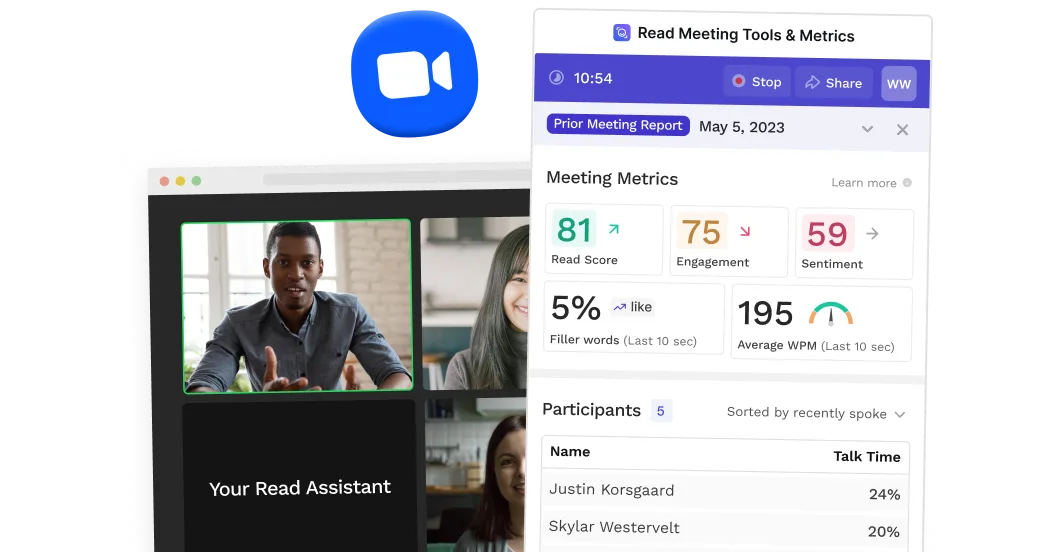
Source: Read AI official website (same for the images below)
- Summary, topics, action items and key questions
- Transcript by speaker (with listener sentiment and engagement)
- Meeting coach: metrics such as talking speed, filler words, bias and charisma, with suggestions to improve how you speak
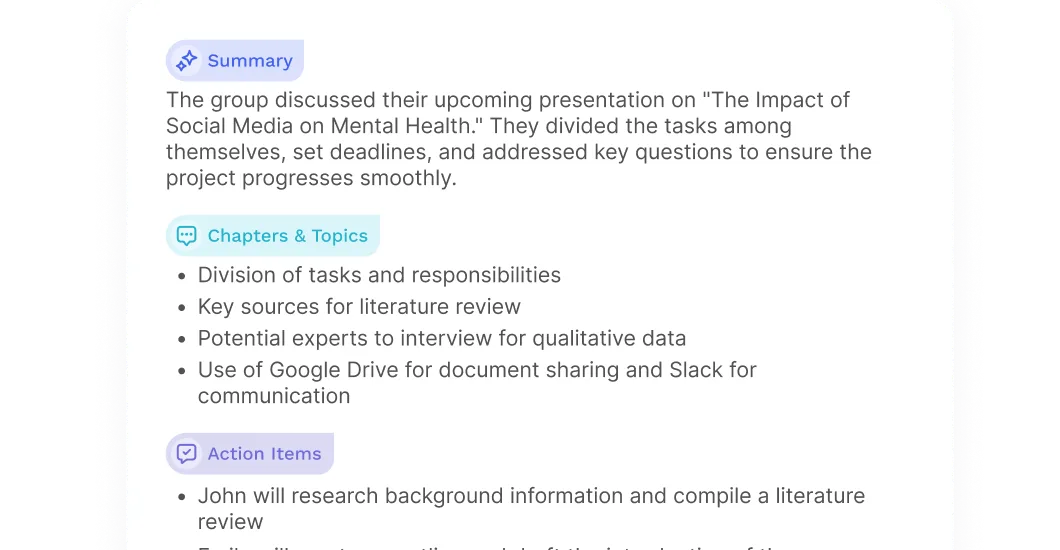
The official site says Read AI is designed so that everyone in the meeting knows it is present. The report language is set automatically from the language mainly spoken in the meeting, and you can also fix the output language in account settings. According to the help center, meetings that mix multiple languages are not fully supported.
Search meetings, email and chat together with Ask Read
Ask Read is an AI search that answers questions using your meeting reports and connected tools. You can ask simple questions like "What issues came up in yesterday's meeting?" or bigger requests like "Write a status update for my manager on what I worked on last week," with no limit on the number of questions.
| What you can search | Free plan | Paid plans |
|---|---|---|
| Meeting reports and the web | ○ | ○ |
| Email (Gmail, Outlook), calendar (Google, Outlook, Zoom), chat (Slack, Microsoft Teams) | ○ | ○ |
| Google Drive, OneDrive, Confluence, Notion, HubSpot, Salesforce, Jira | — | ○ |
| Choose ChatGPT or Claude models for answers | — | ○ |
You can also attach images to your question so Ask Read reads screenshots or dashboards along with your data.
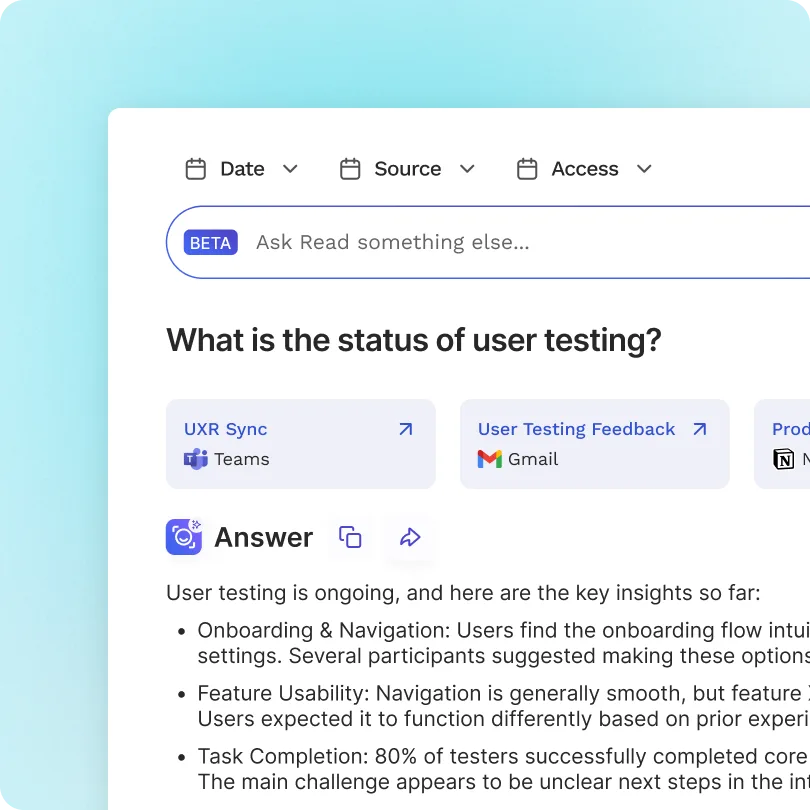
Use your meeting records from ChatGPT and Claude
Read AI provides a REST API and an MCP server, available on all plans including Free. Add it as a ChatGPT plugin or a Claude connector, and you can pull up Read AI meeting notes, summaries and action items from inside ChatGPT or Claude. It also connects to MCP-compatible tools such as VS Code, Cursor and Microsoft Copilot Studio.
The official site also introduces "Ada", an AI assistant you can work with over email. According to the help center, when you CC Ada on an email thread, it checks your calendar, proposes times to the other participants and sends the invite once a time is confirmed.
How to use
- Create an account Sign up for free on the official site. No credit card is required.
- Connect your calendar Link your Google or Microsoft calendar, and the assistant joins your scheduled Zoom, Google Meet and Teams meetings. You can choose which meetings it joins in settings.
- Read the report after the meeting When the meeting ends, you receive a report with the summary, action items, transcript and coaching. Depending on your settings, it can also arrive by email.
- Ask questions with Ask Read If you connect email, Slack and Teams, Ask Read searches meetings and messages together to answer.
- Send results to other tools Paid plans add integrations with Notion, Salesforce, HubSpot, Jira, Confluence, Zapier and webhooks.
Pricing
Monthly price per user (official pricing page as of October 2026, in USD). Annual billing is 25% off.
| Plan | Monthly | Annual (per month) | What's included |
|---|---|---|---|
| Free | $0 | $0 | Up to 5 meeting transcripts and reports per month, meetings up to 1 hour. Unlimited Ask Read search. Basic integrations |
| Pro | $19.75 | $15 | Unlimited meeting transcripts and reports, meetings up to 4 hours. 100 minutes/month of audio and video uploads. Integrations with Notion, Salesforce, HubSpot, Jira and more |
| Enterprise | $29.75 | $22.50 | Everything in Pro plus audio and video playback, video highlights, 200 upload minutes/month and premium support |
| Enterprise+ | $39.75 | $29.75 | 5+ licenses. Meetings up to 8 hours, 300 upload minutes/month, SAML SSO, SCIM, domain capture, custom data retention and HIPAA compliance |
Other ways to get it: Read AI says customers with Zoom One (Pro, Business or Business Plus) "Essential Apps" can use Read's premium features at no extra cost. There is also education pricing for students and teachers. The pricing page lists "20+" and "16+" languages, while the help center's language list (updated October 2026) shows more than 30 languages supported for meeting reports.
Pros and cons
Pros
- Even the Free plan includes 5 meeting reports per month and Ask Read search across meetings, email and chat
- Beyond summaries and transcripts, it automatically adds coaching metrics such as talking speed and filler words
- The MCP server and API are available from the Free plan, so you can pull meeting records into ChatGPT and Claude
- According to the official help center, meeting content is not used to train Read AI's models unless you join the Customer Experience Improvement Program
Cons
- Pricing is in US dollars, with Pro at $19.75 per user per month. That is higher than yen-priced Japanese transcription tools (Notta Premium starts at ¥1,185/month)
- The Help Center has no Japanese version, so you need to look up settings and troubleshooting in English
- When other languages are mixed into a meeting, transcripts and summaries become less reliable
How Read AI differs from other AI meeting assistants
| Product | Provider | Highlights | Pricing (as listed on each product page at the time of checking) |
|---|---|---|---|
| Read AI | Read AI, Inc. (USA) | Meeting reports + speaking coaching + search across meetings, email and chat | Free (5 meetings/month) / Pro from $19.75/month |
| Otter AI | Otter.ai (USA) | Real-time transcription, AI chat across meetings, agents for sales and recruiting | Basic free (300 min/month) / Pro from $8.33 |
| Fireflies.ai | Fireflies.ai (USA) | Records in 100+ languages; strong conversation analytics and CRM integration | Free / Pro from $10 (annual) |
| Fathom | Fathom (USA) | Unlimited recording, transcription and AI summaries even on the free plan | Free / Premium from $16 |
| tl;dv | tl;dv (Germany) | Japanese-specialized transcription model, Japanese UI and Japanese support | Free plan; Pro ¥36,960/seat/year (annual) |
| Notta | Notta | Transcription strong in Japanese; data stored in Japan | Free ¥0 / Premium from ¥1,185/month (annual, tax incl.) |
What sets Read AI apart is that it goes beyond meeting notes: it searches email and chat together with meetings, and adds speaking coaching. If you want to keep many meeting records for free, consider Fathom; if a Japanese interface and support matter most, tl;dv or Notta; and if you want to apply conversation analytics to sales, Fireflies.ai. If you would rather not have a bot join your meetings, Granola, which builds notes from your own memos, is another option.
FAQ
Q. Is Read AI free? A. Yes. The Free plan covers up to 5 meeting transcripts and reports per month, with meetings up to 1 hour. Ask Read search is unlimited, and no credit card is required.
Q. Can I use it for meetings in Japanese? A. Yes. According to the official help center's language list, meeting reports support Japanese. However, meetings that mix multiple languages are not fully supported.
Q. How much does it cost? A. Per user per month, Pro is $19.75, Enterprise is $29.75 and Enterprise+ is $39.75 ($15, $22.50 and $29.75 respectively with annual billing). Enterprise+ requires at least 5 licenses.
Q. Is my meeting content used to train AI? A. The official help center says meeting content is not used to train Read AI's models unless you explicitly opt in. It also states that Read AI does not sell your data and that employees do not listen to customer calls.
Q. Can I use it from ChatGPT or Claude? A. Yes. It is available as a ChatGPT plugin, a Claude connector and an MCP server, and you can access your meeting records on all plans, including Free.
Q. Can it record in-person meetings? A. Yes. You can record in-person meetings with the Android and iOS apps and get the same meeting report.
The information on this page is based on what was published on Read AI's official website and help center as of October 2026. Please check the official website for the latest specifications and pricing.