Gemini Enterprise
: How to use it, features, and the business problems it solves
Add bookmark
What is Gemini Enterprise?
Gemini Enterprise is Google Cloud's AI agent platform for businesses. It searches across 100+ data sources such as Google Workspace, Microsoft 365, Jira and Salesforce while respecting existing permissions, and lets employees use Deep Research, Gemini Notebook, no-code agents and custom or partner-built agents from a single interface. Editions are Business, Standard, Plus, Pay-as-you-go and Frontline, with a 30-day free trial. Per-edition license prices are not published on the official site (as of November 2026).
Business problems it solves




About "Gemini Enterprise"
What is Gemini Enterprise?
Gemini Enterprise is Google Cloud's AI agent platform for businesses: it searches and researches across the data in your company's email, documents and business apps, and lets you hand work off to AI agents. From a single interface, employees can ask questions grounded in company data, draft documents, analyze data and produce research reports, and use agents built by Google, by their own company or by partners. Google Cloud announced it in October 2025.
The data it can connect goes beyond Google Workspace (Gmail, Drive, Calendar) to more than 100 integrations, including Microsoft 365 (Outlook, Teams, OneDrive, SharePoint), Slack, Confluence, Jira, ServiceNow, Salesforce, HubSpot, Notion and BigQuery. Data stays where it is and is used for search and answers according to each user's existing permissions, and inputs and outputs are not used to train Google's models (official FAQ).
Two products share the name: Gemini Enterprise app, which employees use (a per-user, monthly subscription), and Gemini Enterprise Agent Platform, where developers build and run agents (the evolution of Vertex AI, pay-as-you-go). They are purchased separately. This page mainly covers the Gemini Enterprise app.
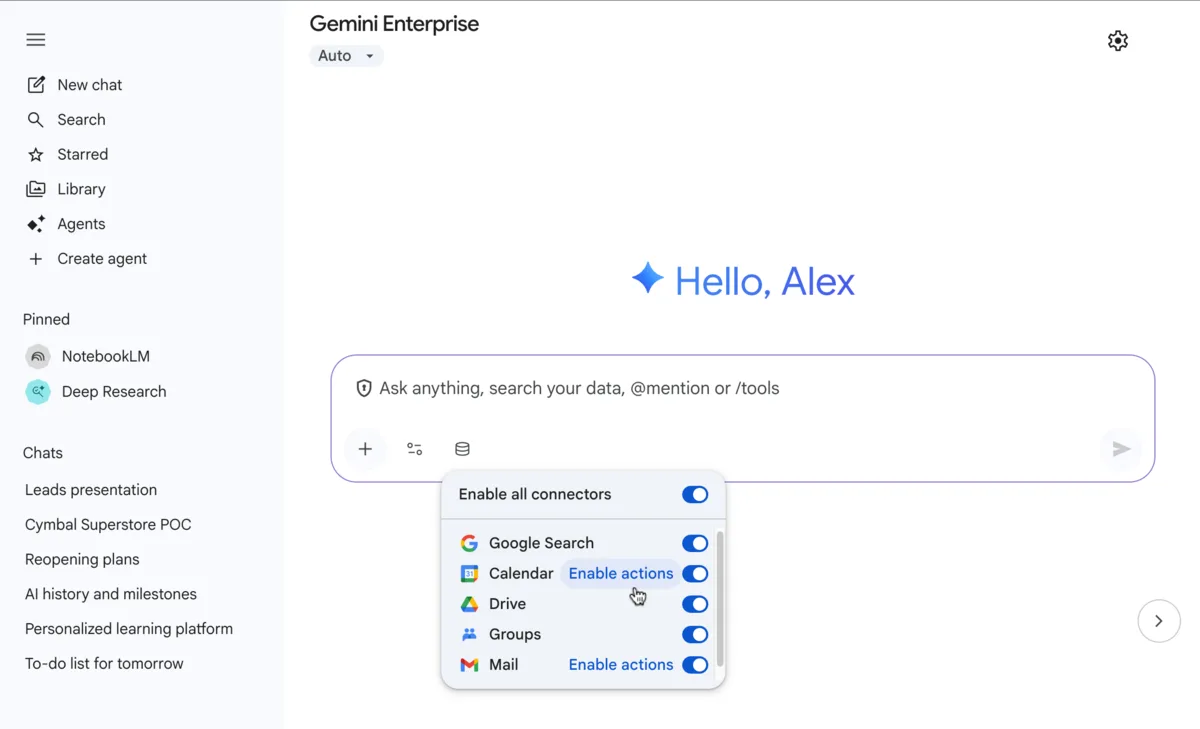 Source: Google Cloud documentation (Get started with the Gemini Enterprise app)
How to use it
- Choose an edition and start Small teams can start with the 30-day free trial of the Business edition, which needs no IT setup. Organizations that need stricter security or unlimited users can start with the 30-day free trial of the Standard or Plus edition, or by contacting Google Cloud sales.
- Connect your data An administrator sets up connectors for Google Workspace, Microsoft 365, Jira, Confluence, ServiceNow and more. Search and answers are limited to what each user is allowed to see in the source systems.
- Ask questions and delegate research From the app's input box, employees get answers that combine company data with the web, have Deep Research write research reports, or organize materials in Gemini Notebook. Image and video generation are also available.
- Build and use agents Use the no-code tool (preview) to build agents for your own work and share them. In Standard and Plus, partner agents from Agent Marketplace and agents developers built with the Agent Development Kit (ADK) or the A2A protocol can be used in the same interface.
- Manage Administrators manage agent governance, license assignment and a monthly spending cap per project.
Key features
01Answers across company data
- Permission-aware enterprise search — Searches across company documents, email, chat and business apps, and answers only with information the user is allowed to see
- Grounding — Builds answers on enterprise data from Google and third-party sources, plus Google Search and the web
- 100+ integrations — Google Workspace, Microsoft 365, Slack, Confluence, Notion, Jira, GitHub, Salesforce, HubSpot, ServiceNow, BigQuery and more
02Agents made by Google
- Deep Research — Researches internal and external sources and produces a readable research report from a single prompt
- Gemini Notebook Enterprise — A notebook for gathering, analyzing and summarizing materials. Creating and publishing notebooks is available in Business, Standard and Plus
- Data Insights — Ask data sources questions in natural language to get analysis (Standard and above)
03Build or bring your own agents
- No-code agent building (preview) — Build and publish agents for your work without programming
- Custom skills — Upload and use skills you create
- Your own agents — Publish agents built with Agent Platform or ADK, or connect agents running elsewhere via the A2A protocol (Standard and above)
- Agent Marketplace — Find and use agents built by partners (Standard and above)
04Management and security
- Data handling — Prompts, outputs and company data are not used to train foundation models and are governed by Google Cloud's enterprise privacy terms
- Compliance — Supports data residency (us / eu / global), customer-managed encryption keys (CMEK), VPC Service Controls and Cloud Audit Logs, as well as FedRAMP and HIPAA (Standard and Plus)
- Cost control — Set a budget cap per project, and agents pause to avoid exceeding it
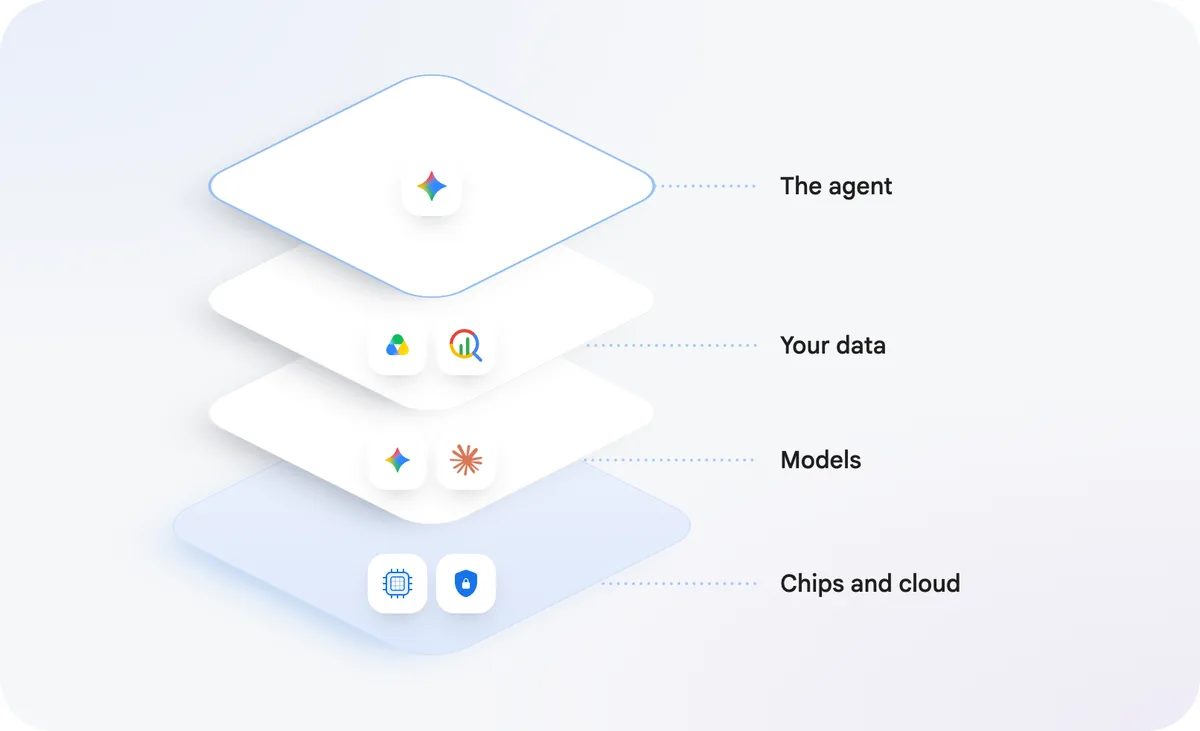 Source: Google Cloud official site (Gemini Enterprise)
The official site introduces a "new Gemini" that works across email, documents, code, data and business apps, with features that remember tasks and methods and that keep long-running work going on Google Cloud. However, it notes that some features — delegating multi-step background tasks, Gemini on mobile and desktop, and choosing third-party models — are in early access and not yet available to all customers.
Edition differences
The main differences, summarized from the edition comparison in the official documentation:
| Item | Business | Standard | Plus | Pay-as-you-go | Frontline |
|---|---|---|---|---|---|
| Users | 1–500 | 1 or more | 1 or more | From 1 seat | Organizations with 150+ Standard / Plus users |
| Storage and data indexing (per user, pooled) | 25 GiB | 30 GiB | 75 GiB | Pay-as-you-go | 2 GiB |
| Full data connector ecosystem | ─ | ○ | ○ | ○ | ○ |
| Priority access to the latest Gemini models | ─ | ○ | ○ | ○ | ─ |
| No-code agent building | ○ | ○ | ○ | ○ | ─ (can use agents) |
| Data Insights and Agent Marketplace | ─ | ○ | ○ | ○ | ○ |
| Use your own agents | ─ | ○ | ○ | ○ | ○ (only those provisioned by admins) |
| Enterprise-grade security and compliance | ─ | ○ | ○ | ○ | ○ |
| Management in the Google Cloud console | ─ (web SaaS) | ○ | ○ | ○ | ○ |
The comparison table lists the Business edition as 1–500 users, while the FAQ describes it as "best for individuals, small businesses and teams of up to 300." Frontline is for frontline staff and is purchased as an add-on by Standard and Plus customers.
Daily limits for Standard and Plus (official documentation)
| Feature | Standard | Plus |
|---|---|---|
| Assistant queries | 160 per day | 200 per day |
| No-code agent creation | 1 agent per day | 10 agents per day |
| Deep Research | 3 per day | 10 per day |
| Image generation | 5 images per day | 10 images per day |
| Video generation | 2 per day | 3 per day |
| AI developer tools credit | $10 per user per month | $15 per user per month |
Quotas are pooled among users of the same edition per project and location. If you exceed them, enabling pay-as-you-go usage beyond quotas lets you keep using features at pay-as-you-go rates.
Pricing
As of November 9, 2026, per-edition license prices are not published on Google Cloud's official site (the Gemini Enterprise pricing page URL shows "page not found," and the product page and FAQ direct you to sales or a free trial). The pricing information that can be confirmed officially is as follows.
| Item | Details (as officially stated) |
|---|---|
| Free trial | The Business edition and the Standard / Plus editions can each be tried free for 30 days |
| Billing unit | The Gemini Enterprise app is billed per user (seat), per month. Monthly or annual subscriptions are available, with optional auto-renewal |
| Pay-as-you-go edition | No subscription or license fee; you pay for what you use. Storage plus data indexing is $5 per GiB per month. Assistant (Gemini models), agent usage, image and video generation and Deep Research are billed at Agent Platform pricing |
| Claude model usage (per million tokens) | Claude Opus 5.5: $4 input, $20 output. Claude Sonnet 5.5: $2 input, $10 output |
| Agent Platform | Purchased separately from the Gemini Enterprise app. Pay-as-you-go with a Google Cloud account |
Payment notes: Pay-as-you-go prices are listed in US dollars; if you pay in another currency, the rates listed in Cloud Platform SKUs apply. Self-serve (online) billing accounts pay pay-as-you-go usage with prepaid credits, while invoiced accounts see usage on their monthly invoice. Note that Google Workspace business plans include a separate product, the "Gemini app," at no extra cost.
How it differs from Gemini (consumer) and the Gemini app
| Item | Gemini Enterprise | Consumer Gemini (gemini.google.com) |
|---|---|---|
| Data and model training | Prompts, responses and company data are not used to train foundation models | Depending on account settings, conversations may be used to improve Google's products and models |
| Accounts and permissions | Managed by administrators with IAM, SSO and source-system access controls | Personal Google account |
| Connected data | Connectors for enterprise systems such as Jira, Confluence, ServiceNow and SharePoint | Mainly Google Search and personal extensions |
| Support | Google Cloud SLA and Customer Care | Gemini Apps Help Center |
According to the official FAQ, the "Gemini app" included with Google Workspace is an everyday AI assistant that uses Workspace data (Gmail, Drive, Chat), while Gemini Enterprise suits teams that need to connect a wide range of company data beyond Workspace and teams that want to use Google-made, custom and third-party agents.
Pros and cons
Pros
- Connect data not only from Google Workspace but also from Microsoft 365, Salesforce, Jira and more, and search and research from one interface
- Google-made agents such as Deep Research and Gemini Notebook are available from the start
- Enterprise management features are in place: permission-aware search, data that is not used for model training, a choice of data residency and more
- Small teams can try the Business edition free for 30 days without IT setup
Cons
- Per-edition license prices cannot be confirmed on the official site, so costs require contacting sales
- Features and daily quotas differ greatly by edition, and some features (the full connector ecosystem, Agent Marketplace, etc.) are not available in Business
- Some new features introduced on the official site are in early access and not immediately available
- The Japanese documentation states that it is AI-translated, so fine details may be better checked in the English version
Reputation and reviews
Google Cloud's announcement (October 2025) described how Gemini Enterprise now does the analytics Banco BV's relationship managers used to do themselves, and at the same time adoptions were announced by Macquarie Bank, Virgin Voyages (a fleet of 50 AI agents company-wide) and SIGNAL IDUNA (rolled out to more than 10,000 employees). Bringing search and research over company data together with the use and management of agents is valued in company-wide deployments at large enterprises. On the other hand, features and quotas are finely divided by edition and pricing is not published, so you need to confirm which edition fits your use before adopting it.
FAQ
Q. How much does Gemini Enterprise cost? A. As of November 9, 2026, per-edition license prices are not published on the official site. The Business and Standard / Plus editions can be tried free for 30 days, and purchases are made through Google Cloud sales or the console. The pay-as-you-go edition charges only for what you use, such as $5 per GiB per month for storage.
Q. Can I try it for free? A. Yes. Both the Business edition and the Standard / Plus editions have a 30-day free trial.
Q. How is it different from the Gemini included with Google Workspace? A. The Gemini app included with Workspace is an everyday AI assistant that uses Workspace data such as Gmail and Drive. Gemini Enterprise is a separate product that also connects data outside Workspace, such as Microsoft 365, Jira and ServiceNow, and lets you use Google-made, custom and third-party agents from one interface.
Q. Is my data used to train AI? A. No. According to the official FAQ, prompts, outputs and company data are not used to train Google's or other customers' models, and the customer owns the data.
Q. Is Gemini Enterprise Agent Platform included? A. No. Agent Platform is a developer platform (the evolution of Vertex AI) purchased separately from the Gemini Enterprise app and used on a pay-as-you-go basis. Agents built on Agent Platform can be published to the Gemini Enterprise app.
Q. Which edition should I choose? A. Business for starting small without IT setup; Standard / Plus if you need strict security, unlimited users, your own agents or Agent Marketplace; and pay-as-you-go if you want to pay only for what you use. Frontline is for frontline staff and is purchased as an add-on to Standard / Plus.
How it differs from other AI tools
| Service | Type | Best for |
|---|---|---|
| Gemini Enterprise | Google Cloud's AI agent and enterprise search platform for businesses | Researching across many kinds of company data and giving employees agents to use |
| Gemini | Google's AI assistant (consumer, and the Gemini app included with Workspace) | Individuals and employees using AI for everyday questions and writing |
| NotebookLM | Google's notebook that answers based on your sources | Loading your own materials to summarize and ask questions |
| Glean | Work AI platform for enterprises | Searching across company apps without depending on a particular cloud |
| Microsoft Copilot Studio | Agent builder integrated with Microsoft 365 | Building agents connected to Teams and SharePoint |
| Agentforce | AI agent platform integrated with Salesforce CRM | Running customer service and sales agents on Salesforce customer data |
If employees just want to use Google's AI personally, Gemini fits; if you want to use a wide range of company data and agents while managing them as an organization, Gemini Enterprise is the choice. If enterprise search is the focus, consider Glean; if Microsoft 365 or Salesforce is at the center of your work, Copilot Studio or Agentforce are also worth comparing.
Information on this page is as of November 9, 2026, and is based on Google Cloud's official Gemini Enterprise product page and FAQ, the Google Cloud documentation (edition comparison, quotas and pay-as-you-go usage, getting a subscription and assigning licenses, getting started with the Gemini Enterprise app) and the official Google Cloud blog post "Introducing Gemini Enterprise" (October 2025). Pricing and features may change, so please check the official site for the latest information.